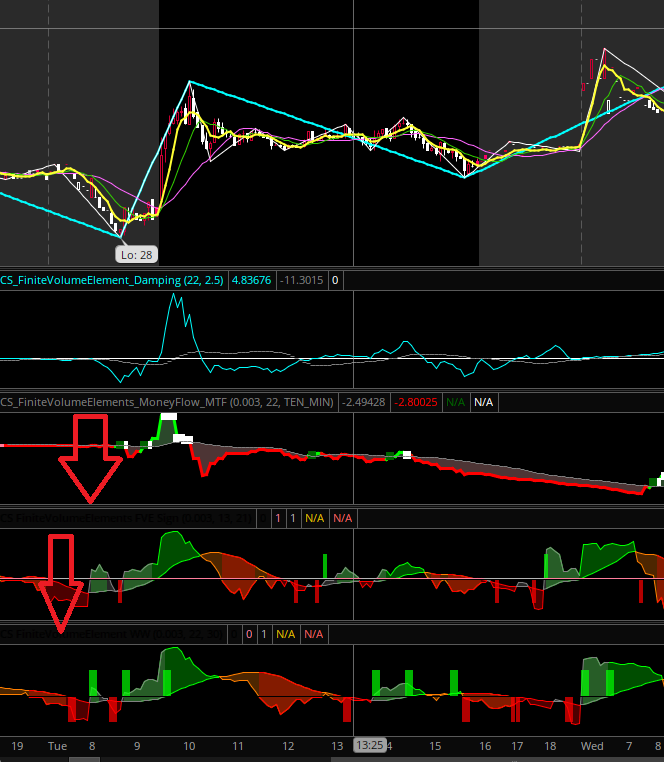
Here is another version of the FVE
Adaptive Institutional FVE Indicator
What It Does
This indicator analyzes volume flow, volatility, and price behavior to detect when large market participants may be accumulating, distributing, or preparing for a breakout.
It combines several concepts:
• Finite Volume Elements (FVE) – measures buying vs selling pressure using volume
• Institutional participation filter – highlights when unusually high volume suggests large traders are active
• Liquidity sweep detection – identifies stop-runs where price briefly breaks highs/lows and reverses
• Adaptive equilibrium zone – shows when bulls and bears are balanced (range/consolidation)
• Compression detection – identifies when volatility and volume pressure contract before a potential breakout
How to Read It
FVE Line (Green / Red)
Shows net buying or selling pressure.
Above zero (green) → buying pressure
Below zero (red) → selling pressure
The yellow line is the signal average that smooths the flow.
Gray Cloud (Equilibrium Zone)
Represents the “fight zone” where buyers and sellers are balanced.
Inside the cloud:
market is ranging or consolidating
directional trades are lower probability
Outside the cloud:
imbalance is forming
trend moves are more likely.
Green Arrows - Institutional accumulation
Conditions:
strong volume
buying pressure
price below trend
Possible early bullish positioning.
Red Arrows - Institutional distribution
Conditions:
strong volume
selling pressure
price above trend
Possible large sellers entering the market.
Cyan Dots - Bullish liquidity sweep
Price briefly breaks recent lows, triggers stops, then reverses with buying pressure. Often precedes short-term upward moves.
Magenta Dots - Bearish liquidity sweep
Price breaks recent highs and quickly reverses. Often precedes downward moves.
Orange Squares - Market compression
Volatility and volume pressure are contracting. This often happens before large breakouts.
Simple Trading Interpretation
Condition
Market State
Inside gray cloud
range / consolidation
Compression signal
breakout likely soon
Green arrows
accumulation bias
Red arrows
distribution bias
Liquidity sweep signals
stop-run reversal
The indicator attempts to show who is in control of the market (buyers or sellers), when the market is balanced, and when conditions suggest a large move may be developing.
Code:
# MODIFIED BY ANTWERKS 03/11/2026
# Adaptive Institutional Style FVE Framework
# Modified / Integrated Version

declare lower;

input MA_Length = 21;
input ATR_Length = 14;
input CutoffFactor = 0.1;
input TrendLength = 50;
input VolumeMultiplier = 1.5;
input SweepLookback = 10;

# equilibrium band inputs
input MeanLength = 50;
input RangeFactor = 0.5;
input MinRange = 5;

# compression detection
input CompressionLookback = 20;

def agg = GetAggregationPeriod();

# adaptive sample length
def Samples =
    if agg <= AggregationPeriod.FIVE_MIN then 12
    else if agg <= AggregationPeriod.THIRTY_MIN then 22
    else if agg <= AggregationPeriod.FOUR_HOURS then 34
    else 55;

def bn = BarNumber();
def nan = Double.NaN;

def tp = hlc3;

# --------------------------------------------------
# Volatility Adjusted Cutoff
# --------------------------------------------------

def atr = Average(TrueRange(high, close, low), ATR_Length);
def cutoff = atr * CutoffFactor;

# --------------------------------------------------
# FVE Core Calculation
# --------------------------------------------------

def mf = (close - (high + low)/2) + tp - tp[1];

def fveFactor =
    if mf > cutoff then 1
    else if mf < -cutoff then -1
    else 0;

def VolumePlusMinus = volume * fveFactor;

def fveSum = Sum(VolumePlusMinus, Samples);

def fveValue =
    if bn > Samples
    then (fveSum / (Average(volume, Samples) * Samples)) * 100
    else nan;

plot FVE = fveValue;
FVE.SetLineWeight(2);

FVE.AssignValueColor(
    if FVE > 0 then Color.GREEN
    else Color.RED
);

plot Signal = ExpAverage(FVE, MA_Length);
Signal.SetDefaultColor(Color.YELLOW);

plot ZeroLine = 0;
ZeroLine.SetDefaultColor(Color.GRAY);

# --------------------------------------------------
# Institutional Volume Participation
# --------------------------------------------------

def avgVol = Average(volume, 30);
def InstitutionalVolume = volume > avgVol * VolumeMultiplier;

# --------------------------------------------------
# Trend Filter
# --------------------------------------------------

def priceTrend = Average(close, TrendLength);

# --------------------------------------------------
# Adaptive Equilibrium Zone
# Mean ± max(5, 0.5 * StdDev)
# --------------------------------------------------

def fveMean = Average(FVE, MeanLength);
def fveDev = StDev(FVE, MeanLength);

def DynamicRange = Max(MinRange, fveDev * RangeFactor);

def UpperRange = fveMean + DynamicRange;
def LowerRange = fveMean - DynamicRange;

def FightZone =
    FVE < UpperRange and
    FVE > LowerRange;

plot UpperBand = UpperRange;
UpperBand.SetDefaultColor(Color.DARK_GRAY);

plot LowerBand = LowerRange;
LowerBand.SetDefaultColor(Color.DARK_GRAY);

AddCloud(
    UpperRange,
    LowerRange,
    Color.DARK_GRAY,
    Color.DARK_GRAY
);

# --------------------------------------------------
# Institutional Accumulation / Distribution
# --------------------------------------------------

def Accumulation =
    !FightZone and
    InstitutionalVolume and
    close < priceTrend and
    FVE > Signal and
    FVE > 0;

def Distribution =
    !FightZone and
    InstitutionalVolume and
    close > priceTrend and
    FVE < Signal and
    FVE < 0;

plot AccSignal = if Accumulation then FVE else Double.NaN;
AccSignal.SetPaintingStrategy(PaintingStrategy.ARROW_UP);
AccSignal.SetDefaultColor(Color.GREEN);
AccSignal.SetLineWeight(3);

plot DistSignal = if Distribution then FVE else Double.NaN;
DistSignal.SetPaintingStrategy(PaintingStrategy.ARROW_DOWN);
DistSignal.SetDefaultColor(Color.RED);
DistSignal.SetLineWeight(3);

# --------------------------------------------------
# Liquidity Sweep Detection
# --------------------------------------------------

def recentHigh = Highest(high[1], SweepLookback);
def recentLow = Lowest(low[1], SweepLookback);

def SweepHigh =
    high > recentHigh and
    close < recentHigh;

def SweepLow =
    low < recentLow and
    close > recentLow;

def BullSweep =
    SweepLow and
    InstitutionalVolume and
    FVE > 0;

def BearSweep =
    SweepHigh and
    InstitutionalVolume and
    FVE < 0;

plot BullLiquiditySweep = if BullSweep then FVE else Double.NaN;
BullLiquiditySweep.SetPaintingStrategy(PaintingStrategy.POINTS);
BullLiquiditySweep.SetDefaultColor(Color.CYAN);
BullLiquiditySweep.SetLineWeight(4);

plot BearLiquiditySweep = if BearSweep then FVE else Double.NaN;
BearLiquiditySweep.SetPaintingStrategy(PaintingStrategy.POINTS);
BearLiquiditySweep.SetDefaultColor(Color.MAGENTA);
BearLiquiditySweep.SetLineWeight(4);

# --------------------------------------------------
# Final Upgrade: Compression Detector
# (Often precedes explosive moves)
# --------------------------------------------------

def fveCompression =
    StDev(FVE, CompressionLookback) < StDev(FVE, CompressionLookback)[CompressionLookback];

def atrCompression =
    atr < Average(atr, CompressionLookback);

def MarketCompression =
    fveCompression and atrCompression;

plot CompressionSignal =
    if MarketCompression then FVE else Double.NaN;

CompressionSignal.SetPaintingStrategy(PaintingStrategy.SQUARES);
CompressionSignal.SetDefaultColor(Color.ORANGE);
CompressionSignal.SetLineWeight(3);

# --------------------------------------------------
# Market Regime Label
# --------------------------------------------------

AddLabel(
    yes,
    if MarketCompression then "REGIME: COMPRESSION (Breakout Risk)"
    else if FightZone then "REGIME: EQUILIBRIUM (Range / Consolidation)"
    else if Accumulation then "REGIME: ACCUMULATION"
    else if Distribution then "REGIME: DISTRIBUTION"
    else "REGIME: TRANSITION",

    if MarketCompression then Color.ORANGE
    else if FightZone then Color.GRAY
    else if Accumulation then Color.GREEN
    else if Distribution then Color.RED
    else Color.YELLOW
);

# --------------------------------------------------
# Institutional Participation Label
# --------------------------------------------------

AddLabel(
    yes,
    if InstitutionalVolume
    then "VOLUME: INSTITUTIONAL PARTICIPATION"
    else "VOLUME: NORMAL PARTICIPATION",

    if InstitutionalVolume
    then Color.CYAN
    else Color.DARK_GRAY
);
AddLabel(
    yes,
    "FVE BAND: " + Round(LowerRange,1) + " to " + Round(UpperRange,1),
    Color.LIGHT_GRAY
);
useThinkScript is the #1 community of stock market investors using indicators and other tools to power their trading strategies. Traders of all skill levels use our forums to learn about scripting and indicators, help each other, and discover new ways to gain an edge in the markets.
How do I get started?
We get it. Our forum can be intimidating, if not overwhelming. With thousands of topics, tens of thousands of posts, our community has created an incredibly deep knowledge base for stock traders. No one can ever exhaust every resource provided on our site.
If you are new, or just looking for guidance, here are some helpful links to get you started.
VIP members get exclusive access to these proven and tested premium indicators: Buy the Dip, Advanced Market Moves 2.0, Take Profit, and Volatility Trading Range. In addition, VIP members get access to over 50 VIP-only custom indicators, add-ons, and strategies, private VIP-only forums, private Discord channel to discuss trades and strategies in real-time, customer support, trade alerts, and much more. Learn all about VIP membership here.
How can I access the premium indicators?
To access the premium indicators, which are plug and play ready, sign up for VIP membership here.




 Cumulative Delta Volume Pressure - Mod by Sam4Cok for ThinkOrSwim
