

Hima Reddy RSI Power Zones Indicator for ThinkorSwim

BenTen

Administrative
Staff member
Staff
VIP
Lifetime
This is a repost from the Yahoo's thinkScript group.

Has anyone here got a thinkscript that places the Hima Reddy Bear Support (20 to 30) and Bear Resistance (55 to 65) Zones and Bull Support (40 to 50) and Bull Resistance (80 to 90) Power Zones on the RSI Indicator? I would appreciate receiving the code if you do...

Oq2QEbr.png


thinkScript Code

Code:
#-----------------------------#
# ---- By Syracusepro ----#

declare lower;

#A: With RSI on a 14 period setting (this is crucial!)
#Bull Resistance Power Zone = 80 to 90
#Bear Resistance Power Zone = 55 to 65
#Bull Support Power Zone = 40 to 50
#Bear Support Power Zone = 20 to 30

def hm_RSI = RSI();

plot himma = hm_rsi;

plot bullRes = 90;
bullRes.setDefaultColor(color.green);

plot bullResb = 80;
bullResb.setDefaultColor(color.green);

plot bearRes = 70;
bearRes.setDefaultColor(color.red);

plot bearResb = 60;
bearResb.setDefaultColor(color.red);

plot bullSupp = 50;
bullSupp.setDefaultColor(color.green);

plot bullSuppb = 40;
bullSuppb.setDefaultColor(color.green);

plot bearSupp = 30;
bearSupp.setDefaultColor(color.red);

plot bearSuppb = 20;
bearSuppb.setDefaultColor(color.red);

#------------------------------#

Fancy Version

Code:
#-----------#

declare lower;

#--------------- Relative Strength Index" -------------#
#----- Translated from pinescript to thinkscript ------#
#----------------- by Syracusepro ---------------------#

input src = close;
input len = 14; #"Length"

plot rsi = rsi(len, close);

plot band1 = 70;
plot band0 = 30;

#addCloud(band1, band0, color.magenta);

plot h1 = 20;
h1.setDefaultColor(color.red);

plot h2 = 30;
h2.setDefaultColor(color.red);

plot h3 = 40;
h3.setdefaultColor(color.green);

plot h5 = 55;
h5.setDefaultColor(color.red);

plot h6 = 65;
h6.setDefaultColor(color.red);

plot h7 = 80;
h7.setdefaultColor(color.green);

plot h8 = 90;
h8.setdefaultColor(color.green);

plot h9 = 50;
h9.setdefaultColor(color.green);

addCloud(h1,h2, color.red, color.red);
addCloud(h3,h9, color.green, color.green);
addCloud(h5,h6, color.red, color.red);
addCloud(h7,h8, color.green, color.green);
#-----------#

Video


Attachments
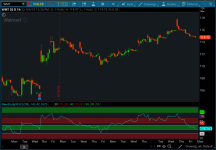
  • Oq2QEbr.png
    Oq2QEbr.png
    95.9 KB · Views: 967
In a 'bullish market' Bulls believe that RSI has a Support of 40-50 and a Resistance of 80-90 while in a 'bearish market' the bears believe that RSI has a Support of 20-30 and a Resistance of 55-60... Cool
 
Stocks. It is an RSI With levels of support that you are supposed to connect three lines before taking the trade. Thanks for checking.
 
@Marvinpatt The indicator plots eight lines.
If you are looking to scan for RSI. you can use the TOS RSI indicator and scan for RSI crosses above (or crosses below) any of the below numbers.
plot bullRes = 90;
bullRes.setDefaultColor(color.green);

plot bullResb = 80;
bullResb.setDefaultColor(color.green);

plot bearRes = 70;
bearRes.setDefaultColor(color.red);

plot bearResb = 60;
bearResb.setDefaultColor(color.red);

plot bullSupp = 50;
bullSupp.setDefaultColor(color.green);

plot bullSuppb = 40;
bullSuppb.setDefaultColor(color.green);

plot bearSupp = 30;
bearSupp.setDefaultColor(color.red);

plot bearSuppb = 20;
bearSuppb.setDefaultColor(color.red);
 
Last edited:
I modified the code for better detection of overbought and oversold states.
Ruby:
#-----------#

declare lower;

#--------------- Relative Strength Index" -------------#
#----- Translated from pinescript to thinkscript ------#
#----------------- by Syracusepro ---------------------#

input src = close;
input len = 14; #"Length"

plot rsi = rsi(len, close);

plot band1 = 70;
plot band0 = 30;

#addCloud(band1, band0, color.magenta);

plot h1 = 20;
h1.setDefaultColor(color.red);

plot h2 = 30;
h2.setDefaultColor(color.red);

plot h3 = 40;
h3.setdefaultColor(color.green);

plot h5 = 60;
h5.setDefaultColor(color.red);

plot h6 = 70;
h6.setDefaultColor(color.red);

plot h7 = 80;
h7.setdefaultColor(color.green);

plot h8 = 90;
h8.setdefaultColor(color.green);

plot h9 = 50;
h9.setdefaultColor(color.green);

plot h10 = 10;
h10.setdefaultColor(color.green);

plot h11 = 0;
h11.setdefaultColor(color.green);

plot h12 = 100;
h12.setdefaultColor(color.red);

addCloud(h1,h2, color.red, color.red);
addCloud(h3,h9, color.green, color.green);
addCloud(h5,h6, color.red, color.red);
addCloud(h7,h8, color.green, color.green);
addCloud(h10,h11, color.green, color.green);

input over_bought = 80;
input over_sold = 20;
input KPeriod = 10;
input DPeriod = 10;
input priceH = high;
input priceL = low;
input priceC = close;
input averageType = AverageType.SIMPLE;
input showBreakoutSignals = {default "No", "On SlowK", "On SlowD", "On SlowK & SlowD"};

plot SlowK = reference StochasticFull(over_bought,over_sold,KPeriod,DPeriod,priceH,priceL,priceC,3,averageType).FullK;
plot SlowD = reference StochasticFull(over_bought,over_sold,KPeriod,DPeriod,priceH,priceL,priceC,3,averageType).FullD;
plot OverBought = over_bought;
plot OverSold = over_sold;

def upK = SlowK crosses above OverSold;
def upD = SlowD crosses above OverSold;
def downK = SlowK crosses below OverBought;
def downD = SlowD crosses below OverBought;

plot UpSignal;
plot DownSignal;
switch (showBreakoutSignals) {
case "No":
UpSignal = Double.NaN;
DownSignal = Double.NaN;
case "On SlowK":
UpSignal = if upK then OverSold else Double.NaN;
DownSignal = if downK then OverBought else Double.NaN;
case "On SlowD":
UpSignal = if upD then OverSold else Double.NaN;
DownSignal = if downD then OverBought else Double.NaN;
case "On SlowK & SlowD":
UpSignal = if upK or upD then OverSold else Double.NaN;
DownSignal = if downK or downD then OverBought else Double.NaN;
}

UpSignal.setHiding(showBreakoutSignals == showBreakoutSignals."No");
DownSignal.setHiding(showBreakoutSignals == showBreakoutSignals."No");

SlowK.setDefaultColor(GetColor(5));
SlowD.setDefaultColor(GetColor(0));
OverBought.SetDefaultColor(GetColor(1));
OverSold.SetDefaultColor(GetColor(1));
UpSignal.SetDefaultColor(Color.UPTICK);
UpSignal.SetPaintingStrategy(PaintingStrategy.ARROW_UP);
DownSignal.SetDefaultColor(Color.DOWNTICK);
DownSignal.SetPaintingStrategy(PaintingStrategy.ARROW_DOWN);
 
Because there is no script in this thread that actually generates or displays labels.
Without a label-displaying script, there simply aren’t any labels to show.

If you have a script that contains AddLabel statements and need help getting them to show; please include that script in your post.
 
Because there is no script in this thread that actually generates or displays labels.
Without a label-displaying script, there simply aren’t any labels to show.

If you have a script that contains AddLabel statements and need help getting them to show; please include that script in your post.
So, you only posted the graphical part of the indicator, but not the labels that are in the same grouping as the indicator? the labels for the indicator must be added separately? I haven't had to do this with most of the other indicators I've found on here. So, this is different.
 
Here's an updated add on to Hima's RSI that I I coded to help with direction of a ticker... I have added the ADX, DMI+ and DMI- along side of and in addition to the RSI.
I find this helps in knowing not only the momentum but strength and direction of a ticker.


Momentum-Strength-direction-mix
Code:
# RSI, ADX, DMI+, DMI- Mix

declare lower;

#input
input length = 20;
input lengthA = 21;
input averageType = AverageType.WILDERS;

###INPUT
input Period = 14; #Hint Period: Period Length for RSI_N. Default RSI_N = 14.

###DEFINITIONS
def NetChgAvg = MovingAverage(AverageType.Wilders, close - close[1], Period);
def TotChgAvg = MovingAverage(AverageType.Wilders, AbsValue(close - close[1]), Period);
def ChgRatio = if TotChgAvg != 0 then NetChgAvg / TotChgAvg else 0;


###PLOTS
plot RSI_N = 50 * (ChgRatio + 1);
plot G90 = 90;
plot G80 = 80;
plot G40 = 40;
plot G50 = 50;
plot R20 = 20;
plot R30 = 30;
plot R55 = 55;
plot R65 = 65;


plot ADX = DMI(lengthA, averageType).ADX;
ADX.SetDefaultColor(GetColor(5));

plot "DI+" = DMI(length, averageType)."DI+";
"DI+".SetDefaultColor(GetColor(1));

plot "DI-" = DMI(length, averageType)."DI-";
"DI-".SetDefaultColor(GetColor(8));


###FORMATTING
RSI_N.SetPaintingStrategy(PaintingStrategy.Line);
RSI_N.SetDefaultColor(Color.cyan);

G90.SetPaintingStrategy(PaintingStrategy.Line);
G90.SetDefaultColor(Color.GREEN);
G80.SetPaintingStrategy(PaintingStrategy.Line);
G80.SetDefaultColor(Color.GREEN);
G40.SetPaintingStrategy(PaintingStrategy.Line);
G40.SetDefaultColor(Color.GREEN);
G50.SetPaintingStrategy(PaintingStrategy.Line);
G50.SetDefaultColor(Color.GREEN);
R20.SetPaintingStrategy(PaintingStrategy.Line);
R20.SetDefaultColor(Color.RED);
R30.SetPaintingStrategy(PaintingStrategy.Line);
R30.SetDefaultColor(Color.RED);
R55.SetPaintingStrategy(PaintingStrategy.Line);
R55.SetDefaultColor(Color.RED);
R65.SetPaintingStrategy(PaintingStrategy.Line);
R65.SetDefaultColor(Color.RED);

#end
 
Last edited by a moderator:
What I’ve been working on (unsuccessfully I might add) is an RSI indicator signal (Up/down Arrow) that will signal RSI reversals in trend. The theory being, the RSI and stock closing high for the day, should move up together or the closing low of the day down in sequence with each other.… in other words when stock price goes up and closes with a high, so should the RSI and vise versa. When a stock makes a high (or new high) for example and the RSI does not but rather is lower then the previous day, that signals a reversal in trend is in the near future. The same is true when a stock is in downtrend and the new daily low is lower then the previous days low, but the RSI is higher, there is a reversal in trend coming. If you notice, the RSI always is a step ahead of what the stock price will do. So being able to visualize this ahead of time will give you a jump of preparation to act on a determined stock.
If anyone out there can write a script that shows those reversals, then we would have an entry and exit level for the stock being followed. If anyone can help, would be appreciated.
FYI That is how The RSI Trend indicator is intended to be used, in addition to knowing when a stock is bull strong (in the bull support and resistance ranges) or bear strong ( in the bear support and resistance ranges).
Thanks in advance.
 
What I’ve been working on (unsuccessfully I might add) is an RSI indicator signal (Up/down Arrow) that will signal RSI reversals in trend. The theory being, the RSI and stock closing high for the day, should move up together or the closing low of the day down in sequence with each other.… in other words when stock price goes up and closes with a high, so should the RSI and vise versa. When a stock makes a high (or new high) for example and the RSI does not but rather is lower then the previous day, that signals a reversal in trend is in the near future. The same is true when a stock is in downtrend and the new daily low is lower then the previous days low, but the RSI is higher, there is a reversal in trend coming. If you notice, the RSI always is a step ahead of what the stock price will do. So being able to visualize this ahead of time will give you a jump of preparation to act on a determined stock.
If anyone out there can write a script that shows those reversals, then we would have an entry and exit level for the stock being followed. If anyone can help, would be appreciated.
FYI That is how The RSI Trend indicator is intended to be used, in addition to knowing when a stock is bull strong (in the bull support and resistance ranges) or bear strong ( in the bear support and resistance ranges).
Thanks in advance.

Everything you wanted to know about using divergences in trading:
https://usethinkscript.com/threads/...rs-possible-in-thinkorswim.17298/#post-134701
 

Join useThinkScript to post your question to a community of 21,000+ developers and traders.

Similar threads

Not the exact question you're looking for?

Start a new thread and receive assistance from our community.

87k+ Posts
1277 Online
Create Post

Similar threads

Similar threads

The Market Trading Game Changer

Join 2,500+ subscribers inside the useThinkScript VIP Membership Club
  • Exclusive indicators
  • Proven strategies & setups
  • Private Discord community
  • ‘Buy The Dip’ signal alerts
  • Exclusive members-only content
  • Add-ons and resources
  • 1 full year of unlimited support

Frequently Asked Questions

What is useThinkScript?

useThinkScript is the #1 community of stock market investors using indicators and other tools to power their trading strategies. Traders of all skill levels use our forums to learn about scripting and indicators, help each other, and discover new ways to gain an edge in the markets.

How do I get started?

We get it. Our forum can be intimidating, if not overwhelming. With thousands of topics, tens of thousands of posts, our community has created an incredibly deep knowledge base for stock traders. No one can ever exhaust every resource provided on our site.

If you are new, or just looking for guidance, here are some helpful links to get you started.

What are the benefits of VIP Membership?
VIP members get exclusive access to these proven and tested premium indicators: Buy the Dip, Advanced Market Moves 2.0, Take Profit, and Volatility Trading Range. In addition, VIP members get access to over 50 VIP-only custom indicators, add-ons, and strategies, private VIP-only forums, private Discord channel to discuss trades and strategies in real-time, customer support, trade alerts, and much more. Learn all about VIP membership here.
How can I access the premium indicators?
To access the premium indicators, which are plug and play ready, sign up for VIP membership here.
Back
Top
