5‑Factor Market Bias For ThinkOrSwim

jonshank62

New member
mod note:
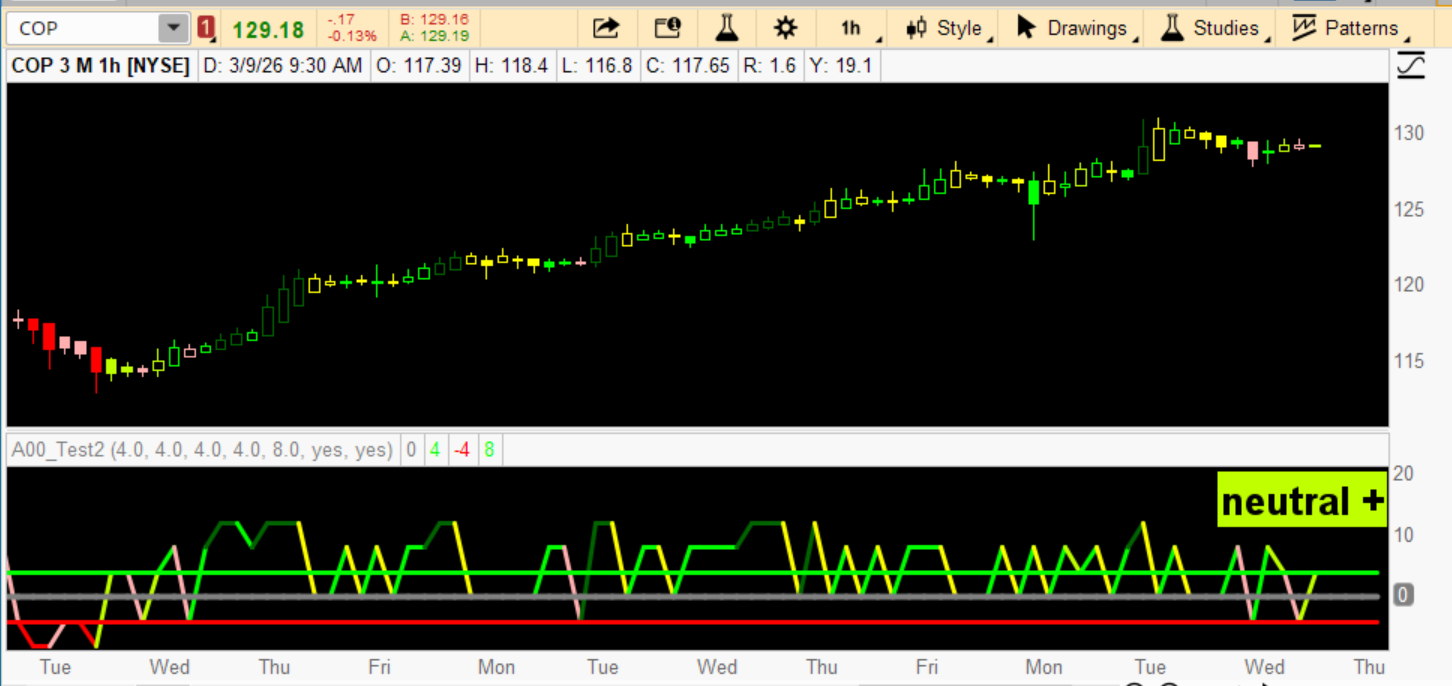
This indicator reads the market’s bias and tells you whether the current bar is neutral, bullish, or bearish.
It converts five different pressures into a single weighted score, colors the line and the price bars based on that score, and prints a label that tells you the current state.


I have come up with this bar-by-bar grading system with a lag time of 1 bar.
I have added different colors for different grades.

The lower study is choppy and hard to follow but does accurately display the choppiness of the market .

I have also added a label and color bar options.
I'm not usually a fan of color bars, but wow, for me, it is an eye-opener. It makes it easy to distinguish institutional bars from the common noise.

Also, yellow = natural is very interesting.
So far, every time a yellow is posted, the price, if not interfered with, will revert to the 20 PMA.

This is the code I am using with good success on all time frames
LInBlxw.png


Code:
# WEIGHTED ENSEMBLE SYSTEM
# 5‑Factor Market Bias Model
# bar by bar analysis

declare lower;
# These defaults reflect real-world behavioral importance:
# 200 Sma >9 sma > rsi 4 > Obv > Break out >

input w1 = 4.0; # Weight for 200 Sma
input w2 = 4.0; # Weight for 9 SMA
input w3 = 4.0; # Weight for rsi (4)
input w4 = 4.0; # Weight for OBV direction
input w5 = 8.0; # Weight for Breakout Range

def score1 =
if close > Average(close, 200) then 0.5 else -0.5;

def score2 =
if Average(close, 8) > Average(close, 9)[1] then 0.5 else -0.5;

def score3 =
if rsi(4) > rsi(4)[1] then 0.5 else -0.5;

def score4 =
if OnBalanceVolume() > OnBalanceVolume()[1] then 0.5 else -0.5;

def score5 =
if close > Highest(high, 5)[1] then 0.5 else
if close < Lowest(low, 5)[1] then -0.5 else 0;

def finalScore =
score1 * w1
+ score2 * w2
+ score3 * w3
+ score4 * w4
+ score5 * w5;

plot ZeroLine = 0;
ZeroLine.SetDefaultColor(Color.GRAY);
ZeroLine.SetLineWeight (4);

plot pLine = 4.0;
pLine.SetDefaultColor(Color.GREEN);
pLine.SetLineWeight (3);

plot nLine = -4.0;
nLine.SetDefaultColor(Color.RED);
nLine.SetLineWeight (3);

plot Score = finalScore;
Score.SetLineWeight(3);
Score.SetPaintingStrategy(PaintingStrategy.LINE);

Score.AssignValueColor(
if finalScore > -2 and finalScore < 2 then Color.YELLOW else
if finalScore > 2.1 and finalScore <= 4 then Color.LIME else
if finalScore > 4.1 and finalScore <= 8 then Color .GREEN else
if finalScore > 8.1 then Color.DARK_GREEN else
if finalScore < -2.1 and finalScore >= -4 then Color.PINK else
if finalScore < -4.1 and finalScore >= -8 then Color.RED else
if finalScore < -8.1 then Color.DARK_RED else Color.GRAY);


input colorbars = yes;
AssignPriceColor(if !colorbars then Color.CURRENT else
if finalScore > -2 and finalScore < 2 then Color.YELLOW else
if finalScore > 2.1 and finalScore <= 4 then Color.LIME else
if finalScore > 4.1 and finalScore <= 8 then Color .GREEN else
if finalScore > 8.1 then Color.DARK_GREEN else
if finalScore < -2.1 and finalScore >= -4 then Color.PINK else
if finalScore < -4.1 and finalScore >= -8 then Color.RED else
if finalScore < -8.1 then Color.DARK_RED else
Color.GRAY );


# note if yellow printed then nutural and price will attempt to revert to movingAverage

input showLabel = yes ;
AddLabel(showLabel ,

if finalScore > -2 and finalScore < 2 then "neutral" else
if finalScore > 2.1 and finalScore <= 4 then "neutral +" else
if finalScore > 4.1 and finalScore <= 8 then "bull" else
if finalScore > 8.1 then "strong bull" else
if finalScore < -2.1 and finalScore >= -4 then "neutral -" else
if finalScore < -4.1 and finalScore >= -8 then "bear" else
if finalScore < -8.1 then "strong bear" else "unknown",

if finalScore > -2 and finalScore < 2 then Color.YELLOW else
if finalScore > 2.1 and finalScore <= 4 then Color.LIME else
if finalScore > 4.1 and finalScore <= 8 then Color.GREEN else
if finalScore > 8.1 then Color.DARK_GREEN else
if finalScore < -2.1 and finalScore >= -4 then Color.PINK else
if finalScore < -4.1 and finalScore >= -8 then Color.RED else
if finalScore < -8.1 then Color.DARK_RED else Color.GRAY , Location.top_right
, FontSize.LARGE);
 
Last edited by a moderator:

Join useThinkScript to post your question to a community of 21,000+ developers and traders.

I turned your wonderful indicator into the following -

7‑Factor Probability Ensemble​

✔ Directional Confidence (high = bullish, low = bearish)​

✔ Symmetric Bull/Bear Action Engine​

✔ Probability Line Color‑Matched to Action States​

Sentiment Label (original style)added as requested

✔ Confidence Label​

✔ Action Suggestion Label​


indicator is now:​

✔ A 7‑factor ensemble​

✔ A directional confidence engine​

✔ A symmetric bull/bear decision model​

✔ A color‑coded visual system​

✔ A trading assistant that tells you:​


How to Use the 7‑Factor Probability Ensemble Indicator

This indicator blends seven independent market factors into a single probability score, a directional confidence score, and a color‑coded action engine. It tells you trend direction, trend strength, and what action to take — long or short.

It is designed to be simple to read and extremely powerful in practice.


🎯 1. Probability (Direction of Bias)

The main line (0–100%) represents the bullish probability of the market based on:

  • Trend (200 SMA)
  • Momentum (8/9 SMA)
  • RSI(4)
  • OBV
  • Breakout/Breakdown behavior
  • Trend stability (ADX)
  • Volatility regime (ATR/price)

Interpretation:​

  • > 70% → Bullish environment
  • 45–55% → Neutral / compression
  • < 30% → Bearish environment
This is your directional bias.


🎯 2. Confidence (Strength of Agreement)

Confidence measures how many of the 7 factors agree with the current direction.

  • High confidence (> 70%) → strong bullish agreement
  • Low confidence (< 30%) → strong bearish agreement
This is your conviction gauge.


🎯 3. Sentiment Label (Original Style)

This label gives a simple, intuitive readout:

  • Strong Bull
  • Bull
  • Neutral +
  • Neutral
  • Neutral –
  • Bear
  • Strong Bear
It’s a quick summary of the probability curve.


🎯 4. Action Suggestion Label (Your Decision Engine)

This is the heart of the system. It combines probability + confidence to tell you exactly what to do.

Press Long

Condition:

  • Probability > 70%
  • Confidence > 70%
Meaning: Strong bull trend. Internals aligned. Best long entries.


Press Short

Condition:

  • Probability < 30%
  • Confidence < 30%
Meaning: Strong bear trend. Internals aligned. Best short entries.


Avoid Longs

Condition:

  • Probability > 70%
  • Confidence < 40%
Meaning: Bullish fake out risk. Price is pushing up but internals disagree.


Avoid Shorts

Condition:

  • Probability < 30%
  • Confidence > 60%
Meaning: Bearish fake out risk. Price is dropping but internals disagree.


Prepare Long (Bullish Compression)

Condition:

  • Probability 45–55%
  • Confidence > 70%
Meaning: Market is coiling. Bullish breakout likely.


Prepare Short (Bearish Compression)

Condition:

  • Probability 45–55%
  • Confidence < 30%
Meaning: Market is coiling. Bearish breakout likely.


Wait

Condition: Everything else.

Meaning: No edge. Stay patient.


🎯 5. Color‑Coded Probability Line

The probability line changes color to match the action state:

  • Dark Green → Press Long
  • Dark Red → Press Short
  • Orange → Avoid Longs
  • Magenta → Avoid Shorts
  • Cyan → Prepare Long
  • Light Red → Prepare Short
  • Gray → Wait
This gives you a visual read of the market state without even looking at the labels.


⭐ How to Trade With It (Simple Rules)

Long Setup

  • Look for Dark Green or Cyan
  • Enter on pullbacks or breakouts
  • Avoid longs when line is Orange

Short Setup

  • Look for Dark Red or Light Red
  • Enter on breakdowns or failed rallies
  • Avoid shorts when line is Magenta

When in Doubt

  • If the line is Gray, sit out.
  • Mixed conditions = no edge.

⭐ What Makes This Indicator Special

It’s not a single signal. It’s not a moving average crossover. It’s not a momentum oscillator.

It’s a multi‑factor ensemble model — the same type of logic used in institutional quant systems.

It gives you:

  • Direction
  • Conviction
  • Sentiment
  • Action
  • Visual confirmation
All in one place.
  • When to press long
  • When to press short
  • When to avoid
  • When to prepare
  • When to wait
    Code:
    declare lower;
    
    # -------------------------
    # Weights for each factor
    # -------------------------
    input w1 = 4.0;  # 200 SMA trend
    input w2 = 4.0;  # 8/9 SMA momentum
    input w3 = 4.0;  # RSI(4) momentum
    input w4 = 4.0;  # OBV direction
    input w5 = 8.0;  # Breakout / breakdown
    input w6 = 6.0;  # Trend stability (ADX)
    input w7 = 3.0;  # Volatility regime (ATR/price)
    
    # -------------------------
    # Core series
    # -------------------------
    def sma200 = Average(close, 200);
    def sma8   = Average(close, 8);
    def sma9   = Average(close, 9);
    def rsi4   = RSI(4);
    def obv    = OnBalanceVolume();
    def adx14  = ADX(14);
    def atr14  = ATR(14);
    
    # -------------------------
    # Factor probabilities (0–1)
    # -------------------------
    
    # 1) 200 SMA trend
    def p1 = if close > sma200 then 0.75 else 0.25;
    
    # 2) Short-term SMA momentum
    def p2 = if sma8 > sma9[1] then 0.70 else 0.30;
    
    # 3) RSI(4) momentum
    def p3 = if rsi4 > rsi4[1] then 0.65 else 0.35;
    
    # 4) OBV direction
    def p4 = if obv > obv[1] then 0.60 else 0.40;
    
    # 5) Breakout / breakdown
    def p5 =
        if close > Highest(high, 5)[1] then 0.80
        else if close < Lowest(low, 5)[1] then 0.20
        else 0.50;
    
    # 6) Trend stability (ADX normalized)
    def p6 = Min(Max(adx14 / 50, 0), 1);
    
    # 7) Volatility regime (ATR/price)
    def vol = atr14 / close;
    def p7 = if vol > vol[1] then 0.60 else 0.40;
    
    # -------------------------
    # Weighted ensemble probability
    # -------------------------
    def totalWeight = w1 + w2 + w3 + w4 + w5 + w6 + w7;
    
    def weightedProb =
        (p1*w1 + p2*w2 + p3*w3 + p4*w4 + p5*w5 + p6*w6 + p7*w7) /
        totalWeight;
    
    # Soft logistic transform
    def bullProb = 1 / (1 + Exp(-(weightedProb - 0.5) * 8));
    
    plot Probability = bullProb * 100;
    Probability.SetLineWeight(3);
    
    # -------------------------
    # Confidence Score (0–100%)
    # -------------------------
    def bullCount =
        (p1 > 0.50) +
        (p2 > 0.50) +
        (p3 > 0.50) +
        (p4 > 0.50) +
        (p5 > 0.50) +
        (p6 > 0.50) +
        (p7 > 0.50);
    
    def confidence = bullCount / 7;
    
    AddLabel(
        yes,
        "Confidence: " + AsPercent(confidence),
        if confidence > 0.80 then Color.GREEN
        else if confidence > 0.60 then Color.LIME
        else if confidence > 0.40 then Color.YELLOW
        else if confidence > 0.20 then Color.PINK
        else Color.RED
    );
    
    # -------------------------
    # Sentiment Label (Original Style)
    # -------------------------
    def sentiment =
        if bullProb > 0.85 then 3 else
        if bullProb > 0.70 then 2 else
        if bullProb > 0.55 then 1 else
        if bullProb >= 0.45 then 0 else
        if bullProb >= 0.30 then -1 else
        if bullProb >= 0.15 then -2 else -3;
    
    AddLabel(
        yes,
        if sentiment == 3 then "Strong Bull (" + AsPercent(bullProb) + ")"
        else if sentiment == 2 then "Bull (" + AsPercent(bullProb) + ")"
        else if sentiment == 1 then "Neutral + (" + AsPercent(bullProb) + ")"
        else if sentiment == 0 then "Neutral (" + AsPercent(bullProb) + ")"
        else if sentiment == -1 then "Neutral - (" + AsPercent(bullProb) + ")"
        else if sentiment == -2 then "Bear (" + AsPercent(bullProb) + ")"
        else "Strong Bear (" + AsPercent(bullProb) + ")",
    
        if sentiment == 3 then Color.DARK_GREEN
        else if sentiment == 2 then Color.GREEN
        else if sentiment == 1 then Color.LIME
        else if sentiment == 0 then Color.YELLOW
        else if sentiment == -1 then Color.PINK
        else if sentiment == -2 then Color.RED
        else Color.DARK_RED
    );
    
    # -------------------------
    # Symmetric Bull + Bear Action Suggestion Label
    # -------------------------
    
    AddLabel(
        yes,
    
        if bullProb > 0.70 and confidence > 0.70 then
            "Press Long: Strong Bull Trend (High Prob + High Conf)"
    
        else if bullProb < 0.30 and confidence < 0.30 then
            "Press Short: Strong Bear Trend (Low Prob + Low Conf)"
    
        else if bullProb > 0.70 and confidence < 0.40 then
            "Avoid Longs: Bull Fakeout Risk (High Prob + Low Conf)"
    
        else if bullProb < 0.30 and confidence > 0.60 then
            "Avoid Shorts: Bear Fakeout Risk (Low Prob + High Conf)"
    
        else if bullProb >= 0.45 and bullProb <= 0.55 and confidence > 0.70 then
            "Prepare Long: Bullish Compression (Neutral Prob + High Conf)"
    
        else if bullProb >= 0.45 and bullProb <= 0.55 and confidence < 0.30 then
            "Prepare Short: Bearish Compression (Neutral Prob + Low Conf)"
    
        else
            "Wait: Mixed Conditions",
    
        if bullProb > 0.70 and confidence > 0.70 then Color.DARK_GREEN
        else if bullProb < 0.30 and confidence < 0.30 then Color.DARK_RED
        else if bullProb > 0.70 and confidence < 0.40 then Color.ORANGE
        else if bullProb < 0.30 and confidence > 0.60 then Color.MAGENTA
        else if bullProb >= 0.45 and bullProb <= 0.55 and confidence > 0.70 then Color.CYAN
        else if bullProb >= 0.45 and bullProb <= 0.55 and confidence < 0.30 then Color.LIGHT_RED
        else Color.GRAY
    );
    
    # -------------------------
    # Probability Line Color Matching Action States
    # -------------------------
    
    Probability.AssignValueColor(
        if bullProb > 0.70 and confidence > 0.70 then Color.DARK_GREEN
        else if bullProb < 0.30 and confidence < 0.30 then Color.DARK_RED
        else if bullProb > 0.70 and confidence < 0.40 then Color.ORANGE
        else if bullProb < 0.30 and confidence > 0.60 then Color.MAGENTA
        else if bullProb >= 0.45 and bullProb <= 0.55 and confidence > 0.70 then Color.CYAN
        else if bullProb >= 0.45 and bullProb <= 0.55 and confidence < 0.30 then Color.LIGHT_RED
        else Color.GRAY
    );
 

Attachments

  • Screenshot 2026-06-14 171524.png
    Screenshot 2026-06-14 171524.png
    97.2 KB · Views: 7
Last edited:

Similar threads

Not the exact question you're looking for?

Start a new thread and receive assistance from our community.

87k+ Posts
810 Online
Create Post

Similar threads

Similar threads

The Market Trading Game Changer

Join 2,500+ subscribers inside the useThinkScript VIP Membership Club
  • Exclusive indicators
  • Proven strategies & setups
  • Private Discord community
  • ‘Buy The Dip’ signal alerts
  • Exclusive members-only content
  • Add-ons and resources
  • 1 full year of unlimited support

Frequently Asked Questions

What is useThinkScript?

useThinkScript is the #1 community of stock market investors using indicators and other tools to power their trading strategies. Traders of all skill levels use our forums to learn about scripting and indicators, help each other, and discover new ways to gain an edge in the markets.

How do I get started?

We get it. Our forum can be intimidating, if not overwhelming. With thousands of topics, tens of thousands of posts, our community has created an incredibly deep knowledge base for stock traders. No one can ever exhaust every resource provided on our site.

If you are new, or just looking for guidance, here are some helpful links to get you started.

What are the benefits of VIP Membership?
VIP members get exclusive access to these proven and tested premium indicators: Buy the Dip, Advanced Market Moves 2.0, Take Profit, and Volatility Trading Range. In addition, VIP members get access to over 50 VIP-only custom indicators, add-ons, and strategies, private VIP-only forums, private Discord channel to discuss trades and strategies in real-time, customer support, trade alerts, and much more. Learn all about VIP membership here.
How can I access the premium indicators?
To access the premium indicators, which are plug and play ready, sign up for VIP membership here.
Back
Top