jonshank62
Member
mod note:
This indicator reads the market’s bias and tells you whether the current bar is neutral, bullish, or bearish.
It converts five different pressures into a single weighted score, colors the line and the price bars based on that score, and prints a label that tells you the current state.
I have come up with this bar-by-bar grading system with a lag time of 1 bar.
I have added different colors for different grades.
The lower study is choppy and hard to follow but does accurately display the choppiness of the market .
I have also added a label and color bar options.
I'm not usually a fan of color bars, but wow, for me, it is an eye-opener. It makes it easy to distinguish institutional bars from the common noise.
Also, yellow = natural is very interesting.
So far, every time a yellow is posted, the price, if not interfered with, will revert to the 20 PMA.
This is the code I am using with good success on all time frames
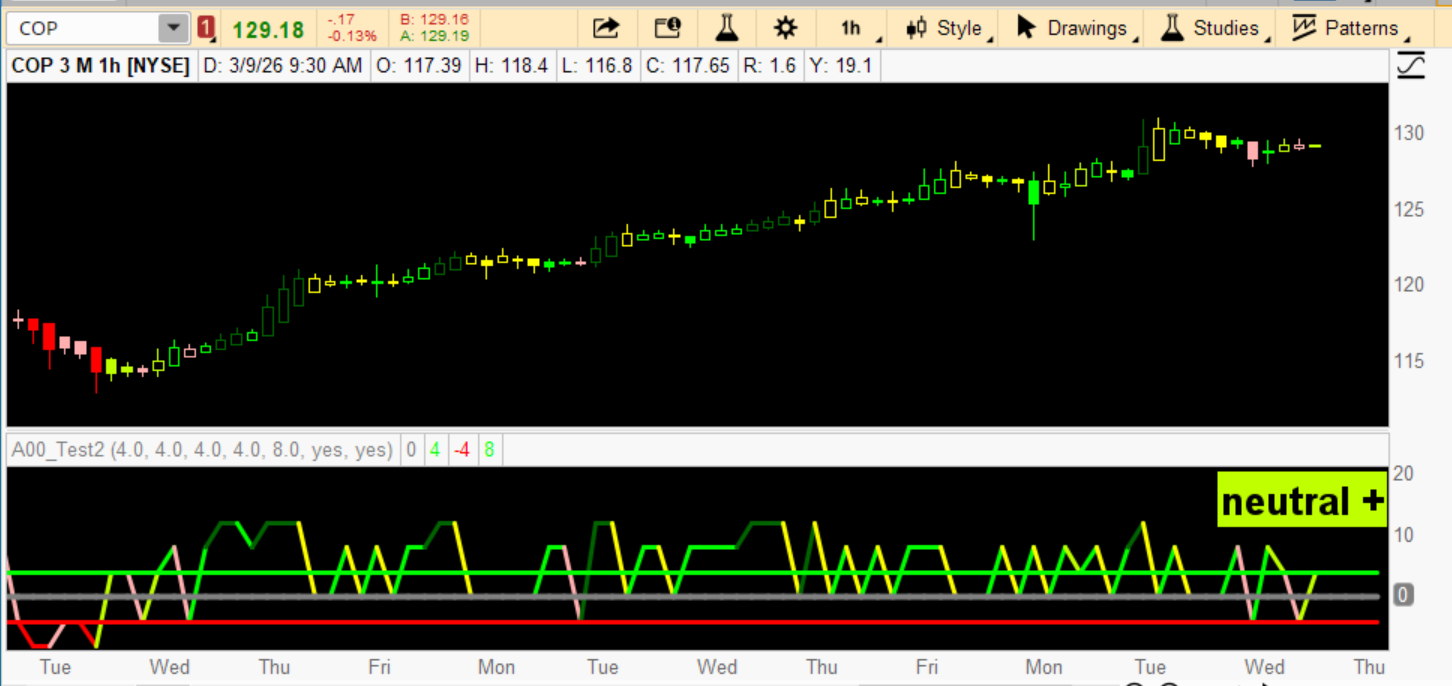
This indicator reads the market’s bias and tells you whether the current bar is neutral, bullish, or bearish.
It converts five different pressures into a single weighted score, colors the line and the price bars based on that score, and prints a label that tells you the current state.
I have come up with this bar-by-bar grading system with a lag time of 1 bar.
I have added different colors for different grades.
The lower study is choppy and hard to follow but does accurately display the choppiness of the market .
I have also added a label and color bar options.
I'm not usually a fan of color bars, but wow, for me, it is an eye-opener. It makes it easy to distinguish institutional bars from the common noise.
Also, yellow = natural is very interesting.
So far, every time a yellow is posted, the price, if not interfered with, will revert to the 20 PMA.
This is the code I am using with good success on all time frames
Code:
# WEIGHTED ENSEMBLE SYSTEM
# 5‑Factor Market Bias Model
# bar by bar analysis

declare lower;
# These defaults reflect real-world behavioral importance:
# 200 Sma >9 sma > rsi 4 > Obv > Break out >

input w1 = 4.0; # Weight for 200 Sma
input w2 = 4.0; # Weight for 9 SMA
input w3 = 4.0; # Weight for rsi (4)
input w4 = 4.0; # Weight for OBV direction
input w5 = 8.0; # Weight for Breakout Range

def score1 =
if close > Average(close, 200) then 0.5 else -0.5;

def score2 =
if Average(close, 8) > Average(close, 9)[1] then 0.5 else -0.5;

def score3 =
if rsi(4) > rsi(4)[1] then 0.5 else -0.5;

def score4 =
if OnBalanceVolume() > OnBalanceVolume()[1] then 0.5 else -0.5;

def score5 =
if close > Highest(high, 5)[1] then 0.5 else
if close < Lowest(low, 5)[1] then -0.5 else 0;

def finalScore =
score1 * w1
+ score2 * w2
+ score3 * w3
+ score4 * w4
+ score5 * w5;

plot ZeroLine = 0;
ZeroLine.SetDefaultColor(Color.GRAY);
ZeroLine.SetLineWeight (4);

plot pLine = 4.0;
pLine.SetDefaultColor(Color.GREEN);
pLine.SetLineWeight (3);

plot nLine = -4.0;
nLine.SetDefaultColor(Color.RED);
nLine.SetLineWeight (3);

plot Score = finalScore;
Score.SetLineWeight(3);
Score.SetPaintingStrategy(PaintingStrategy.LINE);

Score.AssignValueColor(
if finalScore > -2 and finalScore < 2 then Color.YELLOW else
if finalScore > 2.1 and finalScore <= 4 then Color.LIME else
if finalScore > 4.1 and finalScore <= 8 then Color .GREEN else
if finalScore > 8.1 then Color.DARK_GREEN else
if finalScore < -2.1 and finalScore >= -4 then Color.PINK else
if finalScore < -4.1 and finalScore >= -8 then Color.RED else
if finalScore < -8.1 then Color.DARK_RED else Color.GRAY);


input colorbars = yes;
AssignPriceColor(if !colorbars then Color.CURRENT else
if finalScore > -2 and finalScore < 2 then Color.YELLOW else
if finalScore > 2.1 and finalScore <= 4 then Color.LIME else
if finalScore > 4.1 and finalScore <= 8 then Color .GREEN else
if finalScore > 8.1 then Color.DARK_GREEN else
if finalScore < -2.1 and finalScore >= -4 then Color.PINK else
if finalScore < -4.1 and finalScore >= -8 then Color.RED else
if finalScore < -8.1 then Color.DARK_RED else
Color.GRAY );


# note if yellow printed then nutural and price will attempt to revert to movingAverage

input showLabel = yes ;
AddLabel(showLabel ,

if finalScore > -2 and finalScore < 2 then "neutral" else
if finalScore > 2.1 and finalScore <= 4 then "neutral +" else
if finalScore > 4.1 and finalScore <= 8 then "bull" else
if finalScore > 8.1 then "strong bull" else
if finalScore < -2.1 and finalScore >= -4 then "neutral -" else
if finalScore < -4.1 and finalScore >= -8 then "bear" else
if finalScore < -8.1 then "strong bear" else "unknown",

if finalScore > -2 and finalScore < 2 then Color.YELLOW else
if finalScore > 2.1 and finalScore <= 4 then Color.LIME else
if finalScore > 4.1 and finalScore <= 8 then Color.GREEN else
if finalScore > 8.1 then Color.DARK_GREEN else
if finalScore < -2.1 and finalScore >= -4 then Color.PINK else
if finalScore < -4.1 and finalScore >= -8 then Color.RED else
if finalScore < -8.1 then Color.DARK_RED else Color.GRAY , Location.top_right
, FontSize.LARGE);
Last edited by a moderator:

 1. Probability (Direction of Bias)
 How to Trade With It (Simple Rules)