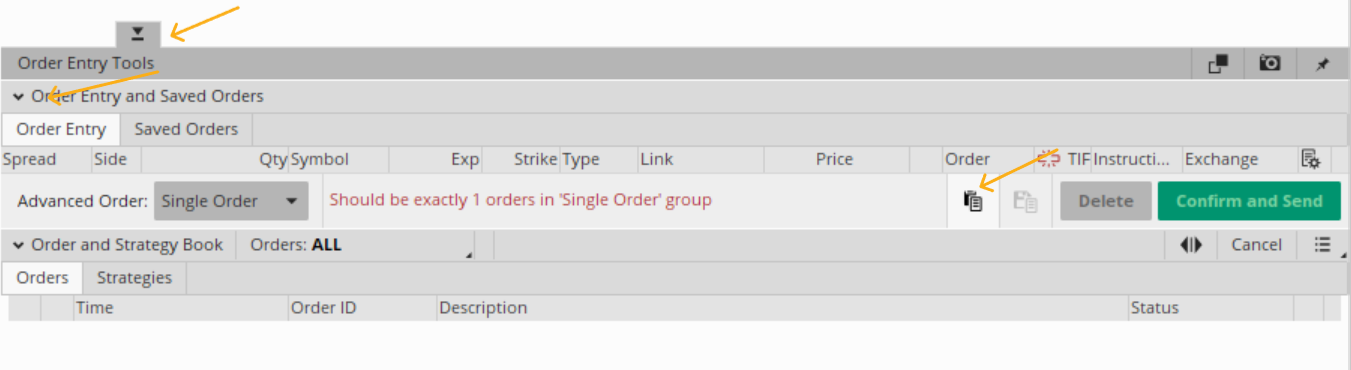
Paste order from clipboard button

tommytx

New member
VIP
Does anyone have any idea how to pull up the "Paste order from clipboard button" on TOS

I am doing some detailed programming on TOS and find it difficult to auto pull up the button that allows you to post an order from the Clipboard.
The button that says when moused over "Paste order from clipboard" There is a lot of button on the bottom left that gives you access but i can never find it every time.
I flunk around with the following buttons and after clicking a few the button shows but i can never determine a good exact sequence to bring it up every time..
The buttons on the bottom left of TOS has the following: But i can never seen to find out which one does it.. I just click butttons till it shows.. But hope to be able to tell
my puter how to do it and not just say.. "Puter tinker around with those buttons till you see the Clipboard button pop up." The puter talks back and says "Tom I am not AI
i do not think.. i just do what i am told.."
Advanced Order Single Order
Order and Strategy Book
Orders Strategy
Virtual Order Entry Tools
Order Entry and Saved Orders
Order Entry
It would be greatly appreciated if anyone has an idea for a hot key or just knows the sequence to click to get it up.. Sometimes many of the buttons are hidden and do not
show unless you press the tab in that area also..
Thanks for any help..It's part of an extensive automation of TOS to make it do round trips which they do not normally all it to do. If i can get all the bugs worked out i would
be happy to share the final product with anyone that may be interested.
 
Last edited by a moderator:
Solution
Does anyone have any idea how to pull up the "Paste order from clipboard button" on TOS

No, there is no "auto pull up the button", there is no hot key.
Yes, you could probably create a Macro Recorder script.

OfpwtJ4.png


Here is the sequence:
1. click the order pulldown tab at bottom of screen
2. click on Order Entry and Saved Orders to expand
3. click on Paste order from clipboard
Does anyone have any idea how to pull up the "Paste order from clipboard button" on TOS

No, there is no "auto pull up the button", there is no hot key.
Yes, you could probably create a Macro Recorder script.

OfpwtJ4.png


Here is the sequence:
1. click the order pulldown tab at bottom of screen
2. click on Order Entry and Saved Orders to expand
3. click on Paste order from clipboard
 
Solution
Thanks for that Merryman however to pull that button up using a macro is going to be very complex as it makes a difference on how the buttons were left when they were last used.. So far i have manually punched thru a dozen or more scenarios where just your 3 steps won't work..
For example depending on what button were last chosen.. The Order and Saved Order button may be 3 lines from the bottom or it may be several line from the bottom and sometimes when you click the Order and Saved button you must ensure the Clip button is not already showing..else it will remove it.. So as what i am seeing its going to take a lot of search for images to determine what is the best method to program it.
If there was a way to reset the button to Default like when they have not been used then the 3 stps you offered would work. but that is the only instance that will work... It a maze of different possibiliteis.. If only there was a reset button to return it to its original position it would work with 3 steps but not otherwise.
Some image recognition may be required to work this out with a macro.. but seems like such a simple task
has been turned into a mess..At least a doxen different buttons need to be considered.. To macro it..
But thanks for the assistance anyway.. I had just hoped someone here has already solved this relativlely comples scenarion. so i do not have to invent the wheel again.
So your 3 step plan is perfect for the first time the routine is called for but will not work in general..

Something that i have just now though of is to activate the 3 button run and then study what position the buttons are in and progaram a macro to 1. if first for the day .do 3 steps.. but if not first use of day .. do another process.. Possiblu just clicking one button may take it back into the original mode so that the 3 steps may be used again. In other words what buttons will need to be pressed my macro to put it back in the ready for the 3 button mode.. So those buttons could be pressed following an activatation to immediately reset if for next use when 3 buttons work... I will test that to see what all it takes to get it back to start.. To bad there is not a reset...
 
Last edited:
also @merryDay do you mind if i ask what image capture you are using.. the image above is only 83k and mine are huge.. I would love to find a free one that is not ridiculous.. like mine is maybe 5 meg for a small basic image.. Or any capture pgms that you know of give a low byte image.. at the expense of quality of course
Thanks
 
.It's part of an extensive automation of TOS to make it do round trips which they do not normally all it to do. If i can get all the bugs worked out i would
be happy to share the final product with anyone that may be interested.

I don't know of anyone doing any extensive automation of TOS; that does not use the API interface
example: https://usethinkscript.com/threads/...that-advises-and-a-system-that-decides.21930/

also @merryDay do you mind if i ask what image capture you are using.. the image above is only 83k and mine are huge.. I would love to find a free one that is not ridiculous..

https://usethinkscript.com/threads/screen-capture-programs.19329/#post-159214
 
I am an avid user of the Schwab api however and we know the API can do round trip trades on TOS all day long.
But i am working on a much simpler idea of the round trip on TOS and of course we all know that if you can do round trip manually (hand keypunch) you can do automated round trip using a macro.
If a human can keypunch it a macro can do it.. Simple enough.
The macro can push any button that you can press by hand... and i have done many round trips on TOS simply having the TOS or even trading view tell me when the RSI crosses up on the 30 (or any other study) and just signal me when its time to turn on the macro that will go and make the order for me.. and i assumed others were doing the same thing when I asked about how to get trading view or Tos to write to an XLS spread sheet..or to cvs text. One user here told me about using colors to show on the screen and have the macro check repeatedly in a loop to see if anything Tos cannot do needs to be done.. Based on a color coded command say appearing on the top left of the screen a certain waiting macro or python file is called for the job.
The python or a Macro could check the spread sheet or a cvs text file or a color code on screen each second to see if any macros or scripts need to run.. And we know of course its a simple matter to tell the Macro to do all the dirty work that TOS won't do like send off the trade at the correct instant.

I don't really need to get the Clipboard working as part of my roundtrip testing.. since to use the clipboard you must first know what options are available before you can enter that way. If you inject something that you did not copy from TOS then its very possible that you will choose a strike,call, put or expire date that is no even available... The clipboard idea comes from my use of another options program that has done very well in analyzing millions of options per second and produces full trades that win 85% of the time.. So it dumps to me the full trade and i just punch it in so it will of course be a valid expiry date, strike, valid call , or valid put as that program is analyzing millions of actual live puts on line, calls and strikes to come up with the trade.. So to save keypunch time i want to convert the text output of my analyzer trade to a format that can be put directly into the clipboard and into the TOS and know for sure the calls, puts and strikes are will be valid since the analyzer is using real live online options to build its trades.
I can generate as many leads as i want all day long with 85% win rate but i am lazy about punching them in.. So i need to hire a keypunch lady or develop a text to clipboard conversion of a trade to be inserted directly into TOS and with the high rate of wins i am seeing i can be rolling in the dough. Also i am an avid purchaser of options leads.. I spend in the range of $19k to $15K per month and most of my leads go to waste as i cannot punch them in fast enough... So i will do it thru the clipboard or spend more time on the API and dump them into Tos thru the API that way..
However the clipboard dump will be much simpler than setting it up on the API as I am far from an expert on Schwab API but i do love working with the API.
 

Join useThinkScript to post your question to a community of 21,000+ developers and traders.

Similar threads

Not the exact question you're looking for?

Start a new thread and receive assistance from our community.

87k+ Posts
603 Online
Create Post

Similar threads

Similar threads

The Market Trading Game Changer

Join 2,500+ subscribers inside the useThinkScript VIP Membership Club
  • Exclusive indicators
  • Proven strategies & setups
  • Private Discord community
  • ‘Buy The Dip’ signal alerts
  • Exclusive members-only content
  • Add-ons and resources
  • 1 full year of unlimited support

Frequently Asked Questions

What is useThinkScript?

useThinkScript is the #1 community of stock market investors using indicators and other tools to power their trading strategies. Traders of all skill levels use our forums to learn about scripting and indicators, help each other, and discover new ways to gain an edge in the markets.

How do I get started?

We get it. Our forum can be intimidating, if not overwhelming. With thousands of topics, tens of thousands of posts, our community has created an incredibly deep knowledge base for stock traders. No one can ever exhaust every resource provided on our site.

If you are new, or just looking for guidance, here are some helpful links to get you started.

What are the benefits of VIP Membership?
VIP members get exclusive access to these proven and tested premium indicators: Buy the Dip, Advanced Market Moves 2.0, Take Profit, and Volatility Trading Range. In addition, VIP members get access to over 50 VIP-only custom indicators, add-ons, and strategies, private VIP-only forums, private Discord channel to discuss trades and strategies in real-time, customer support, trade alerts, and much more. Learn all about VIP membership here.
How can I access the premium indicators?
To access the premium indicators, which are plug and play ready, sign up for VIP membership here.
Back
Top