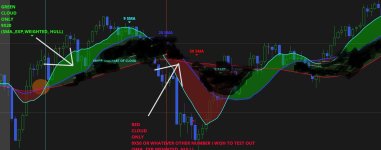
How do I change to individual cloud x-over display instead of double.nan?
I was hoping to be able to display only green "CLOUD" AND NOT HAVE DEFAULT red should the MA cross over happen to reverse.
How do I select when I want to see the cloud on specific x-over to "the long" or "to the short" side at difference MA x-over's>
If I want to see green cloud per say on 3x9 long side and only want to see red on 50x100 on the short side instead of default green or red at one specific x-over?
Really hope someone can help what is probably really simple fix to the script for my chart?
Thank you
#here is the script I found but wish to change when I see green or red clouds at individual x-over both to long or short side
I was hoping to be able to display only green "CLOUD" AND NOT HAVE DEFAULT red should the MA cross over happen to reverse.
How do I select when I want to see the cloud on specific x-over to "the long" or "to the short" side at difference MA x-over's>
If I want to see green cloud per say on 3x9 long side and only want to see red on 50x100 on the short side instead of default green or red at one specific x-over?
Really hope someone can help what is probably really simple fix to the script for my chart?
Thank you
#here is the script I found but wish to change when I see green or red clouds at individual x-over both to long or short side
Code:
input price = close;#hint price: The price used to calculate the crossover. <b>(Default is CLOSE)</b>
input fastLength = 3;#hint fastLength: The number of bars used to calculate the fast moving average. <b>(Default is 3)</b>
input slowLength = 8;#hint slowLength: The number of bars used to calculate the slow moving average. <b>(Default is 8)</b>
input slowAvgType = {default Simple, Exponential, Weighted, Wilders, Hull};#hint slowAvgType: Type of the fast moving average to be used for calculation. <b>(Default is Expontential)</b>
input fastAvgType = {default Simple, Exponential, Weighted, Wilders, Hull};#hint fastAvgType: Type of the fast moving average to be used for calculation. <b>(Default is Exponential)</b>
Input DoArrows = no;#hint DoArrows:Yes shows arrows to define crosses
Input DoPlots = yes;#hint DoPlots: Yes shows MA plots to define crosses. Default is 'YES'
Input DoAlerts = No;#hint DoAlerts:No turns off alerts

Assert( fastLength < slowLength, "fastLength ["+fastLength+"] must be less than slowLength["+slowLength+"]");

def fastAvg;
switch (FASTAvgType) {
case Simple:
fastAvg = Average(price, fastLength);
case Exponential:
fastAvg = ExpAverage(price, fastLength);
case Weighted:
fastAvg = wma(price, fastLength);
case Wilders:
fastAvg = WildersAverage(price, fastLength);
case Hull:
fastAvg = HullMovingAvg(price, fastLength);
}

def slowAvg;
switch (SLOWAvgType) {
case Simple:
slowAvg = Average(price, slowLength);
case Exponential:
slowAvg = ExpAverage(price, slowLength);
case Weighted:
slowAvg = wma(price, slowLength);
case Wilders:
slowAvg = WildersAverage(price, slowLength);
case Hull:
slowAvg = HullMovingAvg(price, slowLength);
}

plot signalXup = If DoArrows Then crosses(fastAvg, slowAvg, CrossingDirection.above) else Double.nan;

signalXup.SetDefaultColor(Color.pink);
signalXup.SetPaintingStrategy(PaintingStrategy.BOOLEAN_ARROW_UP);
signalXup.SetLineWeight(3);
plot signalXdn = If DoArrows Then crosses(fastAvg, slowAvg, CrossingDirection.below) else Double.nan;

signalXdn.SetDefaultColor(Color.Green);
signalXdn.SetPaintingStrategy(PaintingStrategy.BOOLEAN_ARROW_DOWN);
signalXdn.SetLineWeight(3);

Alert(signalXup && DoAlerts, "UP...Fast MA Cross Above Slow MA", Alert.BAR, Sound.Ding );
Alert(signalXdn && DoAlerts, "Down...Fast Ma Cross Below Slow MA", Alert.BAR, Sound.Bell );

Plot fast_Avg = If DoPlots then Fastavg else double.nan;
fast_Avg.SetDefaultColor(Color.orange);
fast_Avg.SetPaintingStrategy(PaintingStrategy.line);
fast_Avg.SetLineWeight(2);

Plot Slo_Avg = If DoPlots then Slowavg else double.nan;
Slo_Avg.SetDefaultColor(Color.cyan);
Slo_Avg.SetPaintingStrategy(PaintingStrategy.line);
Slo_Avg.SetLineWeight(2);

AddCloud(fastAvg, slowAvg, color.dark_green, color.dark_red);