


GAMMA PRESSURE MAP
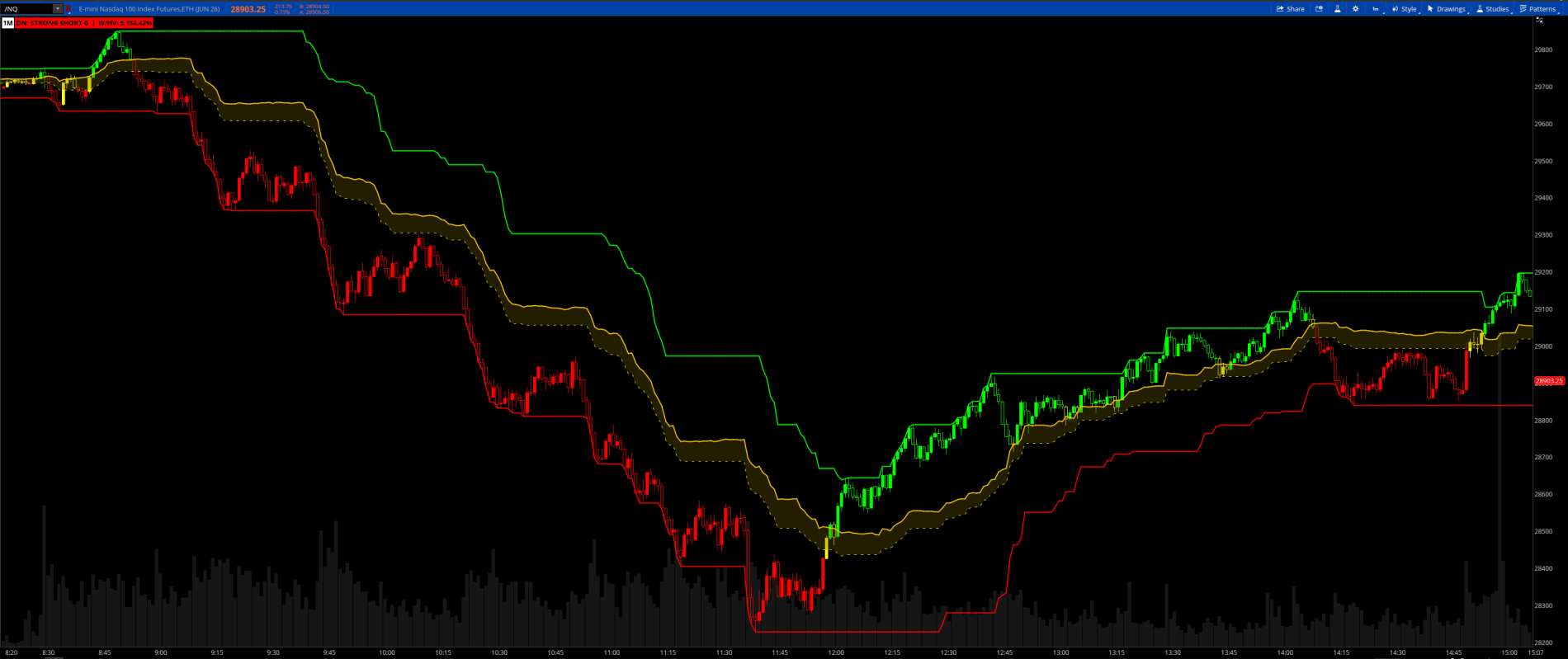
This indicator derives a real-time gamma exposure proxy from implied volatility and historical volatility, identifying whether options dealers are currently positioned in a long gamma or short gamma regime. It plots a dynamic pressure zone on the price chart that expands and contracts with volatility, giving you both a structural read on market behavior and actionable price levels.
NOTE: GAMMA LABEL: reliable on Daily charts only.
ImpVolatility() returns a daily figure on all timeframes.
HV is calculated from chart bars, so IV/HV ratio is only
meaningful when both are on the same daily timeframe.
How it works
The core signal is the ratio of Implied Volatility (ImpVolatility()) to Historical Volatility (calculated as the annualized standard deviation of log returns). When IV is running below realized volatility, dealers are likely long gamma — their hedging activity dampens price movement and creates mean-reverting conditions. When IV rises above realized volatility, dealers are likely short gamma — their hedging amplifies moves and favors trending and momentum behavior. The threshold between these regimes is tunable via the flipBand input (default 10%).
The five regimes in the Label
Three levels are plotted on the price chart:
Best use cases
Works best on index products where dealer hedging actually dominates order flow: SPX, NDX, SPY, QQQ. Also effective on futures like /ES and /MGC. Most reliable on the daily timeframe and intraday near end of session on cash-settled options. For intraday use reduce lookback to 10 and wallLookback to 20 for faster responsiveness.
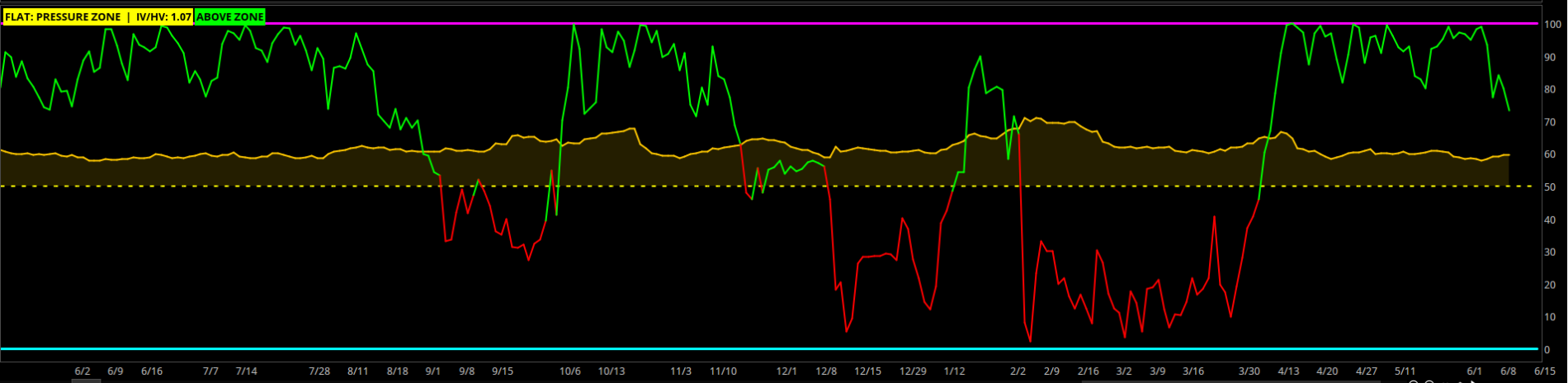
If you want a companion lower indicator, try this.
Here is a column watchlist that shows when price extends the upper and lower levels and breaks up or down.
This indicator derives a real-time gamma exposure proxy from implied volatility and historical volatility, identifying whether options dealers are currently positioned in a long gamma or short gamma regime. It plots a dynamic pressure zone on the price chart that expands and contracts with volatility, giving you both a structural read on market behavior and actionable price levels.
NOTE: GAMMA LABEL: reliable on Daily charts only.
ImpVolatility() returns a daily figure on all timeframes.
HV is calculated from chart bars, so IV/HV ratio is only
meaningful when both are on the same daily timeframe.
How it works
The core signal is the ratio of Implied Volatility (ImpVolatility()) to Historical Volatility (calculated as the annualized standard deviation of log returns). When IV is running below realized volatility, dealers are likely long gamma — their hedging activity dampens price movement and creates mean-reverting conditions. When IV rises above realized volatility, dealers are likely short gamma — their hedging amplifies moves and favors trending and momentum behavior. The threshold between these regimes is tunable via the flipBand input (default 10%).
The five regimes in the Label
- STRONG LONG G — IV well below HV. Dealers are heavily long gamma. Fade moves, buy dips, sell rips. Price tends to pin.
- LONG G — Same directional lean, less conviction. Tighter mean-reversion expected.
- FLIP ZONE — IV and HV are in equilibrium. No directional edge. Wait for resolution before committing.
- SHORT G — IV elevated above HV. Trade with momentum. Breakouts tend to follow through.
- STRONG SHORT G — IV significantly elevated. Explosive move risk. Size down or trade breakouts only.
Three levels are plotted on the price chart:
- Call Wall (green solid) — the highest high over the lookback window, representing the nearest overhead resistance cluster where dealer hedging activity concentrates. In long gamma treat as resistance. In short gamma treat as a magnet or target.
- Put Wall (red solid) — the lowest low over the lookback window, representing the nearest support cluster. In long gamma treat as a floor. In short gamma treat as a breakdown trigger.
- Pressure Zone (gold cloud) — a dynamic band sitting above the true midpoint of the call and put walls. The lower boundary is the plain midpoint (dashed yellow); the upper boundary is the midpoint plus one ATR (solid gold). The zone widens naturally in high volatility environments and tightens when the market is pinning. Price inside the zone is in contested territory. Price below the zone favors the short side. Price above the zone favors the long side.
- Trigger Line - After price makes a new higher or lower level, trading the break of the trigger line is a good entry.
- Gamma bubble— fires when gamma status changes on the chart.
- Zone bubble— fires when price crosses above, is in, or crosses below the Pressure Zone.
- Short bias alert — fires when price crosses below the dashed midpoint line
- Long bias alert — fires when price crosses above the solid ATR-offset line
Best use cases
Works best on index products where dealer hedging actually dominates order flow: SPX, NDX, SPY, QQQ. Also effective on futures like /ES and /MGC. Most reliable on the daily timeframe and intraday near end of session on cash-settled options. For intraday use reduce lookback to 10 and wallLookback to 20 for faster responsiveness.
Code:
# ============================================================
# Gamma_Pressure_Map
# Created by Chewie 6/9/2026
# ============================================================
# Derives a gamma exposure proxy from IV vs. HV relationship.
#
# CORE LOGIC:
#   IV/HV ratio < 1.00 → dealers are long gamma (mean-reversion)
#   IV/HV ratio > 1.10 → dealers are short gamma (trend/momentum)
#   Between 1.00–1.10  → flip zone, no directional bias
#
# KEY LEVELS:
#   Call Wall  = highest high over wallLookback bars (resistance)
#   Put Wall   = lowest low over wallLookback bars (support)
#   Flip Line  = ATR offset midpoint of the two walls
#   Pressure Zone = ATR-offset midpoint band between the walls
# BEST ON: SPX, NDX, SPY, QQQ — daily or intraday

#  The Z: value is the Z-score we added when implementing the regime classification fix.
#  It shows how many standard deviations the current IV/HV ratio is above or below its 60-bar average for that ticker.
#  Z near 0 — IV/HV is at its normal level for this instrument
#  Z below -0.50 — IV/HV is suppressed, leaning long gamma
#  Z below -1.50 — strongly suppressed, strong long gamma
#  Z above +0.50 — IV/HV is elevated, leaning short gamma
#  Z above +1.50 — strongly elevated, strong short gamma

# The five regimes

#  STRONG LONG G — IV well below HV. Dealers are heavily long gamma. Fade moves, buy dips, sell rips. Price tends to pin.
#  LONG G — Same directional lean, less conviction. Tighter mean-reversion expected.
#  FLIP ZONE — IV and HV are in equilibrium. No directional edge. Wait for resolution before committing.
#  SHORT G — IV elevated above HV. Trade with momentum. Breakouts tend to follow through.
#  STRONG SHORT G — IV significantly elevated. Explosive move risk. Size down or trade breakouts only.

# GAMMA LABEL: reliable on Daily charts only.
#   ImpVolatility() returns a daily figure on all timeframes.
#   HV is calculated from chart bars, so IV/HV ratio is only
#   meaningful when both are on the same daily timeframe.
#
# PRESSURE ZONE / CANDLE COLORS: valid on all timeframes.
#   Call wall, put wall, midpoint and ATR zone use only price
#   data and respond correctly to any chart timeframe.
# ============================================================

declare upper;

# ─── INPUTS ────────────────────────────────────────────────
input colorbar     = yes;
input lookback     = 20;    # bars for HV and range calculation
input atrLen       = 14;    # ATR length for band normalization
input flipBand     = 0.10;  # IV/HV spread that defines the flip zone
input wallLookback = 50;    # bars to scan for call/put wall levels
input dots         = yes;
input showWalls    = yes;
input showFlip     = yes;
input showMidpoint = yes;
input showTrigger  = yes;
input showLabel    = yes;
input ShowGamma    = yes;
input ShowZone     = no;
input alert        = no;
input showbackground = no;

# ─── PRICE REFS ────────────────────────────────────────────
def h = high;
def l = low;
def c = close;

# ─── IMPLIED VOLATILITY ────────────────────────────────────
def iv = ImpVolatility();


# ─── HISTORICAL VOLATILITY ─────────────────────────────────
def logRet  = Log(c / c[1]);
def hvRaw   = Sqrt(Average(Sqr(logRet), lookback)) * Sqrt(252);
def hv      = if hvRaw > 0 then hvRaw else Double.NaN;

# ─── GEX PRESSURE PROXY ────────────────────────────────────
def gexRatio = if !IsNaN(iv) and hv > 0 then iv / hv else Double.NaN;

# ─── Z-SCORE NORMALIZATION ─────────────────────────────────
def gexAvg    = Average(gexRatio, 60);
def gexStdDev = Sqrt(Average(Sqr(gexRatio - gexAvg), 60));
def gexZ      = if gexStdDev > 0 and !IsNaN(gexRatio)
                then (gexRatio - gexAvg) / gexStdDev
                else Double.NaN;

def longGammaStrong  = !IsNaN(gexZ) and gexZ < -1.50;
def longGamma        = !IsNaN(gexZ) and gexZ >= -1.50 and gexZ < -0.50;
def flipZone         = !IsNaN(gexZ) and gexZ >= -0.50 and gexZ <= 0.50;
def shortGamma       = !IsNaN(gexZ) and gexZ > 0.50 and gexZ <= 1.50;
def shortGammaStrong = !IsNaN(gexZ) and gexZ > 1.50;

# ─── CALL WALL / PUT WALL LEVELS ───────────────────────────
# Simple high/low clusters over wallLookback — proxy for where
# dealer hedging activity is concentrated
def callWall = Highest(h, wallLookback);
def putWall  = Lowest(l, wallLookback);


# ─── BACKGROUND CLOUD ──────────────────────────────────────
# Paints the price pane to show current regime at a glance
def cloudColor =
    if longGammaStrong  then 1 else
    if longGamma        then 2 else
    if flipZone         then 3 else
    if shortGamma       then 4 else
    if shortGammaStrong then 5 else 0;

AssignBackgroundColor(
    if !showbackground then Color.CURRENT else
    if cloudColor == 1 then CreateColor(0, 80, 0)    else  # dark green
    if cloudColor == 2 then CreateColor(0, 45, 0)    else  # dim green
    if cloudColor == 3 then CreateColor(50, 45, 0)   else  # dark yellow
    if cloudColor == 4 then CreateColor(55, 15, 0)   else  # dim red
    if cloudColor == 5 then CreateColor(80, 0, 0)    else  # dark red
    Color.CURRENT
);

# ─── CALL WALL PLOT ────────────────────────────────────────
plot CallWallPlot = if showWalls then callWall else Double.NaN;
CallWallPlot.SetDefaultColor(Color.magenta);
CallWallPlot.SetLineWeight(3);
CallWallPlot.HideBubble();

# ─── PUT WALL PLOT ─────────────────────────────────────────
plot PutWallPlot = if showWalls then putWall else Double.NaN;
PutWallPlot.SetDefaultColor(Color.cyan);
PutWallPlot.SetLineWeight(3);
PutWallPlot.HideBubble();

# PRICE SIGNALS
plot LD = if dots and low equals PutWall then low - ATR(60) / 2 else Double.NaN;
LD.SetPaintingStrategy(PaintingStrategy.POINTS);
LD.SetDefaultColor(Color.white);
LD.SetLineWeight(2);

plot UD = if dots and high equals CallWall then high + ATR(60) / 2 else Double.NaN;
UD.SetPaintingStrategy(PaintingStrategy.POINTS);
UD.SetDefaultColor(Color.white);
UD.SetLineWeight(2);

# ─── ATR FOR BAND NORMALIZATION ────────────────────────────
def atr = Average(TrueRange(h, c, l), atrLen);

# ─── REGIME LABEL ──────────────────────────────────────────
def regimeCode =
    if longGammaStrong  then 1 else
    if longGamma        then 2 else
    if flipZone         then 3 else
    if shortGamma       then 4 else
    if shortGammaStrong then 5 else 0;

AddLabel(showLabel,
    (if regimeCode == 1 then "UP: STRONG LONG G"  else
     if regimeCode == 2 then "UP: LONG G"         else
     if regimeCode == 3 then "FLAT: PRESSURE ZONE"      else
     if regimeCode == 4 then "DN: SHORT G"        else
     if regimeCode == 5 then "DN: STRONG SHORT G" else
     "— NO DATA") +
    "  |  IV/HV: " + Round(gexRatio, 2) + "  |  Z: " + Round(gexZ, 2),

    if regimeCode == 1 then Color.GREEN         else
    if regimeCode == 2 then CreateColor(100,200,100) else
    if regimeCode == 3 then Color.YELLOW        else
    if regimeCode == 4 then CreateColor(255,120,80)  else
    if regimeCode == 5 then Color.RED           else
    Color.GRAY
);


# ─── PRESSURE ZONE  ────────

def flipLine = if callWall > putWall
                then (callWall + putWall) / 2 + atr
                else Double.NaN;

plot FlippointLine = if showflip then flipLine else Double.NaN;
FlippointLine.SetDefaultColor(CreateColor(255, 200, 0));
FlippointLine.SetLineWeight(2);
FlippointLine.HideBubble();

plot Midpoint = if showmidpoint then (callwallplot - putWallPlot) /2 + putwallplot else double.nan;
Midpoint.setdefaultColor(color.yellow);
Midpoint.SetStyle(Curve.SHORT_DASH);
Midpoint.SetLineWeight(2);

AddCloud(FlippointLine, Midpoint, CreateColor(120, 100, 0), CreateColor(120, 100, 0));

# ─── PRICE POSITION LABEL ──────────────────────────────────
def priceCode =
    if c > FlippointLine then 1 else
    if c < Midpoint      then 3 else 2;

AddLabel(showLabel,
    if priceCode == 1 then "ABOVE ZONE" else
    if priceCode == 2 then "IN ZONE"    else
    "BELOW ZONE",

    if priceCode == 1 then Color.GREEN  else
    if priceCode == 2 then Color.YELLOW else
    Color.RED
);

# ─── CANDLE COLORING ───────────────────────────────────────
AssignPriceColor(
    if !colorBar         then Color.CURRENT else
    if c > FlippointLine then Color.GREEN   else
    if c < Midpoint      then Color.RED     else
    Color.YELLOW
);

# ─── PRESSURE ZONE ALERTS ─────────────────────────────────
# Short signal: price crosses below the dashed midpoint line
# Long signal:  price crosses above the solid ATR-offset line
Alert(alert and
    Crosses(c, Midpoint, CrossingDirection.BELOW),
    "Gamma Pressure Map: price crossed BELOW midpoint — SHORT bias",
    Alert.BAR,
    Sound.Ding
);
Alert(alert and
    Crosses(c, FlippointLine, CrossingDirection.ABOVE),
    "Gamma Pressure Map: price crossed ABOVE pressure zone — LONG bias",
    Alert.BAR,
    Sound.Ding
);

# ─── REGIME CHANGE BUBBLES AT PRICE ───────────────────────
def GammaChanged = regimeCode != regimeCode[1];
def ZoneChanged  = priceCode  != priceCode[1];

AddChartBubble(showgamma and GammaChanged, high,
    if regimeCode == 1 then "SLG" else
    if regimeCode == 2 then "LG"  else
    if regimeCode == 3 then "FZ"  else
    if regimeCode == 4 then "SG"  else
    "SSG",
    if regimeCode == 1 then Color.GREEN                else
    if regimeCode == 2 then CreateColor(100, 200, 100) else
    if regimeCode == 3 then Color.YELLOW               else
    if regimeCode == 4 then CreateColor(255, 120, 80)  else
    Color.RED
);

AddChartBubble(showzone and ZoneChanged, low,
    if priceCode == 1 then "ABV" else
    if priceCode == 2 then "IN"  else
    "BLW",
    if priceCode == 1 then Color.GREEN  else
    if priceCode == 2 then Color.YELLOW else
    Color.RED,
    no
);

#----------------------------
# TRIGGERLINE
#----------------------------

def price        = close;
def smaLength    = 8;
def TatrLength   = 25;  #15
def regLength    = 21;
def atrMult      = 1.25;   # Used to build the Keltner mid channel
def valS               = Average(price, smaLength);
def Tatr               = Average(TrueRange(high, close, low), TatrLength);
def average_true_range = Tatr;
def Upper_Band         = valS + atrMult * average_true_range;
def Lower_Band         = valS - atrMult * average_true_range;
def mid1               = (Upper_Band - Lower_Band) / 2 + Lower_Band;
def regMid             = Inertia(mid1, regLength);

plot TRIGGERLINE = if showtrigger then regMid else double.nan;
TRIGGERLINE.SetDefaultColor(Color.YELLOW);
TRIGGERLINE.SetLineWeight(3);
TRIGGERLINE.SetPaintingStrategy(PaintingStrategy.LINE);
If you want a companion lower indicator, try this.
Code:
# ============================================================
# GAMMA PRESSURE MAP — LOWER OSCILLATOR
# Created by Chewie 6/9/2026
# ============================================================
# Companion lower panel to the Gamma Pressure Map upper study.
# Normalizes price position within the call/put wall range
# as a 0–100 oscillator.
#
# SCALE:
#   0   = price at put wall (max bearish)
#   100 = price at call wall (max bullish)
#   50  = true midpoint of the range
#
# PRESSURE ZONE:
#   Dashed line = normalized midpoint (50)
#   Solid line  = midpoint + ATR-normalized offset
#   Cloud       = contested zone between the two
#
# GAMMA LABEL: reliable on Daily charts only.
#   ImpVolatility() returns a daily figure on all timeframes.
#   HV is calculated from chart bars, so IV/HV ratio is only
#   meaningful when both are on the same daily timeframe.
#
# PRESSURE ZONE / OSCILLATOR: valid on all timeframes.
#
# BEST ON: SPX, NDX, SPY, QQQ
# ============================================================

declare lower;

# ─── INPUTS ────────────────────────────────────────────────
input lookback       = 20;    # bars for HV calculation
input atrLen         = 14;    # ATR length for pressure zone width
input flipBand       = 0.10;  # IV/HV spread defining the flip zone
input wallLookback   = 50;    # bars to scan for call/put wall levels
input showLabel      = yes;
input showBackground = no;
input showFlip       = yes;
input showMidpoint   = yes;
input showGamma      = yes;
input showZone       = no;
input alert          = no;

# ─── PRICE REFS ────────────────────────────────────────────
def h = high;
def l = low;
def c = close;

# ─── IMPLIED VOLATILITY ────────────────────────────────────
def iv = ImpVolatility();

# ─── HISTORICAL VOLATILITY ─────────────────────────────────
def logRet  = Log(c / c[1]);
def hvRaw   = Sqrt(Average(Sqr(logRet), lookback)) * Sqrt(252);
def hv      = if hvRaw > 0 then hvRaw else Double.NaN;

# ─── GEX PRESSURE PROXY ────────────────────────────────────
def gexRatio = if !IsNaN(iv) and hv > 0 then iv / hv else Double.NaN;

# ─── Z-SCORE NORMALIZATION (self-calibrating per ticker) ───
def gexAvg    = Average(gexRatio, 60);
def gexStdDev = Sqrt(Average(Sqr(gexRatio - gexAvg), 60));
def gexZ      = if gexStdDev > 0 and !IsNaN(gexRatio)
                then (gexRatio - gexAvg) / gexStdDev
                else Double.NaN;

# ─── REGIME CLASSIFICATION ─────────────────────────────────
def longGammaStrong  = !IsNaN(gexZ) and gexZ < -1.50;
def longGamma        = !IsNaN(gexZ) and gexZ >= -1.50 and gexZ < -0.50;
def flipZone         = !IsNaN(gexZ) and gexZ >= -0.50 and gexZ <= 0.50;
def shortGamma       = !IsNaN(gexZ) and gexZ > 0.50 and gexZ <= 1.50;
def shortGammaStrong = !IsNaN(gexZ) and gexZ > 1.50;

# ─── WALLS ─────────────────────────────────────────────────
def callWall  = Highest(h, wallLookback);
def putWall   = Lowest(l, wallLookback);
def wallRange = callWall - putWall;

# ─── ATR ───────────────────────────────────────────────────
def atr = Average(TrueRange(h, c, l), atrLen);

# ─── NORMALIZE ATR TO 0–100 SCALE ──────────────────────────
def atrNorm = if wallRange > 0 then (atr / wallRange) * 100 else 0;

# ─── PRICE OSCILLATOR ──────────────────────────────────────
def oscValue = if wallRange > 0
               then ((c - putWall) / wallRange) * 100
               else Double.NaN;

# ─── PRESSURE ZONE LEVELS (normalized) ─────────────────────
def midpoint  = 50;
def flipLevel = midpoint + atrNorm;

# ─── BACKGROUND CLOUD ──────────────────────────────────────
def cloudColor =
    if longGammaStrong  then 1 else
    if longGamma        then 2 else
    if flipZone         then 3 else
    if shortGamma       then 4 else
    if shortGammaStrong then 5 else 0;

AssignBackgroundColor(
    if !showBackground then Color.CURRENT else
    if cloudColor == 1 then CreateColor(0, 80, 0)   else
    if cloudColor == 2 then CreateColor(0, 45, 0)   else
    if cloudColor == 3 then CreateColor(50, 45, 0)  else
    if cloudColor == 4 then CreateColor(55, 15, 0)  else
    if cloudColor == 5 then CreateColor(80, 0, 0)   else
    Color.CURRENT
);

# ─── PRICE OSCILLATOR PLOT ─────────────────────────────────
plot PriceOsc = oscValue;
PriceOsc.AssignValueColor(if oscValue >= 50 then Color.GREEN else Color.RED);
PriceOsc.SetLineWeight(2);
PriceOsc.HideBubble();

# ─── CALL WALL LINE (100) ──────────────────────────────────
plot CallLine = 100;
CallLine.SetDefaultColor(Color.MAGENTA);
CallLine.SetLineWeight(3);
CallLine.HideBubble();

# ─── PUT WALL LINE (0) ─────────────────────────────────────
plot PutLine = 0;
PutLine.SetDefaultColor(Color.CYAN);
PutLine.SetLineWeight(3);
PutLine.HideBubble();

# ─── SOLID ATR-OFFSET PRESSURE LINE ────────────────────────
plot FlippointLine = if showFlip then flipLevel else Double.NaN;
FlippointLine.SetDefaultColor(CreateColor(255, 200, 0));
FlippointLine.SetLineWeight(2);
FlippointLine.HideBubble();

# ─── DASHED MIDPOINT LINE (50) ─────────────────────────────
plot MidpointLine = if showMidpoint then midpoint else Double.NaN;
MidpointLine.SetDefaultColor(Color.YELLOW);
MidpointLine.SetStyle(Curve.SHORT_DASH);
MidpointLine.SetLineWeight(2);
MidpointLine.HideBubble();

# ─── PRESSURE ZONE CLOUD ───────────────────────────────────
AddCloud(FlippointLine, MidpointLine, CreateColor(120, 100, 0), CreateColor(120, 100, 0));

# ─── REGIME LABEL ──────────────────────────────────────────
def regimeCode =
    if longGammaStrong  then 1 else
    if longGamma        then 2 else
    if flipZone         then 3 else
    if shortGamma       then 4 else
    if shortGammaStrong then 5 else 0;

AddLabel(showLabel,
    (if regimeCode == 1 then "UP: STRONG LONG G"  else
     if regimeCode == 2 then "UP: LONG G"         else
     if regimeCode == 3 then "FLAT: PRESSURE ZONE" else
     if regimeCode == 4 then "DN: SHORT G"         else
     if regimeCode == 5 then "DN: STRONG SHORT G"  else
     "— NO DATA") +
    "  |  IV/HV: " + Round(gexRatio, 2),

    if regimeCode == 1 then Color.GREEN                else
    if regimeCode == 2 then CreateColor(100, 200, 100) else
    if regimeCode == 3 then Color.YELLOW               else
    if regimeCode == 4 then CreateColor(255, 120, 80)  else
    if regimeCode == 5 then Color.RED                  else
    Color.GRAY
);

# ─── PRICE POSITION LABEL ──────────────────────────────────
def priceCode =
    if oscValue > flipLevel then 1 else
    if oscValue < midpoint  then 3 else 2;

AddLabel(showLabel,
    if priceCode == 1 then "ABOVE ZONE" else
    if priceCode == 2 then "IN ZONE"    else
    "BELOW ZONE",

    if priceCode == 1 then Color.GREEN  else
    if priceCode == 2 then Color.YELLOW else
    Color.RED
);

# ─── REGIME CHANGE BUBBLES ─────────────────────────────────
def gammaChanged = regimeCode != regimeCode[1];
def zoneChanged  = priceCode  != priceCode[1];

AddChartBubble(showGamma and gammaChanged, oscValue,
    if regimeCode == 1 then "SLG" else
    if regimeCode == 2 then "LG"  else
    if regimeCode == 3 then "FZ"  else
    if regimeCode == 4 then "SG"  else
    "SSG",
    if regimeCode == 1 then Color.GREEN                else
    if regimeCode == 2 then CreateColor(100, 200, 100) else
    if regimeCode == 3 then Color.YELLOW               else
    if regimeCode == 4 then CreateColor(255, 120, 80)  else
    Color.RED
);

AddChartBubble(showZone and zoneChanged, oscValue,
    if priceCode == 1 then "ABV" else
    if priceCode == 2 then "IN"  else
    "BLW",
    if priceCode == 1 then Color.GREEN  else
    if priceCode == 2 then Color.YELLOW else
    Color.RED,
    no
);

# ─── ALERTS ────────────────────────────────────────────────
Alert(alert and
    Crosses(oscValue, midpoint, CrossingDirection.BELOW),
    "Gamma Pressure Map: oscillator crossed BELOW midpoint — SHORT bias",
    Alert.BAR,
    Sound.Ding
);
Alert(alert and
    Crosses(oscValue, flipLevel, CrossingDirection.ABOVE),
    "Gamma Pressure Map: oscillator crossed ABOVE pressure zone — LONG bias",
    Alert.BAR,
    Sound.Ding
);
Here is a column watchlist that shows when price extends the upper and lower levels and breaks up or down.
Code:
# ============================================================
# Gamma_Pressure_Map Column Watchlist
# Created by Chewie 6/9/2026
# ============================================================
# Derives a gamma exposure proxy from IV vs. HV relationship.
#
# ─── INPUTS ────────────────────────────────────────────────
input lookback     = 20;    # bars for HV and range calculation
input atrLen       = 14;    # ATR length for band normalization
input flipBand     = 0.10;  # IV/HV spread that defines the flip zone
input wallLookback = 50;    # bars to scan for call/put wall levels

# ─── PRICE REFS ────────────────────────────────────────────
def h = high;
def l = low;
def c = close;

# ─── IMPLIED VOLATILITY ────────────────────────────────────
def iv = ImpVolatility();

# ─── HISTORICAL VOLATILITY ─────────────────────────────────
def logRet  = Log(c / c[1]);
def hvRaw   = Sqrt(Average(Sqr(logRet), lookback)) * Sqrt(252);
def hv      = if hvRaw > 0 then hvRaw else Double.NaN;

# ─── GEX PRESSURE PROXY ────────────────────────────────────
def gexRatio = if !IsNaN(iv) and hv > 0 then iv / hv else Double.NaN;

# ─── Z-SCORE NORMALIZATION ─────────────────────────────────
def gexAvg    = Average(gexRatio, 60);
def gexStdDev = Sqrt(Average(Sqr(gexRatio - gexAvg), 60));
def gexZ      = if gexStdDev > 0 and !IsNaN(gexRatio)
                then (gexRatio - gexAvg) / gexStdDev
                else Double.NaN;

def longGammaStrong  = !IsNaN(gexZ) and gexZ < -1.50;
def longGamma        = !IsNaN(gexZ) and gexZ >= -1.50 and gexZ < -0.50;
def flipZone         = !IsNaN(gexZ) and gexZ >= -0.50 and gexZ <= 0.50;
def shortGamma       = !IsNaN(gexZ) and gexZ > 0.50 and gexZ <= 1.50;
def shortGammaStrong = !IsNaN(gexZ) and gexZ > 1.50;

# ─── CALL WALL / PUT WALL LEVELS ───────────────────────────
# Simple high/low clusters over wallLookback — proxy for where
# dealer hedging activity is concentrated
def callWall = Highest(h, wallLookback);
def putWall  = Lowest(l, wallLookback);

# ─── CALL WALL PLOT ────────────────────────────────────────
def CallWallPlot =  callWall;

# ─── PUT WALL PLOT ─────────────────────────────────────────
def PutWallPlot =  putWall;

# ─── ATR FOR BAND NORMALIZATION ────────────────────────────
def atr = Average(TrueRange(h, c, l), atrLen);

# ─── PRESSURE ZONE  ────────

def flipLine = if callWall > putWall
                then (callWall + putWall) / 2 + atr
                else Double.NaN;

def FlippointLine =  flipLine;

def Midpoint = (callwallplot - putWallPlot) /2 + putwallplot;
plot BUY = close crosses above flipline;
plot SELL = close crosses below midpoint;
def UPPER = high equals callwall;
def LOWER = low equals putwall;

AddLabel(yes, if buy then "BUY" else if sell then "SELL" else if buy then "BUY" else if sell then "SELL" else if UPPER then "Upper" else if LOWER then "Lower" else " ", if buy or lower then color.blue else if sell then color.yellow else if upper then color.white else Color.black);

AssignBACKGROUNDColor(if buy then color.green else if sell then color.red else if upper then color.magenta else if lower then color.cyan else color.black);
Last edited:


