


Engulfing pattern on your candlestick chart can be useful for identifying trend changes, potential reversal play, etc. Here is an indicator for ThinkorSwim that will automatically find and highlight Engulfing candle on your chart. Both bullish and bearish engulfing patterns.
I also included labels and a unique color for each type of pattern. By default, a bullish engulfing candle will be yellow and a bearish engulfing candle will be purple. You can change this via the source code. This works for any timeframes.
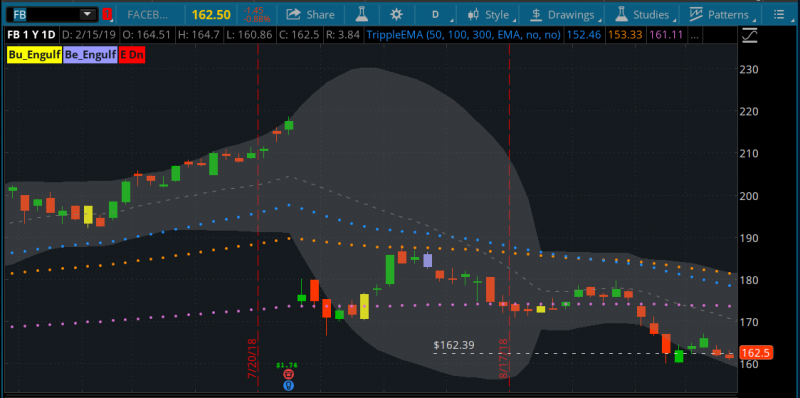
This tool highlights classic bullish and bearish engulfing patterns with a clean, color‑based display. Engulfing candles are among the most recognizable and intuitive candlestick formations, and this indicator makes them easy to spot in real time. A bullish engulfing pattern appears when buyers take control with a strong candle that fully covers the prior candle’s body. A bearish engulfing pattern appears when sellers take control with a candle that fully covers the prior candle’s body.
The script also incorporates a simple trend setup check, helping the pattern appear within a short directional sequence. This keeps the visual signals focused on moments where momentum shifts can be especially meaningful. The result is a straightforward, visually clear tool that supports traders who prefer pattern‑based decision‑making and want an easy way to identify potential shifts in control.
Engulfing patterns are most insightful when they appear at key levels on the chart.
P.S: To fix the shrinking issue, be sure to untick "Show Plot" for Bullish and Bearish options in the indicator's setting.
I also included labels and a unique color for each type of pattern. By default, a bullish engulfing candle will be yellow and a bearish engulfing candle will be purple. You can change this via the source code. This works for any timeframes.
This tool highlights classic bullish and bearish engulfing patterns with a clean, color‑based display. Engulfing candles are among the most recognizable and intuitive candlestick formations, and this indicator makes them easy to spot in real time. A bullish engulfing pattern appears when buyers take control with a strong candle that fully covers the prior candle’s body. A bearish engulfing pattern appears when sellers take control with a candle that fully covers the prior candle’s body.
The script also incorporates a simple trend setup check, helping the pattern appear within a short directional sequence. This keeps the visual signals focused on moments where momentum shifts can be especially meaningful. The result is a straightforward, visually clear tool that supports traders who prefer pattern‑based decision‑making and want an easy way to identify potential shifts in control.
Engulfing patterns are most insightful when they appear at key levels on the chart.
thinkScript Code
Rich (BB code):
#
# TD Ameritrade IP Company, Inc. (c) 2011-2018
# Modified by BenTen @ usethinkscript.com
#
#wizard plots
#wizard text: Inputs: length:
#wizard input: length
#wizard text: trend setup:
#wizard input: trendSetup

input length = 20;
input trendSetup = 3;

def BodyMax = Max(open, close);
def BodyMin = Min(open, close);
def IsEngulfing = BodyMax > BodyMax[1] and
    BodyMin < BodyMin[1];
def IsWhite = open < close;
def IsBlack = open > close;
def IsPrevDoji = IsDoji(length)[1];

plot Bearish = IsAscending(close, trendSetup)[1] and
    (IsWhite[1] or IsPrevDoji) and
    IsBlack and
    IsEngulfing;

plot Bullish = IsDescending(close, trendSetup)[1] and
    (IsBlack[1] or IsPrevDoji) and
    IsWhite and
    IsEngulfing;

assignpriceColor(if Bearish then Color.VIOLET else if Bullish then Color.Yellow else Color.Current);
AddLabel(yes,"Bu_Engulf",color.Yellow);
AddLabel(yes,"Be_Engulf",color.VIOLET);
Shareable Link
https://tos.mx/nirPCbP.S: To fix the shrinking issue, be sure to untick "Show Plot" for Bullish and Bearish options in the indicator's setting.
Last edited by a moderator:


