Repaints AGAIG DayTrading - Scalping For Success In ThinkOrSwim

Repaints
XOM Trade Breakdown – 1/22
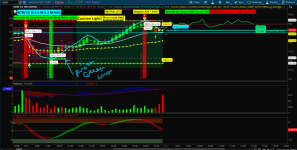
Today’s trade on XOM was a solid example of disciplined patience and multi-factor confirmation using @csricksdds custom indicator stack.
At 8:50 AM, the first buy signal was triggered from the upper AGAIG histogram blocks. However, the price action structure wasn’t aligned — candles lacked conviction, TMO (True Momentum Oscillator) remained negative, and volume was declining. Plus, the Caution Light was still active. So, I waited.

Shortly after, a second histogram buy signal appeared. This time, it was backed by:
  • A "Long" bubble from the system,
  • TMO had bottomed and began curling upward, suggesting emerging bullish momentum,
  • A sequence of doji-like candles hinted at indecision and potential reversal,
  • My Pivot Indicator also triggered.
    At that point, I entered a 132 call option at $1.00, with structure now aligning across momentum, volume, and candle formation.
As the day progressed:
  • Around 10:30, the Polynomial Regression Moving Average (turquoise) turned upward and crossed above the 20 MA, a key confirmation.
  • Price held and climbed above VWAP, with volume picking up — all supporting continuation.
  • Around 13:40, a doji formed, and the next candle closed higher, signaling potential exhaustion of the move.
    That was my exit trigger, and I sold the 132 call at $2.25, locking in over 125% return.
Key Takeaways:
  • I waited for full alignment: histogram trigger, AGAIG signals, TMO reversal, price structure, volume, and MA climbing/crossover.
  • Avoided early entry due to lack of confirmation, which protected capital.
  • Used the higher close after a doji as an elegant profit-taking signal.

This was a textbook example of how multiple confluences of the AGAIG and using other indicators can lead to high-probability trades when timed with discipline.
This is a great write-up of an awesome trade!! Like a great hitter going describing pitch by pitch how he waited until connecting for a grand-slam! ⚾ Couple of ?s: 1. You mention "my pivot indicator" on the chart. Where is that? 2. At the time of the 2nd buy signal, did you wait for the traffic light to turn green? It was at a "caution stage" during the first signal. 3. What version of the TMO Oscillator are you using? 4. The chart has a "predicted high" on the right side. How are you are getting that to appear.? Again, hearty congrats on this great trade $$ and thanks for your insight and willingness to help and teach others. 🙏🙏
 
1.) It is the AGAIG pivots that are on the dual screen set up that csricksdds has on his write up on day trades.
2) the green light came on earlier that session, the AGAIG dashboard traffic light. I was really waiting on another caution light.
3) the version of the TMO I will include in the shared chart
4) The predicted high comes off a calculation of ATM bid ask summation and added and substracted to the close of a Friday before. this covers the volatility range of expected movement from the option volumes. TOS has this number already calculated for you on the trade page next to the volatility top line of each option expiry section. See image. This is a very good guide 90% of the time for exhaustion levels and the stock usually not always but usually closes within that range. I personally add this to the charts along with call walls and put walls .
Here is the shared chart which has some extras - again @csricksdds is the creator here. https://tos.mx/!BCX0YAJO
1769139865719.png
 
the DOJI_PLAY script does not work or is not written for the math on Heikin Ashi candles so it will not color the candles. But I dig it, another @csricksdds write up in here.
Code:
# Doji High Break Color Script
# By: antwerks from csricksdds idea | Jan 2026
# Colors Dojis white and highlights the first candle to close above the Doji's high in yellow

input dojiBodyPct = 10;  # Max body size as % of range to count as a Doji

def o = open;
def c = close;
def h = high;
def l = low;
def body = AbsValue(c - o);
def range = h - l;

# Avoid divide by zero
def bodyPct = if range != 0 then (body / range) * 100 else 0;

# Define Doji
def isDoji = bodyPct < dojiBodyPct;

# Store Doji High
rec dojiHigh = if isDoji then h else dojiHigh[1];
rec waitingForBreak = if isDoji then 1 else if !isDoji and c > dojiHigh[1] and waitingForBreak[1] == 1 then 0 else waitingForBreak[1];

# Signal: first candle to close above the most recent doji
def isBreakCandle = !isDoji and waitingForBreak[1] == 1 and c > dojiHigh[1];

# === Assign Candle Colors ===
AssignPriceColor(
    if isDoji then Color.WHITE
    else if isBreakCandle then Color.YELLOW
    else Color.CURRENT
);
1769141246618.png
 
1.) It is the AGAIG pivots that are on the dual screen set up that csricksdds has on his write up on day trades.
2) the green light came on earlier that session, the AGAIG dashboard traffic light. I was really waiting on another caution light.
3) the version of the TMO I will include in the shared chart
4) The predicted high comes off a calculation of ATM bid ask summation and added and substracted to the close of a Friday before. this covers the volatility range of expected movement from the option volumes. TOS has this number already calculated for you on the trade page next to the volatility top line of each option expiry section. See image. This is a very good guide 90% of the time for exhaustion levels and the stock usually not always but usually closes within that range. I personally add this to the charts along with call walls and put walls .
Here is the shared chart which has some extras - again @csricksdds is the creator here. https://tos.mx/!BCX0YAJO
View attachment 26841
The word AMAZING doesn't begin to describe your generosity and guidance. Between you and @csricksdds we are getting a master class in trading. It's like he supplies the beautiful, colorful frame of the vehicle so it always holds your attention and then you go under the hood to tweak it and tune it up for maximum performance. You guys are awesome. I would encourage anyone, even absolute beginners, to really study what you guys have created here. With practice, patience and discipline, it's a very effective way to trade and interpret different indicators on a chart. I really hope that you will illustrate more of your trades as you did above. It's a great way to teach. I am very grateful for all that you do on this forum.
 
The word AMAZING doesn't begin to describe your generosity and guidance. Between you and @csricksdds we are getting a master class in trading. It's like he supplies the beautiful, colorful frame of the vehicle so it always holds your attention and then you go under the hood to tweak it and tune it up for maximum performance. You guys are awesome. I would encourage anyone, even absolute beginners, to really study what you guys have created here. With practice, patience and discipline, it's a very effective way to trade and interpret different indicators on a chart. I really hope that you will illustrate more of your trades as you did above. It's a great way to teach. I am very grateful for all that you do on this forum.
This is a bang up group for sure!!!! thank you for your kind words - I can only hope I can give back - lotta good stuff in here.
 
This is a great write-up of an awesome trade!! Like a great hitter going describing pitch by pitch how he waited until connecting for a grand-slam! ⚾ Couple of ?s: 1. You mention "my pivot indicator" on the chart. Where is that? 2. At the time of the 2nd buy signal, did you wait for the traffic light to turn green? It was at a "caution stage" during the first signal. 3. What version of the TMO Oscillator are you using? 4. The chart has a "predicted high" on the right side. How are you are getting that to appear.? Again, hearty congrats on this great trade $$ and thanks for your insight and willingness to help and teach others. 🙏🙏
sorry here is the pivot indicator on the chart
1769149153193.png
 
sorry here is the pivot indicator on the chart View attachment 26843
@antwerks or anyone else,

I noticed that the statent in the Volume only shows up the label when it meets the criteria. I'm having trouble try to convert to show the label all the time.

Would someone show me what I'm missing for the 3rd statement? I got an error at line 80.
I master 2 if statements, but I cant find any of my indictors that have 3 if Statements.

1769789050588.png


Thanks,
jrj4774
 
@antwerks or anyone else,

I noticed that the statent in the Volume only shows up the label when it meets the criteria. I'm having trouble try to convert to show the label all the time.

Would someone show me what I'm missing for the 3rd statement? I got an error at line 80.
I master 2 if statements, but I cant find any of my indictors that have 3 if Statements.

View attachment 26936

Thanks,
jrj4774
Not sure if this is what you mean???
Code:
# PNVI is a modified version of the Price-Volume Trend (PVT) indicator
# Many thanks to @antwerks 2/2/2025 for script from usethinkscript.com
# khpro
#added trend labels - khpro
#added option for painting candles - khpro
#added static labels and historicalVolatility counting antwerks 01/30/2026


declare lower;

input ma_length = 15;

def xROC = (close - close[1]) * 100 / close;

def nRes1 = if (volume < volume[1]) then nRes1[1] + xROC else nRes1[1];
def nRes2 = if (volume > volume[1]) then nRes2[1] + xROC else nRes2[1];
def nRes3 = nRes1 + nRes2;
def nResEMA3 = SimpleMovingAvg(nRes1, ma_length) + SimpleMovingAvg(nRes2, ma_length);

plot PNVI = nRes3;
plot PEMA = nResEMA3;

PNVI.SetDefaultColor(GetColor(1));
PNVI.AssignValueColor(if PNVI > PNVI[1] then Color.GREEN else Color.RED);
PEMA.SetDefaultColor(GetColor(1));

AddCloud(PNVI, PEMA, Color.GREEN, Color.RED);

# === Track Last Signal and Bar Number
def bn = BarNumber();

# -- Define each condition
def cross = PNVI crosses PEMA;
def uptrend = PNVI > PEMA and PNVI > PNVI[1];
def exhaustion = PNVI < PEMA and PNVI < PNVI[1];
def bullish = PNVI > PEMA and PNVI > PNVI[1];
def bearish = PNVI < PEMA and PNVI < PNVI[1];

# -- Event tracking (label + bar number)
def lastCrossBar = if cross then bn else lastCrossBar[1];
def lastUptrendBar = if uptrend then bn else lastUptrendBar[1];
def lastExhaustionBar = if exhaustion then bn else lastExhaustionBar[1];
def lastBullishBar = if bullish then bn else lastBullishBar[1];
def lastBearishBar = if bearish then bn else lastBearishBar[1];

def barsSinceCross = bn - lastCrossBar;
def barsSinceUptrend = bn - lastUptrendBar;
def barsSinceExhaustion = bn - lastExhaustionBar;
def barsSinceBullish = bn - lastBullishBar;
def barsSinceBearish = bn - lastBearishBar;

# === Persistent Labels with Time Info
AddLabel(yes, "Absorption / Reversal (" + barsSinceCross + " bars ago)", Color.PLUM);
AddLabel(yes, "Confirmed Uptrend (" + barsSinceUptrend + " bars ago)", Color.BLUE);
AddLabel(yes, "Potential Exhaustion (" + barsSinceExhaustion + " bars ago)", Color.ORANGE);
AddLabel(yes, "Bullish Momentum (" + barsSinceBullish + " bars ago)", Color.GREEN);
AddLabel(yes, "Bearish Momentum (" + barsSinceBearish + " bars ago)", Color.RED);

# === Background Coloring
input paintCandles = yes;
AssignPriceColor(
    if !paintCandles then Color.CURRENT
    else if PNVI > PEMA then Color.GREEN
    else Color.RED
);
 
@antwerks

Hi,

It seems like a have a different version than the one posted above. Thank you for sending the update.

# Define Trend Labels with Else Statements - Based on my interpretation of the script, the label would flash when each criteria are met. Am I interpreting this incorrectly?

The updated version that you just posted now show the label.

The indictor version I had was on the right.

Thank you,
jrj4774

1769800089606.png
 
@antwerks

Hi,

It seems like a have a different version than the one posted above. Thank you for sending the update.

# Define Trend Labels with Else Statements - Based on my interpretation of the script, the label would flash when each criteria are met. Am I interpreting this incorrectly?

The updated version that you just posted now show the label.

The indictor version I had was on the right.

Thank you,
jrj4774

View attachment 26940
is this what you needed?
 
Hi -

I have a script question - So I like to add labels to my indictors and I noticed a few times that when I add them, there few indictors that the labels are just BLACK. Did I code it wrong/use the incorrect script language. Most of my script labels are on the bottom right side either in Green or Red. But this one is coming out as Black/not easy to read it.

# === Crossover Signals on Oscillator ===
plot BullCross = if wt1 crosses above wt2 then wt1 else Double.NaN;
plot BearCross = if wt1 crosses below wt2 then wt1 else Double.NaN;

BullCross.SetPaintingStrategy(PaintingStrategy.ARROW_UP);
BullCross.SetDefaultColor(Color.GREEN);
BullCross.SetLineWeight(5);

BearCross.SetPaintingStrategy(PaintingStrategy.ARROW_DOWN);
BearCross.SetDefaultColor(Color.RED);
BearCross.SetLineWeight(5);

AddLabel(yes,
if BullCross then "BUY" else
if BearCross then "No Trades Allow" else "No Trades Allow",
if BullCross then Color.GREEN else
if BearCross then Color.RED else Color.RED, Location.BOTTOM_RIGHT, FontSize.LARGE);


http://tos.mx/!500Cbg2K

1769917698420.png


Another question, in one of the version of this, there was a histogram, so I added it back in. I currently color code it white, but I would like to make it Green (above zeroline) and Red ( below zeroLine). Would someone show help me with the script or perhaps link and sample of how to add it?

I currently have it as below -

plot wt3 = (wt1 - wt2);
wt3.SetDefaultColor(Color.WHITE);
wt3.SetPaintingStrategy(PaintingStrategy.HISTOGRAM);

1769918044171.png

Thank you,
jrj4774
 
Hi -

I have a script question - So I like to add labels to my indictors and I noticed a few times that when I add them, there few indictors that the labels are just BLACK. Did I code it wrong/use the incorrect script language. Most of my script labels are on the bottom right side either in Green or Red. But this one is coming out as Black/not easy to read it.

# === Crossover Signals on Oscillator ===
plot BullCross = if wt1 crosses above wt2 then wt1 else Double.NaN;
plot BearCross = if wt1 crosses below wt2 then wt1 else Double.NaN;

BullCross.SetPaintingStrategy(PaintingStrategy.ARROW_UP);
BullCross.SetDefaultColor(Color.GREEN);
BullCross.SetLineWeight(5);

BearCross.SetPaintingStrategy(PaintingStrategy.ARROW_DOWN);
BearCross.SetDefaultColor(Color.RED);
BearCross.SetLineWeight(5);

AddLabel(yes,
if BullCross then "BUY" else
if BearCross then "No Trades Allow" else "No Trades Allow",
if BullCross then Color.GREEN else
if BearCross then Color.RED else Color.RED, Location.BOTTOM_RIGHT, FontSize.LARGE);


http://tos.mx/!500Cbg2K

View attachment 26944

Another question, in one of the version of this, there was a histogram, so I added it back in. I currently color code it white, but I would like to make it Green (above zeroline) and Red ( below zeroLine). Would someone show help me with the script or perhaps link and sample of how to add it?

I currently have it as below -

plot wt3 = (wt1 - wt2);
wt3.SetDefaultColor(Color.WHITE);
wt3.SetPaintingStrategy(PaintingStrategy.HISTOGRAM);

View attachment 26945
Thank you,
jrj4774

Code:
declare lower;

input length = 21;

# --- Source Inputs (example only; replace with your own wt1/wt2 logic)
def wt1 = ExpAverage(close, 10);
def wt2 = ExpAverage(close, 21);

# --- Normalization Helper (Min-Max)
script normalize {
    input data = close;
    input len = 21;
    def minVal = Lowest(data, len);
    def maxVal = Highest(data, len);
    plot norm = if maxVal != minVal then (data - minVal) / (maxVal - minVal) * 2 - 1 else 0;
}

# --- Normalized Versions
def n1 = normalize(wt1, length);
def n2 = normalize(wt2, length);
def nDiff = n1 - n2;

# --- Plot Normalized Lines
plot line1 = n1;
plot line2 = n2;
line1.SetDefaultColor(Color.CYAN);
line2.SetDefaultColor(Color.YELLOW);
line1.SetLineWeight(2);
line2.SetLineWeight(2);

# --- Histogram of Difference
plot Histogram = nDiff;
Histogram.SetPaintingStrategy(PaintingStrategy.HISTOGRAM);
Histogram.AssignValueColor(if nDiff > 0 then Color.GREEN else if nDiff < 0 then Color.RED else Color.GRAY);
Histogram.SetLineWeight(3);

# --- Optional Midline
plot Zero = 0;
Zero.SetDefaultColor(Color.DARK_GRAY);
Zero.SetStyle(Curve.MEDIUM_DASH);

# === Arrows on wt1 with vertical offset for visibility ===
# === Crossover Detection ===
# === Crossover Detection (NORMALIZED) ===
def bullCross = n1 crosses above n2;
def bearCross = n1 crosses below n2;

# === Normalized arrow locations ===
plot BullArrow = if bullCross then n1 else Double.NaN;
BullArrow.SetPaintingStrategy(PaintingStrategy.ARROW_UP);
BullArrow.SetDefaultColor(Color.GREEN);
BullArrow.SetLineWeight(3);

plot BearArrow = if bearCross then n1 else Double.NaN;
BearArrow.SetPaintingStrategy(PaintingStrategy.ARROW_DOWN);
BearArrow.SetDefaultColor(Color.RED);
BearArrow.SetLineWeight(3);

def isBuy = n1 crosses above n2;
def isSell = n1 crosses below n2;

AddLabel(yes,
    if isBuy then "BUY" else
    if isSell then "SELL" else "WAIT",
    if isBuy then Color.GREEN else
    if isSell then Color.RED else Color.GRAY
);
 

Join useThinkScript to post your question to a community of 21,000+ developers and traders.

Similar threads

Not the exact question you're looking for?

Start a new thread and receive assistance from our community.

87k+ Posts
1862 Online
Create Post

Similar threads

Similar threads

The Market Trading Game Changer

Join 2,500+ subscribers inside the useThinkScript VIP Membership Club
  • Exclusive indicators
  • Proven strategies & setups
  • Private Discord community
  • ‘Buy The Dip’ signal alerts
  • Exclusive members-only content
  • Add-ons and resources
  • 1 full year of unlimited support

Frequently Asked Questions

What is useThinkScript?

useThinkScript is the #1 community of stock market investors using indicators and other tools to power their trading strategies. Traders of all skill levels use our forums to learn about scripting and indicators, help each other, and discover new ways to gain an edge in the markets.

How do I get started?

We get it. Our forum can be intimidating, if not overwhelming. With thousands of topics, tens of thousands of posts, our community has created an incredibly deep knowledge base for stock traders. No one can ever exhaust every resource provided on our site.

If you are new, or just looking for guidance, here are some helpful links to get you started.

What are the benefits of VIP Membership?
VIP members get exclusive access to these proven and tested premium indicators: Buy the Dip, Advanced Market Moves 2.0, Take Profit, and Volatility Trading Range. In addition, VIP members get access to over 50 VIP-only custom indicators, add-ons, and strategies, private VIP-only forums, private Discord channel to discuss trades and strategies in real-time, customer support, trade alerts, and much more. Learn all about VIP membership here.
How can I access the premium indicators?
To access the premium indicators, which are plug and play ready, sign up for VIP membership here.
Back
Top