How do I code a for loop?

Bassindora

Member
VIP
Can someone direct me to example code of a for loop?

I would like to look at the value of a variable that holds a value that I previously assigned for x (input from the user) number of bars.

I thought it would look something like this:

for loopvar = 0 to x
if signal[x] = 1 then do something
else do something else
increment loopvar

I have seen while and fold statements and am having difficulty deciphering them for my use.

Any help is appreciated.
 
Solution
Can someone direct me to example code of a for loop?

I would like to look at the value of a variable that holds a value that I previously assigned for x (input from the user) number of bars.

I thought it would look something like this:

for loopvar = 0 to x
if signal[x] = 1 then do something
else do something else
increment loopvar

I have seen while and fold statements and am having difficulty deciphering them for my use.

Any help is appreciated.


fold can be a confusing topic to learn. it took me quite awhile , then one day it clicked. i just kept reading and trying dozens of fold examples and adding a bubble to display some values.

this helped a lot...
Can someone direct me to example code of a for loop?

I would like to look at the value of a variable that holds a value that I previously assigned for x (input from the user) number of bars.

I thought it would look something like this:

for loopvar = 0 to x
if signal[x] = 1 then do something
else do something else
increment loopvar

I have seen while and fold statements and am having difficulty deciphering them for my use.

Any help is appreciated.


fold can be a confusing topic to learn. it took me quite awhile , then one day it clicked. i just kept reading and trying dozens of fold examples and adding a bubble to display some values.

this helped a lot.
https://jshingler.github.io/TOS-and-Thinkscript-Snippet-Collection/TOS & Thinkscript Collection.html#the-fold-function-explained

https://usethinkscript.com/threads/fold-function-learning.16047/


---------------

i don't understand your description.
you crammed everything into 1 sentence. spread it out. write several short statements/rules.
don't use variable names, keep it general.
when you are able to explain what you want, it will help you understand how to do it.

first thing is, you need to think about what you want to see on the chart.
..do you want to draw something on a bar in the past (before the last bar) , that has a certain value?
..or just read old values, find the bar with desired value, and do something on current bar?
this will help to set up the loop, to look at old bars or future bars.

what if there are multiple bars with the desired signal? just act on the first one found? do something on each bar found? add up some numbers?

do you want to run the loop on every bar? or just on the last bar?


-----------------

my guess,

# on every bar,
# read from some past bars,
# look for a desired value in signal,
# add up the quantity of bars that had a desired signal

# user input. how many bars back from current bar. (including current bar)


Code:
# fold_help_3

#https://usethinkscript.com/threads/how-do-i-code-a-for-loop.22279/
#How do I code a for loop?
#Bassindora  3/28


#Can someone direct me to example code of a for loop?

#I would like to look at the value of a variable that holds a value that I previously assigned for x (input from the user) number of bars.

#I thought it would look something like this:

#for loopvar = 0 to x
#if signal[x] = 1 then do something
#else do something else
#increment loopvar

#I have seen while and fold statements and am having difficulty deciphering them for my use.


#   my guess,
# on every bar,
#  read from some past bars,
#   look for a desired value in signal,
#    add up the quantity of bars that had a desired signal


# how many bars back to read data
input bars_back = 5;
# current bar , and past 4 bars


# define signal variable ,  0 or 1
# generate random numbers for this test
def signal = round((random() * 1) - 0, 0);

# display the values below each bar
addchartbubble(1, low*0.998,
signal
, color.cyan, 0);


def desired_value = 1;


# count the past bars with the desired value

def cnt = fold a = 0 to bars_back
#  create the loop. pick a letter to use , a
# start with offset 0, so it looks at the current bar
# when the loop counter 'a' reaches the end number, bars_back, it stops. it does not process the loop with a value of bars_back for a.
 with b
#  pick a letter to use as a temporary holder of data for the loop
 while !isnan(getvalue(close, a))
#  check if trying to read data from non existant bars. (if on the 5th bar, and try to read data from 10 bars back)
#  if  not an error , then keep looping
 do b + (if getvalue(signal, a) == desired_value then 1 else 0);
#  read a value from a past bar, and compare it to a value. if equal then increase the value of b
#  when the loop is all done , cnt will equal the value of b, the quantity of desired values


# how many of the 4 past bars , and current bar, had a value of 1
addchartbubble(1, high*1.001,
cnt
, color.yellow, 1);

#

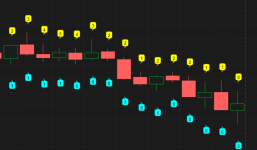
in the image, it is looking at 5 bars, the past 4 past bars and the current bar.
the blue bubbles are the signal
the yellow bubbles are the counts
.
 

Attachments

  • img1.png
    img1.png
    68.8 KB · Views: 34
Last edited:
Solution
i don't understand your description.
you crammed everything into 1 sentence. spread it out. write several short statements/rules.
don't use variable names, keep it general.
when you are able to explain what you want, it will help you understand how to do it.
@halcyonguy You are correct on the description. I've been so deep in the weeds that I just gave the brief pseudo code I was after.

The links helped. Thanks.

Here is what I am trying to do in words:

Every bar there is a buy/sell evaluation done. If the eval is buy, I turn the background green. If it is sell I turn the background red.

The background stays the set color until the condition changes. This may be the next bar or may be many bars later.

The color of the background gives me an easy, visual indication of the potential buy/sell state of the stock. If it is buy, then I go to another set of charts/indicators to do more analysis.

This works pretty well, but sometimes the buy/sell condition gets stale even though it is, for the most part, still in a buy state.

What I am trying to accomplish is to have 2 or 3 background colors that visually indicate how long the stock has been in each state, e.g. for the buy signal green, yellow, light blue. Similar for the sell state.

The length of the freshness of the signals will be a user input.

An example might be: As soon as the buy signal shows and for the next 7 bars, make the background green. For bars 8 - 15 make it yellow. Anything over 15 make it light blue.

To accomplish this, I thought I would be doing a lookback at the finalState[x] variable in the attached. If there is an unbroken streak, then set the background color as defined.

Here's the code that I am using to flag the initial state. There are only 2 background color states, dark green and dark red.

# AsGoodAsItGets Indicator without Arrows
#CSR Buy/Sell Arrows with Short/Long Bubbles
#Developed 4-9-22 First Edition 8-23-22 Revised
#No Arrow Edition 1/1/23

declare upper;

input atrreversal = 2.0;

def priceh = MovingAverage(AverageType.EXPONENTIAL, high, 5);
def pricel = MovingAverage(AverageType.EXPONENTIAL, low, 5);

def EIL = ZigZagHighLow("price h" = priceh, "price l" = pricel, "percentage reversal" = .01, "absolute reversal" = .05, "atr length" = 5, "atr reversal" = atrreversal).lastL;
def EIH = ZigZagHighLow("price h" = priceh, "price l" = pricel, "percentage reversal" = .01, "absolute reversal" = .05, "atr length" = 5, "atr reversal" = atrreversal).lastH;

def prrevbot = EIH;
def prsigdown = EIL;

def state;
state = if !IsNaN(prsigdown) then 1 # new bullish reversal → set to bull
else if !IsNaN(prrevbot) then -1 # new bearish reversal → set to bear
# else 7
else state[1]; # otherwise keep previous state
;


plot signaldown = !IsNaN(EIH);

plot signalrevBot = !IsNaN(EIL);


# For very first bars (no prior state), default to neutral
#def finalState = if !IsNaN(state) then 0 else state;
def finalState = state;


# Background color based on persistent state
AssignBackgroundColor(
if finalState == 1 then Color.DARK_GREEN
else if finalState == -1 then Color.DARK_RED
else Color.CURRENT
# else Color.Blue
);

AddChartBubble(signaldown, high + .01, "Short", Color.RED, yes);

AddChartBubble(signalrevBot, low - .01, "Long", Color.GREEN, no);

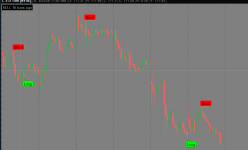
Here is a snapshot of what it looks like when it is in use:

1774867355792.png


I appreciate your feedback.
 
@halcyonguy You are correct on the description. I've been so deep in the weeds that I just gave the brief pseudo code I was after.

The links helped. Thanks.

Here is what I am trying to do in words:

Every bar there is a buy/sell evaluation done. If the eval is buy, I turn the background green. If it is sell I turn the background red.

The background stays the set color until the condition changes. This may be the next bar or may be many bars later.

The color of the background gives me an easy, visual indication of the potential buy/sell state of the stock. If it is buy, then I go to another set of charts/indicators to do more analysis.

This works pretty well, but sometimes the buy/sell condition gets stale even though it is, for the most part, still in a buy state.

What I am trying to accomplish is to have 2 or 3 background colors that visually indicate how long the stock has been in each state, e.g. for the buy signal green, yellow, light blue. Similar for the sell state.

The length of the freshness of the signals will be a user input.

An example might be: As soon as the buy signal shows and for the next 7 bars, make the background green. For bars 8 - 15 make it yellow. Anything over 15 make it light blue.

To accomplish this, I thought I would be doing a lookback at the finalState[x] variable in the attached. If there is an unbroken streak, then set the background color as defined.

Here's the code that I am using to flag the initial state. There are only 2 background color states, dark green and dark red.

# AsGoodAsItGets Indicator without Arrows
#CSR Buy/Sell Arrows with Short/Long Bubbles
#Developed 4-9-22 First Edition 8-23-22 Revised
#No Arrow Edition 1/1/23

declare upper;

input atrreversal = 2.0;

def priceh = MovingAverage(AverageType.EXPONENTIAL, high, 5);
def pricel = MovingAverage(AverageType.EXPONENTIAL, low, 5);

def EIL = ZigZagHighLow("price h" = priceh, "price l" = pricel, "percentage reversal" = .01, "absolute reversal" = .05, "atr length" = 5, "atr reversal" = atrreversal).lastL;
def EIH = ZigZagHighLow("price h" = priceh, "price l" = pricel, "percentage reversal" = .01, "absolute reversal" = .05, "atr length" = 5, "atr reversal" = atrreversal).lastH;

def prrevbot = EIH;
def prsigdown = EIL;

def state;
state = if !IsNaN(prsigdown) then 1 # new bullish reversal → set to bull
else if !IsNaN(prrevbot) then -1 # new bearish reversal → set to bear
# else 7
else state[1]; # otherwise keep previous state
;


plot signaldown = !IsNaN(EIH);

plot signalrevBot = !IsNaN(EIL);


# For very first bars (no prior state), default to neutral
#def finalState = if !IsNaN(state) then 0 else state;
def finalState = state;


# Background color based on persistent state
AssignBackgroundColor(
if finalState == 1 then Color.DARK_GREEN
else if finalState == -1 then Color.DARK_RED
else Color.CURRENT
# else Color.Blue
);

AddChartBubble(signaldown, high + .01, "Short", Color.RED, yes);

AddChartBubble(signalrevBot, low - .01, "Long", Color.GREEN, no);

Here is a snapshot of what it looks like when it is in use:


I appreciate your feedback.



that was a well written description. now i know just what you want.

i now realize that you did what a lot of beginners do. instead of posting a thorough description, they go find a function and try to fit it into their problem. you don't have a fold loop in your 2nd code, and you don't need it.
but i am happy to answer dozens of questions about fold to help someone learn about it.

what you need is a counter , that starts when a signal changes from buy to sell and vice versa.
then compare the counter to some numbers, to determine what color to draw.


this uses a counter
it changes the background color to be 1 of these 6 colors

# buy colors
# 0-7 green
# 8-15 yellow
# >15 light blue.

# sell colors
# 0-7 red
# 8-15 purple
# >15 gray

added a label to show how many bars ago was a signal
changed your signal plots to def


Code:
# fold_help_3b

#https://usethinkscript.com/threads/how-do-i-code-a-for-loop.22279/
#How do I code a for loop?
#Bassindora  3/28


#Can someone direct me to example code of a for loop?

#I would like to look at the value of a variable that holds a value that I previously assigned for x (input from the user) number of bars.

#I thought it would look something like this:

#for loopvar = 0 to x
#if signal[x] = 1 then do something
#else do something else
#increment loopvar

#I have seen while and fold statements and am having difficulty deciphering them for my use.


#--------------------------

# all new code from user


#https://usethinkscript.com/threads/how-do-i-code-a-for-loop.22279/#post-161670
#Bassindora
#3
#Here is what I am trying to do in words:

#Every bar there is a buy/sell evaluation done. If the eval is buy, I turn the background green. If it is sell I turn the background red.

#The background stays the set color until the condition changes. This may be the next bar or may be many bars later.

#The color of the background gives me an easy, visual indication of the potential buy/sell state of the stock. If it is buy, then I go to another set of charts/indicators to do more analysis.

#This works pretty well, but sometimes the buy/sell condition gets stale even though it is, for the most part, still in a buy state.

#What I am trying to accomplish is to have 2 or 3 background colors that visually indicate how long the stock has been in each state, e.g. for the buy signal green, yellow, light blue. Similar for the sell state.

#The length of the freshness of the signals will be a user input.

#An example might be: As soon as the buy signal shows and for the next 7 bars, make the background green. For bars 8 - 15 make it yellow. Anything over 15 make it light blue.

#To accomplish this, I thought I would be doing a lookback at the finalState[x] variable in the attached. If there is an unbroken streak, then set the background color as defined.

#Here's the code that I am using to flag the initial state. There are only 2 background color states, dark green and dark red.

# AsGoodAsItGets Indicator without Arrows
#CSR Buy/Sell Arrows with Short/Long Bubbles
#Developed 4-9-22 First Edition 8-23-22 Revised
#No Arrow Edition 1/1/23

declare upper;

input atrreversal = 2.0;

def priceh = MovingAverage(AverageType.EXPONENTIAL, high, 5);
def pricel = MovingAverage(AverageType.EXPONENTIAL, low, 5);

def EIL = ZigZagHighLow("price h" = priceh, "price l" = pricel, "percentage reversal" = .01, "absolute reversal" = .05, "atr length" = 5, "atr reversal" = atrreversal).lastL;
def EIH = ZigZagHighLow("price h" = priceh, "price l" = pricel, "percentage reversal" = .01, "absolute reversal" = .05, "atr length" = 5, "atr reversal" = atrreversal).lastH;

def prrevbot = EIH;
def prsigdown = EIL;

def state;
state = if !IsNaN(prsigdown) then 1 # new bullish reversal → set to bull
else if !IsNaN(prrevbot) then -1 # new bearish reversal → set to bear
# else 7
else state[1]; # otherwise keep previous state
;


#plot signaldown = !IsNaN(EIH);
#plot signalrevBot = !IsNaN(EIL);
def signaldown = !IsNaN(EIH);
def signalrevBot = !IsNaN(EIL);

AddChartBubble(signaldown, high + .01, "Short", Color.RED, yes);
AddChartBubble(signalrevBot, low - .01, "Long", Color.GREEN, no);


# For very first bars (no prior state), default to neutral
#def finalState = if !IsNaN(state) then 0 else state;
# this isnt needed
def finalState = state;

# buy colors
#  0-7   green
#  8-15  yellow
#  >15   light blue.

# sell colors
#  0-7   red
#  8-15  purple
#  >15   gray

def cnt =
 if state == 1 and state[1] != 1 then 1
 else if state > 0 then cnt[1] + 1
 else if state == -1 and state[1] != -1 then -1
 else if state < 0 then cnt[1] - 1
 else cnt[1];


# Background color based on persistent state
#AssignBackgroundColor(
# if finalState == 1 then Color.DARK_GREEN
# else if finalState == -1 then Color.DARK_RED
# else Color.CURRENT
# else Color.Blue
#);

AssignBackgroundColor(
 if cnt > 0 and cnt <= 7 then Color.GREEN
 else if cnt > 7 and cnt <= 15 then Color.yellow
 else if cnt > 15 then Color.cyan
 else if cnt < 0 and cnt >= -7 then Color.red
 else if cnt < -7 and cnt >= -15 then Color.violet
 else if cnt < -15 then Color.gray
 else Color.CURRENT);


addlabel(1,
(if cnt > 0 then ("BUY " + cnt + " bars ago")
else if cnt < 0 then ("SELL " + -cnt + " bars ago")
else "-")
#, (if cnt > 0 then color.green else if cnt < 0 then color.red else color.gray));
, color.black);

#
 

Attachments

  • img2c.png
    img2c.png
    107 KB · Views: 22
that was a well written description. now i know just what you want.

i now realize that you did what a lot of beginners do. instead of posting a thorough description, they go find a function and try to fit it into their problem. you don't have a fold loop in your 2nd code, and you don't need it.
but i am happy to answer dozens of questions about fold to help someone learn about it.

what you need is a counter , that starts when a signal changes from buy to sell and vice versa.
then compare the counter to some numbers, to determine what color to draw.


this uses a counter
it changes the background color to be 1 of these 6 colors

# buy colors
# 0-7 green
# 8-15 yellow
# >15 light blue.

# sell colors
# 0-7 red
# 8-15 purple
# >15 gray

added a label to show how many bars ago was a signal
changed your signal plots to def


Code:
# fold_help_3b

#https://usethinkscript.com/threads/how-do-i-code-a-for-loop.22279/
#How do I code a for loop?
#Bassindora  3/28


#Can someone direct me to example code of a for loop?

#I would like to look at the value of a variable that holds a value that I previously assigned for x (input from the user) number of bars.

#I thought it would look something like this:

#for loopvar = 0 to x
#if signal[x] = 1 then do something
#else do something else
#increment loopvar

#I have seen while and fold statements and am having difficulty deciphering them for my use.


#--------------------------

# all new code from user


#https://usethinkscript.com/threads/how-do-i-code-a-for-loop.22279/#post-161670
#Bassindora
#3
#Here is what I am trying to do in words:

#Every bar there is a buy/sell evaluation done. If the eval is buy, I turn the background green. If it is sell I turn the background red.

#The background stays the set color until the condition changes. This may be the next bar or may be many bars later.

#The color of the background gives me an easy, visual indication of the potential buy/sell state of the stock. If it is buy, then I go to another set of charts/indicators to do more analysis.

#This works pretty well, but sometimes the buy/sell condition gets stale even though it is, for the most part, still in a buy state.

#What I am trying to accomplish is to have 2 or 3 background colors that visually indicate how long the stock has been in each state, e.g. for the buy signal green, yellow, light blue. Similar for the sell state.

#The length of the freshness of the signals will be a user input.

#An example might be: As soon as the buy signal shows and for the next 7 bars, make the background green. For bars 8 - 15 make it yellow. Anything over 15 make it light blue.

#To accomplish this, I thought I would be doing a lookback at the finalState[x] variable in the attached. If there is an unbroken streak, then set the background color as defined.

#Here's the code that I am using to flag the initial state. There are only 2 background color states, dark green and dark red.

# AsGoodAsItGets Indicator without Arrows
#CSR Buy/Sell Arrows with Short/Long Bubbles
#Developed 4-9-22 First Edition 8-23-22 Revised
#No Arrow Edition 1/1/23

declare upper;

input atrreversal = 2.0;

def priceh = MovingAverage(AverageType.EXPONENTIAL, high, 5);
def pricel = MovingAverage(AverageType.EXPONENTIAL, low, 5);

def EIL = ZigZagHighLow("price h" = priceh, "price l" = pricel, "percentage reversal" = .01, "absolute reversal" = .05, "atr length" = 5, "atr reversal" = atrreversal).lastL;
def EIH = ZigZagHighLow("price h" = priceh, "price l" = pricel, "percentage reversal" = .01, "absolute reversal" = .05, "atr length" = 5, "atr reversal" = atrreversal).lastH;

def prrevbot = EIH;
def prsigdown = EIL;

def state;
state = if !IsNaN(prsigdown) then 1 # new bullish reversal → set to bull
else if !IsNaN(prrevbot) then -1 # new bearish reversal → set to bear
# else 7
else state[1]; # otherwise keep previous state
;


#plot signaldown = !IsNaN(EIH);
#plot signalrevBot = !IsNaN(EIL);
def signaldown = !IsNaN(EIH);
def signalrevBot = !IsNaN(EIL);

AddChartBubble(signaldown, high + .01, "Short", Color.RED, yes);
AddChartBubble(signalrevBot, low - .01, "Long", Color.GREEN, no);


# For very first bars (no prior state), default to neutral
#def finalState = if !IsNaN(state) then 0 else state;
# this isnt needed
def finalState = state;

# buy colors
#  0-7   green
#  8-15  yellow
#  >15   light blue.

# sell colors
#  0-7   red
#  8-15  purple
#  >15   gray

def cnt =
 if state == 1 and state[1] != 1 then 1
 else if state > 0 then cnt[1] + 1
 else if state == -1 and state[1] != -1 then -1
 else if state < 0 then cnt[1] - 1
 else cnt[1];


# Background color based on persistent state
#AssignBackgroundColor(
# if finalState == 1 then Color.DARK_GREEN
# else if finalState == -1 then Color.DARK_RED
# else Color.CURRENT
# else Color.Blue
#);

AssignBackgroundColor(
 if cnt > 0 and cnt <= 7 then Color.GREEN
 else if cnt > 7 and cnt <= 15 then Color.yellow
 else if cnt > 15 then Color.cyan
 else if cnt < 0 and cnt >= -7 then Color.red
 else if cnt < -7 and cnt >= -15 then Color.violet
 else if cnt < -15 then Color.gray
 else Color.CURRENT);


addlabel(1,
(if cnt > 0 then ("BUY " + cnt + " bars ago")
else if cnt < 0 then ("SELL " + -cnt + " bars ago")
else "-")
#, (if cnt > 0 then color.green else if cnt < 0 then color.red else color.gray));
, color.black);

#
Nice work.

Using if then else this way takes me back to my early BASIC years. All I need are a few GOTOs.

I'll make sure to credit you when I post the summary of my approach.

Many thanks for the help.
 
Nice work.

Using if then else this way takes me back to my early BASIC years. All I need are a few GOTOs.

I'll make sure to credit you when I post the summary of my approach.

Many thanks for the help.

glad to help
heh i kind of remember using basic at work in the 90s. i used to spend hours typing in hex code into an apple 2c, from a magazine. those were the days.

------------------

other thoughts,
one thing i may have forgotten address, if a signal expires before another one starts.
i would add some kind of check in the
def cnt =
formula and set it = 0. then add a check in the line plots and clouds.
 

Join useThinkScript to post your question to a community of 21,000+ developers and traders.

Not the exact question you're looking for?

Start a new thread and receive assistance from our community.

87k+ Posts
670 Online
Create Post

The Market Trading Game Changer

Join 2,500+ subscribers inside the useThinkScript VIP Membership Club
  • Exclusive indicators
  • Proven strategies & setups
  • Private Discord community
  • ‘Buy The Dip’ signal alerts
  • Exclusive members-only content
  • Add-ons and resources
  • 1 full year of unlimited support

Frequently Asked Questions

What is useThinkScript?

useThinkScript is the #1 community of stock market investors using indicators and other tools to power their trading strategies. Traders of all skill levels use our forums to learn about scripting and indicators, help each other, and discover new ways to gain an edge in the markets.

How do I get started?

We get it. Our forum can be intimidating, if not overwhelming. With thousands of topics, tens of thousands of posts, our community has created an incredibly deep knowledge base for stock traders. No one can ever exhaust every resource provided on our site.

If you are new, or just looking for guidance, here are some helpful links to get you started.

What are the benefits of VIP Membership?
VIP members get exclusive access to these proven and tested premium indicators: Buy the Dip, Advanced Market Moves 2.0, Take Profit, and Volatility Trading Range. In addition, VIP members get access to over 50 VIP-only custom indicators, add-ons, and strategies, private VIP-only forums, private Discord channel to discuss trades and strategies in real-time, customer support, trade alerts, and much more. Learn all about VIP membership here.
How can I access the premium indicators?
To access the premium indicators, which are plug and play ready, sign up for VIP membership here.
Back
Top