

TOS - Charts - Flexible Grid Active Trader for Calls and Puts doesn't show position with P/L Open and P/L Day

adasagar7511

New member
VIP
Hi All - I've created a Flexible Grid Active Trader under Charts in TOS for Options Call on Left Side and Put on Right side.
When I take a position like Buy 1 TSLA or SPY Call Option or Put Option I don't see in same Active Trader Grid my position where I'm in loss or profit via P/L Open and P/L Day.
I need to navigate to Monitor -> Position Statement -> Instrument and see my Option position. That takes some time and friendly as it may result me in loss unless I setup my stop loss or profit with that position.

I'm attaching a screenshot. Please let me know if there is any solution or workaroudn here.
 

Attachments
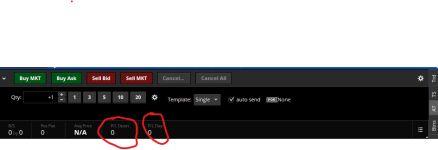
  • Option FlexGridChart-No PL Open and Day.png
    Option FlexGridChart-No PL Open and Day.png
    23.6 KB · Views: 21
Last edited:
Solution
@adasagar7511 I've never relied on those position indicators... Instead, I keep a label on each Option Chart that displays GetOpenPL()... Granted, it doesn't show total contracts but I know where each contract is at all times... I also display the P/L Open column on my ActiveTrader ladder...

Ruby:
input location = Location.TOP_LEFT;
input fontSize = FontSize.SMALL;

def PLOpen =  GetOpenPL();

AddLabel(yes, "P/L: " + AsText(PLOpen, NumberFormat.DOLLAR), if PLOpen > 0 then Color.GREEN else if PLOpen < 0 then Color.RED else Color.WHITE, location, fontSize);
@adasagar7511 I've never relied on those position indicators... Instead, I keep a label on each Option Chart that displays GetOpenPL()... Granted, it doesn't show total contracts but I know where each contract is at all times... I also display the P/L Open column on my ActiveTrader ladder...

Ruby:
input location = Location.TOP_LEFT;
input fontSize = FontSize.SMALL;

def PLOpen =  GetOpenPL();

AddLabel(yes, "P/L: " + AsText(PLOpen, NumberFormat.DOLLAR), if PLOpen > 0 then Color.GREEN else if PLOpen < 0 then Color.RED else Color.WHITE, location, fontSize);
 
Solution

Join useThinkScript to post your question to a community of 21,000+ developers and traders.

@adasagar7511 I've never relied on those position indicators... Instead, I keep a label on each Option Chart that displays GetOpenPL()... Granted, it doesn't show total contracts but I know where each contract is at all times... I also display the P/L Open column on my ActiveTrader ladder...

Ruby:
input location = Location.TOP_LEFT;
input fontSize = FontSize.SMALL;

def PLOpen =  GetOpenPL();

AddLabel(yes, "P/L: " + AsText(PLOpen, NumberFormat.DOLLAR), if PLOpen > 0 then Color.GREEN else if PLOpen < 0 then Color.RED else Color.WHITE, location, fontSize);


Thanls for the response. Actually, I'm using Flexible Grid -> Active Trader and using Buy Mrkt or Buy Ask and Sell in there so I need to have lable or way to see my Profit or Loss via P/L Open in my Active Trader. When I take a position those P/L Open and P/l Day are are always zero (0) and doesn't show any movement.

The P/L Open column is confusing as it shows to many orders and keep going back and forth. What I need is single place where I can see my profit or loss for that contract lile I see it in Monitor Tab -> Position Statements -> Under Instruments
 
Last edited by a moderator:
The P/L Open column shows total profit for that particular trade... If you add or sell positions the P/L Open will show average profit for the remaining open contracts... I've used this method for years...

This is my side by side Option trading Chart which has a Call side and a Put side with contracts loaded at all times... I keep the active directional side maximized and then switch over when trend reverses... Notice the P/L Open column to the far right of the AT Ladder...

1771258334967.png
 

Not the exact question you're looking for?

Start a new thread and receive assistance from our community.

87k+ Posts
1487 Online
Create Post

The Market Trading Game Changer

Join 2,500+ subscribers inside the useThinkScript VIP Membership Club
  • Exclusive indicators
  • Proven strategies & setups
  • Private Discord community
  • ‘Buy The Dip’ signal alerts
  • Exclusive members-only content
  • Add-ons and resources
  • 1 full year of unlimited support

Frequently Asked Questions

What is useThinkScript?

useThinkScript is the #1 community of stock market investors using indicators and other tools to power their trading strategies. Traders of all skill levels use our forums to learn about scripting and indicators, help each other, and discover new ways to gain an edge in the markets.

How do I get started?

We get it. Our forum can be intimidating, if not overwhelming. With thousands of topics, tens of thousands of posts, our community has created an incredibly deep knowledge base for stock traders. No one can ever exhaust every resource provided on our site.

If you are new, or just looking for guidance, here are some helpful links to get you started.

What are the benefits of VIP Membership?
VIP members get exclusive access to these proven and tested premium indicators: Buy the Dip, Advanced Market Moves 2.0, Take Profit, and Volatility Trading Range. In addition, VIP members get access to over 50 VIP-only custom indicators, add-ons, and strategies, private VIP-only forums, private Discord channel to discuss trades and strategies in real-time, customer support, trade alerts, and much more. Learn all about VIP membership here.
How can I access the premium indicators?
To access the premium indicators, which are plug and play ready, sign up for VIP membership here.
Back
Top
