

StochasticFull w Regression Slope For ThinkOrSwim

mod note:
A quick reminder for everyone:
» Bots get things wrong a lot — sometimes 40% or more.​
» Moderators do not test or validate the AI‑generated scripts posted to the forum.​
» This is not a reflection on @BillW, whose work is consistently excellent and well‑regarded in this community.​

About this specific script
The issue here is not the author, not the idea — it’s the math.

Bots hallucinate. Its a thing. ChatGPT hallucinated that a regression slope behaves like any other plotted line. It assumed you could compare two points on the slope like this:
slope > slope[1]
to determine whether a linear regression is “rising” or “falling.”

Obviously that is not true. The plot of the LRC comes from a complex set of arrays that results in a pretty line. But the math that created that line is not available to thinkscript. We have no access to the array math that creates the data points of an LRC plot.
It is not possible to use the slope of a linear regression line as part of our strategies ever.

I didn't review any other part of the bot's logic in this script. But the coloring of the array slope has been commented out in the original script:
# this does not work: Color logic: Spring Blue #4086FF = rising, Classic Rose #A70000 = falling
#RegSlope.AssignValueColor(if slope > slope[1] then CreateColor(64, 134, 255)
# else if slope < slope[1] then CreateColor(167, 0, 0) else Color.YELLOW);
 
Last edited:
BillW

Member
VIP
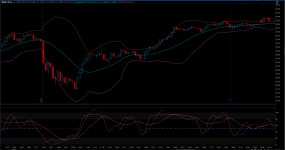
I asked CoPilot to add a regressions slope for StochasticFull. Also included is RSI running across midline. It is color coded for 20 period and OB of 55 and OS of 45. Watch it w BollingerBands for a few days and see if you like it. Pretty simple setup.

Code:
# Stochastic Full w Regression Slope and RSI

declare lower;

plot ZeroLine = 50;
ZeroLine.SetDefaultColor(CreateColor(0, 0, 0));
ZeroLine.SetStyle(Curve.LONG_DASH);
ZeroLine.SetLineWeight(2);
ZeroLine.HideTitle();
ZeroLine.HideBubble();

#RSI Line


input RSI_Wilder_length = 20;
input RSI_Wilder_over_bought = 55;
input RSI_Wilder_over_sold = 45;
input RSI_Wilder_price_type = close;
def RSIplot = reference RSI(RSI_Wilder_length, RSI_Wilder_over_bought,
RSI_Wilder_over_sold,
RSI_Wilder_price_type);
plot RSI_line = 50;
RSI_line.SetDefaultColor(CreateColor(0, 0, 0));

RSI_line.SetLineWeight(2);
RSI_line.HideTitle();
RSI_line.HideBubble();
RSI_line.AssignValueColor(if RSIplot >= RSI_Wilder_over_bought then CreateColor(64, 134, 255) else if
RSIplot <=
RSI_Wilder_over_sold then CreateColor(150, 30, 0) else CreateColor(0, 0, 0));


input over_bought = 80;
input over_sold = 20;
input KPeriod = 10;
input DPeriod = 10;
input priceH = high;
input priceL = low;
input priceC = close;
input slowing_period = 3;
input averageType = AverageType.SIMPLE;


def lowest_k = Lowest(priceL, KPeriod);
def c1 = priceC - lowest_k;
def c2 = Highest(priceH, KPeriod) - lowest_k;
def FastK = if c2 != 0 then c1 / c2 * 100 else 0;

plot FullK = MovingAverage(averageType, FastK, slowing_period);
plot FullD = MovingAverage(averageType, FullK, DPeriod);
FullK.SetDefaultColor(CreateColor(255, 103, 20));
FullD.SetDefaultColor(CreateColor(145, 145, 66));

plot OverBought = over_bought;
plot OverSold = over_sold;
OverBought.Hide();
OverSold.Hide();
plot line = 80;
plot line1 = 20;
line.SetDefaultColor(CreateColor(44, 44, 44));
line1.SetDefaultColor(CreateColor(44, 44, 44));


AddCloud(100,   line,  CreateColor (38, 38, 38));
AddCloud(line1, 0, CreateColor (38, 38, 38));

def upK = FullK crosses above OverSold;
def upD = FullD crosses above OverSold;
def downK = FullK crosses below OverBought;
def downD = FullD crosses below OverBought;


FullK.SetDefaultColor(GetColor(5));
FullD.SetDefaultColor(GetColor(0));
OverBought.SetDefaultColor(CreateColor(0, 0, 0));
OverSold.SetDefaultColor(CreateColor(0, 0, 0));

FullK.HideBubble();
FullK.HideTitle();
FullD.HideBubble();
FullD.HideTitle();
OverBought.HideBubble();
OverBought.HideTitle();
OverSold.HideBubble();
OverSold.HideTitle();
line.HideTitle();
line.hidebubble();
line1.HideTitle();
line1.hidebubble();

# ---------------------------------------------------------
# 📉 Regression Slope of FullK From MS CoPilot
# ---------------------------------------------------------

input slopeLength = 10;

# Linear regression slope of FullK
def slope = Inertia(FullK, slopeLength);

plot RegSlope = slope;
#RegSlope.SetLineWeight(2);
RegSlope.SetDefaultColor(CreateColor(64, 134, 255));

# this does not work: Color logic: Spring Blue #4086FF = rising, Classic Rose #A70000 = falling
#RegSlope.AssignValueColor(if slope > slope[1] then CreateColor(64, 134, 255)
#    else if slope < slope[1] then CreateColor(167, 0, 0)  else Color.YELLOW);

RegSlope.HideBubble();
RegSlope.HideTitle();

Here is full chart: https://tos.mx/!JVpTmPZa
 

Attachments

  • Screen Shot 05-03-26 at 12.09 PM.PNG
    Screen Shot 05-03-26 at 12.09 PM.PNG
    250.5 KB · Views: 51
Last edited by a moderator:

Join useThinkScript to post your question to a community of 21,000+ developers and traders.

Similar threads

Not the exact question you're looking for?

Start a new thread and receive assistance from our community.

87k+ Posts
957 Online
Create Post

Similar threads

Similar threads

The Market Trading Game Changer

Join 2,500+ subscribers inside the useThinkScript VIP Membership Club
  • Exclusive indicators
  • Proven strategies & setups
  • Private Discord community
  • ‘Buy The Dip’ signal alerts
  • Exclusive members-only content
  • Add-ons and resources
  • 1 full year of unlimited support

Frequently Asked Questions

What is useThinkScript?

useThinkScript is the #1 community of stock market investors using indicators and other tools to power their trading strategies. Traders of all skill levels use our forums to learn about scripting and indicators, help each other, and discover new ways to gain an edge in the markets.

How do I get started?

We get it. Our forum can be intimidating, if not overwhelming. With thousands of topics, tens of thousands of posts, our community has created an incredibly deep knowledge base for stock traders. No one can ever exhaust every resource provided on our site.

If you are new, or just looking for guidance, here are some helpful links to get you started.

What are the benefits of VIP Membership?
VIP members get exclusive access to these proven and tested premium indicators: Buy the Dip, Advanced Market Moves 2.0, Take Profit, and Volatility Trading Range. In addition, VIP members get access to over 50 VIP-only custom indicators, add-ons, and strategies, private VIP-only forums, private Discord channel to discuss trades and strategies in real-time, customer support, trade alerts, and much more. Learn all about VIP membership here.
How can I access the premium indicators?
To access the premium indicators, which are plug and play ready, sign up for VIP membership here.
Back
Top
