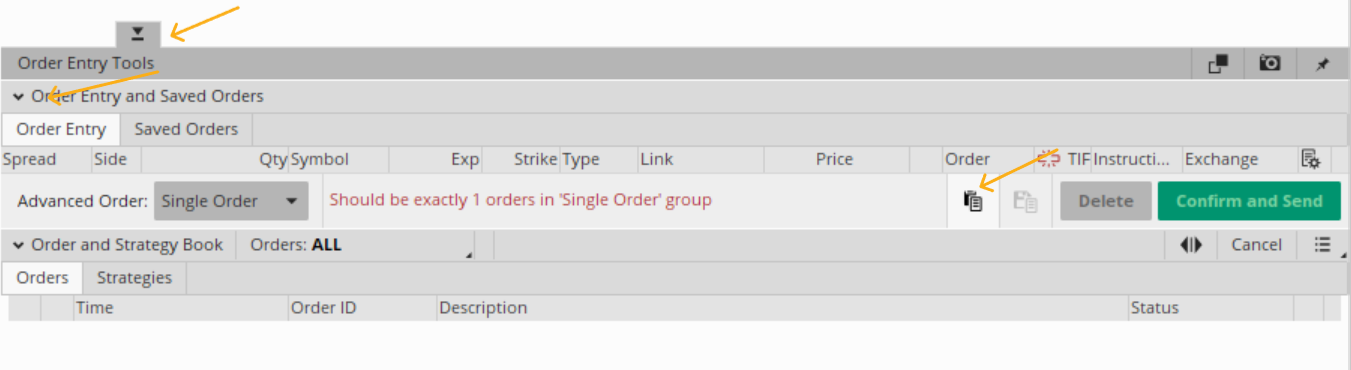
Does anyone have any idea how to pull up the "Paste order from clipboard button" on TOS
I am doing some detailed programming on TOS and find it difficult to auto pull up the button that allows you to post an order from the Clipboard.
The button that says when moused over "Paste order from clipboard" There is a lot of button on the bottom left that gives you access but i can never find it every time.
I flunk around with the following buttons and after clicking a few the button shows but i can never determine a good exact sequence to bring it up every time..
The buttons on the bottom left of TOS has the following: But i can never seen to find out which one does it.. I just click butttons till it shows.. But hope to be able to tell
my puter how to do it and not just say.. "Puter tinker around with those buttons till you see the Clipboard button pop up." The puter talks back and says "Tom I am not AI
i do not think.. i just do what i am told.."
Advanced Order Single Order
Order and Strategy Book
Orders Strategy
Virtual Order Entry Tools
Order Entry and Saved Orders
Order Entry
It would be greatly appreciated if anyone has an idea for a hot key or just knows the sequence to click to get it up.. Sometimes many of the buttons are hidden and do not
show unless you press the tab in that area also..
Thanks for any help..It's part of an extensive automation of TOS to make it do round trips which they do not normally all it to do. If i can get all the bugs worked out i would
be happy to share the final product with anyone that may be interested.
I am doing some detailed programming on TOS and find it difficult to auto pull up the button that allows you to post an order from the Clipboard.
The button that says when moused over "Paste order from clipboard" There is a lot of button on the bottom left that gives you access but i can never find it every time.
I flunk around with the following buttons and after clicking a few the button shows but i can never determine a good exact sequence to bring it up every time..
The buttons on the bottom left of TOS has the following: But i can never seen to find out which one does it.. I just click butttons till it shows.. But hope to be able to tell
my puter how to do it and not just say.. "Puter tinker around with those buttons till you see the Clipboard button pop up." The puter talks back and says "Tom I am not AI
i do not think.. i just do what i am told.."
Advanced Order Single Order
Order and Strategy Book
Orders Strategy
Virtual Order Entry Tools
Order Entry and Saved Orders
Order Entry
It would be greatly appreciated if anyone has an idea for a hot key or just knows the sequence to click to get it up.. Sometimes many of the buttons are hidden and do not
show unless you press the tab in that area also..
Thanks for any help..It's part of an extensive automation of TOS to make it do round trips which they do not normally all it to do. If i can get all the bugs worked out i would
be happy to share the final product with anyone that may be interested.
Last edited by a moderator: