
Overview
The Nadaraya-Watson Trend indicator is a non-repainting, causal kernel regression indicator that plots a smoothed trend line with optional bands.
Original Source: https://www.tradingview.com/script/DyPTog1C-Nadaraya-Watson-Trend-QuantAlgo/
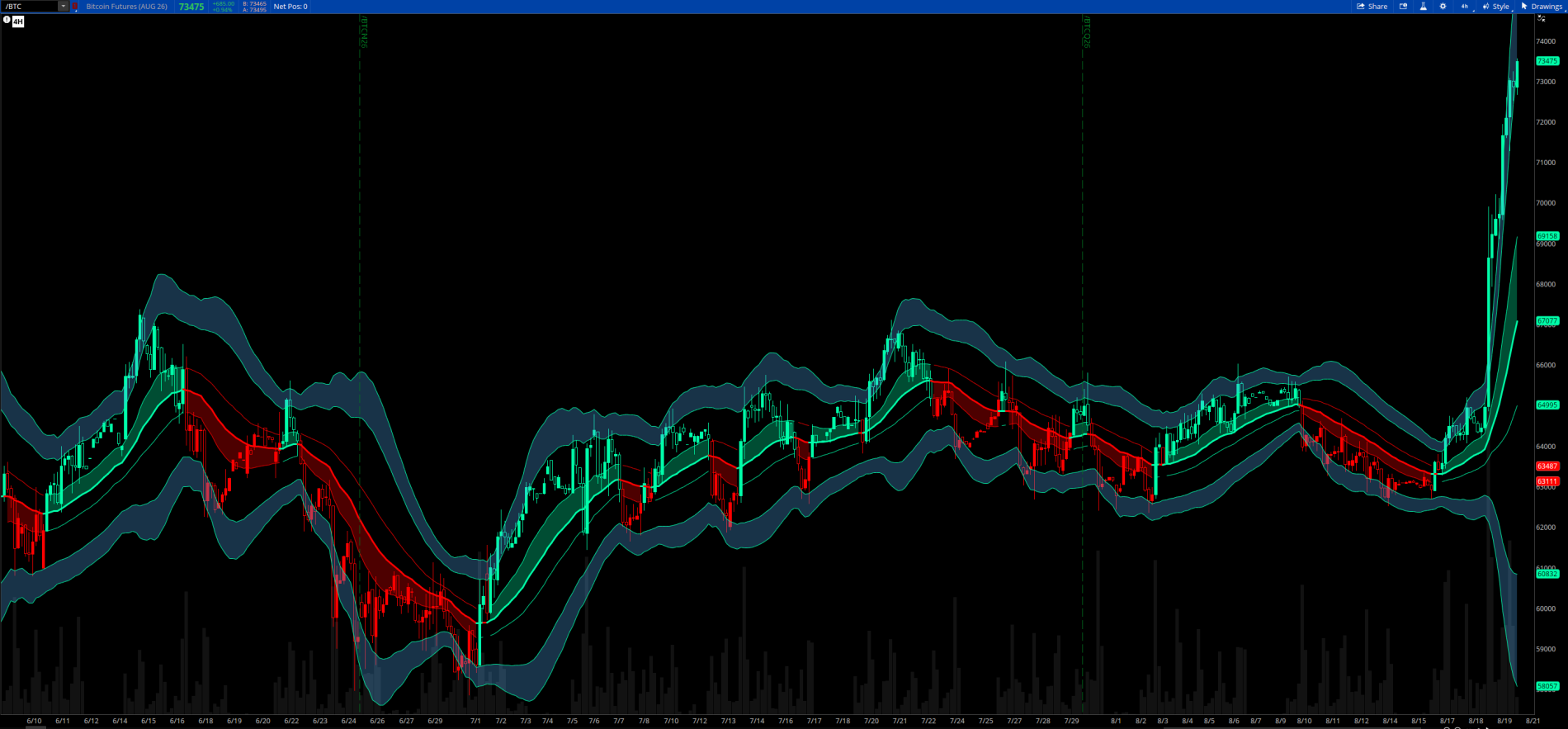
Here is a 4-hour chart of /BTC.
How It Works
Rather than using a simple moving average, the indicator calculates each bar's value using a kernel-weighted average of the previous LookbackInput bars (default: 50), giving more weight to recent prices based on the selected kernel shape. Six kernel types are available — Gaussian, Epanechnikov, Triangular, Quartic, Cosine, and Rational Quadratic — each producing slightly different curve characteristics.
Visual Components
Bands are not ATR or standard-deviation based. They are built from the weighted mean absolute residual — essentially how far prices have typically strayed from the NW estimate over the lookback period, scaled by three user-adjustable multipliers (BandMult0, BandMult, BandMult2).
Intended Use
Best used as a trend context and mean-reversion reference tool. The inner cloud gives a quick visual read on trend conviction, while the outer blue bands flag potentially overextended price conditions.
The Nadaraya-Watson Trend indicator is a non-repainting, causal kernel regression indicator that plots a smoothed trend line with optional bands.
Original Source: https://www.tradingview.com/script/DyPTog1C-Nadaraya-Watson-Trend-QuantAlgo/
Here is a 4-hour chart of /BTC.
How It Works
Rather than using a simple moving average, the indicator calculates each bar's value using a kernel-weighted average of the previous LookbackInput bars (default: 50), giving more weight to recent prices based on the selected kernel shape. Six kernel types are available — Gaussian, Epanechnikov, Triangular, Quartic, Cosine, and Rational Quadratic — each producing slightly different curve characteristics.
Visual Components
- Trend Line — The core NW estimate, colored bull (teal) or bear (red) based on slope direction
- Bar Coloring — Price bars colored to match trend direction
- Inner Cloud — A teal fill (bull) or red fill (bear) between the midline and the inner band, showing near-term volatility context
- Outer Bands — Two pairs of bands at wider residual multiples, filled with a blue cloud, marking extended price territory
Bands are not ATR or standard-deviation based. They are built from the weighted mean absolute residual — essentially how far prices have typically strayed from the NW estimate over the lookback period, scaled by three user-adjustable multipliers (BandMult0, BandMult, BandMult2).
Intended Use
Best used as a trend context and mean-reversion reference tool. The inner cloud gives a quick visual read on trend conviction, while the outer blue bands flag potentially overextended price conditions.
Code:
# Nadaraya-Watson Trend for ThinkOrSwim
# Original Source: https://www.tradingview.com/script/DyPTog1C-Nadaraya-Watson-Trend-QuantAlgo/
# Converted and modified by Chewie 8/14/2026

declare upper;

#─────────────────────────────────────────
#  INPUTS
#─────────────────────────────────────────

input colorbar       = yes;
input ShowBands      = yes;
input Source         = close;
input KernelType     = {default "Gaussian", "Epanechnikov", "Triangular", "Quartic", "Cosine", "RationalQuadratic"};
input LookbackInput  = 50;
input BandwidthInput = 8;
input MultInput      = 2.0;
input RelWeight      = 8.0;
input BandMult0      = 0.6;
input BandMult       = 1.8;
input BandMult2      = 2.6;

DefineGlobalColor("Bull", CreateColor(0, 255, 170));
DefineGlobalColor("Bear", CreateColor(255, 0, 0));

#─────────────────────────────────────────
#  BANDWIDTH
#─────────────────────────────────────────

def h = BandwidthInput * MultInput;

#─────────────────────────────────────────
#  KERNEL TYPE FLAGS
#─────────────────────────────────────────

def isGaussian = KernelType == KernelType."Gaussian";
def isEpan     = KernelType == KernelType."Epanechnikov";
def isTriang   = KernelType == KernelType."Triangular";
def isQuartic  = KernelType == KernelType."Quartic";
def isCosine   = KernelType == KernelType."Cosine";
def isRQ       = KernelType == KernelType."RationalQuadratic";

#─────────────────────────────────────────
#  KERNEL WEIGHT INLINE FUNCTION
#─────────────────────────────────────────

# Helper: weight for index n
def _w0 = fold i = 0 to LookbackInput + 1 with wAcc = 0 do
    wAcc + (
        if isGaussian then Exp(-(i * i) / (2.0 * h * h))
        else if isRQ   then Power(1.0 + (i * i) / (2.0 * RelWeight * h * h), -RelWeight)
        else if isEpan then (if AbsValue(i / h) <= 1.0 then 0.75 * (1.0 - (i / h) * (i / h)) else 0)
        else if isTriang  then (if AbsValue(i / h) <= 1.0 then 1.0 - AbsValue(i / h) else 0)
        else if isQuartic then (if AbsValue(i / h) <= 1.0 then (15.0 / 16.0) * Power(1.0 - (i / h) * (i / h), 2.0) else 0)
        else if isCosine  then (if AbsValue(i / h) <= 1.0 then (Double.Pi / 4.0) * Cos(Double.Pi * (i / h) / 2.0) else 0)
        else Exp(-(i * i) / (2.0 * h * h))
    );

def _p0 = fold j = 0 to LookbackInput + 1 with pAcc = 0 do
    pAcc + (
        GetValue(Source, j) * (
            if isGaussian then Exp(-(j * j) / (2.0 * h * h))
            else if isRQ   then Power(1.0 + (j * j) / (2.0 * RelWeight * h * h), -RelWeight)
            else if isEpan then (if AbsValue(j / h) <= 1.0 then 0.75 * (1.0 - (j / h) * (j / h)) else 0)
            else if isTriang  then (if AbsValue(j / h) <= 1.0 then 1.0 - AbsValue(j / h) else 0)
            else if isQuartic then (if AbsValue(j / h) <= 1.0 then (15.0 / 16.0) * Power(1.0 - (j / h) * (j / h), 2.0) else 0)
            else if isCosine  then (if AbsValue(j / h) <= 1.0 then (Double.Pi / 4.0) * Cos(Double.Pi * (j / h) / 2.0) else 0)
            else Exp(-(j * j) / (2.0 * h * h))
        )
    );

def nwVal = if _w0 != 0 then _p0 / _w0 else Double.NaN;

#─────────────────────────────────────────
#  RESIDUAL BANDS
#─────────────────────────────────────────

def sumAbsW = fold k = 0 to LookbackInput + 1 with rAcc = 0 do
    rAcc + (
        (
            if isGaussian then Exp(-(k * k) / (2.0 * h * h))
            else if isRQ   then Power(1.0 + (k * k) / (2.0 * RelWeight * h * h), -RelWeight)
            else if isEpan then (if AbsValue(k / h) <= 1.0 then 0.75 * (1.0 - (k / h) * (k / h)) else 0)
            else if isTriang  then (if AbsValue(k / h) <= 1.0 then 1.0 - AbsValue(k / h) else 0)
            else if isQuartic then (if AbsValue(k / h) <= 1.0 then (15.0 / 16.0) * Power(1.0 - (k / h) * (k / h), 2.0) else 0)
            else if isCosine  then (if AbsValue(k / h) <= 1.0 then (Double.Pi / 4.0) * Cos(Double.Pi * (k / h) / 2.0) else 0)
            else Exp(-(k * k) / (2.0 * h * h))
        ) * AbsValue(GetValue(Source, k) - nwVal)
    );

def residual  = if _w0 != 0 then sumAbsW / _w0 else Double.NaN;
def innerBandU  = nwVal + residual * BandMult0;
def innerBandD  = nwVal - residual * BandMult0;
def upperBand  = nwVal + residual * BandMult;
def lowerBand  = nwVal - residual * BandMult;
def upperBand2 = nwVal + residual * BandMult2;
def lowerBand2 = nwVal - residual * BandMult2;

#─────────────────────────────────────────
#  TREND DIRECTION & REVERSALS
#─────────────────────────────────────────

def trendUp   = nwVal > nwVal[1];
def turnedBull = nwVal[1] < nwVal[2] and nwVal > nwVal[1];
def turnedBear = nwVal[1] > nwVal[2] and nwVal < nwVal[1];

#─────────────────────────────────────────
#  MAIN TREND PLOT
#─────────────────────────────────────────

plot NWTrendLine = nwVal;
NWTrendLine.SetLineWeight(3);
NWTrendLine.AssignValueColor(if trendUp then GlobalColor("Bull") else GlobalColor("Bear"));

# Coloring Bars
AssignPriceColor(if Colorbar and trendUp then GlobalColor("Bull") else if Colorbar and !trendUp then GlobalColor("Bear") else color.current);

#─────────────────────────────────────────
#  RESIDUAL BAND PLOTS
#─────────────────────────────────────────

plot UpperBandPlot  = if ShowBands then upperBand  else Double.NaN;
plot LowerBandPlot  = if ShowBands then lowerBand  else Double.NaN;
plot UpperBandPlot2 = if ShowBands then upperBand2 else Double.NaN;
plot LowerBandPlot2 = if ShowBands then lowerBand2 else Double.NaN;

UpperBandPlot.SetLineWeight(1);
LowerBandPlot.SetLineWeight(1);
UpperBandPlot2.SetLineWeight(1);
LowerBandPlot2.SetLineWeight(1);
UpperBandPlot.SetDefaultColor(GlobalColor("Bull"));
LowerBandPlot.SetDefaultColor(GlobalColor("Bull"));
UpperBandPlot2.SetDefaultColor(GlobalColor("Bull"));
LowerBandPlot2.SetDefaultColor(GlobalColor("Bull"));

AddCloud(UpperBandPlot,  UpperBandPlot2, CreateColor(80, 170, 240), CreateColor(80, 170, 240));
AddCloud(LowerBandPlot,  LowerBandPlot2, CreateColor(80, 170, 240), CreateColor(80, 170, 240));

# Conditional inner band clouds based on trend direction
def MidForBullCloud = if ShowBands and trendUp  then nwVal else Double.NaN;
def MidForBearCloud = if ShowBands and !trendUp then nwVal else Double.NaN;
plot InnerUForCloud  = if ShowBands and trendUp  then innerBandU else Double.NaN;
plot InnerDForCloud  = if ShowBands and !trendUp then innerBandD else Double.NaN;
plot InnerUForCloudR  = if ShowBands and trendUp  then innerBandD else Double.NaN;
plot InnerDForCloudR  = if ShowBands and !trendUp then innerBandU else Double.NaN;

InnerUForCloudR.SetDefaultColor(GlobalColor("Bull"));
InnerDForCloudR.SetDefaultColor(GlobalColor("Bear"));
InnerUForCloud.SetDefaultColor(GlobalColor("Bull"));
InnerDForCloud.SetDefaultColor(GlobalColor("Bear"));

AddCloud(InnerUForCloud, MidForBullCloud, GlobalColor("Bull"), GlobalColor("Bull"));
AddCloud(MidForBearCloud, InnerDForCloud, GlobalColor("Bear"), GlobalColor("Bear"));
Last edited: