
Label Maker
@thiagoleal provided a really nice refinement to the Climax‑Detector w/ Traps, and his “CLEAN DARK PALETTE — Optimized for RGB(18, 20, 23) / #121417” sent me down another tangent.
Climax Detector w/ Traps - Refinement
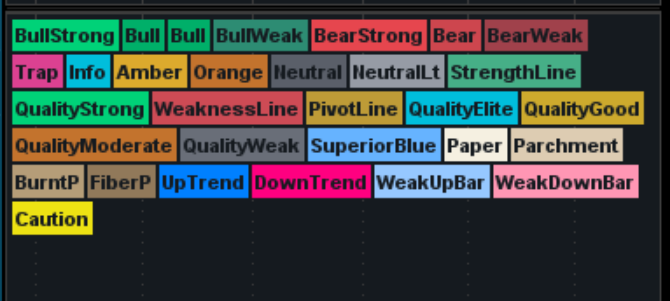
I wanted a readily accessible set of global colors + labels during development — something I could pull up instantly while building or debugging studies. So I put together a Label Maker Reference that prints out the entire palette as labeled swatches.
It’s nothing fancy — just a quick utility script — but it makes color selection and UI consistency a lot easier when I'm working on multiple indicators.
Code:
@thiagoleal provided a really nice refinement to the Climax‑Detector w/ Traps, and his “CLEAN DARK PALETTE — Optimized for RGB(18, 20, 23) / #121417” sent me down another tangent.
Climax Detector w/ Traps - Refinement
I wanted a readily accessible set of global colors + labels during development — something I could pull up instantly while building or debugging studies. So I put together a Label Maker Reference that prints out the entire palette as labeled swatches.
It’s nothing fancy — just a quick utility script — but it makes color selection and UI consistency a lot easier when I'm working on multiple indicators.
Code:
Ruby:
############################################
# Label Reference atcsam 09/06/26
# Playing it forward
# Courtesy of @thiagoleal (inspiration)
# CLEAN DARK PALETTE
# Optimized for RGB(18, 20, 23) / #121417
# Credit to the usethinkscript community

#---------------------------
# Label Switch and Position
#---------------------------
input showLabels = yes;
input LabelPos = {default "Bottom Left", "Top Left", "Top Right"};
def pos =
if LabelPos == LabelPos."Top Left" then 0 else
if LabelPos == LabelPos."Top Right" then 1 else
if LabelPos == LabelPos."Bottom Left" then 2 else
3;


# Spacer with switch and pos syntax
AddLabel(
    showLabels, "    ",
    CreateColor(36, 36, 36),
    location = pos);

# ================================
# PALETTE EXPORT BLOCK
# Copy these into any study
# ================================

DefineGlobalColor("BullStrong",     CreateColor(0, 210, 120));
DefineGlobalColor("Bull",           CreateColor(0, 175, 105));
DefineGlobalColor("BullWeak",       CreateColor(45, 140, 115));

DefineGlobalColor("BearStrong",     CreateColor(230, 70, 78));
DefineGlobalColor("Bear",           CreateColor(205, 70, 78));
DefineGlobalColor("BearWeak",       CreateColor(160, 65, 75));

DefineGlobalColor("Trap",           CreateColor(220, 65, 145));
DefineGlobalColor("Info",           CreateColor(0, 190, 220));
DefineGlobalColor("Amber",          CreateColor(220, 170, 45));

DefineGlobalColor("Neutral",        CreateColor(90, 95, 105));
DefineGlobalColor("NeutralLt",      CreateColor(150, 155, 165));

DefineGlobalColor("StrengthLine",   CreateColor(70, 175, 135));
DefineGlobalColor("WeaknessLine",   CreateColor(205, 75, 85));
DefineGlobalColor("PivotLine",      CreateColor(190, 155, 55));

DefineGlobalColor("QualityElite",   CreateColor(0, 190, 220));
DefineGlobalColor("QualityStrong",  CreateColor(0, 210, 120));
DefineGlobalColor("QualityGood",    CreateColor(205, 170, 45));
DefineGlobalColor("QualityModerate",CreateColor(195, 115, 45));
DefineGlobalColor("QualityWeak",    CreateColor(105, 110, 120));

DefineGlobalColor("SuperiorBlue",   CreateColor(102, 179, 255));

DefineGlobalColor("Paper",          CreateColor(245, 240, 225));
DefineGlobalColor("Parchment",      CreateColor(221, 204, 178));
DefineGlobalColor("BurntP",         CreateColor(181, 157, 120));
DefineGlobalColor("FiberP",         CreateColor(145, 121, 90));


DefineGlobalColor("UpTrend",        CreateColor(0, 128, 255));
DefineGlobalColor("DownTrend",      CreateColor(255, 0, 128));
DefineGlobalColor("WeakUpBar",      CreateColor(150, 200, 255));
DefineGlobalColor("WeakDownBar",    CreateColor(255, 150, 180));

DefineGlobalColor("Caution", CreateColor(237, 226, 19));

# Sample labels

addlabel(yes,"BullStrong",GlobalColor("BullStrong"));
addlabel(yes,"Bull",GlobalColor("Bull"));
addlabel(yes,"BullWeak",GlobalColor("BullWeak"));
addlabel(yes,"BearStrong",GlobalColor("BearStrong"));
addlabel(yes,"Bear",GlobalColor("Bear"));
addlabel(yes,"BearWeak",GlobalColor("BearWeak"));
addlabel(yes,"Trap",GlobalColor("Trap"));
addlabel(yes,"Info",GlobalColor("Info"));
addlabel(yes,"Amber",GlobalColor("Amber"));
addlabel(yes,"Neutral",GlobalColor("Neutral"));
addlabel(yes,"NeutralLt",GlobalColor("NeutralLt"));
addlabel(yes,"StrengthLine",GlobalColor("StrengthLine"));
addlabel(yes,"QualityStrong",GlobalColor("QualityStrong"));
addlabel(yes,"WeaknessLine",GlobalColor("WeaknessLine"));
addlabel(yes,"PivotLine",GlobalColor("PivotLine"));
addlabel(yes,"QualityElite",GlobalColor("QualityElite"));
addlabel(yes,"QualityGood",GlobalColor("QualityGood"));
addlabel(yes,"QualityModerate",GlobalColor("QualityModerate"));
addlabel(yes,"QualityWeak",GlobalColor("QualityWeak"));
addLabel(yes, "SuperiorBlue",GlobalColor("SuperiorBlue"));
addLabel (yes,"Paper",globalColor("Paper"));
addLabel (yes,"Parchment",globalColor("Parchment"));
addLabel (yes,"BurntP",globalColor("BurntP"));
addLabel (yes,"FiberP",globalColor("FiberP"));
addLabel (yes,"UpTrend",globalColor("UpTrend"));
addLabel (yes,"DownTrend",globalColor("DownTrend"));
addLabel (yes,"WeakUpBar",globalColor("WeakUpBar"));
addLabel (yes,"WeakDownBar",globalColor("WeakDownBar"));
addLabel (yes,"Caution",globalColor("Caution"));