

AGAIG OPEX CLOSING PIN INDICATOR
I developed this because I like to sometimes buy a cheap Call/Put on the SPX, NDX or other cash closing security into closing. The purpose is to find options activity that might lead to a closing Pin.
To do this we need to use SPY or QQQ as a proxy for the SPX or NDX, or other as discussed below.
OVERVIEW
The AGAIG Opex Closing Pin Indicator detects heightened options activity on 0DTE expiration days and displays labels identifying the most likely pin strike as price approaches the cash close. Because we’re using a side-by-side proxy you need to multiply thew proxy by 10 to get the Pin on SPX or NDX. This indicator monitors volume spikes relative to a rolling average and fires alerts when unusual activity is detected inside a configurable close window (default: last 90 minutes).
mod note:
The indicator discussed in this thread does not repaint. But note: long/short bubbles on chart do
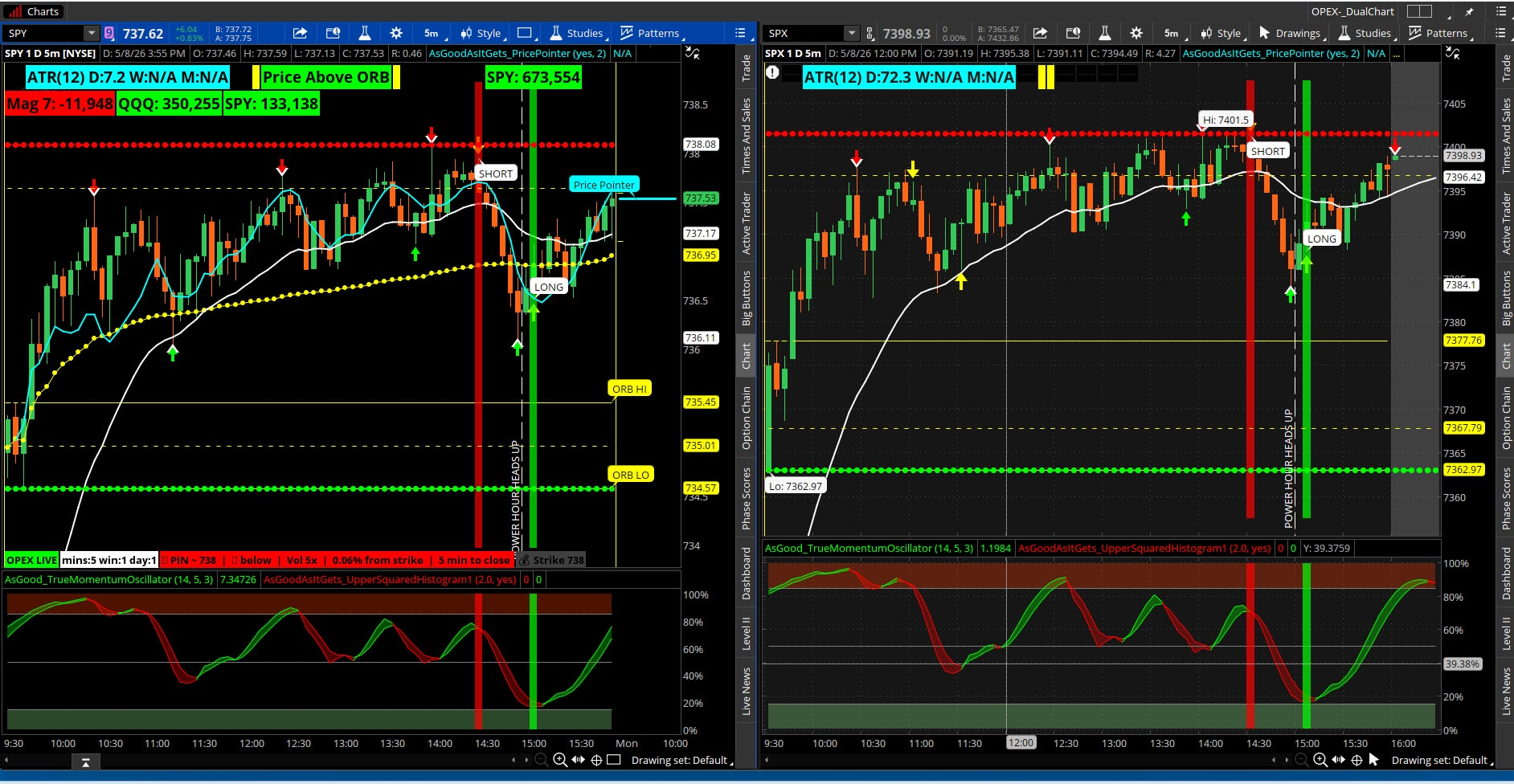
Every weekday is treated as an expiry day since the target instruments — SPX, NDX, RUT and their derivatives — all have daily 0DTE expirations that cash-settle at 4:00 PM ET.
Important: TOS Limitation with SPX and NDX
IMPORTANT: ThinkorSwim does not render ThinkScript studies (including labels and plots) on SPX and NDX cash index charts. This is a known TOS platform restriction for non-tradeable cash index symbols. The indicator will appear in your active studies list but will not display on the chart.
The solution is to use SPY and QQQ as proxy charts. These ETFs track their respective indexes tick-for-tick into the close and carry the same gamma/pin dynamics. Volume data on SPY and QQQ is also cleaner and more reliable for this type of analysis than the cash index volume.
Symbol Proxy Reference
| Cash Index | Use This Chart Instead | Strike Relationship | strikeRounding Setting |
| SPX | SPY | SPX strike ÷ 10 (SPX 5300 = SPY 530) | 1.0 |
| SPXW / XSP | SPY | Same as SPX above | 1.0 |
| NDX | QQQ | NDX strike ÷ ~40 (NDX 18000 = QQQ 450) | 1.0 |
| NDXP / MNX | QQQ | Same as NDX above | 1.0 |
| RUT | IWM | RUT strike ÷ 10 (RUT 2100 = IWM 210) | 1.0 |
| DJX | DIA | DJX strike x 10 (DJX 430 = DIA 430) | 1.0 |
NOTE: The pin strike label in OPEX shows the SPY/QQQ price level, not the SPX/NDX level. Use the ratio above to convert back to the cash index strike if needed.
Input Parameters
Right-click the chart, select Edit Studies, then click the gear icon next to OPEX to access inputs.
| Input | Default | Recommended for SPY/QQQ | Description |
| volumeMultiplier | 2.0 | 2.0 | Volume must exceed this multiple of the rolling average to trigger an alert. Raise to 2.5 if getting too many false signals. |
| lookbackBars | 20 | 20 | Number of bars used to calculate the baseline average volume. 20 bars on a 5-min chart = ~100 minutes of history. |
| alertInLastMins | 60 | 60 | Minutes before 4:00 PM ET to begin watching. The close window opens at 3:00 PM ET by default. |
| strikeRounding | 5.0 | 1.0 | Set to 1.0 for SPY and QQQ since their strikes are at whole dollar increments. |
Label Guide
All labels appear in the label bar at the area selected of the price chart panel.
| Label | Color | When It Appears |
| OPEX LIVE | Green | Always — confirms the study is running correctly. |
 Strike XXXX Strike XXXX | Dark Gray | Always — shows the current nearest strike being tracked. |
 0DTE | Window opens in XX min 0DTE | Window opens in XX min | Yellow | Expiry day confirmed but the close window has not yet opened. |
| 👁 Watching XXXX strike | Vol Nx | XX min to close | Dark Orange | Inside the close window, volume elevated but below spike threshold. |
 PIN ~ XXXX | ▲/▼ | Vol Nx | X.XX% from strike | XX min PIN ~ XXXX | ▲/▼ | Vol Nx | X.XX% from strike | XX min | Red | Primary alert — volume spike detected on expiry day inside close window. |
| mins:XX win:X day:X | White | Debug label — shows raw variable values. Remove once confirmed working. |
TOS Alert Integration
OPEX fires a built-in TOS alert when the primary pin condition is met. To enable notifications:
- Click the Alert bell icon in the TOS toolbar.
- Select Scan/Alert > Study Alert.
- Choose OPEX from the study list.
- Configure your preferred notification method: Sound, Pop-Up, Email, or SMS.
Interpreting the Signals
▲ Above / ▼ Below Strike
The primary alert label shows whether price is currently above or below the nearest estimated strike. This gives context on dealer hedging pressure direction:
- ▲ Above strike — call sellers are delta-hedging by buying the underlying, creating upward support toward the strike.
- ▼ Below strike — put sellers are delta-hedging by selling the underlying, creating downward pressure toward the strike.
Volume Ratio
The Vol Nx value shows how many times above average the current bar's volume is. A reading of 3x or higher on SPY in the final 30 minutes with price near a round strike is a strong pin signal. Readings of 2x–2.5x are moderate.
% From Strike
Shows how far price is from the estimated pin strike as a percentage. Readings under 0.10% indicate price is very close to the strike and pinning behavior is most likely in effect.
Recommended Daily Workflow
- Open SPY on a 5-minute chart with OPEX applied.
- At market open, note the Strike label — this is your reference strike for the day.
- Watch for the yellow label to confirm expiry day detection is active.
- At 2:30 PM ET the 👁 Watching label activates — note which strike is being tracked.
- If the PIN alert fires, observe whether price is gravitating back toward the strike or breaking away from it.
- Use the ▲/▼ indicator to assess dealer flow direction into the close.
Limitations
- TOS does not support this study on SPX, NDX, RUT, or other cash index symbols. Always use the ETF proxy (SPY, QQQ, IWM) instead.
- Strike estimation is based on snapping the ETF price to the nearest whole dollar — it is an approximation. The actual pin strike depends on open interest distribution in the options chain which is not accessible via ThinkScript.
- The indicator uses underlying ETF volume as a proxy for options activity. A volume spike on the ETF does not guarantee options-driven flow — it may reflect institutional block trades, ETF creation/redemption, or other activity.
- The ▲/▼ strike direction is a simplification. Actual dealer gamma exposure depends on the full options chain profile, not just the nearest strike.
- NOTE: You can use this on any stock on expiration closing day. Because it is set to look at the stock daily use it for stocks, if you choose, on 0DTE days.
- Hopefully you will enjoy?
- Feedback appreciated.
DUAL CHART LINK: http://tos.mx/!XPvRZ9TA
CHART LOOK:
Code:
#AGAIG_OpexClosingIndicator assembled by C. Ricks 5/8/26


input volumeMultiplier = 2.0;
input lookbackBars     = 20;
input alertInLastMins  = 60;
input strikeRounding   = 5.0;

input LabelSize = FontSize.MEDIUM;
input LabelLocation = Location.Bottom_LEFT;


def dow       = GetDayOfWeek(GetYYYYMMDD());
def isWeekday = dow >= 1 AND dow <= 5;

def secsLeft    = SecondsTillTime(1600);
def minsToClose = if secsLeft >= 0 then secsLeft / 60 else Double.NaN;
def inWindow    = minsToClose <= alertInLastMins AND minsToClose >= 0;

def activeFilter = isWeekday AND inWindow;

def avgVol   = Average(volume, lookbackBars);
def volRatio = volume / avgVol;
def volSpike = volume >= avgVol * volumeMultiplier;
def alert    = activeFilter AND volSpike;

def nearStrike    = Round(close / strikeRounding, 0) * strikeRounding;
def distToStrike  = AbsValue(close - nearStrike);
def pctFromStrike = distToStrike / close * 100;
def aboveStrike   = close >= nearStrike;

AddLabel(yes, "OPEX LIVE", Color.GREEN, LabelLocation, LabelSize);

AddLabel(yes, "mins:" + Round(minsToClose, 0) + " win:" + inWindow + " day:" + isWeekday, Color.WHITE, LabelLocation, LabelSize);

AddLabel(
    alert,
    "⚡ PIN ~ " + nearStrike +
    "  |  " + (if aboveStrike then "▲ above" else "▼ below") +
    "  |  Vol " + Round(volRatio, 1) + "x" +
    "  |  " + Round(pctFromStrike, 2) + "% from strike" +
    "  |  " + Round(minsToClose, 0) + " min to close",
    Color.RED, LabelLocation, LabelSize
);

AddLabel(
    activeFilter AND !volSpike,
    "👁 Watching " + nearStrike + " strike" +
    "  |  Vol " + Round(volRatio, 1) + "x" +
    "  |  " + Round(minsToClose, 0) + " min to close",
    Color.DARK_ORANGE, LabelLocation, LabelSize
);

AddLabel(
    isWeekday AND !inWindow AND !IsNaN(minsToClose),
    "📅 0DTE  |  Window opens in " +
    Round(minsToClose - alertInLastMins, 0) + " min",
    Color.YELLOW, LabelLocation, LabelSize
);

AddLabel(
    yes,
    "💰 Strike " + nearStrike,
    Color.DARK_GRAY, LabelLocation, LabelSize
);

Alert(
    alert,
    "OPEX Pin: " + nearStrike +
    " | " + (if aboveStrike then "above" else "below") +
    " | Vol " + Round(volRatio, 1) + "x" +
    " | " + Round(minsToClose, 0) + " min to close",
    Alert.BAR,
    Sound.Ding
);
Last edited by a moderator:
