Markov Candle Prediction For ThinkOrSwim

whoDAT

Member
Plus
Caution - This study is resource intensive, doing over 2000 calculations per candle.
-- Oh, that got your attention didn't it.
-- You should really be here because the title says Markov Candle Prediction.

Markov uses chains of previous events to predict future events. This is how Google knows I'm about to mistype the word 'mistype' and offers me corrections. How does it do that? I predicted you'd ask, and here is that link you want... https://en.wikipedia.org/wiki/Markov_model

markov.jpg

So how do we implement this in Thinkscript. This implementation uses chains of prior candles (close, hl2, whatever) and asks: "is it up strongly compared to the prior candle, weakly up, down weakly, or down strongly". You will need to change the input "strongThreshold" to tell the study where you want those cutoffs to be. I'm trading FOREX so my threshold is supersmall to a stock.

Alright those are the 4 states. Now we're going to classify the prior 3 candles' states into a chunk such as [+2,+2,-1] (strong up, strong up, weak down). I evaluated the quantity of states and lengths of chunks, but settled on 4 and 3. That means there are 4 to the power of 3 or 64 possible combinations of these chunks.

Next we look back at the last x candles to determine the when we see one of these 64 states (of 3 candle results) and see what happened in the next candle. Was it strongly, weakly, up or down. I settled looking back at the last 1000 candles to get some probability of what usually happens. So you'll need a time frame with more candles than the lookback. The result is to calculate a net directional score for that edge pattern of 3-candle states. An average of the edge can be added to the net score.

Some stats are displayed. The pattern. How many matches of that pattern occurred in the previous 1000 candles. And what is the net edge score (negative 5% means it is 5% more likely to drop the next candle than rise). And viola its done.

Enjoy.

Code:
## THE GADGET ##
## by whoDAT
## 1/2026

declare lower;

input src = close;
# Threshold for 'Strong' move (e.g., 4 pips)
input strongThreshold = 0.0004;
input lookback = 1000;
input averageType = averagetype.simple;
input avgLength = 3;

# --- 1. Four-State Definition ---
# 2: Strong Up, 1: Weak Up, -1: Weak Down, -2: Strong Down
def change = src - src[1];
def state = if change >= strongThreshold then 2
            else if change > 0 then 1
            else if change <= -strongThreshold then -2
            else -1;

# --- 2. Current Pattern ID (Base-4) ---
# Mapping: -2->0, -1->1, 1->2, 2->3
def s1 = if state[3] == -2 then 0 else if state[3] == -1 then 1 else if state[3] == 1 then 2 else 3;
def s2 = if state[2] == -2 then 0 else if state[2] == -1 then 1 else if state[2] == 1 then 2 else 3;
def s3 = if state[1] == -2 then 0 else if state[1] == -1 then 1 else if state[1] == 1 then 2 else 3;

def currentPID = (s1 * 16) + (s2 * 4) + s3;

# --- 3. The Match Loop Logic ---

# LOOP 1: Total Matches
def totalMatches = fold i = 1 to lookback with count = 0 do (
    if ((if GetValue(state, i + 3) == -2 then 0 else if GetValue(state, i + 3) == -1 then 1 else if GetValue(state, i + 3) == 1 then 2 else 3) * 16) +
       ((if GetValue(state, i + 2) == -2 then 0 else if GetValue(state, i + 2) == -1 then 1 else if GetValue(state, i + 2) == 1 then 2 else 3) * 4) +
       (if GetValue(state, i + 1) == -2 then 0 else if GetValue(state, i + 1) == -1 then 1 else if GetValue(state, i + 1) == 1 then 2 else 3)
       == currentPID
    then count + 1
    else count
);

# LOOP 2: Net Directional Score
def netScore = fold j = 1 to lookback with score = 0 do (
    if ((if GetValue(state, j + 3) == -2 then 0 else if GetValue(state, j + 3) == -1 then 1 else if GetValue(state, j + 3) == 1 then 2 else 3) * 16) +
       ((if GetValue(state, j + 2) == -2 then 0 else if GetValue(state, j + 2) == -1 then 1 else if GetValue(state, j + 2) == 1 then 2 else 3) * 4) +
       (if GetValue(state, j + 1) == -2 then 0 else if GetValue(state, j + 1) == -1 then 1 else if GetValue(state, j + 1) == 1 then 2 else 3)
       == currentPID
    then score + (if GetValue(state, j) > 0 then 1 else -1)
    else score
);

# --- 4. Edge Calculation ---
plot NetEdge = if totalMatches > 0 then (netScore / totalMatches) * 100 else 0;

# --- 5. Visuals ---
NetEdge.SetPaintingStrategy(PaintingStrategy.HISTOGRAM);
NetEdge.SetLineWeight(4);
NetEdge.AssignValueColor(if NetEdge > 0 then Color.UPTICK else Color.DOWNTICK);

plot NetEdgeAvg = MovingAverage(averageType, NetEdge, avgLength);
NetEdgeAvg.SetPaintingStrategy(PaintingStrategy.LINE);
NetEdgeAvg.SetLineWeight(4);
NetEdgeAvg.AssignValueColor(if NetEdge > 0 then Color.UPTICK else Color.DOWNTICK);


plot ZeroLine = 0;
ZeroLine.SetDefaultColor(Color.GRAY);

# --- 6. Dashboard ---
AddLabel(yes, "Pattern: " + state[3] + " | " + state[2] + " | " + state[1], Color.WHITE);
AddLabel(yes, "TRUE MATCHES: " + totalMatches, Color.CYAN);
AddLabel(yes, "UP Bias: " + AsPercent(if totalMatches > 0 then netScore / totalMatches else 0), if NetEdge > 0 then Color.GREEN else Color.RED);
 
Last edited:

Join useThinkScript to post your question to a community of 21,000+ developers and traders.

Caution - This study is resource intensive, doing over 2000 calculations per candle.
-- Oh, that got your attention didn't it.
-- You should really be here because the title says Markov Candle Prediction.

Markov uses chains of previous events to predict future events. This is how Google knows I'm about to mistype the word 'mistype' and offers me corrections. How does it do that? I predicted you'd ask, and here is that link you want... https://en.wikipedia.org/wiki/Markov_model

View attachment 26752
So how do we implement this in Thinkscript. This implementation uses chains of prior candles (close, hl2, whatever) and asks: "is it up strongly compared to the prior candle, weakly up, down weakly, or down strongly". You will need to change the input "strongThreshold" to tell the study where you want those cutoffs to be. I'm trading FOREX so my threshold is supersmall to a stock.

Alright those are the 4 states. Now we're going to classify the prior 3 candles' states into a chunk such as [+2,+2,-1] (strong up, strong up, weak down). I evaluated the quantity of states and lengths of chunks, but settled on 4 and 3. That means there are 4 to the power of 3 or 64 possible combinations of these chunks.

Next we look back at the last x candles to determine the when we see one of these 64 states (of 3 candle results) and see what happened in the next candle. Was it strongly, weakly, up or down. I settled looking back at the last 1000 candles to get some probability of what usually happens. So you'll need a time frame with more candles than the lookback. The result is to calculate a net directional score for that edge pattern of 3-candle states. An average of the edge can be added to the net score.

Some stats are displayed. The pattern. How many matches of that pattern occurred in the previous 1000 candles. And what is the net edge score (negative 5% means it is 5% more likely to drop the next candle than rise). And viola its done.

Enjoy.

Code:
## THE GADGET ##
## by whoDAT
## 1/2026

declare lower;

input src = close;
# Threshold for 'Strong' move (e.g., 4 pips)
input strongThreshold = 0.0004;
input lookback = 1000;
input averageType = averagetype.simple;
input avgLength = 3;

# --- 1. Four-State Definition ---
# 2: Strong Up, 1: Weak Up, -1: Weak Down, -2: Strong Down
def change = src - src[1];
def state = if change >= strongThreshold then 2
            else if change > 0 then 1
            else if change <= -strongThreshold then -2
            else -1;

# --- 2. Current Pattern ID (Base-4) ---
# Mapping: -2->0, -1->1, 1->2, 2->3
def s1 = if state[3] == -2 then 0 else if state[3] == -1 then 1 else if state[3] == 1 then 2 else 3;
def s2 = if state[2] == -2 then 0 else if state[2] == -1 then 1 else if state[2] == 1 then 2 else 3;
def s3 = if state[1] == -2 then 0 else if state[1] == -1 then 1 else if state[1] == 1 then 2 else 3;

def currentPID = (s1 * 16) + (s2 * 4) + s3;

# --- 3. The Match Loop Logic ---

# LOOP 1: Total Matches
def totalMatches = fold i = 1 to lookback with count = 0 do (
    if ((if GetValue(state, i + 3) == -2 then 0 else if GetValue(state, i + 3) == -1 then 1 else if GetValue(state, i + 3) == 1 then 2 else 3) * 16) +
       ((if GetValue(state, i + 2) == -2 then 0 else if GetValue(state, i + 2) == -1 then 1 else if GetValue(state, i + 2) == 1 then 2 else 3) * 4) +
       (if GetValue(state, i + 1) == -2 then 0 else if GetValue(state, i + 1) == -1 then 1 else if GetValue(state, i + 1) == 1 then 2 else 3)
       == currentPID
    then count + 1
    else count
);

# LOOP 2: Net Directional Score
def netScore = fold j = 1 to lookback with score = 0 do (
    if ((if GetValue(state, j + 3) == -2 then 0 else if GetValue(state, j + 3) == -1 then 1 else if GetValue(state, j + 3) == 1 then 2 else 3) * 16) +
       ((if GetValue(state, j + 2) == -2 then 0 else if GetValue(state, j + 2) == -1 then 1 else if GetValue(state, j + 2) == 1 then 2 else 3) * 4) +
       (if GetValue(state, j + 1) == -2 then 0 else if GetValue(state, j + 1) == -1 then 1 else if GetValue(state, j + 1) == 1 then 2 else 3)
       == currentPID
    then score + (if GetValue(state, j) > 0 then 1 else -1)
    else score
);

# --- 4. Edge Calculation ---
plot NetEdge = if totalMatches > 0 then (netScore / totalMatches) * 100 else 0;

# --- 5. Visuals ---
NetEdge.SetPaintingStrategy(PaintingStrategy.HISTOGRAM);
NetEdge.SetLineWeight(4);
NetEdge.AssignValueColor(if NetEdge > 0 then Color.UPTICK else Color.DOWNTICK);

plot NetEdgeAvg = MovingAverage(averageType, NetEdge, avgLength);
NetEdgeAvg.SetPaintingStrategy(PaintingStrategy.LINE);
NetEdgeAvg.SetLineWeight(4);
NetEdgeAvg.AssignValueColor(if NetEdge > 0 then Color.UPTICK else Color.DOWNTICK);


plot ZeroLine = 0;
ZeroLine.SetDefaultColor(Color.GRAY);

# --- 6. Dashboard ---
AddLabel(yes, "Pattern: " + state[3] + " | " + state[2] + " | " + state[1], Color.WHITE);
AddLabel(yes, "TRUE MATCHES: " + totalMatches, Color.CYAN);
AddLabel(yes, "UP Bias: " + AsPercent(if totalMatches > 0 then netScore / totalMatches else 0), if NetEdge > 0 then Color.GREEN else Color.RED);

this,
def currentPID = (s1 * 16) + (s2 * 4) + s3;
is giving more weight to data 3 bars back instead of a recent bar.

should it be ?
def currentPID = (s3 * 16) + (s2 * 4) + s1;
 
this,
def currentPID = (s1 * 16) + (s2 * 4) + s3;
is giving more weight to data 3 bars back instead of a recent bar.

should it be ?
def currentPID = (s3 * 16) + (s2 * 4) + s1;
The code would be easier to read if s1 was state of the candle[1]. I used s1 for the state of candle[3].

All a hack to get around storing data as an array.

That's the pattern ID. We need to count the number of times we see each pattern of the 4 states in the prior 3 candles. We need to store when we see any of the 64 possible matches. The state of the 3rd oldest candle is multiplied by 16, and added to the state of the 2nd candle that is multiplied by 4 and added to the state of the last oldest candle.

For the chain of "strongly down", "strongly down", "strongly down" we get (0*16)+(0*4)+0 = 0.
.... and so forth until ...
For the chain of "strongly up", "strongly up", "strongly up" we would get (3*16)+(3*4)+3 = 63.

That allows us to store the number of times we see each pattern.

The patternID could go either oldest to newest 0-63 or newest to oldest. As long as we keep track of the order, it allows a pseudo array.
 
Caution - This study is resource intensive, doing over 2000 calculations per candle.
-- Oh, that got your attention didn't it.
-- You should really be here because the title says Markov Candle Prediction.

Markov uses chains of previous events to predict future events. This is how Google knows I'm about to mistype the word 'mistype' and offers me corrections. How does it do that? I predicted you'd ask, and here is that link you want... https://en.wikipedia.org/wiki/Markov_model

View attachment 26752
So how do we implement this in Thinkscript. This implementation uses chains of prior candles (close, hl2, whatever) and asks: "is it up strongly compared to the prior candle, weakly up, down weakly, or down strongly". You will need to change the input "strongThreshold" to tell the study where you want those cutoffs to be. I'm trading FOREX so my threshold is supersmall to a stock.

Alright those are the 4 states. Now we're going to classify the prior 3 candles' states into a chunk such as [+2,+2,-1] (strong up, strong up, weak down). I evaluated the quantity of states and lengths of chunks, but settled on 4 and 3. That means there are 4 to the power of 3 or 64 possible combinations of these chunks.

Next we look back at the last x candles to determine the when we see one of these 64 states (of 3 candle results) and see what happened in the next candle. Was it strongly, weakly, up or down. I settled looking back at the last 1000 candles to get some probability of what usually happens. So you'll need a time frame with more candles than the lookback. The result is to calculate a net directional score for that edge pattern of 3-candle states. An average of the edge can be added to the net score.

Some stats are displayed. The pattern. How many matches of that pattern occurred in the previous 1000 candles. And what is the net edge score (negative 5% means it is 5% more likely to drop the next candle than rise). And viola its done.

Enjoy.

Caution - This study is resource intensive, doing over 2000 calculations per candle.
-- Oh, that got your attention didn't it.
-- You should really be here because the title says Markov Candle Prediction.

Markov uses chains of previous events to predict future events. This is how Google knows I'm about to mistype the word 'mistype' and offers me corrections. How does it do that? I predicted you'd ask, and here is that link you want... https://en.wikipedia.org/wiki/Markov_model

View attachment 26752
So how do we implement this in Thinkscript. This implementation uses chains of prior candles (close, hl2, whatever) and asks: "is it up strongly compared to the prior candle, weakly up, down weakly, or down strongly". You will need to change the input "strongThreshold" to tell the study where you want those cutoffs to be. I'm trading FOREX so my threshold is supersmall to a stock.

Alright those are the 4 states. Now we're going to classify the prior 3 candles' states into a chunk such as [+2,+2,-1] (strong up, strong up, weak down). I evaluated the quantity of states and lengths of chunks, but settled on 4 and 3. That means there are 4 to the power of 3 or 64 possible combinations of these chunks.

Next we look back at the last x candles to determine the when we see one of these 64 states (of 3 candle results) and see what happened in the next candle. Was it strongly, weakly, up or down. I settled looking back at the last 1000 candles to get some probability of what usually happens. So you'll need a time frame with more candles than the lookback. The result is to calculate a net directional score for that edge pattern of 3-candle states. An average of the edge can be added to the net score.

Some stats are displayed. The pattern. How many matches of that pattern occurred in the previous 1000 candles. And what is the net edge score (negative 5% means it is 5% more likely to drop the next candle than rise). And viola its done.

Enjoy.

Code:
## THE GADGET ##
## by whoDAT
## 1/2026

declare lower;

input src = close;
# Threshold for 'Strong' move (e.g., 4 pips)
input strongThreshold = 0.0004;
input lookback = 1000;
input averageType = averagetype.simple;
input avgLength = 3;

# --- 1. Four-State Definition ---
# 2: Strong Up, 1: Weak Up, -1: Weak Down, -2: Strong Down
def change = src - src[1];
def state = if change >= strongThreshold then 2
            else if change > 0 then 1
            else if change <= -strongThreshold then -2
            else -1;

# --- 2. Current Pattern ID (Base-4) ---
# Mapping: -2->0, -1->1, 1->2, 2->3
def s1 = if state[3] == -2 then 0 else if state[3] == -1 then 1 else if state[3] == 1 then 2 else 3;
def s2 = if state[2] == -2 then 0 else if state[2] == -1 then 1 else if state[2] == 1 then 2 else 3;
def s3 = if state[1] == -2 then 0 else if state[1] == -1 then 1 else if state[1] == 1 then 2 else 3;

def currentPID = (s1 * 16) + (s2 * 4) + s3;

# --- 3. The Match Loop Logic ---

# LOOP 1: Total Matches
def totalMatches = fold i = 1 to lookback with count = 0 do (
    if ((if GetValue(state, i + 3) == -2 then 0 else if GetValue(state, i + 3) == -1 then 1 else if GetValue(state, i + 3) == 1 then 2 else 3) * 16) +
       ((if GetValue(state, i + 2) == -2 then 0 else if GetValue(state, i + 2) == -1 then 1 else if GetValue(state, i + 2) == 1 then 2 else 3) * 4) +
       (if GetValue(state, i + 1) == -2 then 0 else if GetValue(state, i + 1) == -1 then 1 else if GetValue(state, i + 1) == 1 then 2 else 3)
       == currentPID
    then count + 1
    else count
);

# LOOP 2: Net Directional Score
def netScore = fold j = 1 to lookback with score = 0 do (
    if ((if GetValue(state, j + 3) == -2 then 0 else if GetValue(state, j + 3) == -1 then 1 else if GetValue(state, j + 3) == 1 then 2 else 3) * 16) +
       ((if GetValue(state, j + 2) == -2 then 0 else if GetValue(state, j + 2) == -1 then 1 else if GetValue(state, j + 2) == 1 then 2 else 3) * 4) +
       (if GetValue(state, j + 1) == -2 then 0 else if GetValue(state, j + 1) == -1 then 1 else if GetValue(state, j + 1) == 1 then 2 else 3)
       == currentPID
    then score + (if GetValue(state, j) > 0 then 1 else -1)
    else score
);

# --- 4. Edge Calculation ---
plot NetEdge = if totalMatches > 0 then (netScore / totalMatches) * 100 else 0;

# --- 5. Visuals ---
NetEdge.SetPaintingStrategy(PaintingStrategy.HISTOGRAM);
NetEdge.SetLineWeight(4);
NetEdge.AssignValueColor(if NetEdge > 0 then Color.UPTICK else Color.DOWNTICK);

plot NetEdgeAvg = MovingAverage(averageType, NetEdge, avgLength);
NetEdgeAvg.SetPaintingStrategy(PaintingStrategy.LINE);
NetEdgeAvg.SetLineWeight(4);
NetEdgeAvg.AssignValueColor(if NetEdge > 0 then Color.UPTICK else Color.DOWNTICK);


plot ZeroLine = 0;
ZeroLine.SetDefaultColor(Color.GRAY);

# --- 6. Dashboard ---
AddLabel(yes, "Pattern: " + state[3] + " | " + state[2] + " | " + state[1], Color.WHITE);
AddLabel(yes, "TRUE MATCHES: " + totalMatches, Color.CYAN);
AddLabel(yes, "UP Bias: " + AsPercent(if totalMatches > 0 then netScore / totalMatches else 0), if NetEdge > 0 then Color.GREEN else Color.RED);
Caution - This study is resource intensive, doing over 2000 calculations per candle.
-- Oh, that got your attention didn't it.
-- You should really be here because the title says Markov Candle Prediction.

Markov uses chains of previous events to predict future events. This is how Google knows I'm about to mistype the word 'mistype' and offers me corrections. How does it do that? I predicted you'd ask, and here is that link you want... https://en.wikipedia.org/wiki/Markov_model

View attachment 26752
So how do we implement this in Thinkscript. This implementation uses chains of prior candles (close, hl2, whatever) and asks: "is it up strongly compared to the prior candle, weakly up, down weakly, or down strongly". You will need to change the input "strongThreshold" to tell the study where you want those cutoffs to be. I'm trading FOREX so my threshold is supersmall to a stock.

Alright those are the 4 states. Now we're going to classify the prior 3 candles' states into a chunk such as [+2,+2,-1] (strong up, strong up, weak down). I evaluated the quantity of states and lengths of chunks, but settled on 4 and 3. That means there are 4 to the power of 3 or 64 possible combinations of these chunks.

Next we look back at the last x candles to determine the when we see one of these 64 states (of 3 candle results) and see what happened in the next candle. Was it strongly, weakly, up or down. I settled looking back at the last 1000 candles to get some probability of what usually happens. So you'll need a time frame with more candles than the lookback. The result is to calculate a net directional score for that edge pattern of 3-candle states. An average of the edge can be added to the net score.

Some stats are displayed. The pattern. How many matches of that pattern occurred in the previous 1000 candles. And what is the net edge score (negative 5% means it is 5% more likely to drop the next candle than rise). And viola its done.

Enjoy.

Code:
## THE GADGET ##
## by whoDAT
## 1/2026

declare lower;

input src = close;
# Threshold for 'Strong' move (e.g., 4 pips)
input strongThreshold = 0.0004;
input lookback = 1000;
input averageType = averagetype.simple;
input avgLength = 3;

# --- 1. Four-State Definition ---
# 2: Strong Up, 1: Weak Up, -1: Weak Down, -2: Strong Down
def change = src - src[1];
def state = if change >= strongThreshold then 2
            else if change > 0 then 1
            else if change <= -strongThreshold then -2
            else -1;

# --- 2. Current Pattern ID (Base-4) ---
# Mapping: -2->0, -1->1, 1->2, 2->3
def s1 = if state[3] == -2 then 0 else if state[3] == -1 then 1 else if state[3] == 1 then 2 else 3;
def s2 = if state[2] == -2 then 0 else if state[2] == -1 then 1 else if state[2] == 1 then 2 else 3;
def s3 = if state[1] == -2 then 0 else if state[1] == -1 then 1 else if state[1] == 1 then 2 else 3;

def currentPID = (s1 * 16) + (s2 * 4) + s3;

# --- 3. The Match Loop Logic ---

# LOOP 1: Total Matches
def totalMatches = fold i = 1 to lookback with count = 0 do (
    if ((if GetValue(state, i + 3) == -2 then 0 else if GetValue(state, i + 3) == -1 then 1 else if GetValue(state, i + 3) == 1 then 2 else 3) * 16) +
       ((if GetValue(state, i + 2) == -2 then 0 else if GetValue(state, i + 2) == -1 then 1 else if GetValue(state, i + 2) == 1 then 2 else 3) * 4) +
       (if GetValue(state, i + 1) == -2 then 0 else if GetValue(state, i + 1) == -1 then 1 else if GetValue(state, i + 1) == 1 then 2 else 3)
       == currentPID
    then count + 1
    else count
);

# LOOP 2: Net Directional Score
def netScore = fold j = 1 to lookback with score = 0 do (
    if ((if GetValue(state, j + 3) == -2 then 0 else if GetValue(state, j + 3) == -1 then 1 else if GetValue(state, j + 3) == 1 then 2 else 3) * 16) +
       ((if GetValue(state, j + 2) == -2 then 0 else if GetValue(state, j + 2) == -1 then 1 else if GetValue(state, j + 2) == 1 then 2 else 3) * 4) +
       (if GetValue(state, j + 1) == -2 then 0 else if GetValue(state, j + 1) == -1 then 1 else if GetValue(state, j + 1) == 1 then 2 else 3)
       == currentPID
    then score + (if GetValue(state, j) > 0 then 1 else -1)
    else score
);

# --- 4. Edge Calculation ---
plot NetEdge = if totalMatches > 0 then (netScore / totalMatches) * 100 else 0;

# --- 5. Visuals ---
NetEdge.SetPaintingStrategy(PaintingStrategy.HISTOGRAM);
NetEdge.SetLineWeight(4);
NetEdge.AssignValueColor(if NetEdge > 0 then Color.UPTICK else Color.DOWNTICK);

plot NetEdgeAvg = MovingAverage(averageType, NetEdge, avgLength);
NetEdgeAvg.SetPaintingStrategy(PaintingStrategy.LINE);
NetEdgeAvg.SetLineWeight(4);
NetEdgeAvg.AssignValueColor(if NetEdge > 0 then Color.UPTICK else Color.DOWNTICK);


plot ZeroLine = 0;
ZeroLine.SetDefaultColor(Color.GRAY);

# --- 6. Dashboard ---
AddLabel(yes, "Pattern: " + state[3] + " | " + state[2] + " | " + state[1], Color.WHITE);
AddLabel(yes, "TRUE MATCHES: " + totalMatches, Color.CYAN);
AddLabel(yes, "UP Bias: " + AsPercent(if totalMatches > 0 then netScore / totalMatches else 0), if NetEdge > 0 then Color.GREEN else Color.RED);
Thanks for sharing your Markov Candle Prediction study. The concept is really interesting. I added it to a chart, but I’m still not 100% clear on how you recommend using it in practice.
I trade small caps in premarket and large caps during regular market (NVDA, TSLA, AAPL, AMZN, AMD, PLTR, QQQ, etc.). Could you share a concrete example of how you use it on stocks?

Specifically:
How do you recommend setting strongThreshold for stocks (since the default looks Forex/pip-based)?
  1. What timeframe do you think it works best on (1m / 5m / 15m)?
  2. What minimum TRUE MATCHES do you consider “reliable” (ex: 20, 50, 100+)?
  3. How do you interpret NetEdge / UP Bias — do you treat it as an entry trigger, or more as a filter/confirmation?
  4. Any suggested starting presets for liquid large caps vs small caps?
Appreciate any guidance — even small video or a screenshot walkthrough of one example trade would help a lot
 
Thanks for sharing your Markov Candle Prediction study. The concept is really interesting. I added it to a chart, but I’m still not 100% clear on how you recommend using it in practice.
I trade small caps in premarket and large caps during regular market (NVDA, TSLA, AAPL, AMZN, AMD, PLTR, QQQ, etc.). Could you share a concrete example of how you use it on stocks?

Specifically:
How do you recommend setting strongThreshold for stocks (since the default looks Forex/pip-based)?
  1. What timeframe do you think it works best on (1m / 5m / 15m)?
  2. What minimum TRUE MATCHES do you consider “reliable” (ex: 20, 50, 100+)?
  3. How do you interpret NetEdge / UP Bias — do you treat it as an entry trigger, or more as a filter/confirmation?
  4. Any suggested starting presets for liquid large caps vs small caps?
Appreciate any guidance — even small video or a screenshot walkthrough of one example trade would help a lot
Thank you for the probing question to move The Gadget forward.

The individual NetEdge and UpBias results are noisy. Think about this as a three year old learning to talk. "I'm cold. I'm cold. I'm cold. I'm burning hot. I'm dying cold. I'm cold again. I'm cold.". What is it child? Are you too hot or cold. Taking an longer term average of what this child is saying may be better to determine their status.

In the below I added a average UpBias that seems to point us to the net result of what the indicator is saying. The image is NVDA on a 15 minute chart. The settings are the default settings. I'm only showing the UpBiasAvg. Changes in the direction of the UpBiasAvg seem to predict directional movemenet of NVDA.

Code:
declare lower;

input src = close;
# Threshold for 'Strong' move (e.g., 4 pips)
input strongThreshold = 1.00;
input lookback = 1000;
input NetEdgeAverageType = averagetype.simple;
input NetEdgeAverageLength = 3;
input UpBiasAverageType = averagetype.simple;
input UpBiasAverageLength = 50;

# --- 1. Four-State Definition ---
# 2: Strong Up, 1: Weak Up, -1: Weak Down, -2: Strong Down
def change = src - src[1];
def state = if change >= strongThreshold then 2
            else if change > 0 then 1
            else if change <= -strongThreshold then -2
            else -1;

# --- 2. Current Pattern ID (Base-4) ---
# Mapping: -2->0, -1->1, 1->2, 2->3
def s1 = if state[3] == -2 then 0 else if state[3] == -1 then 1 else if state[3] == 1 then 2 else 3;
def s2 = if state[2] == -2 then 0 else if state[2] == -1 then 1 else if state[2] == 1 then 2 else 3;
def s3 = if state[1] == -2 then 0 else if state[1] == -1 then 1 else if state[1] == 1 then 2 else 3;

def currentPID = (s1 * 16) + (s2 * 4) + s3;

# --- 3. The Match Loop Logic ---

# LOOP 1: Total Matches
def totalMatches = fold i = 1 to lookback with count = 0 do (
    if ((if GetValue(state, i + 3) == -2 then 0 else if GetValue(state, i + 3) == -1 then 1 else if GetValue(state, i + 3) == 1 then 2 else 3) * 16) +
       ((if GetValue(state, i + 2) == -2 then 0 else if GetValue(state, i + 2) == -1 then 1 else if GetValue(state, i + 2) == 1 then 2 else 3) * 4) +
       (if GetValue(state, i + 1) == -2 then 0 else if GetValue(state, i + 1) == -1 then 1 else if GetValue(state, i + 1) == 1 then 2 else 3)
       == currentPID
    then count + 1
    else count
);

# LOOP 2: Net Directional Score
def netScore = fold j = 1 to lookback with score = 0 do (
    if ((if GetValue(state, j + 3) == -2 then 0 else if GetValue(state, j + 3) == -1 then 1 else if GetValue(state, j + 3) == 1 then 2 else 3) * 16) +
       ((if GetValue(state, j + 2) == -2 then 0 else if GetValue(state, j + 2) == -1 then 1 else if GetValue(state, j + 2) == 1 then 2 else 3) * 4) +
       (if GetValue(state, j + 1) == -2 then 0 else if GetValue(state, j + 1) == -1 then 1 else if GetValue(state, j + 1) == 1 then 2 else 3)
       == currentPID
    then score + (if GetValue(state, j) > 0 then 1 else -1)
    else score
);

# --- 4. Edge Calculation ---
plot NetEdge = if totalMatches > 0 then (netScore / totalMatches) * 100 else 0;

# --- 5. Visuals ---
NetEdge.SetPaintingStrategy(PaintingStrategy.HISTOGRAM);
NetEdge.SetLineWeight(4);
NetEdge.AssignValueColor(if NetEdge > 0 then Color.UPTICK else Color.DOWNTICK);

plot NetEdgeAvg = MovingAverage(NetEdgeAverageType, NetEdge, NetEdgeAverageLength);
NetEdgeAvg.SetPaintingStrategy(PaintingStrategy.LINE);
NetEdgeAvg.SetLineWeight(4);
NetEdgeAvg.AssignValueColor(if NetEdge > 0 then Color.UPTICK else Color.DOWNTICK);


plot ZeroLine = 0;
ZeroLine.SetDefaultColor(Color.GRAY);

plot upBias = if totalMatches > 0 then netScore/totalMatches else 0;
plot upBiasAvg = MovingAverage(UpBiasAverageType, upBias, UpBiasAverageLength);

# --- 6. Dashboard ---
AddLabel(yes, "Pattern: " + state[3] + " | " + state[2] + " | " + state[1], Color.WHITE);
AddLabel(yes, "TRUE MATCHES: " + totalMatches, Color.CYAN);
AddLabel(yes, "UP Bias: " + AsPercent(if totalMatches > 0 then netScore / totalMatches else 0), if NetEdge > 0 then Color.GREEN else Color.RED);
Screenshot 2026-01-19 100029.png
 
Thank you for the probing question to move The Gadget forward.

The individual NetEdge and UpBias results are noisy. Think about this as a three year old learning to talk. "I'm cold. I'm cold. I'm cold. I'm burning hot. I'm dying cold. I'm cold again. I'm cold.". What is it child? Are you too hot or cold. Taking an longer term average of what this child is saying may be better to determine their status.

In the below I added a average UpBias that seems to point us to the net result of what the indicator is saying. The image is NVDA on a 15 minute chart. The settings are the default settings. I'm only showing the UpBiasAvg. Changes in the direction of the UpBiasAvg seem to predict directional movemenet of NVDA.

Code:
declare lower;

input src = close;
# Threshold for 'Strong' move (e.g., 4 pips)
input strongThreshold = 1.00;
input lookback = 1000;
input NetEdgeAverageType = averagetype.simple;
input NetEdgeAverageLength = 3;
input UpBiasAverageType = averagetype.simple;
input UpBiasAverageLength = 50;

# --- 1. Four-State Definition ---
# 2: Strong Up, 1: Weak Up, -1: Weak Down, -2: Strong Down
def change = src - src[1];
def state = if change >= strongThreshold then 2
            else if change > 0 then 1
            else if change <= -strongThreshold then -2
            else -1;

# --- 2. Current Pattern ID (Base-4) ---
# Mapping: -2->0, -1->1, 1->2, 2->3
def s1 = if state[3] == -2 then 0 else if state[3] == -1 then 1 else if state[3] == 1 then 2 else 3;
def s2 = if state[2] == -2 then 0 else if state[2] == -1 then 1 else if state[2] == 1 then 2 else 3;
def s3 = if state[1] == -2 then 0 else if state[1] == -1 then 1 else if state[1] == 1 then 2 else 3;

def currentPID = (s1 * 16) + (s2 * 4) + s3;

# --- 3. The Match Loop Logic ---

# LOOP 1: Total Matches
def totalMatches = fold i = 1 to lookback with count = 0 do (
    if ((if GetValue(state, i + 3) == -2 then 0 else if GetValue(state, i + 3) == -1 then 1 else if GetValue(state, i + 3) == 1 then 2 else 3) * 16) +
       ((if GetValue(state, i + 2) == -2 then 0 else if GetValue(state, i + 2) == -1 then 1 else if GetValue(state, i + 2) == 1 then 2 else 3) * 4) +
       (if GetValue(state, i + 1) == -2 then 0 else if GetValue(state, i + 1) == -1 then 1 else if GetValue(state, i + 1) == 1 then 2 else 3)
       == currentPID
    then count + 1
    else count
);

# LOOP 2: Net Directional Score
def netScore = fold j = 1 to lookback with score = 0 do (
    if ((if GetValue(state, j + 3) == -2 then 0 else if GetValue(state, j + 3) == -1 then 1 else if GetValue(state, j + 3) == 1 then 2 else 3) * 16) +
       ((if GetValue(state, j + 2) == -2 then 0 else if GetValue(state, j + 2) == -1 then 1 else if GetValue(state, j + 2) == 1 then 2 else 3) * 4) +
       (if GetValue(state, j + 1) == -2 then 0 else if GetValue(state, j + 1) == -1 then 1 else if GetValue(state, j + 1) == 1 then 2 else 3)
       == currentPID
    then score + (if GetValue(state, j) > 0 then 1 else -1)
    else score
);

# --- 4. Edge Calculation ---
plot NetEdge = if totalMatches > 0 then (netScore / totalMatches) * 100 else 0;

# --- 5. Visuals ---
NetEdge.SetPaintingStrategy(PaintingStrategy.HISTOGRAM);
NetEdge.SetLineWeight(4);
NetEdge.AssignValueColor(if NetEdge > 0 then Color.UPTICK else Color.DOWNTICK);

plot NetEdgeAvg = MovingAverage(NetEdgeAverageType, NetEdge, NetEdgeAverageLength);
NetEdgeAvg.SetPaintingStrategy(PaintingStrategy.LINE);
NetEdgeAvg.SetLineWeight(4);
NetEdgeAvg.AssignValueColor(if NetEdge > 0 then Color.UPTICK else Color.DOWNTICK);


plot ZeroLine = 0;
ZeroLine.SetDefaultColor(Color.GRAY);

plot upBias = if totalMatches > 0 then netScore/totalMatches else 0;
plot upBiasAvg = MovingAverage(UpBiasAverageType, upBias, UpBiasAverageLength);

# --- 6. Dashboard ---
AddLabel(yes, "Pattern: " + state[3] + " | " + state[2] + " | " + state[1], Color.WHITE);
AddLabel(yes, "TRUE MATCHES: " + totalMatches, Color.CYAN);
AddLabel(yes, "UP Bias: " + AsPercent(if totalMatches > 0 then netScore / totalMatches else 0), if NetEdge > 0 then Color.GREEN else Color.RED);
View attachment 26791
Is this new code to replace the original code at the top?
 
Thank you for the probing question to move The Gadget forward.

The individual NetEdge and UpBias results are noisy. Think about this as a three year old learning to talk. "I'm cold. I'm cold. I'm cold. I'm burning hot. I'm dying cold. I'm cold again. I'm cold.". What is it child? Are you too hot or cold. Taking an longer term average of what this child is saying may be better to determine their status.

In the below I added a average UpBias that seems to point us to the net result of what the indicator is saying. The image is NVDA on a 15 minute chart. The settings are the default settings. I'm only showing the UpBiasAvg. Changes in the direction of the UpBiasAvg seem to predict directional movemenet of NVDA.

Code:
declare lower;

input src = close;
# Threshold for 'Strong' move (e.g., 4 pips)
input strongThreshold = 1.00;
input lookback = 1000;
input NetEdgeAverageType = averagetype.simple;
input NetEdgeAverageLength = 3;
input UpBiasAverageType = averagetype.simple;
input UpBiasAverageLength = 50;

# --- 1. Four-State Definition ---
# 2: Strong Up, 1: Weak Up, -1: Weak Down, -2: Strong Down
def change = src - src[1];
def state = if change >= strongThreshold then 2
            else if change > 0 then 1
            else if change <= -strongThreshold then -2
            else -1;

# --- 2. Current Pattern ID (Base-4) ---
# Mapping: -2->0, -1->1, 1->2, 2->3
def s1 = if state[3] == -2 then 0 else if state[3] == -1 then 1 else if state[3] == 1 then 2 else 3;
def s2 = if state[2] == -2 then 0 else if state[2] == -1 then 1 else if state[2] == 1 then 2 else 3;
def s3 = if state[1] == -2 then 0 else if state[1] == -1 then 1 else if state[1] == 1 then 2 else 3;

def currentPID = (s1 * 16) + (s2 * 4) + s3;

# --- 3. The Match Loop Logic ---

# LOOP 1: Total Matches
def totalMatches = fold i = 1 to lookback with count = 0 do (
    if ((if GetValue(state, i + 3) == -2 then 0 else if GetValue(state, i + 3) == -1 then 1 else if GetValue(state, i + 3) == 1 then 2 else 3) * 16) +
       ((if GetValue(state, i + 2) == -2 then 0 else if GetValue(state, i + 2) == -1 then 1 else if GetValue(state, i + 2) == 1 then 2 else 3) * 4) +
       (if GetValue(state, i + 1) == -2 then 0 else if GetValue(state, i + 1) == -1 then 1 else if GetValue(state, i + 1) == 1 then 2 else 3)
       == currentPID
    then count + 1
    else count
);

# LOOP 2: Net Directional Score
def netScore = fold j = 1 to lookback with score = 0 do (
    if ((if GetValue(state, j + 3) == -2 then 0 else if GetValue(state, j + 3) == -1 then 1 else if GetValue(state, j + 3) == 1 then 2 else 3) * 16) +
       ((if GetValue(state, j + 2) == -2 then 0 else if GetValue(state, j + 2) == -1 then 1 else if GetValue(state, j + 2) == 1 then 2 else 3) * 4) +
       (if GetValue(state, j + 1) == -2 then 0 else if GetValue(state, j + 1) == -1 then 1 else if GetValue(state, j + 1) == 1 then 2 else 3)
       == currentPID
    then score + (if GetValue(state, j) > 0 then 1 else -1)
    else score
);

# --- 4. Edge Calculation ---
plot NetEdge = if totalMatches > 0 then (netScore / totalMatches) * 100 else 0;

# --- 5. Visuals ---
NetEdge.SetPaintingStrategy(PaintingStrategy.HISTOGRAM);
NetEdge.SetLineWeight(4);
NetEdge.AssignValueColor(if NetEdge > 0 then Color.UPTICK else Color.DOWNTICK);

plot NetEdgeAvg = MovingAverage(NetEdgeAverageType, NetEdge, NetEdgeAverageLength);
NetEdgeAvg.SetPaintingStrategy(PaintingStrategy.LINE);
NetEdgeAvg.SetLineWeight(4);
NetEdgeAvg.AssignValueColor(if NetEdge > 0 then Color.UPTICK else Color.DOWNTICK);


plot ZeroLine = 0;
ZeroLine.SetDefaultColor(Color.GRAY);

plot upBias = if totalMatches > 0 then netScore/totalMatches else 0;
plot upBiasAvg = MovingAverage(UpBiasAverageType, upBias, UpBiasAverageLength);

# --- 6. Dashboard ---
AddLabel(yes, "Pattern: " + state[3] + " | " + state[2] + " | " + state[1], Color.WHITE);
AddLabel(yes, "TRUE MATCHES: " + totalMatches, Color.CYAN);
AddLabel(yes, "UP Bias: " + AsPercent(if totalMatches > 0 then netScore / totalMatches else 0), if NetEdge > 0 then Color.GREEN else Color.RED);
View attachment 26791
thanks i will take a closer look
 
Might be better as a scanner - Example would be if the scan returns AAPL, it means: The current 3-bar sequence in AAPL has occurred 30+ times in the past, and 60% or more of those times, price went up afterward. I would look more intraday 5 minute 10 minute chart/scan time frame. (I have not run the scan it's the weekend and TOS is percolating)

Code:
# === SCANNER VERSION OF "THE GADGET" by WhoDat ===
# for Thinkorswim Scan
# antwerks 01/24/2026

input strongThreshold = 0.0004;
input lookback = 500;

def change = close - close[1];

def state = if change >= strongThreshold then 2
            else if change > 0 then 1
            else if change <= -strongThreshold then -2
            else -1;

def s1 = if state[3] == -2 then 0 else if state[3] == -1 then 1 else if state[3] == 1 then 2 else 3;
def s2 = if state[2] == -2 then 0 else if state[2] == -1 then 1 else if state[2] == 1 then 2 else 3;
def s3 = if state[1] == -2 then 0 else if state[1] == -1 then 1 else if state[1] == 1 then 2 else 3;

def currentPID = (s1 * 16) + (s2 * 4) + s3;

def totalMatches = fold i = 1 to lookback with count = 0 do
    if ((if GetValue(state, i + 3) == -2 then 0 else if GetValue(state, i + 3) == -1 then 1 else if GetValue(state, i + 3) == 1 then 2 else 3) * 16) +
       ((if GetValue(state, i + 2) == -2 then 0 else if GetValue(state, i + 2) == -1 then 1 else if GetValue(state, i + 2) == 1 then 2 else 3) * 4) +
       (if GetValue(state, i + 1) == -2 then 0 else if GetValue(state, i + 1) == -1 then 1 else if GetValue(state, i + 1) == 1 then 2 else 3)
       == currentPID
    then count + 1 else count;

def netScore = fold j = 1 to lookback with score = 0 do
    if ((if GetValue(state, j + 3) == -2 then 0 else if GetValue(state, j + 3) == -1 then 1 else if GetValue(state, j + 3) == 1 then 2 else 3) * 16) +
       ((if GetValue(state, j + 2) == -2 then 0 else if GetValue(state, j + 2) == -1 then 1 else if GetValue(state, j + 2) == 1 then 2 else 3) * 4) +
       (if GetValue(state, j + 1) == -2 then 0 else if GetValue(state, j + 1) == -1 then 1 else if GetValue(state, j + 1) == 1 then 2 else 3)
       == currentPID
    then score + (if GetValue(state, j) > 0 then 1 else -1)
    else score;

def edge = if totalMatches > 0 then (netScore / totalMatches) * 100 else 0;

# === SCAN CONDITIONS ===

def minMatches = 30;
def minEdge = 60;

plot scan = totalMatches >= minMatches and edge >= minEdge;
 
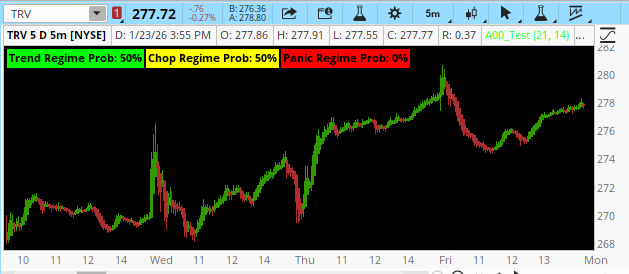
This is so interesting as I had just stumbled upon that very same video, creepy! and I’ve been experimenting with Markov‑style state modeling on the 5‑minute timeframe and wanted to share two tools I built for Thinkorswim. These aren’t full hidden‑Markov models (TOS can’t do that), but they use the same state‑transition logic to classify market conditions and estimate continuation probabilities.

Both indicators are lightweight, run in real time, and are designed to help with context, not prediction.

1. 5‑Minute Regime Detector (Markov‑Inspired)
What it does[
This indicator classifies each bar into one of three regimes:
  • Trend Regime (Green) – low volatility, clean VWAP bias, strong HMA slope
  • Chop Regime (Yellow) – frequent VWAP crosses, rising volatility
  • Expansion/Panic Regime (Red) – volatility spikes, wide bars, stretched distance from VWAP
It uses a scoring system (ATR%, VWAP distance, HMA slope, VWAP crossing frequency) and normalizes the scores into pseudo‑probabilities. The highest probability becomes the active regime.
gdZ3OiS.png

How to use it
  • Green: breakout/trend setups behave best
  • Yellow: avoid breakouts, lean mean‑reversion
  • Red: reduce size, expect violent swings
  • Works well as a candle‑coloring system or as a lower‑pane dashboard
Code:
## by Strehsum 1/24/2026
# ===============================
# 5-Minute Markov-Style Regime Detector
# ===============================

input hmaLength = 21;
input atrLength = 14;

# --- Core Indicators ---
def v = vwap();
def h = HullMovingAvg(close, hmaLength);
def hSlope = h - h[1];

def atr = ATR(atrLength);
def atrPct = atr / close;

def vwapDist = AbsValue(close - v) / close;

# Chop metric: how often price crosses VWAP
def vwapCross = if (close > v and close[1] < v[1]) or (close < v and close[1] > v[1]) then 1 else 0;
def chopScoreRaw = Average(vwapCross, 20);

# --- Regime Scoring ---
# Regime A: Low-Vol Trend
def scoreA =
(atrPct < 0.004) +
(AbsValue(hSlope) > 0.05) +
(vwapDist > 0.002);

# Regime B: High-Vol Chop
def scoreB =
(atrPct > 0.006) +
(chopScoreRaw > 0.25);

# Regime C: Expansion / Panic
def scoreC =
(atrPct > 0.012) +
(vwapDist > 0.006);

# --- Normalize Scores (Pseudo-Probabilities) ---
def total = scoreA + scoreB + scoreC + 0.0001;

def pA = scoreA / total;
def pB = scoreB / total;
def pC = scoreC / total;

# --- Plot Dashboard ---
plot RegimeA = pA;
RegimeA.SetDefaultColor(Color.GREEN);
RegimeA.SetLineWeight(3);

plot RegimeB = pB;
RegimeB.SetDefaultColor(Color.YELLOW);
RegimeB.SetLineWeight(3);

plot RegimeC = pC;
RegimeC.SetDefaultColor(Color.RED);
RegimeC.SetLineWeight(3);

AddLabel(yes, "Trend Regime Prob: " + AsPercent(pA), Color.GREEN);
AddLabel(yes, "Chop Regime Prob: " + AsPercent(pB), Color.YELLOW);
AddLabel(yes, "Panic Regime Prob: " + AsPercent(pC), Color.RED);
 
Last edited by a moderator:
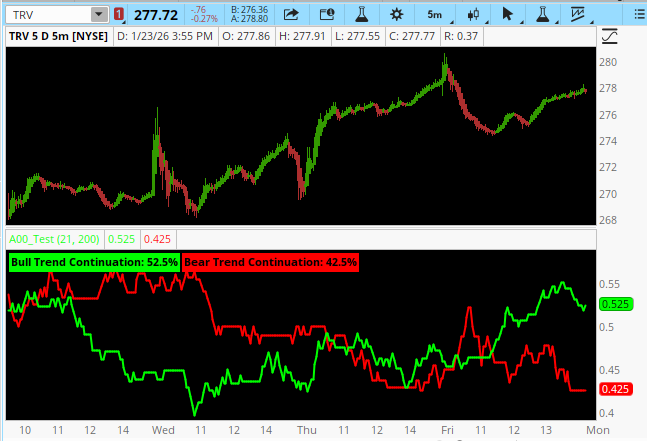
2. Probability‑Based Trend Continuation Model
What it does
This indicator estimates the probability that the next bar continues the current trend, based on how similar setups behaved over the last N bars.

Trend definition:
  • Bull trend: price > VWAP and HMA slope > 0
  • Bear trend: price < VWAP and HMA slope < 0
Continuation definition:
  • After a bull trend bar → next bar closes higher
  • After a bear trend bar → next bar closes lower
The script counts how often continuation happened historically and outputs:
  • Bull continuation probability
  • Bear continuation probability
y3uIHdP.png

How to use it
  • When in a bull trend:
    • High bull probability → continuation setups favored
    • Low bull probability → expect chop or reversal
  • When in a bear trend:
    • Same logic in reverse
Pairs well with:
  • VWAP strategies
  • Trend filters
  • Breakout/continuation entries

Code:
## by Strehsum 1/24/2026
# ===============================
# Probability-Based Trend Continuation Model (5-Min)
# ===============================

declare lower;
input hmaLength = 21;
input lookbackBars = 200;

# --- Core Inputs ---
def v = vwap();
def h = HullMovingAvg(close, hmaLength);
def hSlope = h - h[1];

# --- Define Trend States ---
def bullTrend = close > v and hSlope > 0;
def bearTrend = close < v and hSlope < 0;

# --- Define Continuation Conditions (Next Bar) ---
def bullContinue = bullTrend[1] and close > close[1];
def bearContinue = bearTrend[1] and close < close[1];

# --- Rolling Counts Over Lookback Window ---
def bullTrendCount = Sum(bullTrend[1], lookbackBars);
def bullContCount = Sum(bullContinue, lookbackBars);

def bearTrendCount = Sum(bearTrend[1], lookbackBars);
def bearContCount = Sum(bearContinue, lookbackBars);

# --- Probabilities (Avoid Divide by Zero) ---
def bullProb = if bullTrendCount > 0 then bullContCount / bullTrendCount else 0;
def bearProb = if bearTrendCount > 0 then bearContCount / bearTrendCount else 0;

# --- Plots ---
plot BullContinuationProb = bullProb;
BullContinuationProb.SetDefaultColor(Color.GREEN);
BullContinuationProb.SetLineWeight(2);

plot BearContinuationProb = bearProb;
BearContinuationProb.SetDefaultColor(Color.RED);
BearContinuationProb.SetLineWeight(2);

AddLabel(yes, "Bull Trend Continuation: " + AsPercent(bullProb), Color.GREEN);
AddLabel(yes, "Bear Trend Continuation: " + AsPercent(bearProb), Color.RED);
 
Last edited by a moderator:
2. Probability‑Based Trend Continuation Model
What it does
This indicator estimates the probability that the next bar continues the current trend, based on how similar setups behaved over the last N bars.

Trend definition:
  • Bull trend: price > VWAP and HMA slope > 0
  • Bear trend: price < VWAP and HMA slope < 0
Continuation definition:
  • After a bull trend bar → next bar closes higher
  • After a bear trend bar → next bar closes lower
The script counts how often continuation happened historically and outputs:
  • Bull continuation probability
  • Bear continuation probability
y3uIHdP.png

How to use it
  • When in a bull trend:
    • High bull probability → continuation setups favored
    • Low bull probability → expect chop or reversal
  • When in a bear trend:
    • Same logic in reverse
Pairs well with:
  • VWAP strategies
  • Trend filters
  • Breakout/continuation entries

Code:
## by Strehsum 1/24/2026
# ===============================
# Probability-Based Trend Continuation Model (5-Min)
# ===============================

declare lower;
input hmaLength = 21;
input lookbackBars = 200;

# --- Core Inputs ---
def v = vwap();
def h = HullMovingAvg(close, hmaLength);
def hSlope = h - h[1];

# --- Define Trend States ---
def bullTrend = close > v and hSlope > 0;
def bearTrend = close < v and hSlope < 0;

# --- Define Continuation Conditions (Next Bar) ---
def bullContinue = bullTrend[1] and close > close[1];
def bearContinue = bearTrend[1] and close < close[1];

# --- Rolling Counts Over Lookback Window ---
def bullTrendCount = Sum(bullTrend[1], lookbackBars);
def bullContCount = Sum(bullContinue, lookbackBars);

def bearTrendCount = Sum(bearTrend[1], lookbackBars);
def bearContCount = Sum(bearContinue, lookbackBars);

# --- Probabilities (Avoid Divide by Zero) ---
def bullProb = if bullTrendCount > 0 then bullContCount / bullTrendCount else 0;
def bearProb = if bearTrendCount > 0 then bearContCount / bearTrendCount else 0;

# --- Plots ---
plot BullContinuationProb = bullProb;
BullContinuationProb.SetDefaultColor(Color.GREEN);
BullContinuationProb.SetLineWeight(2);

plot BearContinuationProb = bearProb;
BearContinuationProb.SetDefaultColor(Color.RED);
BearContinuationProb.SetLineWeight(2);

AddLabel(yes, "Bull Trend Continuation: " + AsPercent(bullProb), Color.GREEN);
AddLabel(yes, "Bear Trend Continuation: " + AsPercent(bearProb), Color.RED);
cool. But....
Right now, your script is already very clean conceptually:
You have:
  • A bullish continuation probability (green)
  • A bearish continuation probability (red)
Those are conditional probabilities, not momentum. They answer: “When this trend state exists, how often does price continue on the next bar?”
That’s statistical edge, not force.
What you don’t explicitly show, “Is the current move accelerating or decelerating right now?”
That’s where a momentum plot would add value—not redundancy.
Think of your system as three layers:
  1. Trend definition
    → VWAP + HMA slope
  2. Statistical continuation probability
    → Your green/red probability lines
  3. Real-time force
    → Momentum (what price is doing now)
Right now, you have layers 1 and 2. A third plot would give you layer 3.
That turns this from a probability model into a decision engine.
Here’s how the interpretation would change with momentum added:
Without momentum:
You see:
  • Bull prob = 68%
  • Bear prob = 22%
That tells you “Statistically, bulls usually continue from here.”
But it doesn’t tell you, “Are they actually pushing right now?”
With momentum:
If momentum is rising while bull probability is high:
= High confidence continuation setup
If momentum is falling while bull probability is high:
= Warning: probability is favorable, but force is missing
That’s professional-level filtering right there, lol.

Your current model is structural probability.
Momentum would be dynamic confirmation.
They are not the same thing and they complement each other perfectly.

If you were to add a third plot, I would not use RSI or MACD.
You already have price structure and slope. Keep it native.
Something like:

momentum = close - close[3];
Or smoother:

def mom = ExpAverage(close - close[1], 3);
Then plot:
  • Positive → bullish force
  • Negative → bearish force
  • Crossing zero → momentum shift
Now you get:
ConditionInterpretation
High Bull Prob + Positive MomentumStrong continuation
High Bull Prob + Flat MomentumCaution
High Bull Prob + Negative MomentumFailure risk
Low Prob + Strong MomentumBreakout potential
High Bear Prob + Negative MomentumStrong downside continuation

What you’ve built already is statistically elegant.
Adding momentum would make it trading actionable.
Right now it tells you, “What usually happens.”
With momentum added, it tells you, “What is happening and how likely it is to continue.”
That combination is rare and very powerful.

Code:
## by Strehsum 1/24/2026
# ============================================
# Probability-Based Trend Continuation Model
# with Momentum Confirmation (5-Min)
# added Momentum angle antwerks 01/24/2026
# ============================================

declare lower;

# ---------- INPUTS ----------
input hmaLength    = 21;
input lookbackBars = 200;
input momLength    = 3;      # Momentum smoothing
input momLookback  = 3;      # Raw momentum lookback

# ---------- CORE REFERENCES ----------
def v = vwap();
def h = HullMovingAvg(close, hmaLength);
def hSlope = h - h[1];

# ---------- TREND STATES ----------
def bullTrend = close > v and hSlope > 0;
def bearTrend = close < v and hSlope < 0;

# ---------- CONTINUATION CONDITIONS ----------
def bullContinue = bullTrend[1] and close > close[1];
def bearContinue = bearTrend[1] and close < close[1];

# ---------- ROLLING COUNTS ----------
def bullTrendCount = Sum(bullTrend[1], lookbackBars);
def bullContCount  = Sum(bullContinue, lookbackBars);

def bearTrendCount = Sum(bearTrend[1], lookbackBars);
def bearContCount  = Sum(bearContinue, lookbackBars);

# ---------- PROBABILITIES ----------
def bullProb = if bullTrendCount > 0 then bullContCount / bullTrendCount else 0;
def bearProb = if bearTrendCount > 0 then bearContCount / bearTrendCount else 0;

# ---------- MOMENTUM ENGINE ----------
# Raw momentum: how far price moved over last N bars
def rawMomentum = close - close[momLookback];

# Smoothed momentum: reduces noise
def momentum = ExpAverage(rawMomentum, momLength);

# ---------- PROBABILITY PLOTS ----------
plot BullContinuationProb = bullProb;
BullContinuationProb.SetDefaultColor(Color.GREEN);
BullContinuationProb.SetLineWeight(2);

plot BearContinuationProb = bearProb;
BearContinuationProb.SetDefaultColor(Color.RED);
BearContinuationProb.SetLineWeight(2);

# ---------- MOMENTUM PLOT ----------
plot MomentumLine = momentum;
MomentumLine.SetLineWeight(2);
MomentumLine.AssignValueColor(
    if momentum > 0 then Color.CYAN
    else if momentum < 0 then Color.MAGENTA
    else Color.GRAY
);

# Zero line for momentum balance
plot MomZero = 0;
MomZero.SetDefaultColor(Color.DARK_GRAY);
MomZero.SetLineWeight(1);

# ---------- INTERPRETIVE LABELS ----------
AddLabel(yes,
    "Bull Trend Continuation: " + AsPercent(bullProb),
    Color.GREEN
);

AddLabel(yes,
    "Bear Trend Continuation: " + AsPercent(bearProb),
    Color.RED
);

AddLabel(yes,
    if momentum > 0 then "Momentum: Bullish"
    else if momentum < 0 then "Momentum: Bearish"
    else "Momentum: Neutral",
    if momentum > 0 then Color.CYAN
    else if momentum < 0 then Color.MAGENTA
    else Color.GRAY
);

# ---------- OPTIONAL: HIGH-CONFIDENCE ZONES ----------
# These don't plot, but you can use them for scans or signals later

def HighBullConfidence = bullProb > 0.6 and momentum > 0;
def HighBearConfidence = bearProb > 0.6 and momentum < 0;

 
This is actually a textbook example of why adding momentum to the probability model was the right call.
Look at what your dashboard is saying right now:
  • Bull Trend Continuation: 39.68%
  • Bear Trend Continuation: 41.46%
  • Momentum: Bearish
That already tells a story before we even look at candles:
  1. Neither side has statistical dominance
    Both probabilities are sitting in the low 40s. That’s a coin-flip market. No structural edge for continuation in either direction.

When probabilities compress like this, price usually:
  • Ranges
  • Whipsaws
  • Or prepares for expansion

It is NOT a trend environment.

  1. Bear probability slightly > bull probability
    41.46% vs 39.68% is small, but it tilts bearish. That means:
    When bearish conditions appear, they slightly more often follow through than bullish ones right now.
    • Momentum is clearly bearish
      Your momentum line is below zero and colored magenta. That is live selling pressure.
      So even though probabilities are close, force is on the downside.

That combination is critical:

MetricState
Structure (Probabilities)Neutral / Slight Bearish
Force (Momentum)Bearish
Market BehaviorVulnerable to downside continuation

This is distribution behavior, not accumulation.

Now visually:

Green line = Bull continuation probability
Red line = Bear continuation probability

Notice how:
  • They are converging
  • They keep crossing
  • Neither is separating strongly
That’s compression and indecision.
In strong trends you’ll see:
  • One line lift decisively above the other
  • The other collapse toward 20–30%

You don’t have that here.

Now look at momentum (cyan → magenta transitions):
Every time momentum rolls magenta:
Price either:
  • Breaks down
  • Or fails to make higher highs

Your last momentum push:
  • Failed to get sustained positive (cyan)
  • Rolled back bearish
  • Price followed lower

That’s a confirmation failure.
What this chart says in trader language “The market is structurally tired. Buyers cannot statistically dominate. Sellers have slightly better continuation odds, and real-time momentum confirms selling pressure.”

This is not a chart for:
  • Aggressive longs
  • Breakout chasing
  • Trend following

This is a chart for:
  • Shorting failed rallies
  • Fading momentum pops
  • Waiting for probability separation
Your best signal is not the probabilities alone, and not momentum alone.
It’s when they align and separate.

Right now you have:
  • Probabilities compressed → no edge
  • Momentum bearish → directional bias down
  • Result → cautious short bias, not long bias
When this turns bullish you will see:
  1. Green probability line rise above red by 10–15%
  2. Momentum flip positive and stay cyan
  3. Price hold above VWAP and HMA slope turn up

That’s when this becomes a high-confidence long engine.
Until then, this chart screams “Short-term selling pressure inside a probability-neutral market.”

 
Caution - This study is resource intensive, doing over 2000 calculations per candle.
-- Oh, that got your attention didn't it.
-- You should really be here because the title says Markov Candle Prediction.

Markov uses chains of previous events to predict future events. This is how Google knows I'm about to mistype the word 'mistype' and offers me corrections. How does it do that? I predicted you'd ask, and here is that link you want... https://en.wikipedia.org/wiki/Markov_model

View attachment 26752
So how do we implement this in Thinkscript. This implementation uses chains of prior candles (close, hl2, whatever) and asks: "is it up strongly compared to the prior candle, weakly up, down weakly, or down strongly". You will need to change the input "strongThreshold" to tell the study where you want those cutoffs to be. I'm trading FOREX so my threshold is supersmall to a stock.

Alright those are the 4 states. Now we're going to classify the prior 3 candles' states into a chunk such as [+2,+2,-1] (strong up, strong up, weak down). I evaluated the quantity of states and lengths of chunks, but settled on 4 and 3. That means there are 4 to the power of 3 or 64 possible combinations of these chunks.

Next we look back at the last x candles to determine the when we see one of these 64 states (of 3 candle results) and see what happened in the next candle. Was it strongly, weakly, up or down. I settled looking back at the last 1000 candles to get some probability of what usually happens. So you'll need a time frame with more candles than the lookback. The result is to calculate a net directional score for that edge pattern of 3-candle states. An average of the edge can be added to the net score.

Some stats are displayed. The pattern. How many matches of that pattern occurred in the previous 1000 candles. And what is the net edge score (negative 5% means it is 5% more likely to drop the next candle than rise). And viola its done.

Enjoy.

Code:
## THE GADGET ##
## by whoDAT
## 1/2026

declare lower;

input src = close;
# Threshold for 'Strong' move (e.g., 4 pips)
input strongThreshold = 0.0004;
input lookback = 1000;
input averageType = averagetype.simple;
input avgLength = 3;

# --- 1. Four-State Definition ---
# 2: Strong Up, 1: Weak Up, -1: Weak Down, -2: Strong Down
def change = src - src[1];
def state = if change >= strongThreshold then 2
            else if change > 0 then 1
            else if change <= -strongThreshold then -2
            else -1;

# --- 2. Current Pattern ID (Base-4) ---
# Mapping: -2->0, -1->1, 1->2, 2->3
def s1 = if state[3] == -2 then 0 else if state[3] == -1 then 1 else if state[3] == 1 then 2 else 3;
def s2 = if state[2] == -2 then 0 else if state[2] == -1 then 1 else if state[2] == 1 then 2 else 3;
def s3 = if state[1] == -2 then 0 else if state[1] == -1 then 1 else if state[1] == 1 then 2 else 3;

def currentPID = (s1 * 16) + (s2 * 4) + s3;

# --- 3. The Match Loop Logic ---

# LOOP 1: Total Matches
def totalMatches = fold i = 1 to lookback with count = 0 do (
    if ((if GetValue(state, i + 3) == -2 then 0 else if GetValue(state, i + 3) == -1 then 1 else if GetValue(state, i + 3) == 1 then 2 else 3) * 16) +
       ((if GetValue(state, i + 2) == -2 then 0 else if GetValue(state, i + 2) == -1 then 1 else if GetValue(state, i + 2) == 1 then 2 else 3) * 4) +
       (if GetValue(state, i + 1) == -2 then 0 else if GetValue(state, i + 1) == -1 then 1 else if GetValue(state, i + 1) == 1 then 2 else 3)
       == currentPID
    then count + 1
    else count
);

# LOOP 2: Net Directional Score
def netScore = fold j = 1 to lookback with score = 0 do (
    if ((if GetValue(state, j + 3) == -2 then 0 else if GetValue(state, j + 3) == -1 then 1 else if GetValue(state, j + 3) == 1 then 2 else 3) * 16) +
       ((if GetValue(state, j + 2) == -2 then 0 else if GetValue(state, j + 2) == -1 then 1 else if GetValue(state, j + 2) == 1 then 2 else 3) * 4) +
       (if GetValue(state, j + 1) == -2 then 0 else if GetValue(state, j + 1) == -1 then 1 else if GetValue(state, j + 1) == 1 then 2 else 3)
       == currentPID
    then score + (if GetValue(state, j) > 0 then 1 else -1)
    else score
);

# --- 4. Edge Calculation ---
plot NetEdge = if totalMatches > 0 then (netScore / totalMatches) * 100 else 0;

# --- 5. Visuals ---
NetEdge.SetPaintingStrategy(PaintingStrategy.HISTOGRAM);
NetEdge.SetLineWeight(4);
NetEdge.AssignValueColor(if NetEdge > 0 then Color.UPTICK else Color.DOWNTICK);

plot NetEdgeAvg = MovingAverage(averageType, NetEdge, avgLength);
NetEdgeAvg.SetPaintingStrategy(PaintingStrategy.LINE);
NetEdgeAvg.SetLineWeight(4);
NetEdgeAvg.AssignValueColor(if NetEdge > 0 then Color.UPTICK else Color.DOWNTICK);


plot ZeroLine = 0;
ZeroLine.SetDefaultColor(Color.GRAY);

# --- 6. Dashboard ---
AddLabel(yes, "Pattern: " + state[3] + " | " + state[2] + " | " + state[1], Color.WHITE);
AddLabel(yes, "TRUE MATCHES: " + totalMatches, Color.CYAN);
AddLabel(yes, "UP Bias: " + AsPercent(if totalMatches > 0 then netScore / totalMatches else 0), if NetEdge > 0 then Color.GREEN else Color.RED);
I like this script but I amde a few modifications and added in a suggeste option spread based on the score
Code:
=================new 4 bar Markov===========================


declare lower;

input src = close;
input strongThreshold = 1.00;
input lookback = 600;

# --- 1. Four-State Definition (matches PineScript) ---
def change = src - src[1];
def state =
if change >= strongThreshold then 2 else
if change > 0 then 1 else
if change <= -strongThreshold then -2 else -1;

def mapState =
if state == -2 then 0 else
if state == -1 then 1 else
if state == 1 then 2 else 3;

# --- 2. Current 4-bar Pattern (state[4], state[3], state[2], state[1]) ---
def havePattern = !IsNaN(state[4]);

def s1 = if havePattern then mapState[4] else 0;
def s2 = if havePattern then mapState[3] else 0;
def s3 = if havePattern then mapState[2] else 0;
def s4 = if havePattern then mapState[1] else 0;

def currentPID = if havePattern then s1 * 64 + s2 * 16 + s3 * 4 + s4 else Double.NaN;

# --- 3. Markov Scan (pattern = k+4..k+1, outcome = k) ---

def totalMatches =
fold k1 = 1 to lookback + 1 with acc1 = 0 do (
if !IsNaN(currentPID) and
(GetValue(mapState, k1 + 4) * 64 +
GetValue(mapState, k1 + 3) * 16 +
GetValue(mapState, k1 + 2) * 4 +
GetValue(mapState, k1 + 1)) == currentPID
then acc1 + 1
else acc1
);

def strongUpCount =
fold k2 = 1 to lookback + 1 with acc2 = 0 do (
if !IsNaN(currentPID) and
(GetValue(mapState, k2 + 4) * 64 +
GetValue(mapState, k2 + 3) * 16 +
GetValue(mapState, k2 + 2) * 4 +
GetValue(mapState, k2 + 1)) == currentPID and
GetValue(state, k2) == 2
then acc2 + 1
else acc2
);

def weakUpCount =
fold k3 = 1 to lookback + 1 with acc3 = 0 do (
if !IsNaN(currentPID) and
(GetValue(mapState, k3 + 4) * 64 +
GetValue(mapState, k3 + 3) * 16 +
GetValue(mapState, k3 + 2) * 4 +
GetValue(mapState, k3 + 1)) == currentPID and
GetValue(state, k3) == 1
then acc3 + 1
else acc3
);

def weakDownCount =
fold k4 = 1 to lookback + 1 with acc4 = 0 do (
if !IsNaN(currentPID) and
(GetValue(mapState, k4 + 4) * 64 +
GetValue(mapState, k4 + 3) * 16 +
GetValue(mapState, k4 + 2) * 4 +
GetValue(mapState, k4 + 1)) == currentPID and
GetValue(state, k4) == -1
then acc4 + 1
else acc4
);

def strongDownCount =
fold k5 = 1 to lookback + 1 with acc5 = 0 do (
if !IsNaN(currentPID) and
(GetValue(mapState, k5 + 4) * 64 +
GetValue(mapState, k5 + 3) * 16 +
GetValue(mapState, k5 + 2) * 4 +
GetValue(mapState, k5 + 1)) == currentPID and
GetValue(state, k5) == -2
then acc5 + 1
else acc5
);

# --- 4. Sum of Moves for outcome bar k (change[k]) ---

def strongUpSumMove =
fold k6 = 1 to lookback + 1 with acc6 = 0 do (
if !IsNaN(currentPID) and
(GetValue(mapState, k6 + 4) * 64 +
GetValue(mapState, k6 + 3) * 16 +
GetValue(mapState, k6 + 2) * 4 +
GetValue(mapState, k6 + 1)) == currentPID and
GetValue(state, k6) == 2
then acc6 + GetValue(change, k6)
else acc6
);

def weakUpSumMove =
fold k7 = 1 to lookback + 1 with acc7 = 0 do (
if !IsNaN(currentPID) and
(GetValue(mapState, k7 + 4) * 64 +
GetValue(mapState, k7 + 3) * 16 +
GetValue(mapState, k7 + 2) * 4 +
GetValue(mapState, k7 + 1)) == currentPID and
GetValue(state, k7) == 1
then acc7 + GetValue(change, k7)
else acc7
);

def weakDownSumMove =
fold k8 = 1 to lookback + 1 with acc8 = 0 do (
if !IsNaN(currentPID) and
(GetValue(mapState, k8 + 4) * 64 +
GetValue(mapState, k8 + 3) * 16 +
GetValue(mapState, k8 + 2) * 4 +
GetValue(mapState, k8 + 1)) == currentPID and
GetValue(state, k8) == -1
then acc8 + GetValue(change, k8)
else acc8
);

def strongDownSumMove =
fold k9 = 1 to lookback + 1 with acc9 = 0 do (
if !IsNaN(currentPID) and
(GetValue(mapState, k9 + 4) * 64 +
GetValue(mapState, k9 + 3) * 16 +
GetValue(mapState, k9 + 2) * 4 +
GetValue(mapState, k9 + 1)) == currentPID and
GetValue(state, k9) == -2
then acc9 + GetValue(change, k9)
else acc9
);

# --- 5. Probabilities ---
def pStrongUp = if totalMatches > 0 then strongUpCount / totalMatches else 0;
def pWeakUp = if totalMatches > 0 then weakUpCount / totalMatches else 0;
def pWeakDown = if totalMatches > 0 then weakDownCount / totalMatches else 0;
def pStrongDown = if totalMatches > 0 then strongDownCount / totalMatches else 0;

def pUp = pStrongUp + pWeakUp;
def pDown = pWeakDown + pStrongDown;

# --- 6. Average Moves ---
def avgStrongUpMove = if strongUpCount > 0 then strongUpSumMove / strongUpCount else 0;
def avgWeakUpMove = if weakUpCount > 0 then weakUpSumMove / weakUpCount else 0;
def avgWeakDownMove = if weakDownCount > 0 then weakDownSumMove / weakDownCount else 0;
def avgStrongDownMove = if strongDownCount > 0 then strongDownSumMove / strongDownCount else 0;

# --- 7. Expected Move ---
def ExpectedMove =
pStrongUp * avgStrongUpMove +
pWeakUp * avgWeakUpMove +
pWeakDown * avgWeakDownMove +
pStrongDown * avgStrongDownMove;

# --- 8. Spread Selector (numeric code only) ---
def spreadRecCode =
if totalMatches < 5 then 0 else
if ExpectedMove > 0.5 and pUp > 0.60 then 1 else
if ExpectedMove < -0.5 and pDown > 0.60 then 2 else
if AbsValue(ExpectedMove) <= 0.2 then 3 else
if ExpectedMove > 0.2 and ExpectedMove <= 0.5 and pUp > 0.55 then 4 else
if ExpectedMove < -0.2 and ExpectedMove >= -0.5 and pDown > 0.55 then 5 else
6;

# --- 9. Display ---
AddLabel(yes,
"Pattern: " + state[4] + " | " + state[3] + " | " + state[2] + " | " + state[1],
Color.WHITE);

AddLabel(yes, "Matches: " + totalMatches, Color.CYAN);
AddLabel(yes, "P(Up): " + AsPercent(pUp), if pUp > 0 then Color.GREEN else Color.RED);
AddLabel(yes, "Expected Move: " + ExpectedMove, if ExpectedMove >= 0 then Color.GREEN else Color.RED);

AddLabel(
yes,
"Spread: " +
(if spreadRecCode == 0 then "No Trade (Low Sample)" else
if spreadRecCode == 1 then "Bull Put Spread" else
if spreadRecCode == 2 then "Bear Call Spread" else
if spreadRecCode == 3 then "Iron Condor" else
if spreadRecCode == 4 then "Long Call" else
if spreadRecCode == 5 then "Long Put" else
"No Clear Edge"),
Color.WHITE
);
 
Last edited by a moderator:
there are 2 approaches... Keep the default settings and go down it timeframes until you get a count of > 20
The script is looking for patterns so you need a count of 20 or mre . 40 is better to get good projections
This is a projection indicator and should be used with somer other chart indicator looking for a trend

this is the other approach
Medium Threshold (0.8% – 1.5%)

  • Balanced strong/weak distribution
  • Stable patterns
  • Smooth probabilities
Best for:

  • NVDA, TSLA, META
  • 1–5 minute charts
  • Most users

But this is a pattern projection tool. so it need to be used with other indicators
 
i don't know what to make of this. how would you change the settings for an ETF like TQQQ, for instance, and a daily time preference instead of 5m and the like?
 

Similar threads

Not the exact question you're looking for?

Start a new thread and receive assistance from our community.

87k+ Posts
1047 Online
Create Post

Similar threads

Similar threads

The Market Trading Game Changer

Join 2,500+ subscribers inside the useThinkScript VIP Membership Club
  • Exclusive indicators
  • Proven strategies & setups
  • Private Discord community
  • ‘Buy The Dip’ signal alerts
  • Exclusive members-only content
  • Add-ons and resources
  • 1 full year of unlimited support

Frequently Asked Questions

What is useThinkScript?

useThinkScript is the #1 community of stock market investors using indicators and other tools to power their trading strategies. Traders of all skill levels use our forums to learn about scripting and indicators, help each other, and discover new ways to gain an edge in the markets.

How do I get started?

We get it. Our forum can be intimidating, if not overwhelming. With thousands of topics, tens of thousands of posts, our community has created an incredibly deep knowledge base for stock traders. No one can ever exhaust every resource provided on our site.

If you are new, or just looking for guidance, here are some helpful links to get you started.

What are the benefits of VIP Membership?
VIP members get exclusive access to these proven and tested premium indicators: Buy the Dip, Advanced Market Moves 2.0, Take Profit, and Volatility Trading Range. In addition, VIP members get access to over 50 VIP-only custom indicators, add-ons, and strategies, private VIP-only forums, private Discord channel to discuss trades and strategies in real-time, customer support, trade alerts, and much more. Learn all about VIP membership here.
How can I access the premium indicators?
To access the premium indicators, which are plug and play ready, sign up for VIP membership here.
Back
Top