


What this strategy does
This strategy is a trend-and-volume-pressure confirmation system. It tries to enter trades only when your chart symbol, plus the broader market filters you chose, are aligned in the same direction.
At the chart-symbol level, it measures:
How the market filters work
The script also calculates volume pressure for:
For a long trade:
How entries happen
The strategy does not enter every bar that stays bullish or bearish.
It only enters when the condition turns true on this bar after being false on the prior bar:
Inputs you can control
Main display input
Turning them off makes it trade based more on the chart symbol alone.
Volume-pressure settings
Smaller length:
Moving-average settings
Smaller MA length:
Best way to use it
This strategy is best used as:
How to add it in Thinkorswim
Thinkorswim separates studies and strategies. Strategies are added from the Strategies tab in the “Edit Studies and Strategies” window, and custom strategies can be created in the thinkScript editor there.
Basic workflow:
How to backtest it
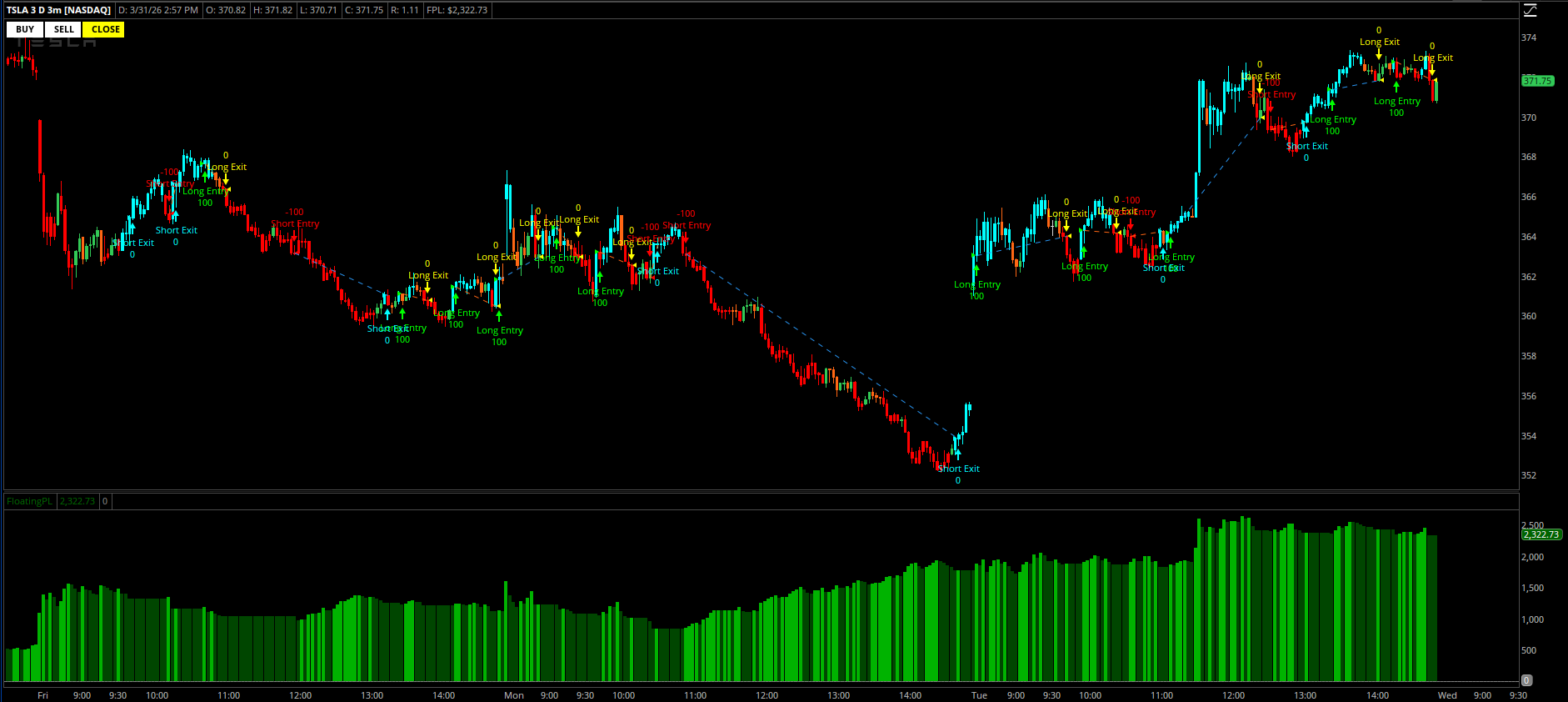
Once added as a strategy, Thinkorswim will show simulated entries and exits on the chart. Strategies in thinkorswim are technical analysis tools that add historical trade signals so you can backtest the conditions.
When testing it:
Important limitations
Right now it does not include:
Practical starting settings
A good starting point is:
Simple summary
In one sentence:
The strategy goes long when your symbol’s buying pressure and price trend turn bullish, goes short when they turn bearish, and can require Mag 7, QQQ, and SPY to agree before taking the trade.
This strategy is a trend-and-volume-pressure confirmation system. It tries to enter trades only when your chart symbol, plus the broader market filters you chose, are aligned in the same direction.
At the chart-symbol level, it measures:
- Buying pressure versus selling pressure
- A moving average trend filter
- smoothed buying pressure is greater than smoothed selling pressure, and
- price is above the moving average
- smoothed selling pressure is greater than smoothed buying pressure, and
- price is below the moving average
How the market filters work
The script also calculates volume pressure for:
- the Magnificent 7 as a group
- QQQ
- SPY
For a long trade:
- your symbol must be bullish
- and, if enabled, Mag 7 must be bullish
- and, if enabled, QQQ must be bullish
- and, if enabled, SPY must be bullish
- your symbol must be bearish
- and the enabled filters must also be bearish
How entries happen
The strategy does not enter every bar that stays bullish or bearish.
It only enters when the condition turns true on this bar after being false on the prior bar:
- longEntry = longFilterOK and !longFilterOK[1]
- shortEntry = shortFilterOK and !shortFilterOK[1]
Inputs you can control
Main display input
- PaintBars
- colors price bars cyan when bullish
- colors price bars red when bearish
- otherwise gray
- Use_Mag7_Filter
- Use_QQQ_Filter
- Use_SPY_Filter
Turning them off makes it trade based more on the chart symbol alone.
Volume-pressure settings
- Volume_AvgType
- Volume_Length
Smaller length:
- faster signals
- more trades
- more noise
- slower signals
- fewer trades
- more smoothing
Moving-average settings
- MovAvg_AvgType
- MovAvg_Price
- MovAvg_Length
Smaller MA length:
- faster trend changes
- earlier entries
- more whipsaws
- slower trend changes
- fewer but more filtered entries
Best way to use it
This strategy is best used as:
- a directional alignment tool
- a backtesting idea generator
- a confirmation system for intraday or swing entries
- is my symbol strong or weak?
- is that strength or weakness confirmed by the broader market?
- did a fresh alignment just appear?
How to add it in Thinkorswim
Thinkorswim separates studies and strategies. Strategies are added from the Strategies tab in the “Edit Studies and Strategies” window, and custom strategies can be created in the thinkScript editor there.
Basic workflow:
- Open a chart.
- Go to Studies > Edit Studies and Strategies.
- Open the Strategies tab.
- Click Create.
- Paste the strategy code.
- Save it with a name.
- Add it to the chart.
How to backtest it
Once added as a strategy, Thinkorswim will show simulated entries and exits on the chart. Strategies in thinkorswim are technical analysis tools that add historical trade signals so you can backtest the conditions.
When testing it:
- try multiple timeframes
- test with all filters on, then selectively turn some off
- compare shorter versus longer moving-average lengths
- compare shorter versus longer volume lengths
- check whether the strategy fits trending symbols better than choppy symbols
Important limitations
Right now it does not include:
- stop loss
- profit target
- trailing stop
- time-of-day filter
- volume minimum
- volatility filter
- position sizing logic beyond the fixed strategy size
Practical starting settings
A good starting point is:
- Volume_Length = 8
- MovAvg_Length = 16
- all three filters on
- aggressive mode: shorter lengths, fewer filters
- conservative mode: longer lengths, all filters on
Simple summary
In one sentence:
The strategy goes long when your symbol’s buying pressure and price trend turn bullish, goes short when they turn bearish, and can require Mag 7, QQQ, and SPY to agree before taking the trade.
Attachments
Last edited:


