
I’ve noticed that when I use HA candles, the stock price appears delayed in TOS. Is there a reason for this, and how can I fix it?This indicator is used specifically for heiken ashi candles. It indicates a reversal signal and only appears when a high volume doji candle forms
# Precision Trend Scalping (Non-Repaint, Intuitive, Plot on Last Confirming Bar)
# - Non-repainting: uses only completed prior candles for confirmation
# - Intuitive mapping: Above EMA -> flat bottoms (bullish), Below EMA -> flat tops (bearish)
# - Plots signal on the LAST confirming candle by shifting back minConsecutiveCandles bars
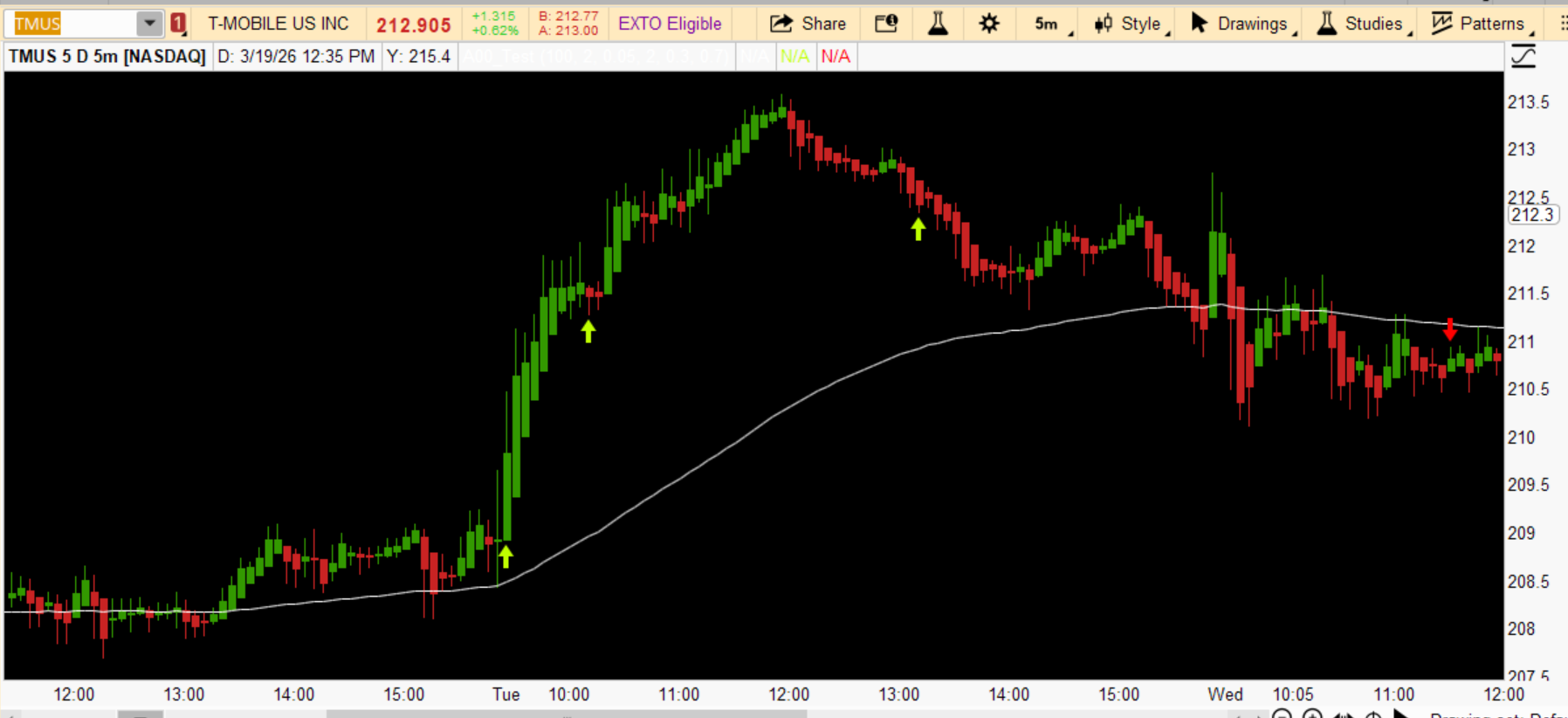
Code:# Precision Trend Scalping (Non-Repaint, Intuitive, Plot on Last Confirming Bar) # - Non-repainting: uses only completed prior candles for confirmation # - Intuitive mapping: Above EMA -> flat bottoms (bullish), Below EMA -> flat tops (bearish) # - Plots signal on the LAST confirming candle by shifting back minConsecutiveCandles bars declare upper; input emaLength = 100; input minConsecutiveCandles = 2; input maxWickRatio = 0.05; input maxWickTicks = 2; input maxDojiBodyRatio = 0.3; input minWickTotalRatio = 0.7; # ------------------------- # EMA # ------------------------- def ema = ExpAverage(close, emaLength); plot EMAline = ema; EMAline.SetDefaultColor(Color.WHITE); # ------------------------- # Heikin Ashi (Manual Calculation - Compatible) # ------------------------- rec haClose = (open + high + low + close) / 4; rec haOpen = if BarNumber() == 1 then (open + close) / 2 else (haOpen[1] + haClose[1]) / 2; def haHigh = Max(high, Max(haOpen, haClose)); def haLow = Min(low, Min(haOpen, haClose)); def haBullish = haClose > haOpen; def haBearish = haClose < haOpen; def haTotalSize = haHigh - haLow; def haBodySize = AbsValue(haClose - haOpen); def haUpperWick = haHigh - Max(haOpen, haClose); def haLowerWick = Min(haOpen, haClose) - haLow; def wickTolerance = TickSize() * maxWickTicks; def okSize = haTotalSize > 0; def haFlatBottom = haBullish and okSize and (haLowerWick / haTotalSize <= maxWickRatio) and (haLowerWick <= wickTolerance); def haFlatTop = haBearish and okSize and (haUpperWick / haTotalSize <= maxWickRatio) and (haUpperWick <= wickTolerance); def haDoji = okSize and (haBodySize / haTotalSize <= maxDojiBodyRatio) and ((haUpperWick + haLowerWick) / haTotalSize >= minWickTotalRatio); def prevTotal = haHigh[1] - haLow[1]; def largerThanPrev = haTotalSize >= prevTotal; # ------------------------- # EMA zones (regular candles) # ------------------------- def fullyAboveEMA = low > ema; def fullyBelowEMA = high < ema; # ------------------------- # Consecutive confirmation using ONLY prior completed bars: # Require the last N bars (1..N) to all be flat. # ------------------------- def allPriorFlatBottoms = (fold fb_i = 1 to minConsecutiveCandles + 1 with fb_flag = 1 do fb_flag * (if GetValue(haFlatBottom, fb_i) then 1 else 0)) == 1; def allPriorFlatTops = (fold ft_i = 1 to minConsecutiveCandles + 1 with ft_flag = 1 do ft_flag * (if GetValue(haFlatTop, ft_i) then 1 else 0)) == 1; # Confirmed signals (true on the bar AFTER the last confirming bar) def bullishConfirmed = fullyAboveEMA and allPriorFlatBottoms and haDoji and largerThanPrev; def bearishConfirmed = fullyBelowEMA and allPriorFlatTops and haDoji and largerThanPrev; # Shift plots back so the arrow prints on the LAST confirming bar plot Bull = bullishConfirmed[minConsecutiveCandles]; Bull.SetPaintingStrategy(PaintingStrategy.BOOLEAN_ARROW_UP); Bull.SetDefaultColor(Color.LIME); Bull.SetLineWeight(3); plot Bear = bearishConfirmed[minConsecutiveCandles]; Bear.SetPaintingStrategy(PaintingStrategy.BOOLEAN_ARROW_DOWN); Bear.SetDefaultColor(Color.RED); Bear.SetLineWeight(3);

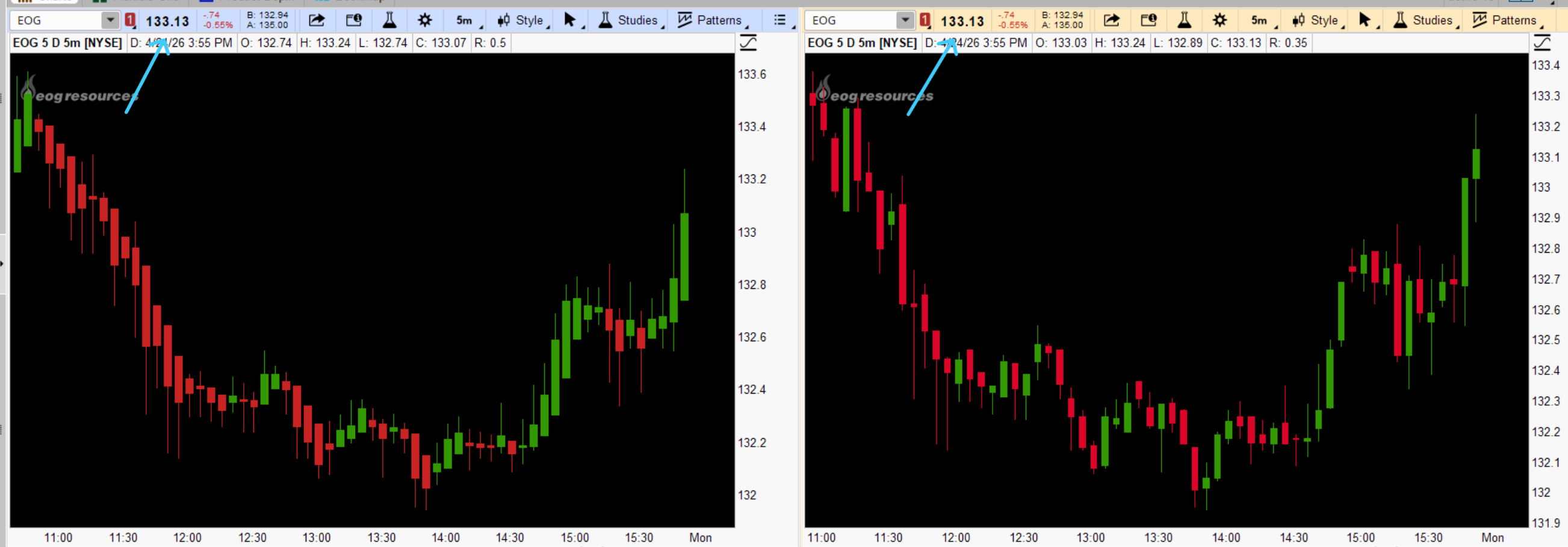
use HA candles, the stock price appears delayed
- Thread starter AlAbed
- Start date



| Thread starter | Similar threads | Forum | Replies | Date |
|---|---|---|---|---|
| O | highlight candles less than 4 ticks candle length | Questions | 1 | |
| S | Horizontal lines at high volume candles | Questions | 1 | |
| A | Help on Confirmation Candles | Questions | 1 | |
| B | Count green candles | Questions | 1 | |
| J | 4-hr Candles? | Questions | 1 |
Similar threads

The Market Trading Game Changer
Join 2,500+ subscribers inside the useThinkScript VIP Membership Club
- Exclusive indicators
- Proven strategies & setups
- Private Discord community
- ‘Buy The Dip’ signal alerts
- Exclusive members-only content
- Add-ons and resources
- 1 full year of unlimited support
Frequently Asked Questions
What is useThinkScript?
useThinkScript is the #1 community of stock market investors using indicators and other tools to power their trading strategies. Traders of all skill levels use our forums to learn about scripting and indicators, help each other, and discover new ways to gain an edge in the markets.
How do I get started?
We get it. Our forum can be intimidating, if not overwhelming. With thousands of topics, tens of thousands of posts, our community has created an incredibly deep knowledge base for stock traders. No one can ever exhaust every resource provided on our site.
If you are new, or just looking for guidance, here are some helpful links to get you started.
- The most viewed thread:
https://usethinkscript.com/threads/repainting-trend-reversal-for-thinkorswim.183/ - Our most popular indicator:
https://usethinkscript.com/threads/buy-the-dip-indicator-for-thinkorswim.3553/ - Answers to frequently asked questions:
https://usethinkscript.com/threads/answers-to-commonly-asked-questions.6006/
What are the benefits of VIP Membership?
VIP members get exclusive access to these proven and tested premium indicators: Buy the Dip, Advanced Market Moves 2.0, Take Profit, and Volatility Trading Range. In addition, VIP members get access to over 50 VIP-only custom indicators, add-ons, and strategies, private VIP-only forums, private Discord channel to discuss trades and strategies in real-time, customer support, trade alerts, and much more. Learn all about VIP membership here.
How can I access the premium indicators?
To access the premium indicators, which are plug and play ready, sign up for VIP membership here.