

Up/Dn arrows...how to paint on bar[1]?

DaysOff

New member
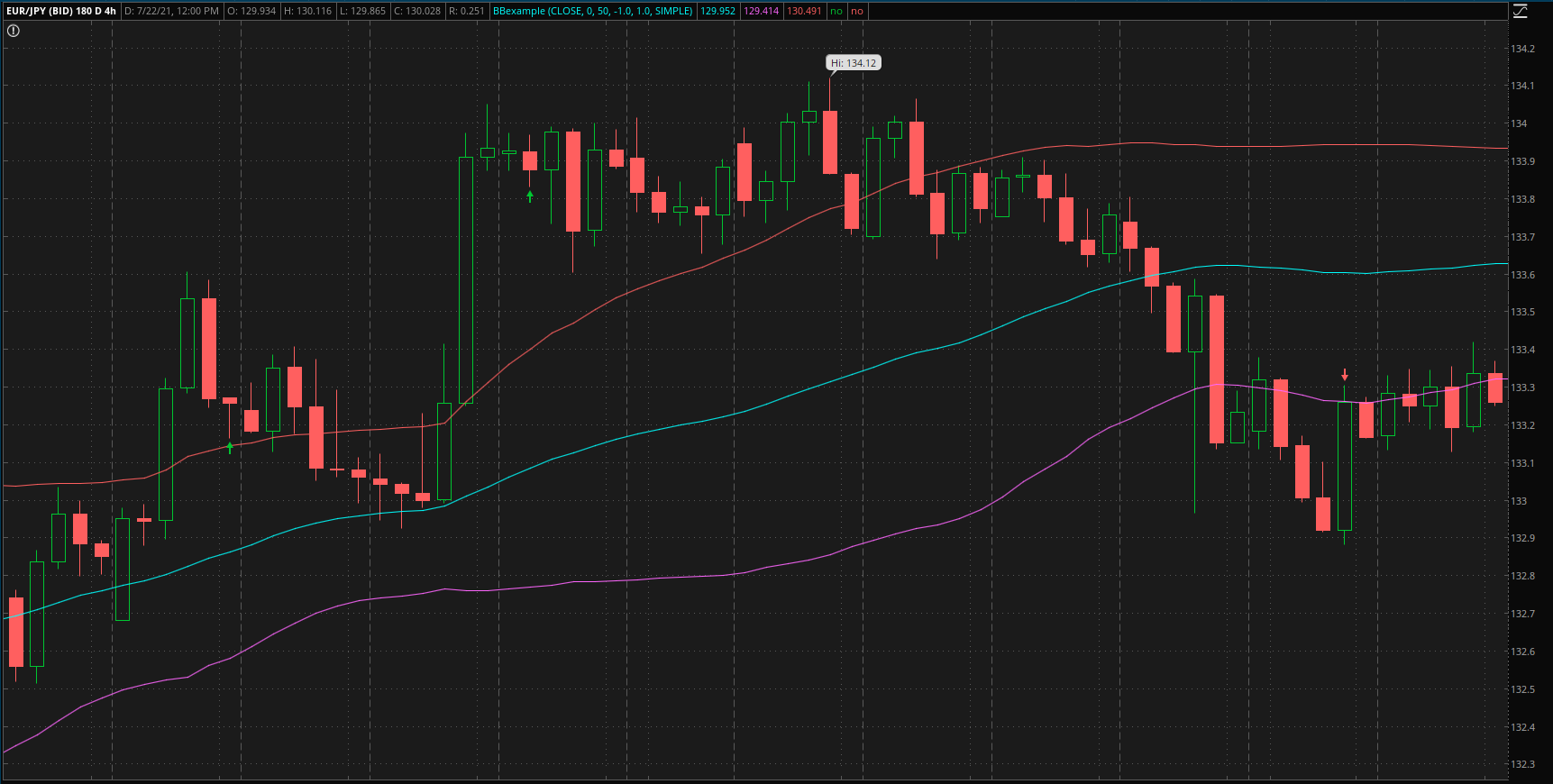
I have coded a strategy in thinkorswim that places up or down arrows on the chart once a condition has been met. For discussion sake, let's say the condition is if two bars form with the entire range of each bar completely above the upper Bollinger band, a red arrow is placed below the second bar. When I try to code this, it will paint on the next bar after the condition has been met. Is there any way to get the arrow to paint on the prior bar?

Thanks in advance for any assistance!

In the image is an example with corresponding code below. In the example, the condition is met when two bars are entirely above or below the BB's. Instead of the arrow painting on the next bar, I'd like it to paint on the one previous...the second bar that forms entirely outside.
5Mzx056.png


Code:

Code:
input price = close;
input displace = 0;
input length = 20;
input Num_Dev_Dn = -2.0;
input Num_Dev_up = 2.0;
input averageType = AverageType.Simple;

def sDev = stdev(data = price[-displace], length = length);

plot MidLine = MovingAverage(averageType, data = price[-displace], length = length);
plot LowerBand = MidLine + num_Dev_Dn * sDev;
plot UpperBand = MidLine + num_Dev_Up * sDev;

LowerBand.SetDefaultColor(GetColor(0));
MidLine.SetDefaultColor(GetColor(1));
UpperBand.SetDefaultColor(GetColor(5));

#2 Bar buy
def b1 = (low > max(LowerBand, UpperBand));
def buy1Count = if b1 then buy1count[1] + 1 else 0;
#plot test = buy1count;
#test.setpaintingStrategy(paintingStrategy.VALUES_ABOVE);
plot buy1 = buy1Count[1] == 2;
buy1.setpaintingStrategy(paintingStrategy.BOOLEAN_ARROW_UP);
buy1.setDefaultColor(color.uptick);
Alert(buy1, "Buy 1", alert.bar, sound.ding);


#2 Bar sell
def s1 = (high < min(LowerBand, UpperBand));
def sell1Count = if s1 then sell1count[1] + 1 else 0;
#plot test2 = sell1count;
#test2.setpaintingStrategy(paintingStrategy.VALUES_BELOW);
plot sell1 = sell1Count[1] == 2;
sell1.setpaintingStrategy(paintingStrategy.BOOLEAN_ARROW_Down);
sell1.setDefaultColor(color.downtick);
Alert(sell1, "Sell 1", alert.bar, sound.ding);
 
Last edited by a moderator:
it should be showing the arrow as soon as 2 valid candles finish, so not much delay.

it is looking at a previous bar to determine a buy. because then it only looks at completed bars.
plot buy1 = buy1Count[1] == 2;

try changing the [1] to [0] , to make it look at the current bar.
the price fluctuations may cause multiple triggers?
plot buy1 = buy1Count[0] == 2;
 
@DaysOff If you don't wait for the two prior candles to close before painting the arrows, the indicator will repaint, giving false signals... There is good reason for the lag of some indicators because we want to know that something happened rather than something may or may not be happening... Acting prematurely can get you stopped out of a higher percentage of trades than desirable...
 
Thanks for the replies. I wasn’t suggesting the logic be changed…as it works the way it is. I was more wondering if it was possible to indicate on which bar to have the arrow painted. I don’t think it is possible…but thought I would ask.
 
Thanks for the replies. I wasn’t suggesting the logic be changed…as it works the way it is. I was more wondering if it was possible to indicate on which bar to have the arrow painted. I don’t think it is possible…but thought I would ask.

Yes, the chart bar/candle can be painted to match the arrow... The issue would be that the candle/bar would repaint along with the arrow... The code would be something like the following but it hasn't been tested... I'm assuming this is what you are looking for...

Ruby:
AssignPriceColor(if buy1 then Color.GREEN else if sell1 then Color.RED else Color.CURRENT);
 
Thanks for the replies. I wasn’t suggesting the logic be changed…as it works the way it is. I was more wondering if it was possible to indicate on which bar to have the arrow painted. I don’t think it is possible…but thought I would ask.

See if this works for you. By increasing/decreasing the arrowmover you can move arrow right/left. It will plot the arrow after the bar closes meeting your condition. The counts for buy/sell are plotted for testing and the circled areas are highlighting the arrows.

Capture.jpg
Ruby:
input price = close;
input displace = 0;
input length = 20;
input Num_Dev_Dn = -2.0;
input Num_Dev_up = 2.0;
input averageType = AverageType.SIMPLE;

def sDev = StDev(data = price[-displace], length = length);

plot MidLine = MovingAverage(averageType, data = price[-displace], length = length);
plot LowerBand = MidLine + Num_Dev_Dn * sDev;
plot UpperBand = MidLine + Num_Dev_up * sDev;

LowerBand.SetDefaultColor(GetColor(0));
MidLine.SetDefaultColor(GetColor(1));
UpperBand.SetDefaultColor(GetColor(5));

input arrowmover = -1;#Hint arrowmover: increase/decrease arrowmover to move arrowmover right/left
def n  = arrowmover;
def n1 = n + 1;

#2 Bar buy
def b1 = (low > Max(LowerBand, UpperBand));
def buy1Count = if b1 then buy1Count[1] + 1 else 0;
plot test = buy1Count;
test.SetPaintingStrategy(PaintingStrategy.VALUES_ABOVE);

plot buy1 = if !IsNaN(close[n]) and buy1Count[n1] == 2 then 1 else 0;
buy1.SetPaintingStrategy(PaintingStrategy.BOOLEAN_ARROW_UP);
buy1.SetDefaultColor(Color.UPTICK);
Alert(buy1, "Buy 1", Alert.BAR, Sound.Ding);


#2 Bar sell
def s1 = (high < Min(LowerBand, UpperBand));
def sell1Count = if s1 then sell1Count[1] + 1 else 0;
plot test2 = sell1count;
test2.setpaintingStrategy(paintingStrategy.VALUES_BELOW);
plot sell1 = if !IsNaN(close[n]) and sell1Count[n1] == 2 then 1 else 0;
sell1.SetPaintingStrategy(PaintingStrategy.BOOLEAN_ARROW_DOWN);
sell1.SetDefaultColor(Color.DOWNTICK);
Alert(sell1, "Sell 1", Alert.BAR, Sound.Ding);
 
Last edited:
See if this works for you. By increasing/decreasing the arrowmover you can move arrow right/left. It will plot the arrow after the bar closes meeting your condition. The counts for buy/sell are plotted for testing and the circled areas are highlighting the arrows.
Hi, How do I incorporate this ArrowMover feature into the following? Thanks in advance for your help.

plot ArrowUp = if EMA9 crosses above SMA20
then low
else double.nan;
ArrowUP.SetPaintingStrategy(PaintingStrategy.Arrow_UP);
ArrowUP.SetLineWeight(2);
ArrowUP.SetDefaultColor(Color.GREEN);

plot ArrowDN = if EMA9 crosses below SMA20
then high
else double.nan;
ArrowDN.SetPaintingStrategy(PaintingStrategy.Arrow_DOWN);
ArrowDN.SetLineWeight(2);
ArrowDN.SetDefaultColor(Color.RED);
Alert(ArrowUp, " ", Alert.Bar, Sound.Ding);
Alert(ArrowDN, " ", Alert.Bar, Sound.Bell);
 
Hi, How do I incorporate this ArrowMover feature into the following? Thanks in advance for your help.

plot ArrowUp = if EMA9 crosses above SMA20
then low
else double.nan;
ArrowUP.SetPaintingStrategy(PaintingStrategy.Arrow_UP);
ArrowUP.SetLineWeight(2);
ArrowUP.SetDefaultColor(Color.GREEN);

plot ArrowDN = if EMA9 crosses below SMA20
then high
else double.nan;
ArrowDN.SetPaintingStrategy(PaintingStrategy.Arrow_DOWN);
ArrowDN.SetLineWeight(2);
ArrowDN.SetDefaultColor(Color.RED);
Alert(ArrowUp, " ", Alert.Bar, Sound.Ding);
Alert(ArrowDN, " ", Alert.Bar, Sound.Bell);

This has the arrowmover included, which was modified to fit with your code. When 'n' is set to zero, then both arrowmover is at the normal arrow plot. A negative number moves it n spaces to the left and a postive number to the right of the normal arrow.

Your arrowup and arrowdn was changed from low/high to 1/0 boolean to facilitate the arrowmover code adaption.

Screenshot-2022-12-01-094024.png
Ruby:
def ema9 = ExpAverage(close, 9);
def sma20 = SimpleMovingAvg(close, 20);

def Arrow_Up = if ema9 crosses above sma20 then 1 else 0;
def Arrow_DN = if ema9 crosses below sma20 then 1 else 0;


input arrowmover = -1;#Hint arrowmover: increase/decrease arrowmover to move arrowmover right/left
def n  = arrowmover;


#2 Bar up
def upCount  = if Arrow_Up then upCount[1] + 1 else 0;

plot arrowup = if !IsNaN(close[n]) and upCount[n] == 1 then 1 else 0;
arrowup.SetPaintingStrategy(PaintingStrategy.BOOLEAN_ARROW_UP);
arrowup.SetDefaultColor(Color.UPTICK);


#2 Bar dn
def dnCount  = if Arrow_DN then dnCount[1] + 1 else 0;

plot arrowdn = if !IsNaN(close[n]) and dnCount[n] == 1 then 1 else 0;
arrowdn.SetPaintingStrategy(PaintingStrategy.BOOLEAN_ARROW_DOWN);
arrowdn.SetDefaultColor(Color.DOWNTICK);

Alert(Arrow_Up, " ", Alert.BAR, Sound.Ding);
Alert(Arrow_DN, " ", Alert.BAR, Sound.Bell);

#Test Bubbles
input test = yes;
AddChartBubble(test and arrowup == 1, low * .9995, "Off\nSet: \n" + n, Color.GREEN, no);
AddChartBubble(test and arrowdn == 1, high * 1.0005, "Off\nSet: \n" + n, Color.RED);
 
This has the arrowmover included, which was modified to fit with your code. When 'n' is set to zero, then both arrowmover is at the normal arrow plot. A negative number moves it n spaces to the left and a postive number to the right of the normal arrow.

Your arrowup and arrowdn was changed from low/high to 1/0 boolean to facilitate the arrowmover code adaption.
Thank you so much!
 
So I'm still learning about Chart plots, and I'm wondering how much freedom/liberty we have when it comes to where the arrows, triangles, etc. are actually plotted/positioned on the chart. So for example, I have a simple pullback plot that I'm using:

Code:
Plot PBSMALL = If Close[2] >= open[2] * 1.065 AND close[1] >= open[1] AND Close[1] >= Close[2] AND (close[1] – open[1]) <= (0.15 * (close[2] – open[2])) then (open * 0.85) else Double.NaN;
PBSMALL.SetPaintingStrategy(PaintingStrategy.ARROW_UP);
PBSMALL.SetLineWeight(5);
PBSMALL.SetDefaultColor(Color.MAGENTA);

This plots a magenta arrow on the chart at 85% of the value of the open of the current bar [0] when the previous two bars/candles meet the above criteria. I use 85% so that there is some space between the plotted arrow and the current running bar/candle.

This is OK, but what I'd really like to be able to do is "back plot" the arrow so that it appears under candle [1] rather than under the present candle[0]. I tried doing: "...then (open[1] * 0.85) else Double.NaN;" but this only adjusts the height of the position where the arrow is plotted (i.e. it vertically offsets it 85% from open[1] rather than from open[0]), and does not change the candle under which it appears (i.e. still @ [0] and not @ [1]).

Is there any way around this, or a clever trick to get the arrow to offset to the desired location/candle, once the "if" the criteria are met?

Thank you,
JRD
 
Last edited by a moderator:
@jrandydavis
What’s the intended benefit of shifting the arrow backward in time?
The signal itself still fires one bar later, so the entry doesn’t actually move. All that changes is the appearance — it looks earlier even though it happened later.

And if the arrow is repainted onto an earlier bar, how can you trust the signal at all?
If the plotted location doesn’t reflect when the signal truly occurred, the chart stops being a record of reality.

Ruby:
input arrowmover = -1;  # move arrow left/right
def n = arrowmover;

def trigger =
    Close[2] >= open[2] * 1.065 and
    close[1] >= open[1] and
    Close[1] >= Close[2] and
    (close[1] - open[1]) <= (0.15 * (close[2] - open[2]));

def upCount = if trigger then upCount[1] + 1 else 0;

plot arrowup = if !IsNaN(close[n]) and upCount[n] == 1 then 1 else 0;
arrowup.SetPaintingStrategy(PaintingStrategy.BOOLEAN_ARROW_UP);
arrowup.SetLineWeight(5);
arrowup.SetDefaultColor(color.magenta);
 
Last edited:
What’s the intended benefit of shifting the arrow backward in time?
The signal itself still fires one bar later, so the entry doesn’t actually move. All that changes is the appearance — it looks earlier even though it happened later.

And if the arrow is repainted onto an earlier bar, how can you trust the signal at all?
If the plotted location doesn’t reflect when the signal truly occurred, the chart stops being a record of reality.

It sounds like you already understand the answer to your question; move the plot to open[1]
Ruby:
def trigger =
    Close[2] >= open[2] * 1.065 and
    close[1] >= open[1] and
    Close[1] >= Close[2] and
    (close[1] - open[1]) <= (0.15 * (close[2] - open[2]));


plot PBSMALL = if trigger then open[1] * 0.85 else Double.NaN;
PBSMALL.SetPaintingStrategy(PaintingStrategy.ARROW_UP);
PBSMALL.SetLineWeight(5);
PBSMALL.SetDefaultColor(Color.MAGENTA);
Thank you for the reply. Yes, it's arguably just about appearances on the chart-- I'd like to know ("see") the exact bar where the criteria was met, rather than have the arrow plot on the bar after that point.

As to your solution, perhaps that coding format produces the desired outcome (I will try it this afternoon), however as stated in my OP, using "open[1] * 0.85 else Double.NaN;" vs. "open * 0.85 else Double.NaN;" does not shift the plot position of the candle one bar to the left, but rather only adjusts the vertical height of the candle (assuming open and open[1] are not equal) still on candle[0].

It seems SleepyZ solved this issue for eagle.ai from earlier in this thread using 'arrowmover' (the resultant chart pic shows this well) but I don't know how this was accomplished coding-wise. I'm hoping to get a similar solution for my plots.

Thank you,
JRD
 

Join useThinkScript to post your question to a community of 21,000+ developers and traders.

Similar threads

Not the exact question you're looking for?

Start a new thread and receive assistance from our community.

87k+ Posts
1366 Online
Create Post

Similar threads

Similar threads

The Market Trading Game Changer

Join 2,500+ subscribers inside the useThinkScript VIP Membership Club
  • Exclusive indicators
  • Proven strategies & setups
  • Private Discord community
  • ‘Buy The Dip’ signal alerts
  • Exclusive members-only content
  • Add-ons and resources
  • 1 full year of unlimited support

Frequently Asked Questions

What is useThinkScript?

useThinkScript is the #1 community of stock market investors using indicators and other tools to power their trading strategies. Traders of all skill levels use our forums to learn about scripting and indicators, help each other, and discover new ways to gain an edge in the markets.

How do I get started?

We get it. Our forum can be intimidating, if not overwhelming. With thousands of topics, tens of thousands of posts, our community has created an incredibly deep knowledge base for stock traders. No one can ever exhaust every resource provided on our site.

If you are new, or just looking for guidance, here are some helpful links to get you started.

What are the benefits of VIP Membership?
VIP members get exclusive access to these proven and tested premium indicators: Buy the Dip, Advanced Market Moves 2.0, Take Profit, and Volatility Trading Range. In addition, VIP members get access to over 50 VIP-only custom indicators, add-ons, and strategies, private VIP-only forums, private Discord channel to discuss trades and strategies in real-time, customer support, trade alerts, and much more. Learn all about VIP membership here.
How can I access the premium indicators?
To access the premium indicators, which are plug and play ready, sign up for VIP membership here.
Back
Top
