Trend Vigor for ThinkOrSwim

Sesqui

Member
VIP
I did not find a Trend Vigor indicator so I am adding it.

Trend Vigor, per Dr Ehlers, is used to determine if the market is trending or cycling.

• Suppose an RSI signals a valley
– The trading action is to buy
• However, the market keeps going down
– In hindsight a trend mode has started
• Oscillators and Moving Averages often give opposite signals

THE REAL PROBLEM IS HOW TO IDENTIFY THE CORRECT MARKET MODE

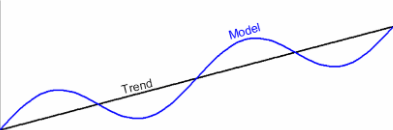
Trend Vigor is the ratio of the (smoothed) trend slope across one full cycle period to the cycle peak-to-peak amplitude.
• If the ratio is greater than one the trend component swamps the cycle
– Don’t stand in front of the train
– You can still use the cycle to enter the trade at the best time in the direction of the trend
• If the ratio is less than one the trend has a minimum effect on the cycle
– Use your favorite oscillator

• The simple model has two components
– A perfect trend
– A perfect cycle

1770447345135.png


1770447374358.png


Here is a screenshot of what it looks like. The Trend Vigor is the blue line at the bottom of the chart.

1770447518203.png


One very interesting thing other than the actual indicator that the code provides is a different way to estimate the peak to Peak Cycle amplitude. In short the code is as follows, where "BP" is the value of the Bandpass Filter:

For count = 0 to Period - 1 Begin
Power = Power + BP[count]*BP[count] + BP[count + Period / 4]*BP[count + Period / 4];
End;
RMS = SquareRoot(Power / Period);
PtoP = 2*1.414*RMS;
Plot1(PtoP, "PP", Yellow, 2);


Here is the code for the Trend Vigor indicator:

CSS:
# Trend Vigor Index (TVI) per Dr Ehlers
declare lower;

#===================================================================
script HilbertTransform {
    # Measures dominant cycle using Hilbert Transform method of
    # CH 9 "Cybernetic Analysis for Stocks and Futures" by Dr Ehlers
    input InstPeriodPrior = 20;
    input price = HL2;

    def alpha = 0.07;

    def Smooth = (price + 2 * price[1] + 2 * price[2] + price[3]) / 6;
    def Cycle = if IsNaN(Cycle[7]) then 0.25 * (price - 2 * price[1] + price[2]) else (1 - 0.5 * alpha) * (1 - 0.5 * alpha) * (Smooth - 2 * Smooth[1] + Smooth[2]) + 2 * (1 - alpha) * Cycle[1] - (1 - alpha) * (1 - alpha) * Cycle[2];

    def Q1 = (0.0962 * Cycle + 0.5769 * Cycle[2] - 0.5769 * Cycle[4] - 0.0962 * Cycle[6]) * (0.5 + 0.08 * InstPeriodPrior);
    def I1 = Cycle[3];

    def DeltaPhase_calc = if Q1 <> 0 and Q1[1] <> 0 then (I1 / Q1 - I1[1] / Q1[1]) / (1 + I1 * I1[1] / (Q1 * Q1[1])) else 0;
    plot DeltaPhase = if DeltaPhase_calc < 0.1 then 0.1 else if DeltaPhase_calc > 1.1 then 1.1 else DeltaPhase_calc;

    plot MedianDelta = Median(DeltaPhase, 5);

    plot DC = if MedianDelta == 0 then 15 else 6.28318 / MedianDelta + 0.5;

    plot InstPeriod = 0.33 * DC + 0.67 * InstPeriodPrior;

} #End Script HilbertTransform{}
#-------------------------------------------------------

input price = HL2;

#******* This section measures the Dominant Cycle *******#
# The following line is the required means of calling script HilbertTransform
# because the algorithm is nonlinear in the definition of Period[1]. In order
# to provide the value of Period[1] before Period[0] has been computed we use
# a CompoundValue() method to front load the Period[1] value as required for
# the HilbertTransform to work
def Period_ = CompoundValue(4,
               if BarNumber() > 5 then HilbertTransform(Period_[1], price).InstPeriod else Period_[1],
               20);  

# Per Ehlers, smoothes the cycle period
def Period = 0.15 * Period_ + 0.85 * Period[1];
def CycleLength = if IsNaN(Floor(Period)) then CycleLength[1] else Floor(Period);

#*******This section computes the adaptive Cycle indicator*******#
def alpha = 2 / (CycleLength + 1);
#def Smooth = (price + 2 * price[1] + 2 * price[2] + price[3]) / 6;
def Smooth = price;
def Pcyclic = if IsNaN(Pcyclic[7]) then (price - 2 * price[1] + price[2]) / 4 else (1 - 0.5 * alpha) * (1 - 0.5 * alpha) * (Smooth - 2 * Smooth[1] + Smooth[2]) + 2 * (1 - alpha) * Pcyclic[1] - (1 - alpha) * (1 - alpha) * Pcyclic[2];

#****** This is Ehlers ITrend, per CH 2-3 of "Cybernetic analysis for Stocks and Futures",
# has essentially no lag since it is a HPF subtracted from the price data.
# Refer to Figure 3.6 for the code:

def ITrend = if IsNaN(ITrend[7]) then (price + 2 * price[1] + price[2]) / 4 else (alpha - alpha * alpha / 4) * price + 0.5 * alpha * alpha * price[1] - (alpha - 0.75 * alpha * alpha) * price[2] + 2 * (1 - alpha) * ITrend[1] - (1 - alpha) * (1 - alpha) * ITrend[2];

def Power = fold count = 0 to CycleLength with pwr=0 do pwr + Sqr(GetValue(Pcyclic,count)) + Sqr(GetValue(Pcyclic,count + CycleLength / 4));

def RMS = sqrt(Power / CycleLength);

# Peak To Peak Amplitude of the Pcycle waveform
def PtoP = 2*1.414*RMS;

def TVI_val = (ITrend - GetValue(ITrend,CycleLength-1))/PtoP;

plot TVI = if TVI_val > 2 then 2 else if TVI_val < -2 then -2 else TVI_Val;
TVI.AssignValueColor(Color.Blue);
TVI.SetLineWeight(3);

plot Trending = 1;

Trending.HideBubble();
Trending.AssignValueColor(Color.GRAY);
Trending.SetStyle(Curve.SHORT_DASH);
Trending.SetLineWeight(3);

Enjoy!
 
Last edited by a moderator:
Another outstanding indicator from @Sesqui!


mxTJLgD.png

Low‑beta, range‑bound names are low risk because the cycles are clean, the levels are obvious, and the stock respects structure.
Buy the bottom of the range, sell the top. Predictable, repeatable, low‑stress.


YDfs2gb.png

High‑beta momentum names are higher risk because you don't know where those tops and bottoms are.
Novice day traders chase those bottoms and tops; which inevitably leads to bigger losses.

The key is anchor the tops and bottoms to structure: identifiable support and resistance.
Thus limiting your risk and identifying whether the reward is worth it.
Identifying where to wait for entry and only then acting on your favorite momo / trend signal.
Exercising the discipline to exit when the trade breaks structure.
Exercising the discipline to exit when you hit your target; and not chasing that last dying breath of the trend.
 
@moveupwithmike The RSI_WITH_HMA is an RSI indicator with a Hull Moving Average (HMA) of the RSI value overlaid on top of the RSI indicator. Simply put, when the RSI value is greater than the HMA(RSI), the RSI value is above average and some may consider that to mean it is trending. I find the HMA not only helps with that but it helps me to more intuitively understand at a glance the general direction the RSI value is going since I tend to use some fast moving RSI indicators when scalping.

Here is the code for the RSI_WITH_HMA:

CSS:
declare lower;
input ColorBARS = no;
input length = 15;
input HMA_LENGTH = 15;
input over_Bought = 70;
input over_Sold = 30;

input price = close;

def NetChgAvg = MovingAverage(averageType, price - price[1], length);
def TotChgAvg = MovingAverage(averageType, AbsValue(price - price[1]), length);
def ChgRatio = if TotChgAvg != 0 then NetChgAvg / TotChgAvg else 0;

plot RSI = 50 * (ChgRatio + 1);

def Diff = RSI - RSI[1];
RSI.DefineColor("Positive and Up", Color.GREEN);
RSI.DefineColor("Positive and Down", CreateColor(0,204,102));
RSI.DefineColor("Negative and Up", CreateColor(239, 83, 80));
RSI.DefineColor("Negative and Down", Color.RED);

RSI.AssignValueColor(if Diff >= 0 then if Diff > Diff[1] then RSI.color("Positive and Up") else RSI.color("Positive and Down") else if Diff < Diff[1] then RSI.color("Negative and Down") else RSI.color("Negative and Up"));

RSI.SetLineWeight(2);
RSI.HideBubble();

#--------------------------------------------------------------------------------------
# plots a horizontal line from the RSI value over to the right hand side of the plot
# to show its value bubble
def RSIValPlot = if !IsNaN(RSI) and IsNaN(RSI[-1]) then RSI else RSIValPlot[1];
plot RSIValPointer = if IsNaN(RSI) then RSIValPlot else Double.NaN;
RSIValPointer.SetDefaultColor(Color.BLACK);
RSIValPointer.SetLineWeight(1);

#--------------------------------------------------------------------------------------

plot OverSold = If MarketOpen then over_Sold else Double.NaN;
plot OverBought = If MarketOpen then over_Bought else Double.NaN;

OverSold.SetDefaultColor(GetColor(8));
OverBought.SetDefaultColor(GetColor(8));

plot HMA = If MarketOpen then MovingAverage(AverageType.HULL, RSI, HMA_LENGTH) else Double.NaN;
HMA.SetDefaultColor(GetColor(8));
HMA.SetLineWeight(2);
HMA.HideBubble();

AddCloud(RSI, HMA, Color.LIGHT_GREEN, Color.LIGHT_RED);

plot CenterLine = 50;
CenterLine.HideBubble();
CenterLine.AssignValueColor(Color.GRAY);
CenterLine.SetStyle(Curve.SHORT_DASH);
CenterLine.SetLineweight(3);

input ColorCandles = no;
AssignPriceColor(if ColorCandles and RSI > HMA then Color.PLUM else if ColorCandles and RSI < HMA then Color.YELLOW else Color.CURRENT);


#================================================

AddCloud(RSI, HMA, Color.DARK_GREEN, Color.RED);


The CYCLE_DC_HILBERT indicator uses the Hilbert Transform from Dr Ehlers to estimate the dominant cycle (DC) of the stock. The DC is like the main beat or rhythm that high frequency oscillations of the stock price are moving at. It uses a high pass filter (HPF) with an upper cut off period equal to the DC. The output of the HPF is a single plot curve that captures the all of the high frequency price action up to the cutoff period (eg the DC). Dr Ehlers provides numerous different ways to capture the cycle and in his papers he states that his favorite is the Band Pass Filter (BPF). ThinkOrSwim has a BandPassFilter indicator built in. Below is a screenshot of it. You can see it is smoother than the cycle indicator made by my CYCLE_DC_HILBERT. Below the screenshot is the code for the CYCLE_DC_HILBERT indicator.

1772468347638.png


CSS:
declare lower;

#===================================================================
script HilbertTransform {
    # Measures dominant cycle using Hilbert Transform method of
    # CH 9 "Cybernetic Analysis for Stocks and Futures" by Dr Ehlers
    input InstPeriodPrior = 20;
    input price = HL2;

    def alpha = 0.07;

    def Smooth = (price + 2 * price[1] + 2 * price[2] + price[3]) / 6;
    def Cycle = if IsNaN(Cycle[7]) then 0.25 * (price - 2 * price[1] + price[2]) else (1 - 0.5 * alpha) * (1 - 0.5 * alpha) * (Smooth - 2 * Smooth[1] + Smooth[2]) + 2 * (1 - alpha) * Cycle[1] - (1 - alpha) * (1 - alpha) * Cycle[2];

    def Q1 = (0.0962 * Cycle + 0.5769 * Cycle[2] - 0.5769 * Cycle[4] - 0.0962 * Cycle[6]) * (0.5 + 0.08 * InstPeriodPrior);
    def I1 = Cycle[3];

    def DeltaPhase_calc = if Q1 <> 0 and Q1[1] <> 0 then (I1 / Q1 - I1[1] / Q1[1]) / (1 + I1 * I1[1] / (Q1 * Q1[1])) else 0;
    plot DeltaPhase = if DeltaPhase_calc < 0.1 then 0.1 else if DeltaPhase_calc > 1.1 then 1.1 else DeltaPhase_calc;

    plot MedianDelta = Median(DeltaPhase, 5);

    plot DC = if MedianDelta == 0 then 15 else 6.28318 / MedianDelta + 0.5;

    plot InstPeriod = 0.33 * DC + 0.67 * InstPeriodPrior;

} #End Script HilbertTransform{}
#-------------------------------------------------------

input price = HL2;

#******* This section measures the Dominant Cycle *******#
# The following line is the required means of calling script HilbertTransform
# because the algorithm is nonlinear in the definition of Period[1]. In order
# to provide the value of Period[1] before Period[0] has been computed we use
# a CompoundValue() method to front load the Period[1] value as required for
# the HilbertTransform to work
def Period_ = CompoundValue(4,
               if BarNumber() > 5 then HilbertTransform(Period_[1], price).InstPeriod else Period_[1],
               20); 

# Per Ehlers, smoothes the cycle period
def Period = 0.15 * Period_ + 0.85 * Period[1];
def CycleLength = if IsNaN(Floor(Period)) then CycleLength[1] else Floor(Period);

#*******This section computes the adaptive Cycle indicator*******#
def alpha = 2 / (CycleLength + 1);
#def Smooth = (price + 2 * price[1] + 2 * price[2] + price[3]) / 6;
def Smooth = price;
def Pcyclic = if IsNaN(Pcyclic[7]) then (price - 2 * price[1] + price[2]) / 4 else (1 - 0.5 * alpha) * (1 - 0.5 * alpha) * (Smooth - 2 * Smooth[1] + Smooth[2]) + 2 * (1 - alpha) * Pcyclic[1] - (1 - alpha) * (1 - alpha) * Pcyclic[2];

The label on the CYCLE_DC_HILBERT that indicates whether it is okay to be trading when stock price is ranging or not is a method also from Dr Ehlers. It compares the amplitude of the Cycle indicator to the range of the stock price. If the amplitude of the Cycle is not a large enough portion of the stock price oscillations then it says not to trade when price is ranging because the price is too choppy and taking a profit would be more of a crap shoot.

Hope this helps and thanks for asking.
 

Join useThinkScript to post your question to a community of 21,000+ developers and traders.

Similar threads

Not the exact question you're looking for?

Start a new thread and receive assistance from our community.

87k+ Posts
1325 Online
Create Post

Similar threads

Similar threads

The Market Trading Game Changer

Join 2,500+ subscribers inside the useThinkScript VIP Membership Club
  • Exclusive indicators
  • Proven strategies & setups
  • Private Discord community
  • ‘Buy The Dip’ signal alerts
  • Exclusive members-only content
  • Add-ons and resources
  • 1 full year of unlimited support

Frequently Asked Questions

What is useThinkScript?

useThinkScript is the #1 community of stock market investors using indicators and other tools to power their trading strategies. Traders of all skill levels use our forums to learn about scripting and indicators, help each other, and discover new ways to gain an edge in the markets.

How do I get started?

We get it. Our forum can be intimidating, if not overwhelming. With thousands of topics, tens of thousands of posts, our community has created an incredibly deep knowledge base for stock traders. No one can ever exhaust every resource provided on our site.

If you are new, or just looking for guidance, here are some helpful links to get you started.

What are the benefits of VIP Membership?
VIP members get exclusive access to these proven and tested premium indicators: Buy the Dip, Advanced Market Moves 2.0, Take Profit, and Volatility Trading Range. In addition, VIP members get access to over 50 VIP-only custom indicators, add-ons, and strategies, private VIP-only forums, private Discord channel to discuss trades and strategies in real-time, customer support, trade alerts, and much more. Learn all about VIP membership here.
How can I access the premium indicators?
To access the premium indicators, which are plug and play ready, sign up for VIP membership here.
Back
Top