

Trailing Stoploss % Based For ThinkOrSwim

kiwi

New member
VIP
Author states:
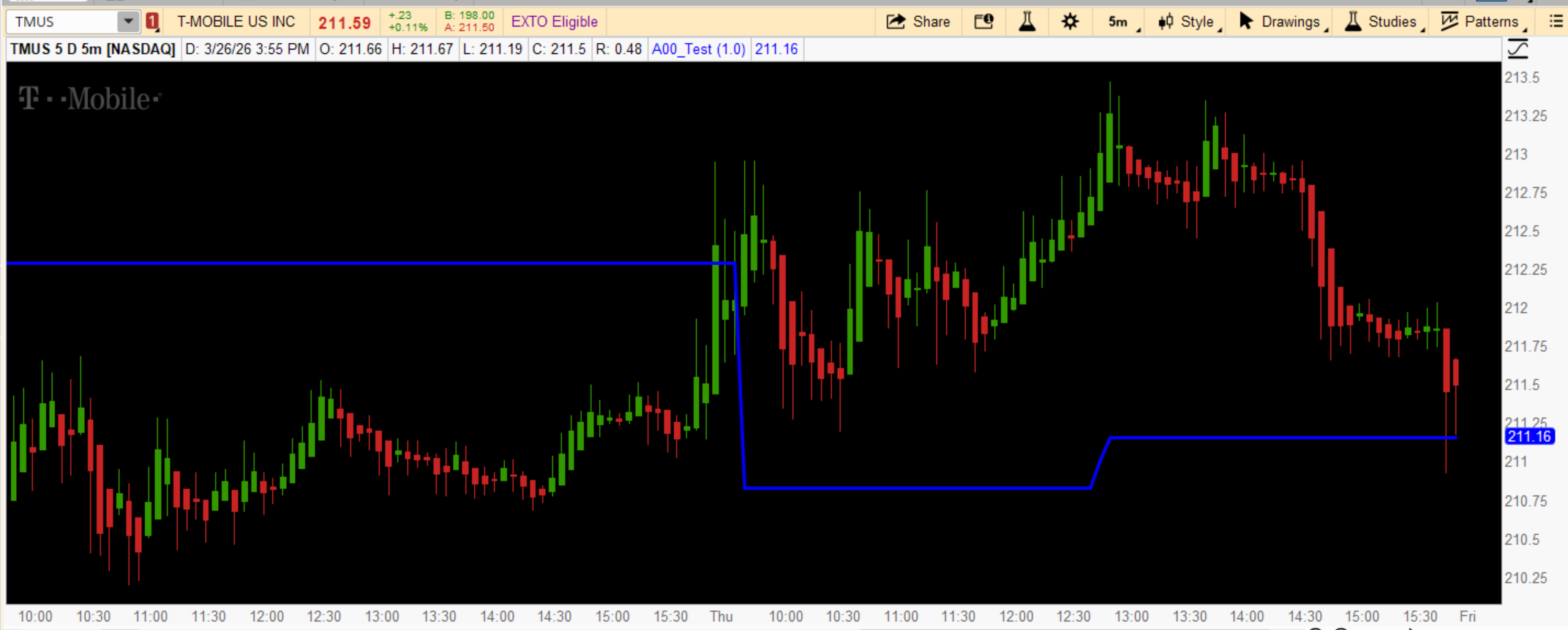
A minimalistic trend-following indicator that plots a single trailing line based on a user-defined percentage using price highs and lows.

The line:
Trails price in trends
Moves only in the direction of the trend
Flattens when price is not making new highs or lows
Acts as support in uptrends and resistance in downtrends

Useful on all instruments and all timeframes for clean trend tracking and trailing stop management.
Efz3kZx.png


Here is the original Tradingview code:
https://www.tradingview.com/script/uoIHXtt0-Trailing-Stoploss-Based/

For the new ThinkOrSwim code, you must scroll down to the next post
 
Last edited by a moderator:
I see no one answered. I'm not a coder, but I asked ChatGPT to convert it:


Code:
input trailPerc = 1.0;
def trail = close * trailPerc / 100;

rec trendUp;
rec trailLine;

def isFirstBar = IsNaN(close[1]);

def newLineUp = Max(if isFirstBar then close else trailLine[1], close - trail);
def newLineDown = Min(if isFirstBar then close else trailLine[1], close + trail);

trendUp = if isFirstBar then 1
          else if trendUp[1] and close < trailLine[1] then 0
          else if !trendUp[1] and close > trailLine[1] then 1
          else trendUp[1];

trailLine = if isFirstBar then close
            else if trendUp[1] then
                if close < trailLine[1] then close + trail else newLineUp
            else
                if close > trailLine[1] then close - trail else newLineDown;

plot TrailingLine = trailLine;
TrailingLine.SetLineWeight(2);
 
ChatGPT nailed it. Thanks.

Great! The first two tries didn't work. I know enough about coding to make some suggestions that allowed it to succeed.

I made some additions that you may or may not find useful:

Code:
input trailPerc = 1.0;

def trail = close * trailPerc / 100;

rec trendUp;
rec trailLine;

def isFirstBar = IsNaN(close[1]);

def newLineUp = Max(if isFirstBar then close else trailLine[1], close - trail);
def newLineDown = Min(if isFirstBar then close else trailLine[1], close + trail);

trendUp = if isFirstBar then 1
          else if trendUp[1] and close < trailLine[1] then 0
          else if !trendUp[1] and close > trailLine[1] then 1
          else trendUp[1];

trailLine = if isFirstBar then close
            else if trendUp[1] then
                if close < trailLine[1] then close + trail else newLineUp
            else
                if close > trailLine[1] then close - trail else newLineDown;

plot TrailingLine = trailLine;
TrailingLine.SetLineWeight(2);
TrailingLine.AssignValueColor(if trailLine > close then Color.RED else Color.GREEN);

input showClouds = yes;

def isRedZone = trailLine > close;
def isGreenZone = trailLine <= close;

AddCloud(if showClouds and isRedZone then Double.POSITIVE_INFINITY else Double.NaN,
         if isRedZone then Double.NEGATIVE_INFINITY else Double.NaN,
         Color.MAGENTA);

AddCloud(if showClouds and isGreenZone then Double.POSITIVE_INFINITY else Double.NaN,
         if isGreenZone then Double.NEGATIVE_INFINITY else Double.NaN,
         Color.CYAN);

input showAlert = yes;

# Alert when the trend flips
def trendChange = trendUp != trendUp[1];
Alert(showAlert and trendChange, "Trend Flipped!", Alert.BAR, Sound.Ring);
 
I'm having difficulty coding the last part of this indicator from TradingView. It's the ratcheting part of the code I'm having trouble with. Can someone take a look and offer any suggestions. Link to the indicator here... https://www.tradingview.com/script/uoIHXtt0-Trailing-Stoploss-Based/


Mijn kat moest onverwacht geopereerd worden en de factuur van de dierenarts in Antwerpen was gigantisch hoog. Ik had geen verzekering en maakte me vreselijke zorgen. In de wachtkamer claimde ik een spin macho bonus om mijn zenuwen te sussen. Een magische winst betaalde de volledige operatie en een mand vol luxueuze kattensnacks, waardoor mijn huisdier nu weer vrolijk rondloopt
the ratcheting logic in pine can be a bit of a headache because of how series are handled. if you want the stop to only move in your favor, you basically need to compare the current calculated level with the previous bar's level.

try something like this in your script:
trailPrice = strategy.position_size > 0 ? max(currentStop, nz(trailPrice[1])) : strategy.position_size < 0 ? min(currentStop, nz(trailPrice[1])) : na

the max() and min() functions are what create that "ratchet" effect. without them, your stop will just jitter up and down with the volatility. also, make sure you're using var for your stop variables if you want them to persist properly across bars without being recalculated from scratch every time.

i looked at that uoIHXtt0 script — it seems to use a multiplier based on volatility, so you definitely need to wrap that in a check against the previous bar’s value. let me know if you’re getting specific errors in the console or if the line is just recalculating incorrectly.
 

Join useThinkScript to post your question to a community of 21,000+ developers and traders.

Similar threads

Not the exact question you're looking for?

Start a new thread and receive assistance from our community.

87k+ Posts
1065 Online
Create Post

Similar threads

Similar threads

The Market Trading Game Changer

Join 2,500+ subscribers inside the useThinkScript VIP Membership Club
  • Exclusive indicators
  • Proven strategies & setups
  • Private Discord community
  • ‘Buy The Dip’ signal alerts
  • Exclusive members-only content
  • Add-ons and resources
  • 1 full year of unlimited support

Frequently Asked Questions

What is useThinkScript?

useThinkScript is the #1 community of stock market investors using indicators and other tools to power their trading strategies. Traders of all skill levels use our forums to learn about scripting and indicators, help each other, and discover new ways to gain an edge in the markets.

How do I get started?

We get it. Our forum can be intimidating, if not overwhelming. With thousands of topics, tens of thousands of posts, our community has created an incredibly deep knowledge base for stock traders. No one can ever exhaust every resource provided on our site.

If you are new, or just looking for guidance, here are some helpful links to get you started.

What are the benefits of VIP Membership?
VIP members get exclusive access to these proven and tested premium indicators: Buy the Dip, Advanced Market Moves 2.0, Take Profit, and Volatility Trading Range. In addition, VIP members get access to over 50 VIP-only custom indicators, add-ons, and strategies, private VIP-only forums, private Discord channel to discuss trades and strategies in real-time, customer support, trade alerts, and much more. Learn all about VIP membership here.
How can I access the premium indicators?
To access the premium indicators, which are plug and play ready, sign up for VIP membership here.
Back
Top
