

Quantum Tunneling Predictor
1. Executive Core & Operational Philosophy
The Quantum Tunneling Predictor applies the non-linear mathematical principles of quantum mechanics—specifically particle velocity and potential energy barrier penetration—to isolate high-probability institutional breakouts while insulating capital from market micro-noise.
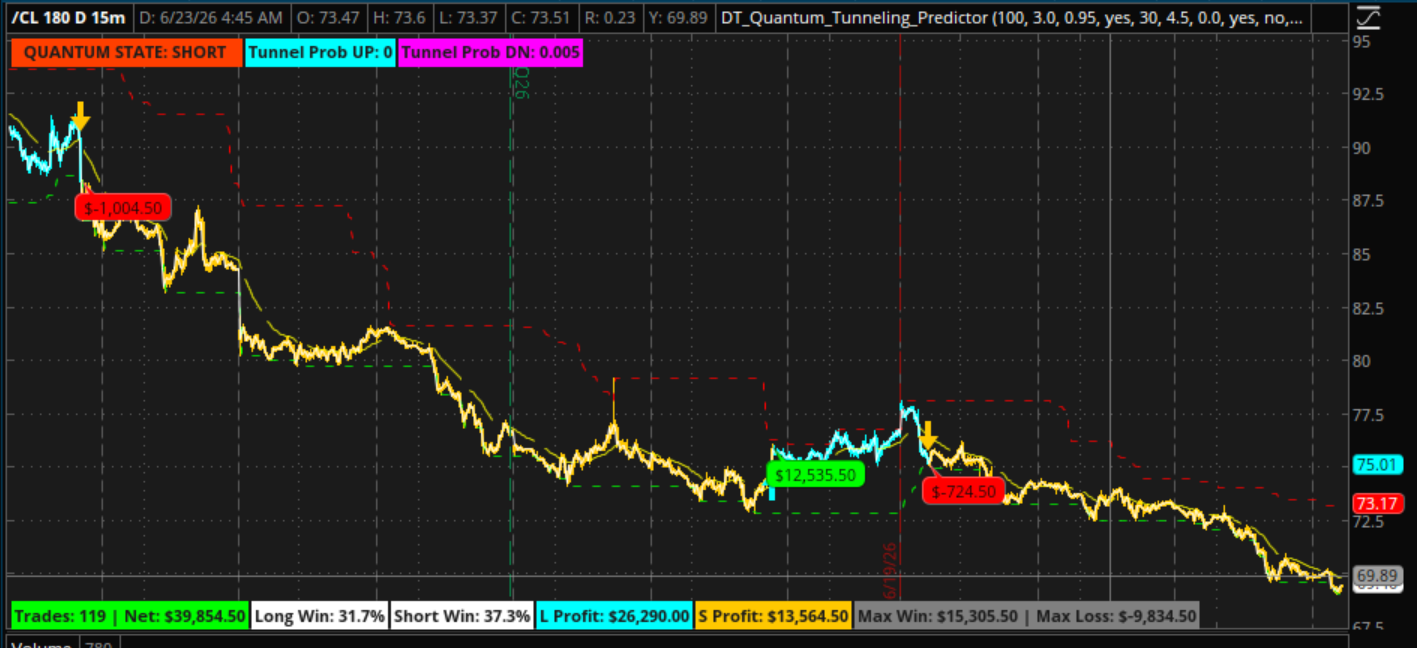
2. Theoretical Framework: The Quantum Analogy
In physics, quantum tunneling describes a phenomenon where a particle penetrates a solid potential energy barrier that it classically lacks the kinetic energy to clear. This occurs because subatomic positions are defined by a probability wave function (psi); when this wave strikes a thin barrier, it decays exponentially but does not drop to zero, leaving a calculable probability that the particle will instantly materialize on the far side.
Classical Model (Deflection): [Price Momentum] ───► | Historical Range Wall | (Reversal)
Quantum Model (Tunneling): [Price Momentum] ───► ░░░░░░░░░░░░░░░░░░░░░░ ───► [New Trend Regime]
Exponential Wave Decay (Breakout Confirmed)
The study translates this phenomenon into financial market structures:
3. Core Mathematical Architecture
The signal engine processes price feeds sequentially through four top-down mathematical layers to eliminate data leakage and ensure structural stability:
Layer 1: Boundary Initialization (The Potential Energy Well)
The framework maps out the physical width of the energy barrier using the highest high and lowest low of the preceding candles, systematically lagging the calculation by one bar to prevent repainting.
Barrier(high) = MAX {H_(t-1), H_(t-2), ..., H_(t-n)}
Barrier(low) = MIN {L_(t-1), L_(t-2), ..., L_(t-n)}
Layer 2: Volatility Normalization (Kinetic Energy)
Raw momentum is divided by the Average True Range (ATR). This converts price velocity into a dimensionless unit of energy, ensuring that a price spike during a low-volatility compression phase is weighted with significantly higher energy than the same price move during erratic, wide-ranged chop.
Norm_Momentum = {C_t - C_(t-1)} / MAX{(ATR)_n, 0.00001}
Layer 3: Structural Energy Distance (Z)
The model computes the net energy delta between the particle's kinetic energy and its proximity to the barrier wall.
Z_up = Norm_Momentum - ( (Barrier_high - C_t) / (MAX (ATR}_n, 0.00001) )
Layer 4: Probability Generation (Wave Decay Engine)
To replicate subatomic wave decay within an obstructive wall, the engine raises Euler's number (e) to the power of the structural energy distance, amplified by a sensitivity multiplier (s). The output is clamped strictly between 0.0 and 1.0.
Probability = MIN (1.0, MAX (0.0, e^(Z \c * s)))

4. Input Parameters & System Sensitivity
The strategy’s operational footprint is governed by five highly interconnected inputs that allow traders to shift the engine between aggressive capture and institutional protection:
5. Algorithmic Stability & Execution Integrity
1. Executive Core & Operational Philosophy
The Quantum Tunneling Predictor applies the non-linear mathematical principles of quantum mechanics—specifically particle velocity and potential energy barrier penetration—to isolate high-probability institutional breakouts while insulating capital from market micro-noise.
2. Theoretical Framework: The Quantum Analogy
In physics, quantum tunneling describes a phenomenon where a particle penetrates a solid potential energy barrier that it classically lacks the kinetic energy to clear. This occurs because subatomic positions are defined by a probability wave function (psi); when this wave strikes a thin barrier, it decays exponentially but does not drop to zero, leaving a calculable probability that the particle will instantly materialize on the far side.
Classical Model (Deflection): [Price Momentum] ───► | Historical Range Wall | (Reversal)
Quantum Model (Tunneling): [Price Momentum] ───► ░░░░░░░░░░░░░░░░░░░░░░ ───► [New Trend Regime]
Exponential Wave Decay (Breakout Confirmed)
The study translates this phenomenon into financial market structures:
- The Particle: Current price action moving through time.
- The Potential Barrier: High-density overhead supply (resistance) or underlying demand (support) established by historical range bounds.
- Kinetic Energy: Asset momentum normalized directly against baseline market volatility (by use of ATR).
- Wave Function Collapse: The exact moment the non-linear tunneling probability breaches your defined threshold, signifying that structural range limits have collapsed and a powerful new trend regime has begun.
3. Core Mathematical Architecture
The signal engine processes price feeds sequentially through four top-down mathematical layers to eliminate data leakage and ensure structural stability:
Layer 1: Boundary Initialization (The Potential Energy Well)
The framework maps out the physical width of the energy barrier using the highest high and lowest low of the preceding candles, systematically lagging the calculation by one bar to prevent repainting.
Barrier(high) = MAX {H_(t-1), H_(t-2), ..., H_(t-n)}
Barrier(low) = MIN {L_(t-1), L_(t-2), ..., L_(t-n)}
Layer 2: Volatility Normalization (Kinetic Energy)
Raw momentum is divided by the Average True Range (ATR). This converts price velocity into a dimensionless unit of energy, ensuring that a price spike during a low-volatility compression phase is weighted with significantly higher energy than the same price move during erratic, wide-ranged chop.
Norm_Momentum = {C_t - C_(t-1)} / MAX{(ATR)_n, 0.00001}
Layer 3: Structural Energy Distance (Z)
The model computes the net energy delta between the particle's kinetic energy and its proximity to the barrier wall.
Z_up = Norm_Momentum - ( (Barrier_high - C_t) / (MAX (ATR}_n, 0.00001) )
Layer 4: Probability Generation (Wave Decay Engine)
To replicate subatomic wave decay within an obstructive wall, the engine raises Euler's number (e) to the power of the structural energy distance, amplified by a sensitivity multiplier (s). The output is clamped strictly between 0.0 and 1.0.
Probability = MIN (1.0, MAX (0.0, e^(Z \c * s)))
4. Input Parameters & System Sensitivity
The strategy’s operational footprint is governed by five highly interconnected inputs that allow traders to shift the engine between aggressive capture and institutional protection:
- lookback (Default: 90): Dictates the width of the energy barrier. Shorter lookbacks thin the wall, resulting in an aggressive, high-frequency setup. Longer lookbacks thicken the wall, capturing major structural macroeconomic shifts while ignoring short-term noise.
- tunnel_sensitivity (Default: 3.0): Controls the steepness of the probability decay curve. Low values flatten the curve, requiring extreme, anomalous velocity to trigger signals. High values sharpen the curve, making the engine responsive to minor boundary approaches.
- collapse_threshold (Default: 0.80): The exact mathematical probability gate (80%) required to execute a trade. Raising this input to 0.90 or 0.95 optimizes the system for ultra-low frequency, high-conviction setups.
- use_trend_filter & trend_length (Default: Yes, 100): A structural asymmetry gate. When active, long trades are completely suppressed below the macro EMA, and short trades are suppressed above it. This critical filter insulates the user from catastrophic counter-trend drawdowns.
5. Algorithmic Stability & Execution Integrity
- Strict Anti-Repainting Design: The strategy relies entirely on closed bar lookbacks (t−1) and historical ranges. Once a signal prints at a candle close, it is locked into the chart permanently. The backtested results reflect live, real-time tick execution with total fidelity.
- Recursive State Latching: Utilizing top-down sequential recursion (rec), the anti-duplication state machine remembers its active regime. It forces strict signal alternation, guaranteeing that the strategy cleanly shifts from Long to Short without spamming consecutive orders or diluting capital efficiency.
- Friction-Adjusted Backtesting: The underlying performance engine automatically subtracts contract commissions and bid-ask spread leakage in real-time, delivering realistic net metrics across individualized Long Win % and Short Win % matrixes.
Code:
#====================================================================
# Quantum Tunneling Predictor
# by whoDAT
# 6/2026
#+===================================================================

declare upper;

# --- INPUT PARAMETERS ---
input lookback = 90;           # The width of the energy barrier (Range lookback)
input tunnel_sensitivity = 3.0;  # How easily price tunnels (Lower = stricter signals)
input collapse_threshold = 0.80; # Probability required to trigger an arrow (0.80 to 0.95)

# --- MACRO TREND FILTER ---
input use_trend_filter = yes;
input trend_length = 100;

# --- STATISTICS ENGINE INPUTS ---
input Trade_Commission = 4.50;
input PipsLostToSpread = 0.0;
input ShowProfitBubbles = yes;
input ShowDebugBubbles = no;

input Display_Mode = {default "Dollars", "Pips"};


# --- 1. DEFINE THE QUANTUM BARRIER ---
def barrier_high = Highest(high[1], lookback);
def barrier_low = Lowest(low[1], lookback);


# --- 2. THE PARTICLE'S KINETIC ENERGY ---
def momentum = close - close[1];
def atr = reference ATR(lookback, averageType = AverageType.SIMPLE);
def safe_atr = Max(atr, 0.00001);
def norm_momentum = momentum / safe_atr;


# --- 3. QUANTUM TUNNELING MATH (UP DIRECTION) ---
def dist_to_top = (barrier_high - close) / safe_atr;
def z_up = norm_momentum - dist_to_top;
def prob_up_raw = Exp(z_up * tunnel_sensitivity);
def prob_up = Min(1.0, Max(0.0, prob_up_raw));


# --- 4. QUANTUM TUNNELING MATH (DOWN DIRECTION) ---
def dist_to_bottom = (close - barrier_low) / safe_atr;
def z_down = (-norm_momentum) - dist_to_bottom;
def prob_down_raw = Exp(z_down * tunnel_sensitivity);
def prob_down = Min(1.0, Max(0.0, prob_down_raw));


# --- 5. MACRO TREND FILTER CALCULATION ---
def macro_ema = ExpAverage(close, trend_length);
def trend_long_allowed = if use_trend_filter then close > macro_ema else yes;
def trend_short_allowed = if use_trend_filter then close < macro_ema else yes;


# --- 6. ANTI-DUPLICATION STATE MACHINE ---
# Gating occurs directly inside the state transition logic.
# The state *cannot* change unless the trend condition is also satisfied.
rec state = if IsNaN(state[1]) then 0
            else if state[1] != 1 and prob_up > collapse_threshold and trend_long_allowed then 1
            else if state[1] != -1 and prob_down > collapse_threshold and trend_short_allowed then -1
            else state[1];


# Signals fire ONLY on the exact bar the state switches values

def LongSignal = state == 1 and state[1] != 1;
def ShortSignal = state == -1 and state[1] != -1;


# Tick Size Calculations
def ts = if !IsNaN(TickSize()) and TickSize() > 0 then TickSize() else 0.0001;


# --- 7. POSITION TRACKING ENGINE (Executes at Next Bar Open) ---
rec pos = if IsNaN(pos[1]) then 0
          else if LongSignal[1] then 1
          else if ShortSignal[1] then -1
          else pos[1];

def isNewTrade = !IsNaN(pos[1]) and pos != pos[1];

rec hasOpened = if IsNaN(hasOpened[1]) then 0
                else if isNewTrade then 1
                else hasOpened[1];

rec entryPrice = if isNewTrade then open
                 else if !IsNaN(entryPrice[1]) then entryPrice[1]
                 else Double.NaN;


# --- 8. ADJUSTED PROFIT CALCULATOR ---
def rawTV = if !IsNaN(TickValue()) then TickValue() else 0;
def globalTV_Max = HighestAll(rawTV);
def tv = if globalTV_Max > 0 then globalTV_Max else 1.0;

def rawPips = if pos[1] == 1 then (open - entryPrice[1]) / ts else (entryPrice[1] - open) / ts;

def netPips = rawPips - PipsLostToSpread;

def commissionInPips = if tv != 0 then Trade_Commission / tv else 0;

def currentTradeResult = if hasOpened[1] == 1 and isNewTrade and pos[1] != 0 then
    (if Display_Mode == Display_Mode."Pips" then netPips - commissionInPips
    else (netPips * tv) - Trade_Commission)
    else 0;


# --- 9. STATISTICAL MATRIX BUILDER ---

rec totalPnl = if IsNaN(totalPnl[1]) then 0 else totalPnl[1] + currentTradeResult;

rec tradeCount = if IsNaN(tradeCount[1]) then 0 else if currentTradeResult != 0 then tradeCount[1] + 1 else tradeCount[1];

rec pLong = if IsNaN(pLong[1]) then 0 else if currentTradeResult != 0 and pos[1] == 1 then pLong[1] + currentTradeResult else pLong[1];

rec cLong = if IsNaN(cLong[1]) then 0 else if currentTradeResult != 0 and pos[1] == 1 then cLong[1] + 1 else cLong[1];

rec wLong = if IsNaN(wLong[1]) then 0 else if currentTradeResult > 0 and pos[1] == 1 then wLong[1] + 1 else wLong[1];

rec pShort = if IsNaN(pShort[1]) then 0 else if currentTradeResult != 0 and pos[1] == -1 then pShort[1] + currentTradeResult else pShort[1];

rec cShort = if IsNaN(cShort[1]) then 0 else if currentTradeResult != 0 and pos[1] == -1 then cShort[1] + 1 else cShort[1];

rec wShort = if IsNaN(wShort[1]) then 0 else if currentTradeResult > 0 and pos[1] == -1 then wShort[1] + 1 else wShort[1];

rec mWin = if IsNaN(mWin[1]) then 0 else if currentTradeResult > mWin[1] then currentTradeResult else mWin[1];

rec mLoss = if IsNaN(mLoss[1]) then 0 else if currentTradeResult < mLoss[1] then currentTradeResult else mLoss[1];


# --- 10. METRICS DASHBOARD (LABELS) ---

def isPips = Display_Mode == Display_Mode."Pips";

AddLabel(yes, "Trades: " + tradeCount + " | Net: " + (if isPips then "" + Round(totalPnl, 1) + " P" else AsDollars(totalPnl)), if totalPnl >= 0 then Color.GREEN else Color.RED, location.BOTTOM_LEFT);

def wrL = if cLong > 0 then (wLong / cLong) * 100 else 0;

def wrS = if cShort > 0 then (wShort / cShort) * 100 else 0;

AddLabel(cLong > 0, "Long Win: " + Round(wrL, 1) + "%", Color.WHITE, location.BOTTOM_LEFT);

AddLabel(cShort > 0, "Short Win: " + Round(wrS, 1) + "%", Color.WHITE, location.BOTTOM_LEFT);

AddLabel(yes, "L Profit: " + (if isPips then "" + Round(pLong, 1) + " P" else AsDollars(pLong)), Color.CYAN, location.BOTTOM_LEFT);

AddLabel(yes, "S Profit: " + (if isPips then "" + Round(pShort, 1) + " P" else AsDollars(pShort)), Color.ORANGE, location.BOTTOM_LEFT);

AddLabel(tradeCount > 0, "Max Win: " + (if isPips then "" + Round(mWin, 1) + " P" else AsDollars(mWin)) + " | Max Loss: " + (if isPips then "" + Round(mLoss, 1) + " P" else AsDollars(mLoss)), Color.GRAY, location.BOTTOM_LEFT);


# Status Labels Top Right

AddLabel(state == 1, "  QUANTUM STATE: LONG   ", Color.LIGHT_GREEN);

AddLabel(state == -1, "  QUANTUM STATE: SHORT   ", Color.LIGHT_RED);

AddLabel(yes, "Tunnel Prob UP: " + Round(prob_up, 3), Color.CYAN);

AddLabel(yes, "Tunnel Prob DN: " + Round(prob_down, 3), Color.MAGENTA);

# --- 11. VISUALIZATION & PLOTS ---

plot Price = close;
Price.SetDefaultColor(Color.WHITE);

plot BarrierTop = barrier_high;
BarrierTop.SetDefaultColor(Color.RED);
BarrierTop.SetStyle(Curve.SHORT_DASH);

plot BarrierBottom = barrier_low;
BarrierBottom.SetDefaultColor(Color.GREEN);
BarrierBottom.SetStyle(Curve.SHORT_DASH);


# Optional Trend Plot

plot TrendLine = if use_trend_filter then macro_ema else Double.NaN;
TrendLine.SetDefaultColor(Color.YELLOW);
TrendLine.SetStyle(Curve.LONG_DASH);


# Directional Signals (Forced Alternate)
plot UpArrow = if LongSignal then low - (ts * 10) else Double.NaN;
UpArrow.SetPaintingStrategy(PaintingStrategy.BOOLEAN_ARROW_UP);
UpArrow.SetDefaultColor(Color.CYAN);
UpArrow.SetLineWeight(4);

plot DownArrow = if ShortSignal then high + (ts * 10) else Double.NaN;
DownArrow.SetPaintingStrategy(PaintingStrategy.BOOLEAN_ARROW_DOWN);
DownArrow.SetDefaultColor(Color.ORANGE);
DownArrow.SetLineWeight(4);


# Candle Colors

AssignPriceColor(if pos == 1 then Color.CYAN else if pos == -1 then Color.ORANGE else Color.CURRENT);


# --- 12. PERFORMANCE BUBBLES ---

def hideOnActive = !IsNaN(close[-1]);

AddChartBubble(ShowProfitBubbles and isNewTrade and hasOpened[1] == 1 and pos[1] != 0 and hideOnActive, open,
    (if isPips then "" + Round(currentTradeResult, 1) + " P" else AsDollars(currentTradeResult)),
    if currentTradeResult >= 0 then Color.GREEN else Color.RED, no);

AddChartBubble(ShowDebugBubbles and isNewTrade and hasOpened[1] == 1 and pos[1] != 0 and hideOnActive, high,
    "In: " + entryPrice[1] + "\nOut: " + open + "\nNet: " + (if isPips then "" + Round(currentTradeResult, 1) + " Pips" else AsDollars(currentTradeResult)),
    Color.GRAY, yes);
Last edited by a moderator:


