


Smoothed RSX Indicator
Advanced Momentum Oscillator with Adaptive Smoothing
Platform: Thinkorswim (ThinkScript)
Panel: Lower Study
Overview
The Smoothed RSX Indicator is an advanced momentum oscillator designed to measure trend strength, momentum direction, and exhaustion with significantly reduced noise compared to standard RSI-based tools.
It combines:
Key Objectives
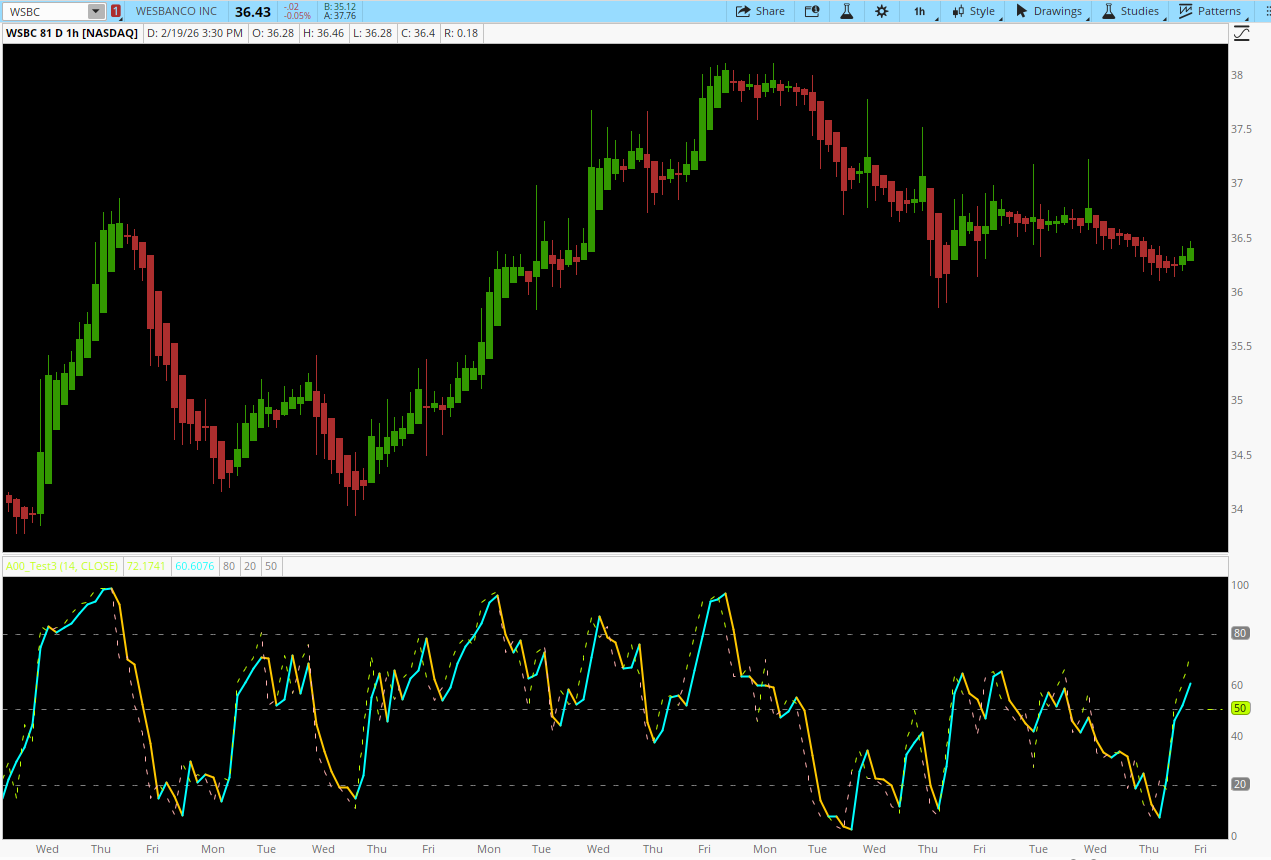
Indicator Components
1. Price Source Selection
The indicator allows full control over the input price used in calculations:
Available Price Types:
2. RSX Calculation (Core Momentum Engine)
The RSX logic improves on traditional RSI by using:
3. Adaptive Smoothing Engine
The Smoothed RSX applies a correlation-based adaptive moving average to the raw RSX output.
How It Works:
Visual Design & Color Logic
Plots
Dynamic Color Coding
Colors are driven by slope direction of the Smoothed RSX:
Reference Levels
All levels are plotted with dashed gray lines to maintain clarity without visual clutter.
How to Trade the Smoothed RSX
1. Trend Confirmation
Strengths
Reduced noise without heavy lag
Adaptive to changing market conditions
Clear visual momentum cues
Works across all timeframes
Excellent for trend continuation setups
Limitations
Not a standalone entry system
Performs best when combined with:
Best Use Cases
Conclusion
The Smoothed RSX Indicator is a professional-grade momentum tool designed for traders who want clarity without lag. By combining RSX’s advanced momentum logic with adaptive smoothing, it delivers actionable, visually intuitive signals that outperform traditional RSI-based oscillators in real trading conditions.
Advanced Momentum Oscillator with Adaptive Smoothing
Platform: Thinkorswim (ThinkScript)
Panel: Lower Study
Overview
The Smoothed RSX Indicator is an advanced momentum oscillator designed to measure trend strength, momentum direction, and exhaustion with significantly reduced noise compared to standard RSI-based tools.
It combines:
- RSX (Relative Strength eXtended) – a refined RSI variant with superior smoothness and responsiveness
- Adaptive Correlation-Based Smoothing – a dynamic filter that adjusts smoothing strength based on volatility and directional stability
Key Objectives
- Reduce false momentum signals common in standard RSI
- Improve trend clarity without lag-heavy moving averages
- Provide visual confirmation of momentum acceleration and deceleration
- Support scalping, intraday, and swing trading
Indicator Components
1. Price Source Selection
The indicator allows full control over the input price used in calculations:
Available Price Types:
- Close
- Open
- High
- Low
- HL2 (High + Low) / 2
- HLC3 (High + Low + Close) / 3
- OHLC4 (Open + High + Low + Close) / 4
- Volatility-focused strategies (HL2 / HLC3)
- Mean-based calculations (OHLC4)
- Traditional momentum setups (Close)
2. RSX Calculation (Core Momentum Engine)
The RSX logic improves on traditional RSI by using:
- Recursive exponential smoothing
- Dual-stage filtering of momentum and absolute momentum
- Normalization to a bounded 0–100 scale
- Faster response than RSI
- Less whipsaw in consolidation
- Stable behavior across timeframes
- Momentum and absolute momentum are smoothed independently
- A weighted blend of first- and second-stage filters improves responsiveness
- Final RSX value is normalized and clamped between 0 and 100
3. Adaptive Smoothing Engine
The Smoothed RSX applies a correlation-based adaptive moving average to the raw RSX output.
How It Works:
- Measures volatility (standard deviation) of RSX
- Compares it to directional variance
- Dynamically adjusts smoothing strength:
- More smoothing during noisy conditions
- Less smoothing during strong directional moves
Responsiveness vs Smoothness
Visual Design & Color Logic
Plots
| Line | Description |
|---|---|
| RSXLine | Raw RSX (dashed, thinner) |
| SmoothedRSXLine | Adaptive smoothed RSX (solid, thicker) |
Colors are driven by slope direction of the Smoothed RSX:
- Upward Momentum
- RSX: Lime
- Smoothed RSX: Cyan
- Downward Momentum
- RSX: Pink
- Smoothed RSX: Orange
- Neutral / Flat
- Dark Gray
Reference Levels
| Level | Purpose |
|---|---|
| 80 | Overbought threshold |
| 20 | Oversold threshold |
| 50 | Momentum equilibrium |
How to Trade the Smoothed RSX
1. Trend Confirmation
- Smoothed RSX above 50 and rising → bullish momentum
- Smoothed RSX below 50 and falling → bearish momentum
- Color change + slope reversal = early momentum transition
- Often precedes price breakouts or breakdowns
- Sustained strength above 80 = strong trend (not immediate reversal)
- Sharp rejection from 80 or 20 = exhaustion signal
- Price makes higher highs while RSX fails → bearish divergence
- Price makes lower lows while RSX rises → bullish divergence
Code:
# Smoothed_RSX
# Description: RSX with additional smoothing

declare lower;

input inpRsiPeriod = 14;        # RSX period
input inpPriceType = {default CLOSE, OPEN, HIGH, LOW, HL2, HLC3, OHLC4};

def price;
if inpPriceType == inpPriceType.OPEN {
    price = open;
} else if inpPriceType == inpPriceType.HIGH {
    price = high;
} else if inpPriceType == inpPriceType.LOW {
    price = low;
} else if inpPriceType == inpPriceType.CLOSE {
    price = close;
} else if inpPriceType == inpPriceType.HL2 {
    price = (high + low) / 2;
} else if inpPriceType == inpPriceType.HLC3 {
    price = (high + low + close) / 3;
} else {
    price = (open + high + low + close) / 4;
}

# RSX Calculation
script RSX {
    input p = close;
    input period = 14;

    def Kg = 3.0 / (2.0 + period);
    def Hg = 1.0 - Kg;

    def mom = p - p[1];
    def moa = AbsValue(mom);

    # First stage
    def f1;
    if IsNaN(p[1]) {
        f1 = 0;
    } else {
        f1 = Kg * mom + Hg * (if IsNaN(f1[1]) then 0 else f1[1]);
    }

    def f2;
    if IsNaN(f1) {
        f2 = 0;
    } else {
        f2 = Kg * f1 + Hg * (if IsNaN(f2[1]) then 0 else f2[1]);
    }

    def momOut = 1.5 * f1 - 0.5 * f2;

    # Absolute stage
    def a1;
    if IsNaN(p[1]) {
        a1 = 0;
    } else {
        a1 = Kg * moa + Hg * (if IsNaN(a1[1]) then 0 else a1[1]);
    }

    def a2;
    if IsNaN(a1) {
        a2 = 0;
    } else {
        a2 = Kg * a1 + Hg * (if IsNaN(a2[1]) then 0 else a2[1]);
    }

    def moaOut = 1.5 * a1 - 0.5 * a2;

    def rsiValue;
    if moaOut == 0 {
        rsiValue = 50;
    } else {
        rsiValue = (momOut / moaOut + 1) * 50;
    }

    def rsx;
    if period > BarNumber() {
        rsx = Double.NaN;
    } else {
        rsx = Min(Max(rsiValue, 0), 100);
    }

    plot result = rsx;
}

# Moving Average calculation
script SmoothingMA {
    input avg = close;
    input price = close;
    input period = 14;

    def priceVal = price;
    def avgVal = avg;

    # correlation calculation
    def deviation = StDev(priceVal, period);
    def v1 = Power(deviation, 2);

    def v2;
    if !IsNaN(avgVal[1]) and !IsNaN(avgVal) {
        v2 = Power(avgVal[1] - avgVal, 2);
    } else {
        v2 = 0;
    }

    def c;
    if v2 < v1 or v2 == 0 {
        c = 0;
    } else {
        c = 1 - v1 / v2;
    }

    def corrVal;
    if IsNaN(avgVal[1]) {
        corrVal = avgVal;
    } else {
        corrVal = avgVal[1] + c * (avgVal - avgVal[1]);
    }

    plot result = corrVal;
}

# Calculate RSX
def rsxValue = RSX(price, inpRsiPeriod);

# Calculate Smoothed RSX
def smoothedRSX = SmoothingMA(rsxValue, rsxValue, inpRsiPeriod);

# Color coding based on direction change
def rsxColor;
if smoothedRSX > smoothedRSX[1] {
    rsxColor = 1;
} else if smoothedRSX < smoothedRSX[1] {
    rsxColor = 2;
} else {
    rsxColor = rsxColor[1];
}

# Plot the indicator
plot RSXLine = rsxValue;
plot SmoothedRSXLine = smoothedRSX;

# color schemes
RSXLine.SetPaintingStrategy(PaintingStrategy.LINE);
RSXLine.AssignValueColor(if rsxColor == 1 then Color.LIME
                          else if rsxColor == 2 then Color.PINK
                          else Color.DARK_GRAY);
RSXLine.SetLineWeight(1);
RSXLine.SetStyle(Curve.SHORT_DASH);  # Make RSX dashed

SmoothedRSXLine.SetPaintingStrategy(PaintingStrategy.LINE);
SmoothedRSXLine.AssignValueColor(if rsxColor == 1 then Color.CYAN
                                   else if rsxColor == 2 then Color.ORANGE
                                   else Color.DARK_GRAY);
SmoothedRSXLine.SetLineWeight(2);   # Keep smoothed RSX thicker

# Add horizontal lines
plot Overbought = 80;
plot Oversold = 20;
plot MidLine = 50;

Overbought.SetDefaultColor(Color.GRAY);
Overbought.SetStyle(Curve.SHORT_DASH);
Oversold.SetDefaultColor(Color.GRAY);
Oversold.SetStyle(Curve.SHORT_DASH);
MidLine.SetDefaultColor(Color.GRAY);
MidLine.SetStyle(Curve.SHORT_DASH);
Strengths
Reduced noise without heavy lag
Adaptive to changing market conditions
Clear visual momentum cues
Works across all timeframes
Excellent for trend continuation setups
Limitations
Not a standalone entry system
Performs best when combined with:
- Market structure
- VWAP
- Volume or volatility tools
Best Use Cases
- Trend continuation confirmation
- Pullback entries
- Momentum exhaustion analysis
- Divergence-based trade planning
- Scalping with reduced oscillator noise
Conclusion
The Smoothed RSX Indicator is a professional-grade momentum tool designed for traders who want clarity without lag. By combining RSX’s advanced momentum logic with adaptive smoothing, it delivers actionable, visually intuitive signals that outperform traditional RSI-based oscillators in real trading conditions.
Last edited by a moderator:

