

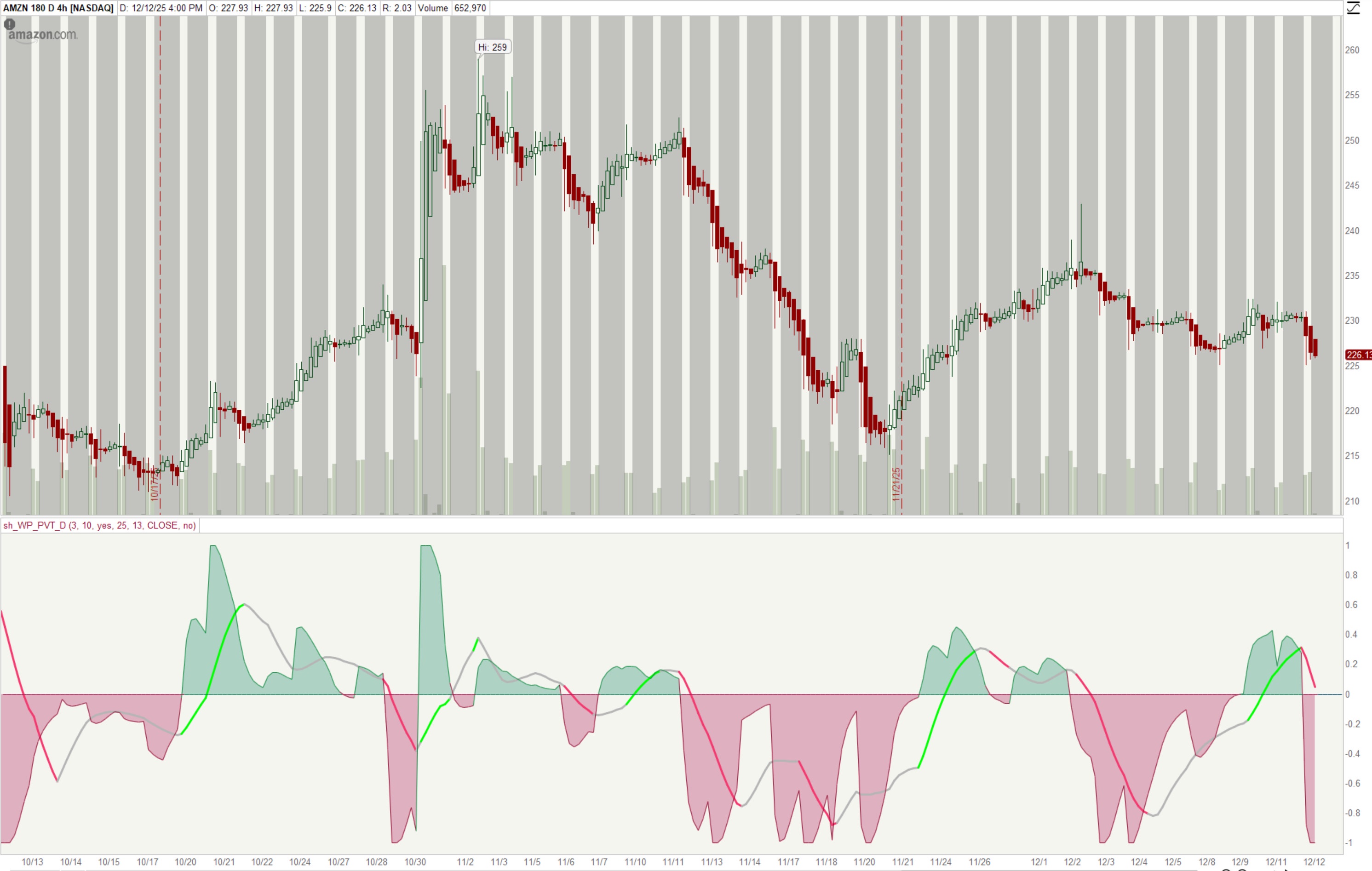
Normalized Price Volume Trend Indicator (PVT)
This is based on https://www.tradingview.com/script/zRe2J3M5-PVT-Osc-Price-Volume-Trend-Oscillator-UTS/
The author states:
The oscillator version of the Price Volume Trend indicator (PVT) can be considered as a leading indicator of future price movements. The PVT Indicator is similar to the On Balance Volume indicator as it is also used to measure the strength of a trend.
The difference between the OBV and the PVT is that where the OBV adds all volumes when price achieves higher daily closes and subtracts them when price registers a lower daily close, the PVT adds or subtracts only a portion of the volume from the cumulative total in relation to a percentage change in price.
The general market consensus is that this difference enables the PVT to more accurately represent money flow volumes in and out of a stock or commodity.
The PVT has been designed so that it is capable of forecasting directional changes in price. For instance, if the price of a stock is rising and the PVT begins to fall, then this is indicative that a price reversal could occur very soon.
The general consensus is that the PVT is more accurate at detecting new trading opportunities than the OBV because of the differences in their construction. The OBV is designed so that it adds the same amount of volume whether the price closes upwards by just a small fraction or by multiples of its day opening value. On the other hand, the PVT adds volume proportional to the amount the price closed higher.
General Usage
Plain old PVT can be used to confirm trends, as well as spot possible trading signals due to divergences.
A benefit of the oscillator version is that it can produce LONG or SHORT signals on zero line cross.
Or controversy, disallow LONG trades in bearish territory and disallow SHORT trades in bullish territory.
Code:
# sh_WP_pvt
# created by wpnet50 12/14/2025
# https://www.tradingview.com/script/zRe2J3M5-PVT-Osc-Price-Volume-Trend-Oscillator-UTS/
# https://usethinkscript.com/threads/max-and-absolutevalue-in-thinkorswim.6928/
# From the author
# Plain old PVT can be used to confirm trends, as well as spot possible trading signals due to divergences.
# A benefit of the oscillator version is that it can produce LONG or SHORT signals on zero line cross.
# Or controversy, disallow LONG trades in bearish territory and disallow SHORT trades in bullish territory.

declare lower;
declare once_per_bar;

input pvtS = 3;
input pvtL = 10;
input norPVT = yes;
input normLB = 25;
input maL = 13;
input src = close;

# GLOBAL COLORS
DefineGlobalColor("Green", CreateColor(0,255,0));
DefineGlobalColor("BGreen", CreateColor(34,208,104));
DefineGlobalColor("DGreen", CreateColor(8,136,58));
DefineGlobalColor("DDGreen", CreateColor(4,68,30));
DefineGlobalColor("BRed", CreateColor(242,58,110));
DefineGlobalColor("DRed", CreateColor(146,6,44));
DefineGlobalColor("DDRed", CreateColor(82,6,26));
DefineGlobalColor("Gray", CreateColor(181,181,181));
DefineGlobalColor("DGray", CreateColor(87,78,80));
DefineGlobalColor("BGray", CreateColor(138,128,132));
DefineGlobalColor("Orange", CreateColor(252,158,4));
DefineGlobalColor("SRed", CreateColor(176,18,80));
DefineGlobalColor("SGreen", CreateColor(12,134,94));
DefineGlobalColor("BBlue", CreateColor(32,170,176));
DefineGlobalColor("Blue", CreateColor(105,108,245));
DefineGlobalColor("DBlue", CreateColor(41,12,204));
DefineGlobalColor("DDBlue", CreateColor(22,5,120));

#def rng = 1;

def changeP = (src - src[1]) / src[1];
def volAdj = changeP * volume;

# https://usethinkscript.com/threads/using-compoundvalue-function.2010/
#The 1st parameter is how many bars to initialize your value for (many times, just 1).
#The 2nd parameter is the formula once your variable is initialized.
#The 3rd parameter is the value to initialize your variable with.

# def PVT = CompoundValue(1, if (IsNaN(close[1])) then 0 else PVT[1] + (close - close[1]) / close[1] * volume, 0);
 def PVT = CompoundValue(1, if (IsNaN(close[1])) then 0 else PVT[1] + volAdj, 0);

#def volS = Sum(volume, 50);
#def chS = Sum(changeP, 50);
#def pvtA = chS/volS;

def shVT = ExpAverage(PVT, pvtS);
def lnVT = ExpAverage(PVT, pvtL);
def PVT1 = shVT - lnVT;
def absPVT = AbsValue(PVT1);
def maxABS = Highest(absPVT, 25);
def nPVT = PVT1/maxABS;

def valPVT = if norPVT then nPVT else PVT1;
def valSigPVT = SimpleMovingAvg(valPVT, maL);

plot VTL = valPVT;
VTL.SetPaintingStrategy(PaintingStrategy.LINE);
#define color change on PVT line
VTL.AssignValueColor(if valPVT >0 then GlobalColor("DGreen") else GlobalColor("DRed") );
VTL.SetLineWeight(1);
VTL.HideTitle();
VTL.HideBubble();
plot VTS = valSigPVT;
VTS.SetPaintingStrategy(PaintingStrategy.LINE);
VTS.SetLineWeight(3);
#define color change on PVT signal line
def angPVT = 180*ATan((valSigPVT - valSigPVT[2])/2)/Double.Pi;
def angPVTV = Round(angPVT, 2);

input showANG = no;
AddLabel(showANG , " Angle: " + angPVTV + " ", GlobalColor("DGreen"));

VTS.AssignValueColor(if angPVT > 1.2 and valPVT > 0 then GlobalColor("Green") else if angPVT <= -1.2 and valpVT < 0 then GlobalColor("BRed") else GlobalColor("Gray"));
VTS.HideTitle();
VTS.HideBubble();

def zeroVL = 0;
plot ZL = zeroVL;
ZL.SetPaintingStrategy(PaintingStrategy.HORIZONTAL);
ZL.AssignValueColor(if valPVT <= 0 then GlobalColor("SRed") else GlobalColor("SGreen"));
ZL.SetLineWeight(1);
Zl.HideTitle();
ZL.HideBubble();
AddCloud(ZL, VTL, GlobalColor("SRed"), GlobalColor("SGreen"));
The signal line (moving average in bold) coloring was modified to allow for alignment with the faster PVT line - it allows for more conservative entries (and as always will have some inherent lag).
Last edited:


