Near Zero Lag Williams Alligator for ThinkOrSwim

Sesqui

Member
VIP
I read somewhere that one of the cons of using Williams Alligator is that it is a lagging indicator based on smoothed moving averages, causing delayed entries and exits.

I really liked using the Alligator but recalling the potential for late entries got me to thinking that maybe this indicator could be made better by removing the lag.

So I replaced the moving averages with Dr Ehlers Instantaneous Trend Lines (ITrend).

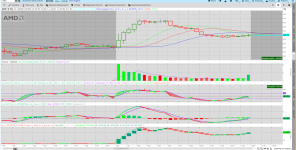
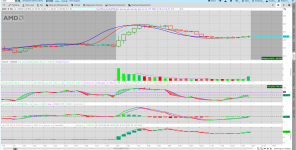
But the results were not as promising as I hoped. The following screenshot shows the ITrend variant of the Williams Alligator wakes up to feed pretty much as late as the standard alligator does.

The second screenshot shows the standard Williams Alligator applied to the same data, missing the opening wave entirely.

Perhaps there is a better way to reduce the lag...

1769320821326.png


The following screenshot shows the regular Williams Alligator, which does indeed appear to open up too late, at least in this example.

1769320845833.png


CSS:
# Near Zero-Lag Williams Alligator Using the Dr Ehlers ITrend

#*** ITrend with virtually zero lag from CH2-3 of "Cybernetic Analysis for Stocks and
# Futures" by Dr Ehlers. It subtracts a High-Pass Filter (HPF) from the data to get the low frequency
# data containing the trend. And since HPFs have virtually no lag, this ITrend is virtually
# zero lag.
 

declare upper;

input Show_Cycle = yes;
input ShowITRENDDC = yes;
input ShowITRENDfast = yes;
input ShowITRENDslow = yes;

input Show_CrossOver = yes;
input Show_fastTrigger = yes;
input Show_slowTrigger = yes;
input ShowHMA = no;
input showlabels = no;
input OpenTime = 0715;
input CloseTime = 1600;
input MinutesPerBar = 15;


#****** The Dr Ehlers ITrend, per CH 2-3 of "Cybernetic analysis for Stocks and Futures",
# has essentially no lag since it is a HPF subtracted from the price data.
# Refer to Figure 3.6 for the code:

script getITrend {
    input Price = HL2;
    input Length = 20;

    def alpha = 2 / (Length + 1);
    def ITrend = CompoundValue(6,
                 (alpha - alpha * alpha / 4) * Price +
                 .5 * alpha * alpha * Price[1] -
                 (alpha - .75 * alpha * alpha) * Price[2] +
                 2 * (1 - alpha) * ITrend[1] -
                 (1 - alpha) * (1 - alpha) * ITrend[2],
            (Price + 2 * Price[1] + Price[2]) / 4);

    plot Trend = ITrend;

} # End Script getItrend{}

#===============================================
input price = HL2;
input Jaw = 13;
input Teeth = 8;
input Lips = 5;

def ITrend_JAW = getITrend(price[8], Jaw);
def ITrend_TEETH = getITrend(price[5], Teeth);
def ITrend_LIPS = getITrend(price[3], Lips);

#PLOTS

plot pJAW = ITrend_JAW;
pJAW.SetLineWeight(2);
pJAW.HideBubble();
pJAW.AssignValueColor(Color.BLUE);

plot pTEETH = ITrend_TEETH;
pTEETH.SetLineWeight(2);
pTEETH.HideBubble();
pTEETH.AssignValueColor(Color.RED);

plot pLIPS = ITrend_LIPS;
pLIPS.SetLineWeight(2);
pLIPS.HideBubble();
pLIPS.AssignValueColor(Color.CYAN);
 

Attachments
  • 1769307608886.png
    1769307608886.png
    210 KB · Views: 200
  • 1769307755790.png
    1769307755790.png
    210.3 KB · Views: 228
Last edited:

Join useThinkScript to post your question to a community of 21,000+ developers and traders.

I asked Grok AI to backtest the optimal settings for a Williams Alligator using Hull averages for day trading. It backtested two years of data on QQQ and came up with settings of 5, 27, and 29 on a five minute chart. The total return over two years came to 93% which ain't too shabby. I'm taking a look at it on charts now.
 

Attachments

  • Screenshot 2026-01-25 at 1.45.54 PM.png
    Screenshot 2026-01-25 at 1.45.54 PM.png
    446 KB · Views: 89
Last edited:
Code:
# Settings
input Fast_HMA = 5;
input Pivot_HMA = 27;
input Slow_HMA = 29;
input Highlight_Fast = no;
input Highlight_Pivot = no;
input Highlight_Slow = no;

# Calculations
def price = close;
def FastValue = HullMovingAvg(price, Fast_HMA);
def PivotValue = HullMovingAvg(price, Pivot_HMA);
def SlowValue = HullMovingAvg(price, Slow_HMA);

# Add Clouds
DefineGlobalColor("Fast Long", Color.GREEN);
DefineGlobalColor("Fast Short", Color.RED);
AddCloud(FastValue, PivotValue, GlobalColor("Fast Long"), GlobalColor("Fast Short"));
DefineGlobalColor("Slow Long", Color.CYAN);
DefineGlobalColor("Slow Short", Color.LIGHT_ORANGE);
AddCloud(PivotValue, SlowValue, GlobalColor("Slow Long"), GlobalColor("Slow Short"));

# Trend Analysis
def bullish = price >= FastValue and price >= PivotValue and price >= SlowValue;
def bearish = price <= FastValue and price <= PivotValue and price <= SlowValue;

# Add Pivot Plot
DefineGlobalColor("Pivot Highlight", Color.LIGHT_GRAY);
plot Pivot = if Highlight_Pivot then PivotValue else Double.nan;
Pivot.AssignValueColor(GlobalColor("Pivot Highlight"));

# Add Fast Plot
DefineGlobalColor("Fast Highlight", Color.LIGHT_GRAY);
plot Fast = if Highlight_Fast then FastValue else Double.nan;
Pivot.AssignValueColor(GlobalColor("Fast Highlight"));

# Add Slow Plot
DefineGlobalColor("Slow Highlight", Color.LIGHT_GRAY);
plot Slow = if Highlight_Slow then SlowValue else Double.nan;
Pivot.AssignValueColor(GlobalColor("Slow Highlight"));
 
The code above is adapted from a three EMA indicator I found on this forum. I applied the backtested settings using the Hull MA. It looks pretty good.
 
I remember looking at it a few years ago but I set it aside for some reason that I can't recall. Maybe I'll take another look at it.
 
I read somewhere that one of the cons of using Williams Alligator is that it is a lagging indicator based on smoothed moving averages, causing delayed entries and exits.

I really liked using the Alligator but recalling the potential for late entries got me to thinking that maybe this indicator could be made better by removing the lag.

So I replaced the moving averages with Dr Ehlers Instantaneous Trend Lines (ITrend).

But the results were not as promising as I hoped. The following screenshot shows the ITrend variant of the Williams Alligator wakes up to feed pretty much as late as the standard alligator does.

The second screenshot shows the standard Williams Alligator applied to the same data, missing the opening wave entirely.

Perhaps there is a better way to reduce the lag...

View attachment 26872

The following screenshot shows the regular Williams Alligator, which does indeed appear to open up too late, at least in this example.

View attachment 26873


CSS:
# Near Zero-Lag Williams Alligator Using the Dr Ehlers ITrend

#*** ITrend with virtually zero lag from CH2-3 of "Cybernetic Analysis for Stocks and
# Futures" by Dr Ehlers. It subtracts a High-Pass Filter (HPF) from the data to get the low frequency
# data containing the trend. And since HPFs have virtually no lag, this ITrend is virtually
# zero lag.
 

declare upper;

input Show_Cycle = yes;
input ShowITRENDDC = yes;
input ShowITRENDfast = yes;
input ShowITRENDslow = yes;

input Show_CrossOver = yes;
input Show_fastTrigger = yes;
input Show_slowTrigger = yes;
input ShowHMA = no;
input showlabels = no;
input OpenTime = 0715;
input CloseTime = 1600;
input MinutesPerBar = 15;


#****** The Dr Ehlers ITrend, per CH 2-3 of "Cybernetic analysis for Stocks and Futures",
# has essentially no lag since it is a HPF subtracted from the price data.
# Refer to Figure 3.6 for the code:

script getITrend {
    input Price = HL2;
    input Length = 20;

    def alpha = 2 / (Length + 1);
    def ITrend = CompoundValue(6,
                 (alpha - alpha * alpha / 4) * Price +
                 .5 * alpha * alpha * Price[1] -
                 (alpha - .75 * alpha * alpha) * Price[2] +
                 2 * (1 - alpha) * ITrend[1] -
                 (1 - alpha) * (1 - alpha) * ITrend[2],
            (Price + 2 * Price[1] + Price[2]) / 4);

    plot Trend = ITrend;

} # End Script getItrend{}

#===============================================
input price = HL2;
input Jaw = 13;
input Teeth = 8;
input Lips = 5;

def ITrend_JAW = getITrend(price[8], Jaw);
def ITrend_TEETH = getITrend(price[5], Teeth);
def ITrend_LIPS = getITrend(price[3], Lips);

#PLOTS

plot pJAW = ITrend_JAW;
pJAW.SetLineWeight(2);
pJAW.HideBubble();
pJAW.AssignValueColor(Color.BLUE);

plot pTEETH = ITrend_TEETH;
pTEETH.SetLineWeight(2);
pTEETH.HideBubble();
pTEETH.AssignValueColor(Color.RED);

plot pLIPS = ITrend_LIPS;
pLIPS.SetLineWeight(2);
pLIPS.HideBubble();
pLIPS.AssignValueColor(Color.CYAN);
Could you give the acceleration deceleration OSC?
 

Similar threads

Not the exact question you're looking for?

Start a new thread and receive assistance from our community.

87k+ Posts
1344 Online
Create Post

Similar threads

Similar threads

The Market Trading Game Changer

Join 2,500+ subscribers inside the useThinkScript VIP Membership Club
  • Exclusive indicators
  • Proven strategies & setups
  • Private Discord community
  • ‘Buy The Dip’ signal alerts
  • Exclusive members-only content
  • Add-ons and resources
  • 1 full year of unlimited support

Frequently Asked Questions

What is useThinkScript?

useThinkScript is the #1 community of stock market investors using indicators and other tools to power their trading strategies. Traders of all skill levels use our forums to learn about scripting and indicators, help each other, and discover new ways to gain an edge in the markets.

How do I get started?

We get it. Our forum can be intimidating, if not overwhelming. With thousands of topics, tens of thousands of posts, our community has created an incredibly deep knowledge base for stock traders. No one can ever exhaust every resource provided on our site.

If you are new, or just looking for guidance, here are some helpful links to get you started.

What are the benefits of VIP Membership?
VIP members get exclusive access to these proven and tested premium indicators: Buy the Dip, Advanced Market Moves 2.0, Take Profit, and Volatility Trading Range. In addition, VIP members get access to over 50 VIP-only custom indicators, add-ons, and strategies, private VIP-only forums, private Discord channel to discuss trades and strategies in real-time, customer support, trade alerts, and much more. Learn all about VIP membership here.
How can I access the premium indicators?
To access the premium indicators, which are plug and play ready, sign up for VIP membership here.
Back
Top