

mod note:
This indicator gives a stacked read on market bias across three timeframes so a trader can see, at a glance, whether buyers or sellers control the tape.
Market bias matters because it tells the trader which side has the advantage right now, and trading with that advantage keeps them out of chop, out of failed reversal attempts, and out of entries that unknowingly fight the dominant flow.
Bias keeps the trader aligned with the side that is already winning and removes the urge to fight the tape.
This Binary indicator that has 5 different lengths of an indicator, spread out over 3 time frames.
Each time frame also has a consensus line.
the shortest length is on the bottom and rises up to the highest length, the same hold true for the time frames current time frame on the bottom and then the next higher time frame
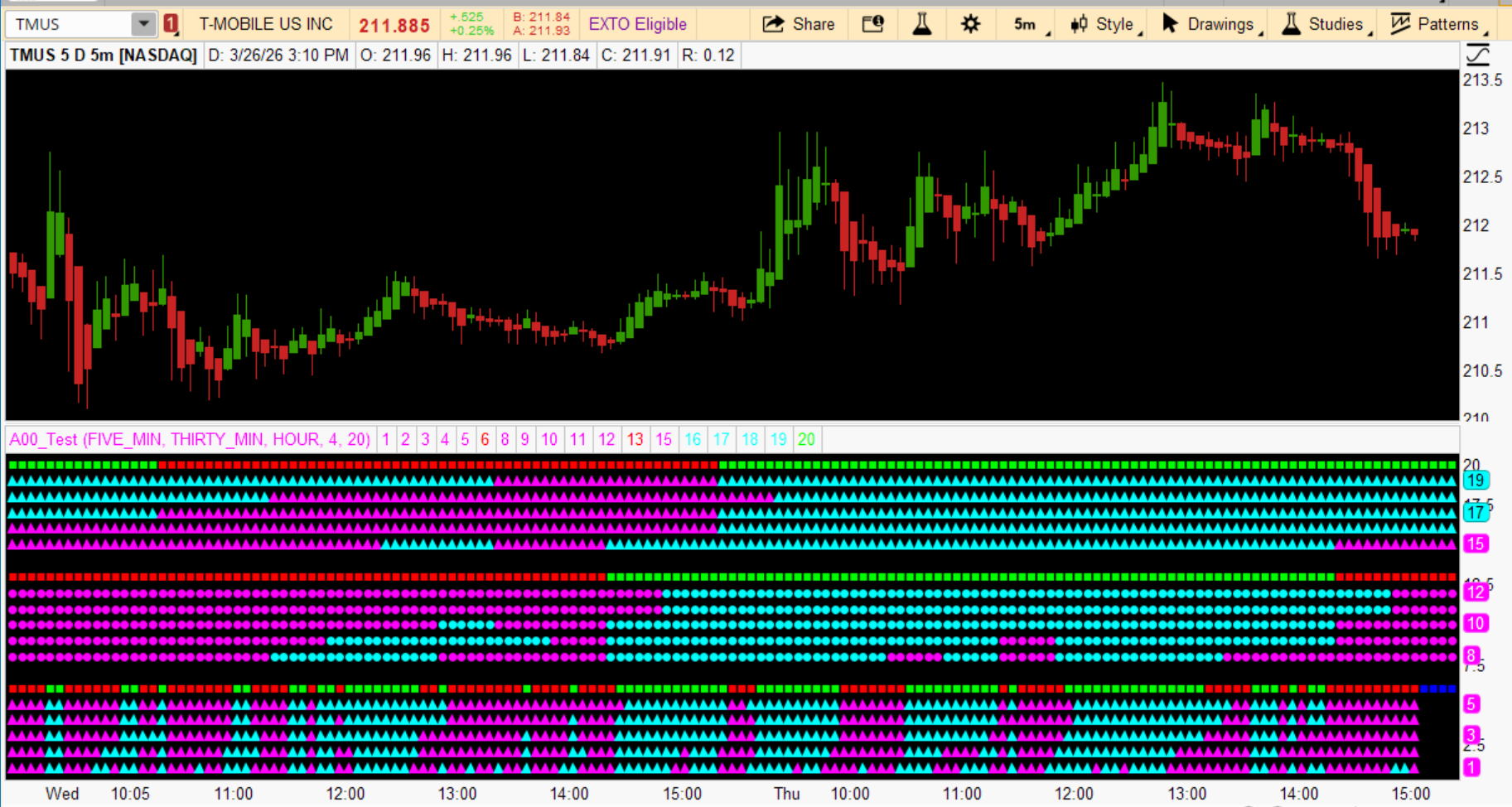
So here is the code
This indicator gives a stacked read on market bias across three timeframes so a trader can see, at a glance, whether buyers or sellers control the tape.
Market bias matters because it tells the trader which side has the advantage right now, and trading with that advantage keeps them out of chop, out of failed reversal attempts, and out of entries that unknowingly fight the dominant flow.
Bias keeps the trader aligned with the side that is already winning and removes the urge to fight the tape.
This Binary indicator that has 5 different lengths of an indicator, spread out over 3 time frames.
Each time frame also has a consensus line.
the shortest length is on the bottom and rises up to the highest length, the same hold true for the time frames current time frame on the bottom and then the next higher time frame
| Transition | Action |
|---|---|
| A single five‑minute dot flips from magenta to cyan while the rest of the row is still mixed. | Treat it as the first sign of buyer pressure. Do nothing yet. Wait for at least three dots to agree before acting. |
| A single five‑minute dot flips from cyan to magenta while the row was previously mostly cyan. | Read it as early seller pressure. Tighten risk if already long. Do not reverse until the row shows majority agreement. |
| The five‑minute row crosses the threshold where three or more dots flip to cyan at once. | Recognize this as the actionable long trigger. Prepare to enter long if price structure supports it. Avoid shorts immediately. |
| The five‑minute row crosses the threshold where three or more dots flip to magenta at once. | Recognize this as the actionable short trigger. Exit longs. Only take shorts if allowed. Avoid counter‑trend longs. |
| The five‑minute square flips green after being red. | Treat this as confirmation that the lower timeframe has shifted to buy‑side control. Enter long or tighten stops on existing longs. |
| The five‑minute square flips red after being green. | Treat this as confirmation that sellers now control the lower timeframe. Exit longs. Do not fade the flip. |
| The thirty‑minute row flips to majority cyan while the five‑minute row is already cyan. | Increase confidence in long setups. Take normal size. Expect cleaner follow‑through. |
| The thirty‑minute row flips to majority magenta while the five‑minute row is already magenta. | Increase confidence in short setups. Take normal size. Expect cleaner follow‑through. |
| The thirty‑minute square flips green while the five‑minute row is already cyan. | Treat this as higher‑timeframe confirmation. Hold longs with conviction. Avoid premature exits. |
| The thirty‑minute square flips red while the five‑minute row is already magenta. | Treat this as higher‑timeframe confirmation. Hold shorts with conviction. Avoid counter‑trend longs. |
| The hourly row flips to majority cyan while lower timeframes are already cyan. | Recognize this as full alignment. Expect trend‑side continuation. Trade with normal size and standard stops. |
| The hourly row flips to majority magenta while lower timeframes are already magenta. | Recognize this as full alignment. Expect trend‑side continuation. Trade shorts with normal size if permitted. |
| The hourly square flips green after a long period of red. | Treat this as a major regime shift. Favor long setups until evidence changes. |
| The hourly square flips red after a long period of green. | Treat this as a major regime shift. Avoid longs. Favor shorts if allowed. |
| The five‑minute row flips against the thirty‑minute and hourly rows. | Identify this as a counter‑trend move. Do not chase it. Wait for realignment before entering. |
| The five‑minute square flips against the thirty‑minute and hourly squares. | Treat this as a temporary push against the dominant trend. Stay flat or reduce size until alignment returns. |
| Analysis | Action |
|---|---|
| A row of five dots on the five‑minute line turning mostly cyan or mostly magenta. | Treat the row as the immediate bias. Go long only when most dots are cyan. Avoid or reduce size when the row is mixed. Do not short when the row is cyan. |
| A green or red square on the five‑minute line. | Use the square as the confirmation switch. Enter long only when the square is green. Stay out or scale down when it is red. Never counter‑trade the square. |
| A row of five dots on the thirty‑minute line showing cyan or magenta clusters. | Check whether the higher timeframe supports the five‑minute direction. Take normal size when both rows agree. Treat disagreement as a warning and tighten risk. |
| A green or red square on the thirty‑minute line. | Use the square as the trend filter. Only take long setups when the square is green. Skip long setups when the square is red unless the trader is intentionally taking a counter‑trend scalp. |
| A row of five dots on the hourly line showing cyan or magenta clusters. | Read this as the background trend. Favor trades that move in the same direction as the hourly row. Avoid fighting the hourly row unless the trader is experienced, which novices are not. |
| A green or red square on the hourly line. | Treat this as the anchor. Only take long trades when the hourly square is green. When it is red, treat all long setups as low‑quality and avoid them. |
| All three squares turning green at the same time. | Take long setups with confidence. Expect cleaner follow‑through. Use normal size and standard stops. |
| All three squares turning red at the same time. | Avoid longs entirely. Only take shorts if the trader is allowed to short. If not, stay flat and wait for alignment to flip. |
| Five‑minute row flips color while the thirty‑minute and hourly rows stay opposite. | Treat the move as a counter‑trend push. Do not chase it. Wait for the five‑minute row to realign with the higher timeframes before entering. |
| Yellow bubbles labeling each timeframe. | Use the labels to keep orientation clear. Do not confuse which row belongs to which timeframe when making decisions. |
So here is the code
Code:
##############
Declare Lower;
# GLOBAL DEFINITIONS

DefineGlobalColor("TrendUp", Color.Cyan);
DefineGlobalColor("TrendDown", Color.Magenta);

input agg = AggregationPeriod.FIVE_MIN;
input agg2 = AggregationPeriod.THIRTY_MIN;
input agg3 = AggregationPeriod.HOUR;
input DotSize = 4;
input n = 20;
def n1  = n + 1;
def O = Open(Period = AGG);
def C = Close(Period =AGG);
def O2 = Open(Period = AGG2);
def C2 = Close(Period =AGG2);
def O3 = Open(Period = AGG3);
def C3 = Close(Period =AGG3);
Def BIAS3 = ((O+C)/2 - Average ((O+C)/2,3))/ Average((O+C)/2,3)*100;
Def BIAS6 = ((O+C)/2 - Average ((O+C)/2,6))/ Average ((O+C)/2,6)*100;
Def BIAS9 = ((O+C)/2 - Average ((O+C)/2,9))/ Average ((O+C)/2,9)*100;
Def BIAS12 = ((O+C)/2 - Average ((O+C)/2,12))/ Average ((O+C)/2,12)*100;
Def BIAS15 = ((O+C)/2 - Average ((O+C)/2,15))/ Average ((O+C)/2,15)*100;
Def A3 = If(Bias3>=0,1,0);
Def A6 = If(Bias6>=0,1,0);
Def A9 = If(Bias9>=0,1,0);
Def A12= If(Bias12>=0,1,0);
Def A15 = If(Bias15>=0,1,0);

Def BBIAS3 = ((O2+C2)/2 -Average((O2+C2)/2,3))/ Average((O2+C2)/2,3)*100;
Def BBIAS6 = ((O2+C2)/2 - Average((O2+C2)/2,6))/ Average((O2+C2)/2,6)*100;
Def BBIAS9 = ((O2+C2)/2 - Average((O2+C2)/2,9))/ Average((O2+C2)/2,9)*100;
Def BBIAS12 = ((O2+C2)/2 - Average((O2+C2)/2,12))/ Average((O2+C2)/2,12)*100;
Def BBIAS15 = ((O2+C2)/2 - Average((O2+C2)/2,15))/ Average((O2+C2)/2,15)*100;
Def B3 = If(BBias3>=0,1,0);
Def B6 = If(BBias6>=0,1,0);
Def B9 = If(BBias9>=0,1,0);
Def B12= If(BBias12>=0,1,0);
Def B15 = If(BBias15>=0,1,0);

Def CBIAS3 = ((O3+C3)/2 -Average((O3+C3)/2,3))/ Average((O3+C3)/2,3)*100;
Def CBIAS6 = ((O3+C3)/2 - Average((O3+C3)/2,6))/ Average((O3+C3)/2,6)*100;
Def CBIAS9 = ((O3+C3)/2 - Average((O3+C3)/2,9))/ Average((O3+C3)/2,9)*100;
Def CBIAS12 = ((O3+C3)/2 - Average((O3+C3)/2,12))/ Average((O3+C3)/2,12)*100;
Def CBIAS15 = ((O3+C3)/2 - Average((O3+C3)/2,15))/ Average((O3+C3)/2,15)*100;
Def CC3 = If(CBias3>=0,1,0);
Def CC6 = If(CBias6>=0,1,0);
Def CC9 = If(CBias9>=0,1,0);
Def CC12= If(CBias12>=0,1,0);
Def CC15 = If(CBias15>=0,1,0);

plot A3_Dot = if IsNaN(c) then Double.NaN else 1;
A3_Dot.SetPaintingStrategy(PaintingStrategy.TRIANGLES);
A3_Dot.SetLineWeight(DotSize);
A3_Dot.AssignValueColor(if A3 < 1 then GlobalColor("TrendDown") else GlobalColor("TrendUp"));
AddChartBubble(!IsNaN(c[n1]) and IsNaN(c[n]), 1, (agg/1000/60) + " min", Color.Yellow, yes);
plot A6_Dot = if IsNaN(c) then Double.NaN else 2;
A6_Dot.SetPaintingStrategy(PaintingStrategy.TRIANGLES);
A6_Dot.SetLineWeight(DotSize);
A6_Dot.AssignValueColor(if A6 < 1 then GlobalColor("TrendDown") else GlobalColor("TrendUp"));
AddChartBubble(!IsNaN(c[n1]) and IsNaN(c[n]), 2, (agg/1000/60) + " min", Color.Yellow, yes);
plot A9_Dot = if IsNaN(c) then Double.NaN else 3;
A9_Dot.SetPaintingStrategy(PaintingStrategy.TRIANGLES);
A9_Dot.SetLineWeight(DotSize);
A9_Dot.AssignValueColor(if A9 < 1 then GlobalColor("TrendDown") else GlobalColor("TrendUp"));
AddChartBubble(!IsNaN(c[n1]) and IsNaN(c[n]), 3, (agg/1000/60) + " min", Color.Yellow, yes);
plot A12_Dot = if IsNaN(c) then Double.NaN else 4;
A12_Dot.SetPaintingStrategy(PaintingStrategy.TRIANGLES);
A12_Dot.SetLineWeight(DotSize);
A12_Dot.AssignValueColor(if A12 < 1 then GlobalColor("TrendDown") else GlobalColor("TrendUp"));
AddChartBubble(!IsNaN(c[n1]) and IsNaN(c[n]), 4, (agg/1000/60) + " min", Color.Yellow, yes);
plot A15_Dot = if IsNaN(c) then Double.NaN else 5;
A15_Dot.SetPaintingStrategy(PaintingStrategy.TRIANGLES);
A15_Dot.SetLineWeight(DotSize);
A15_Dot.AssignValueColor(if A15 < 1 then GlobalColor("TrendDown") else GlobalColor("TrendUp"));
AddChartBubble(!IsNaN(c[n1]) and IsNaN(c[n]), 5, (agg/1000/60) + " min", Color.Yellow, yes);
plot MTF_ADot = 6;
MTF_ADot.SetPaintingStrategy(PaintingStrategy.SQUARES);
MTF_ADot.SetLineWeight(lineWeight = 3);
MTF_ADot.DefineColor("Buy", Color.Green);
MTF_ADot.DefineColor("Sell", Color.red);
MTF_ADot.AssignValueColor ( if (A3 + A6 + A9 + A12 + A15) >= 3 then MTF_ADot.Color("Buy") else MTF_ADot.Color("Sell"));

plot B3_Dot = if IsNaN(c2) then Double.NaN else 8;
B3_Dot.SetPaintingStrategy(PaintingStrategy.Points);
B3_Dot.SetLineWeight(DotSize);
B3_Dot.AssignValueColor(if B3 < 1 then GlobalColor("TrendDown") else GlobalColor("TrendUp"));
AddChartBubble(!IsNaN(c2[n1]) and IsNaN(c2[n]), 8, (agg2/1000/60) + " min", Color.Yellow, yes);
plot B6_Dot = if IsNaN(c2) then Double.NaN else 9;
B6_Dot.SetPaintingStrategy(PaintingStrategy.Points);
B6_Dot.SetLineWeight(DotSize);
B6_Dot.AssignValueColor(if B6 < 1 then GlobalColor("TrendDown") else GlobalColor("TrendUp"));
AddChartBubble(!IsNaN(c2[n1]) and IsNaN(c2[n]), 9, (agg2/1000/60) + " min", Color.Yellow, yes);
plot B9_Dot = if IsNaN(c2) then Double.NaN else 10;
B9_Dot.SetPaintingStrategy(PaintingStrategy.Points);
B9_Dot.SetLineWeight(DotSize);
B9_Dot.AssignValueColor(if B9 < 1 then GlobalColor("TrendDown") else GlobalColor("TrendUp"));
AddChartBubble(!IsNaN(c2[n1]) and IsNaN(c2[n]), 10, (agg2/1000/60) + " min", Color.Yellow, yes);
plot B12_Dot = if IsNaN(c2) then Double.NaN else 11;
B12_Dot.SetPaintingStrategy(PaintingStrategy.Points);
B12_Dot.SetLineWeight(DotSize);
B12_Dot.AssignValueColor(if B12 < 1 then GlobalColor("TrendDown") else GlobalColor("TrendUp"));
AddChartBubble(!IsNaN(c2[n1]) and IsNaN(c2[n]), 11, (agg2/1000/60) + " min", Color.Yellow, yes);
plot B15_Dot = if IsNaN(c2) then Double.NaN else 12;
B15_Dot.SetPaintingStrategy(PaintingStrategy.Points);
B15_Dot.SetLineWeight(DotSize);
B15_Dot.AssignValueColor(if B15 < 1 then GlobalColor("TrendDown") else GlobalColor("TrendUp"));
AddChartBubble(!IsNaN(c[n1]) and IsNaN(c2[n]), 12, (agg2/1000/60) + " min", Color.Yellow, yes);
plot MTF_BDot = 13;
MTF_BDot.SetPaintingStrategy(PaintingStrategy.SQUARES);
MTF_BDot.SetLineWeight(lineWeight = 3);
MTF_BDot.DefineColor("Buy", Color.Green);
MTF_BDot.DefineColor("Sell", Color.red);
MTF_BDot.AssignValueColor ( if (B3 + B6 + B9 + B12 + B15) >= 3 then MTF_BDot.Color("Buy") else MTF_BDot.Color("Sell"));

plot CC3_Dot = if IsNaN(c3) then Double.NaN else 15;
CC3_Dot.SetPaintingStrategy(PaintingStrategy.Triangles);
CC3_Dot.SetLineWeight(DotSize);
CC3_Dot.AssignValueColor(if CC3 < 1 then GlobalColor("TrendDown") else GlobalColor("TrendUp"));
AddChartBubble(!IsNaN(c3[n1]) and IsNaN(c3[n]), 15, (agg3/1000/60) + " min", Color.Yellow, yes);
plot CC6_Dot = if IsNaN(c3) then Double.NaN else 16;
CC6_Dot.SetPaintingStrategy(PaintingStrategy.Triangles);
CC6_Dot.SetLineWeight(DotSize);
CC6_Dot.AssignValueColor(if CC6 < 1 then GlobalColor("TrendDown") else GlobalColor("TrendUp"));
AddChartBubble(!IsNaN(c3[n1]) and IsNaN(c3[n]), 16, (agg3/1000/60) + " min", Color.Yellow, yes);
plot CC9_Dot = if IsNaN(c3) then Double.NaN else 17;
CC9_Dot.SetPaintingStrategy(PaintingStrategy.Triangles);
CC9_Dot.SetLineWeight(DotSize);
CC9_Dot.AssignValueColor(if CC9 < 1 then GlobalColor("TrendDown") else GlobalColor("TrendUp"));
AddChartBubble(!IsNaN(c3[n1]) and IsNaN(c3[n]), 17, (agg3/1000/60) + " min", Color.Yellow, yes);
plot CC12_Dot = if IsNaN(c3) then Double.NaN else 18;
CC12_Dot.SetPaintingStrategy(PaintingStrategy.Triangles);
CC12_Dot.SetLineWeight(DotSize);
CC12_Dot.AssignValueColor(if CC12 < 1 then GlobalColor("TrendDown") else GlobalColor("TrendUp"));
AddChartBubble(!IsNaN(c3[n1]) and IsNaN(c3[n]), 18, (agg3/1000/60) + " min", Color.Yellow, yes);
plot CC15_Dot = if IsNaN(c3) then Double.NaN else 19;
CC15_Dot.SetPaintingStrategy(PaintingStrategy.Triangles);
CC15_Dot.SetLineWeight(DotSize);
CC15_Dot.AssignValueColor(if CC15 < 1 then GlobalColor("TrendDown") else GlobalColor("TrendUp"));
AddChartBubble(!IsNaN(c3[n1]) and IsNaN(c3[n]), 19, (agg3/1000/60) + " min", Color.Yellow, yes);
plot MTF_CDot = 20;
MTF_CDot.SetPaintingStrategy(PaintingStrategy.SQUARES);
MTF_CDot.SetLineWeight(lineWeight = 3);
MTF_CDot.DefineColor("Buy", Color.Green);
MTF_CDot.DefineColor("Sell", Color.red);
MTF_CDot.AssignValueColor ( if (CC3 + CC6 + CC9 + CC12 + CC15) >= 3 then MTF_CDot.Color("Buy") else MTF_CDot.Color("Sell"));
Last edited by a moderator:


