Momentum Tide [Alpha Extract] For ThinkOrSwim

FreefallJM03

Active member
VIP
The author states:
This is a momentum-based trend identification system
Unlike traditional momentum oscillators, Momentum Tide integrates directly with price action.
The three-state system filters ranging periods using a momentum strength measurement.

VxgxVza.png


Here is the original Tradingview code:
https://www.tradingview.com/script/6Rm7rtzu-Momentum-Tide-Alpha-Extract/

For the new ThinkOrSwim code, you must scroll down to the next post
 
Last edited by a moderator:
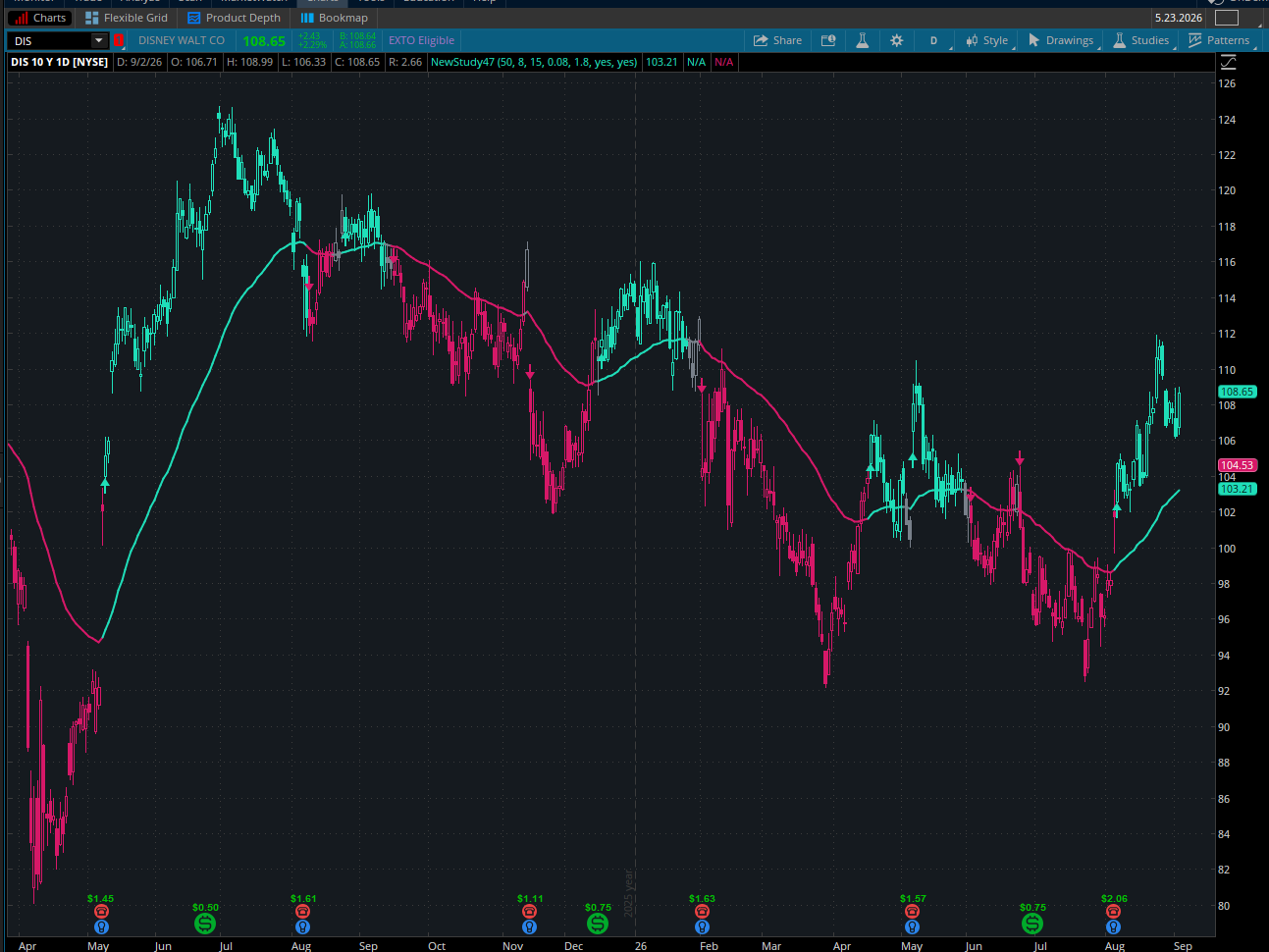
Screenshot 2026-09-02 142512.png

⭐ Quick Summary: How to Use Momentum Tide​

1. Baseline Trend
  • The EMA baseline (default 50‑period) is your primary trend anchor.
  • Price above baseline → bullish bias
  • Price below baseline → bearish bias
2. Momentum Tide Signal
  • The core signal is a normalized deviation of price from the baseline.
  • It’s ATR‑scaled and run through a tanh curve to compress extremes.
  • This produces a smooth, stable momentum reading between ‑1 and +1.
3. Trend States
Momentum Tide classifies each bar into:
StateMeaning
+1 (Bull)Momentum strongly positive
0 (Neutral)Inside the ATR neutral band
‑1 (Bear)Momentum strongly negative
The neutral band prevents “whipsaw flips.”

4. Bar Colors
  • Green → Bullish momentum
  • Red → Bearish momentum
  • Gray → Neutral
This gives an immediate visual read of trend direction.

5. Flip Markers
  • Triangle Up → Bullish momentum flip
  • Triangle Down → Bearish momentum flip
These mark transitions when the state changes from bull ↔ bear.

6. Strength
  • Strength = |clamped|
  • Higher strength → stronger trend conviction
  • Lower strength → weakening trend
In TradingView this drives color fading; in Thinkorswim you’ll see it through behavior rather than visuals.


⭐ How Traders Typically Use It​

Trend Confirmation
Use Momentum Tide to confirm:

  • Breakouts
  • Pullbacks
  • Trend continuation setups
Momentum Shifts
Flip markers help identify:

  • Early trend reversals
  • End of pullbacks
  • Momentum exhaustion
Filtering Trades
Avoid trades when:

  • State = 0 (neutral)
  • Strength is weak
Baseline Interaction
Strong signals occur when:

  • Momentum flips near the baseline
  • Price reclaims the baseline with a bull flip
  • Price loses the baseline with a bear flip
Code:
# Momentum Tide [Thinkorswim Port]
# Core math conversion from TradingView version

input lenBaseline = 50;
input lenSmooth   = 8;
input atrLen      = 15;
input neutralBand = 0.08;
input slopeScaler = 1.8;
input showBaseline = yes;
input showTri = yes;

# === Core Trend Math ===

def baseline = ExpAverage(close, lenBaseline);
def atrValue = Average(TrueRange(high, close, low), atrLen);

# Prevent divide-by-zero
def safeATR = Max(atrValue * slopeScaler, TickSize());

def rawDeviation = (close - baseline) / safeATR;
def signal = ExpAverage(rawDeviation, lenSmooth);

# --- TanhSafe conversion ---
def capped = Max(Min(signal, 20), -20);
def e2 = Exp(2 * capped);
def clamped = (e2 - 1) / (e2 + 1);

# Trend state
def state =
    if clamped > neutralBand then 1
    else if clamped < -neutralBand then -1
    else 0;

def strength = AbsValue(clamped);

# === Colors ===
DefineGlobalColor("Bull", CreateColor(31, 222, 185));
DefineGlobalColor("Bear", CreateColor(214, 24, 104));
DefineGlobalColor("Neutral", CreateColor(120, 128, 138));

def isBull = state == 1;
def isBear = state == -1;

# === Baseline Plot ===
plot Base = if showBaseline then baseline else Double.NaN;

Base.AssignValueColor(
    if isBull then GlobalColor("Bull")
    else if isBear then GlobalColor("Bear")
    else GlobalColor("Neutral")
);

Base.SetLineWeight(2);

# === Bar Coloring ===
AssignPriceColor(
    if isBull then GlobalColor("Bull")
    else if isBear then GlobalColor("Bear")
    else GlobalColor("Neutral")
);

# === Flip Markers ===
def lastState = state[1];

def isGreenFlip = state == 1 and lastState != 1;
def isRedFlip   = state == -1 and lastState != -1;

plot UpFlip = if showTri and isGreenFlip then low else Double.NaN;
UpFlip.SetPaintingStrategy(PaintingStrategy.ARROW_UP);
UpFlip.SetDefaultColor(GlobalColor("Bull"));
UpFlip.SetLineWeight(2);

plot DownFlip = if showTri and isRedFlip then high else Double.NaN;
DownFlip.SetPaintingStrategy(PaintingStrategy.ARROW_DOWN);
DownFlip.SetDefaultColor(GlobalColor("Bear"));
DownFlip.SetLineWeight(2);

@FreefallJM03
 
Last edited by a moderator:

Join useThinkScript to post your question to a community of 21,000+ developers and traders.

Similar threads

Not the exact question you're looking for?

Start a new thread and receive assistance from our community.

87k+ Posts
986 Online
Create Post

Similar threads

Similar threads

The Market Trading Game Changer

Join 2,500+ subscribers inside the useThinkScript VIP Membership Club
  • Exclusive indicators
  • Proven strategies & setups
  • Private Discord community
  • ‘Buy The Dip’ signal alerts
  • Exclusive members-only content
  • Add-ons and resources
  • 1 full year of unlimited support

Frequently Asked Questions

What is useThinkScript?

useThinkScript is the #1 community of stock market investors using indicators and other tools to power their trading strategies. Traders of all skill levels use our forums to learn about scripting and indicators, help each other, and discover new ways to gain an edge in the markets.

How do I get started?

We get it. Our forum can be intimidating, if not overwhelming. With thousands of topics, tens of thousands of posts, our community has created an incredibly deep knowledge base for stock traders. No one can ever exhaust every resource provided on our site.

If you are new, or just looking for guidance, here are some helpful links to get you started.

What are the benefits of VIP Membership?
VIP members get exclusive access to these proven and tested premium indicators: Buy the Dip, Advanced Market Moves 2.0, Take Profit, and Volatility Trading Range. In addition, VIP members get access to over 50 VIP-only custom indicators, add-ons, and strategies, private VIP-only forums, private Discord channel to discuss trades and strategies in real-time, customer support, trade alerts, and much more. Learn all about VIP membership here.
How can I access the premium indicators?
To access the premium indicators, which are plug and play ready, sign up for VIP membership here.
Back
Top