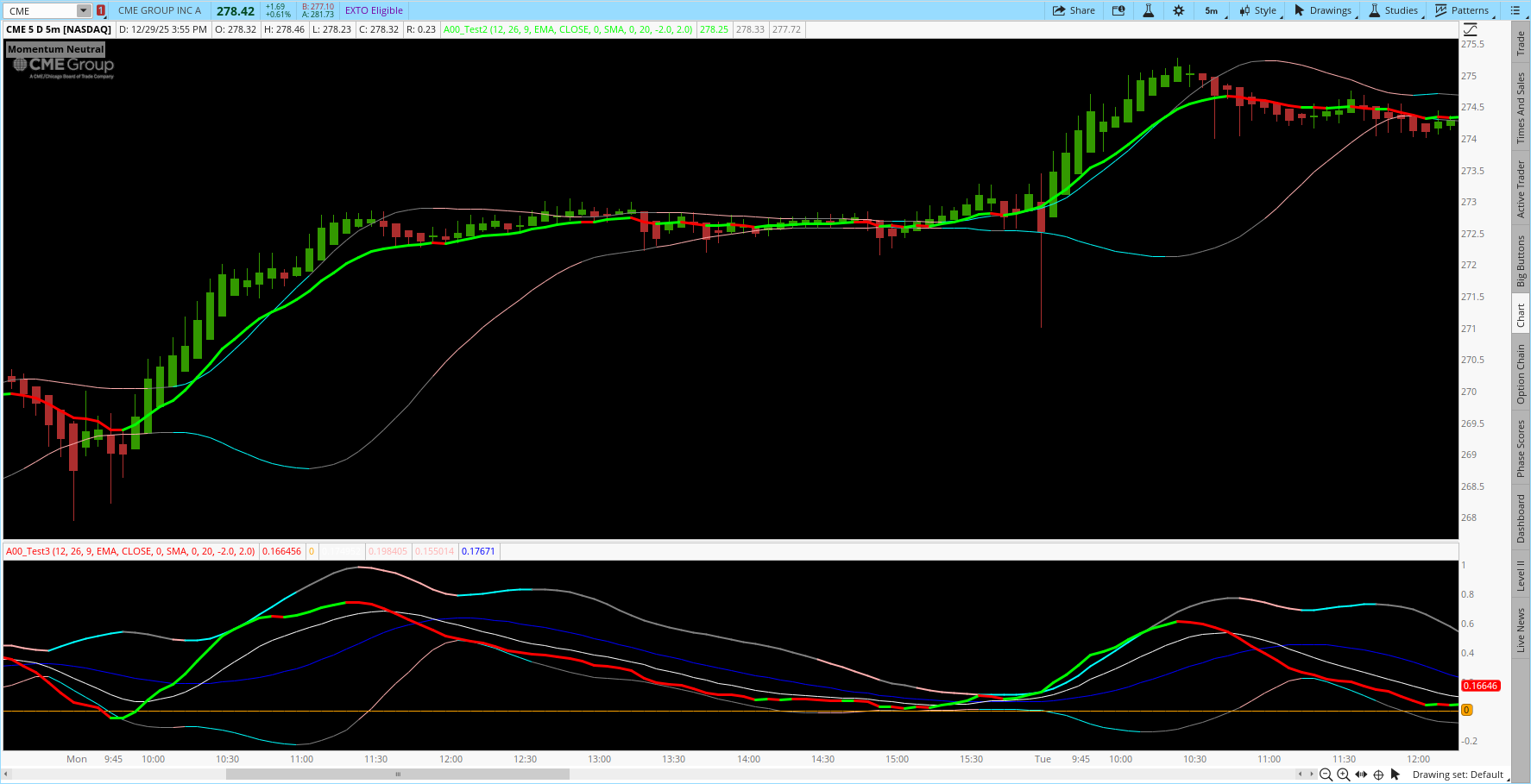
MACDLine plotted in the upper chart?

jrj4774

Member
VIP
Is there a way to have the MACDLine plotted in the upper chart?

It looks a little off -

https://usethinkscript.com/threads/ultimate-macd-indicator-for-thinkorswim.558/
1767031446993.png


thanks,
jrj4774
 
Last edited by a moderator:
Solution
I think it more like confirmation visually for me. I like to see the candle movement and identify that MACD Line is sort of aligned. Im also trying to save real estate room and especially when I travel, I only have laptop screen vs my 2x 43 inch monitors at home.

TRwtiGF.png

I spend a lot of time on the road. I start missing my screens before I am out the front door.
I can sympathize with the frustrations of small screen real estate.

As you noticed, dragging indicators between panels doesn’t always behave as expected.

MACD is just a couple of EMAs with some momentum and trend calculations.
Instead of plotting on the those oscillations which don't translate well to the upper chart;
Just take your...
I think it more like confirmation visually for me. I like to see the candle movement and identify that MACD Line is sort of aligned. Im also trying to save real estate room and especially when I travel, I only have laptop screen vs my 2x 43 inch monitors at home.

I guess I was hoping it would look something like this -

https://usethinkscript.com/threads/supertrend-tradingview-look-a-like-for-thinkorswim.7719/

White and Pink plotted lines

is there a better indictor?

thanks,
jrj4774


1767037666437.png
 
I think it more like confirmation visually for me. I like to see the candle movement and identify that MACD Line is sort of aligned. Im also trying to save real estate room and especially when I travel, I only have laptop screen vs my 2x 43 inch monitors at home.

TRwtiGF.png

I spend a lot of time on the road. I start missing my screens before I am out the front door.
I can sympathize with the frustrations of small screen real estate.

As you noticed, dragging indicators between panels doesn’t always behave as expected.

MACD is just a couple of EMAs with some momentum and trend calculations.
Instead of plotting on the those oscillations which don't translate well to the upper chart;
Just take your exact code and apply it to the exact EMA that you are using to track the momo and trend.
This version gives you the same MACD information, but directly on the EMA.
It uses the exact same colors and code as your Ultimate MACD.
You don’t need to adjust anything — it works exactly like your MACD.

Here is another hint of navigating limited real estate
https://usethinkscript.com/threads/stacked-charts-nested-behind-each-other.18186/
Ruby:
# #######################################################
# This software is licensed for individual use only.
# NOT FOR REDISTRIBUTION *PRIVATE/CONFIDENTIAL*
# Copyright (c) 2025 useThinkScript LLC
# ############################################################
#   MACD Price Overlay  Upper Chart + State Label
#   Matches "Ultimate MACD" Colors
# ############################################################

#
# Ultimate MACD by Horserider 8/30/2019
# Standard version
# Also have short and long term versions. Can accomplish all three by just adjusting inputs to fit your trading style.
# Standard MACD 12,26,9 BB length 20.
# Short term MACD 6, 13, 6 BB length 5.
# Long term MACD 48, 104, 36 BB length 20.
# Added zero line on suggestion of Ahmar824 1/12/2019.

input fastLength = 12;
input slowLength = 26;
input MACDLength = 9;
input AverageTypeMACD = {SMA, default EMA, Wilders};

input price = close;
input displace = 0;


plot MACD_Line = expAverage(price, fastLength);;
MACD_Line.DefineColor("Up", Color.GREEN);
MACD_Line.DefineColor("Down", Color.RED);
MACD_Line.DefineColor("Even", Color.WHITE);
MACD_Line.AssignValueColor(if MACD_Line > MACD_Line[1] then MACD_Line.Color("Up") else (if MACD_Line == MACD_Line[1] then MACD_Line.Color("Even") else MACD_Line.Color("Down")));
MACD_Line.SetLineWeight(3);

#plot BB;
#Bollinger BandsSMA,EMA
input AverageTypeBB = {default SMA, EMA, HMA};
input displaceBB = 0;
input lengthBB = 20;
input Num_Dev_Dn = -2.0;
input Num_Dev_up = 2.0;

plot upperBand;
plot lowerBand;
def midline;

switch (AverageTypeBB) {
case SMA:
    upperBand = reference BollingerBands(MACD_Line, displaceBB, lengthBB, Num_Dev_Dn, Num_Dev_up).UpperBand;
    lowerBand = reference BollingerBands(MACD_Line, displaceBB, lengthBB, Num_Dev_Dn, Num_Dev_up).LowerBand;
    midline   = reference BollingerBands(MACD_Line, displaceBB, lengthBB, Num_Dev_Dn, Num_Dev_up).Midline;
case EMA:
    upperBand = reference BollingerBands(MACD_Line, displaceBB, lengthBB, Num_Dev_Dn, Num_Dev_up, averageType = AverageType.EXPONENTIAL).UpperBand;
    lowerBand = reference BollingerBands(MACD_Line, displaceBB, lengthBB, Num_Dev_Dn, Num_Dev_up, averageType = AverageType.EXPONENTIAL).LowerBand;
    midline   = reference BollingerBands(MACD_Line, displaceBB, lengthBB, Num_Dev_Dn, Num_Dev_up, averageType = AverageType.EXPONENTIAL).Midline;
case HMA:
    upperBand = reference BollingerBands(MACD_Line, displaceBB, lengthBB, Num_Dev_Dn, Num_Dev_up, averageType = AverageType.EXPONENTIAL).UpperBand;
    lowerBand = reference BollingerBands(MACD_Line, displaceBB, lengthBB, Num_Dev_Dn, Num_Dev_up, averageType = AverageType.EXPONENTIAL).LowerBand;
    midline   = reference BollingerBands(MACD_Line, displaceBB, lengthBB, Num_Dev_Dn, Num_Dev_up, averageType = AverageType.EXPONENTIAL).Midline;
}

upperBand.SetDefaultColor(Color.GRAY);
upperBand.DefineColor("Up", Color.CYAN);
upperBand.DefineColor("Down", Color.PINK);
upperBand.DefineColor("Even", Color.GRAY);
upperBand.AssignValueColor(if upperBand > upperBand[1] and lowerBand < lowerBand[1] then upperBand.Color("Up") else (if upperBand < upperBand[1] and lowerBand > lowerBand[1] then upperBand.Color("Down") else upperBand.Color("Even")));

lowerBand.SetDefaultColor(Color.GRAY);
lowerBand.DefineColor("Up", Color.CYAN);
lowerBand.DefineColor("Down", Color.PINK);
lowerBand.DefineColor("Even", Color.GRAY);
lowerBand.AssignValueColor(if upperBand > upperBand[1] and lowerBand < lowerBand[1] then upperBand.Color("Up") else (if upperBand < upperBand[1] and lowerBand > lowerBand[1] then upperBand.Color("Down") else upperBand.Color("Even")));

AddLabel(yes,
    if upperBand > upperBand[1] and lowerBand < lowerBand[1] then "Momentum Strengthening" else
    if upperBand < upperBand[1] and lowerBand > lowerBand[1] then "Momentum Weakening" else "Momentum Neutral",
    if upperBand > upperBand[1] and lowerBand < lowerBand[1] then upperBand.Color("Up") else
    if upperBand < upperBand[1] and lowerBand > lowerBand[1] then upperBand.Color("Down") else upperBand.Color("Even"));

 
Last edited:
Solution

Join useThinkScript to post your question to a community of 21,000+ developers and traders.

Similar threads

Not the exact question you're looking for?

Start a new thread and receive assistance from our community.

87k+ Posts
824 Online
Create Post

Similar threads

Similar threads

The Market Trading Game Changer

Join 2,500+ subscribers inside the useThinkScript VIP Membership Club
  • Exclusive indicators
  • Proven strategies & setups
  • Private Discord community
  • ‘Buy The Dip’ signal alerts
  • Exclusive members-only content
  • Add-ons and resources
  • 1 full year of unlimited support

Frequently Asked Questions

What is useThinkScript?

useThinkScript is the #1 community of stock market investors using indicators and other tools to power their trading strategies. Traders of all skill levels use our forums to learn about scripting and indicators, help each other, and discover new ways to gain an edge in the markets.

How do I get started?

We get it. Our forum can be intimidating, if not overwhelming. With thousands of topics, tens of thousands of posts, our community has created an incredibly deep knowledge base for stock traders. No one can ever exhaust every resource provided on our site.

If you are new, or just looking for guidance, here are some helpful links to get you started.

What are the benefits of VIP Membership?
VIP members get exclusive access to these proven and tested premium indicators: Buy the Dip, Advanced Market Moves 2.0, Take Profit, and Volatility Trading Range. In addition, VIP members get access to over 50 VIP-only custom indicators, add-ons, and strategies, private VIP-only forums, private Discord channel to discuss trades and strategies in real-time, customer support, trade alerts, and much more. Learn all about VIP membership here.
How can I access the premium indicators?
To access the premium indicators, which are plug and play ready, sign up for VIP membership here.
Back
Top