

MACD-V Variation and Use Case For ThinkOrSwim

justAnotherTrader

Well-known member
VIP
VIP Enthusiast
This is a variation of an indicator already created by another poster. You can find the original here: https://usethinkscript.com/threads/macd-v-for-thinkorswim.19214/


Whats up my fellow Trend Followers!

As someone who trades trends I have to ask myself 3 questions everytime I look at a potential trade.

1) Is There a Trend?
2) How long has it been a Trend?
3) Do I think the Trend will continue?

The downside to being a trend trader is you never show up first, you just hope you dont show up last. That's what this indicator is for. It is super simple, and would be a useful indicator, label, watchlist column and screen.

I am just going to give you the logic, a pretty picture, and some code and if you want to spin it up into something else that awesome sauce =)

Here is the logic:
A trend as far as charts goes is most obvious when a stock is above the 200sma and the 50sma. But not every stock above the 200SMA and 50SMA is a good trend.

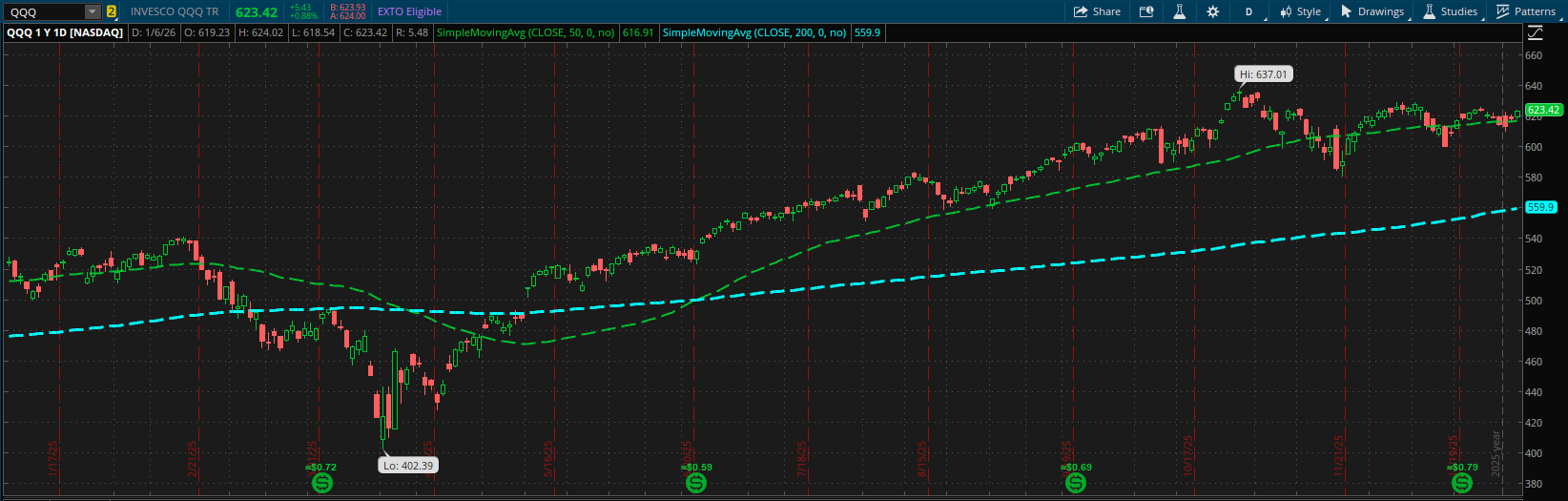
Note the following chart:
7mP4tdX.png


This is one of the most commonly tracked ETF's. You will notice from the chart its in a long term uptrend, but you also might notice its been chopping for a bit as noted by the multiple crosses of the 50SMA. Notice how wide the gap is between the 50SMA and the 200SMA. That large gap is a strong indication that the trend is Mature, or what I call a Stage 3 trend.

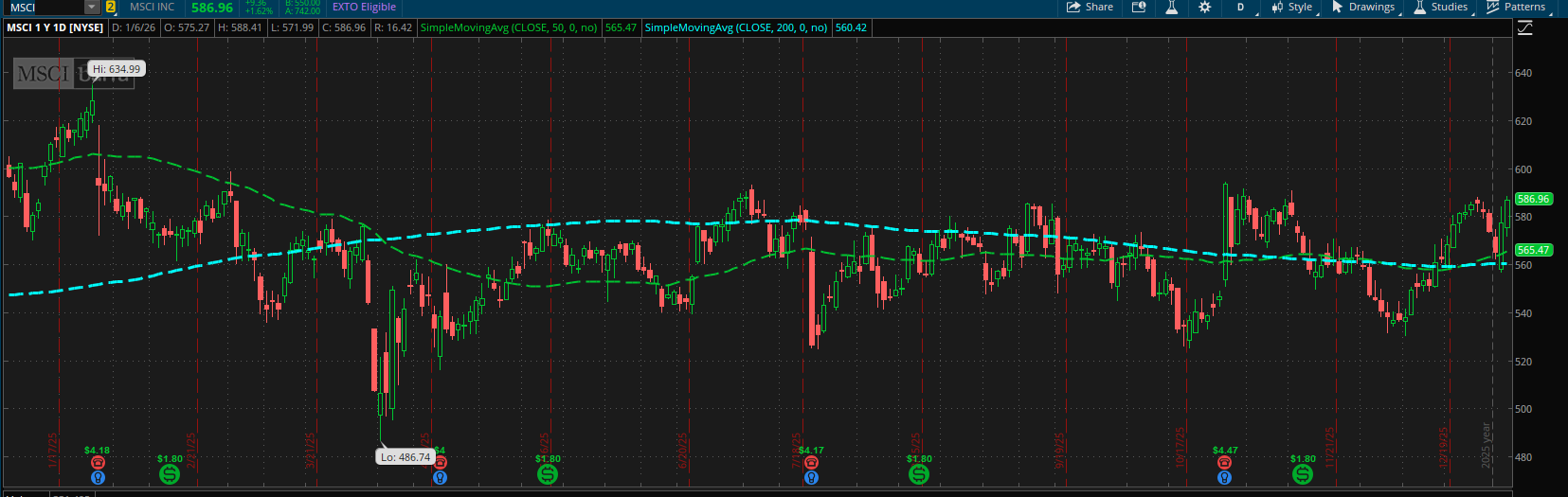
Now consider the following chart:
lEI4J45.png


This chart has everything a trend is supposed to have right? I mean the price is above the 50SMA and the 200SMA, so its a trend yes? No, its obviously not. That is because the stock has obviously been crossing the 50sma and 200sma for quite a bit of time. We dont want that, this is a chop chart. Verdict, no Trend.

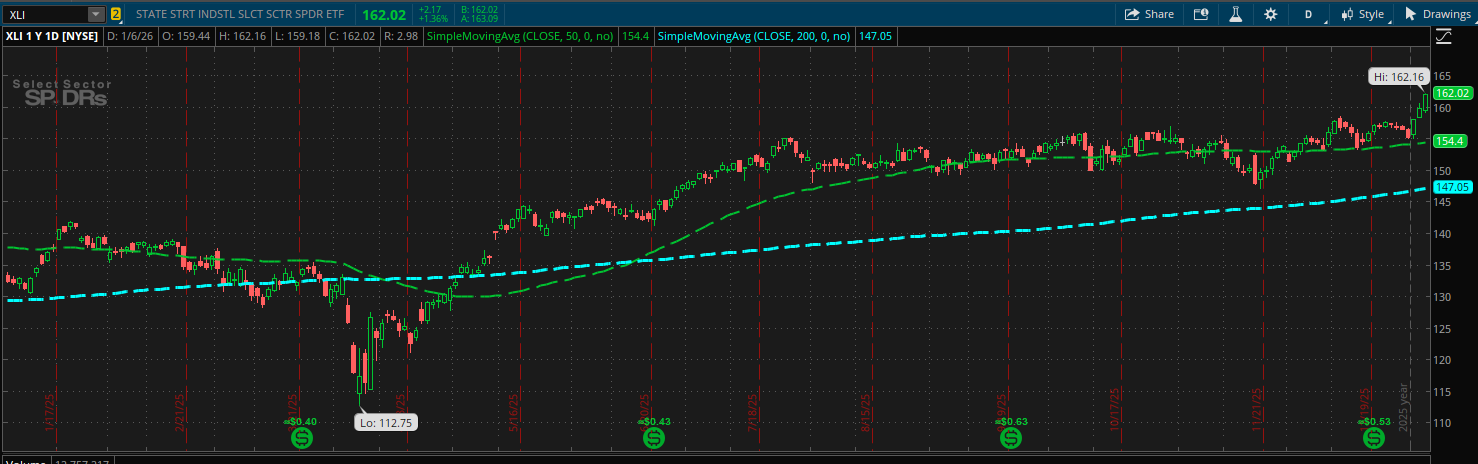
Lastly consider the following chart:
cZV1PGZ.png


This chart is beautiful. The 50SMA crossed the 200SMA and stayed above while the stock mostly respected the 50SMA as a support trend line. Also notice the gap between the 50SMA and the 200SMA. Not to crazy like what we saw on the QQQ. This is what I would call a Stage 2 Trend.

So what is a trend and can we define it mathematically through the use of indicators? I have come up with a method I think is mostly sufficient. A trend exists when the 50SMA-200SMA is greater than or equal to 3*ATR. I model this with (50SMA-200SMA)/(3*ATR) >=1. Why 3*ATR? Because 3*ATR is enough time for a stock to breathe and go through a couple of volatility cycles.

In my world view, a trend has 3 stages:
1) Stage 1 is when the stock initially satisfies the definition of the trend. That would have been about July 7th on the XLI chart above. In this stage the dips become tradeable as long as our supports hold and it respects the moving averages. If it breaks our 50SMA multiple times however its chopping and untradeable. However a break of the 200SMA is required to throw out the company.

2) Stage 2 is when (50SMA-200SMA)/(3*ATR) >=2 (the first time it happens when the trend occurs). This is when a trend is confirmed and the most durable.

3) Stage 3 is when (50SMA-200SMA)/(3*ATR) >=3 (the first time it happens when the trend occurs). This trend is mature, but its also the one you want to be more willing to cut the trade short. Lower size, or tighten stops.

I hope you will find some utility out of this. I dont use a bunch of indicators anymore. I am not smart enough to be a contrarian investor, I show up after the party has already started. My hope is to just get there as close to the beginning without being too early and also to get some idea when the party might end.

Enjoy!

The Code:

Code:
# ============================================
# Normalized Moving Average Spread
# (MA1 - MA2) / (ATR * Multiplier)
# LOWER STUDY
# ============================================

declare lower;

input fastMALength = 50;
input slowMALength = 200;
input maType = AverageType.SIMPLE;

input atrLength = 14;
input atrMultiplier = 3.0;

# === Moving Averages ===
def fastMA = MovingAverage(maType, close, fastMALength);
def slowMA = MovingAverage(maType, close, slowMALength);

# === ATR ===
def atr = Average(TrueRange(high, close, low), atrLength);

# === Spread ===
def maSpread = fastMA - slowMA;

# === Normalized Spread ===
def normalizedSpread = maSpread / (atr * atrMultiplier);

# === Plot ===
plot NormSpread = normalizedSpread;
NormSpread.SetLineWeight(2);

# === Zero Line ===
plot ZeroLine = 0;
ZeroLine.SetDefaultColor(Color.GRAY);

# === Threshold Bands ===
plot UpperBand = 1;
plot LowerBand = -1;

UpperBand.SetStyle(Curve.SHORT_DASH);
LowerBand.SetStyle(Curve.SHORT_DASH);
UpperBand.SetDefaultColor(Color.DARK_GRAY);
LowerBand.SetDefaultColor(Color.DARK_GRAY);

# === Color Logic ===
NormSpread.AssignValueColor(
    if NormSpread > 1 then Color.GREEN
    else if NormSpread < -1 then Color.RED
    else Color.YELLOW
);
 
Last edited:

Join useThinkScript to post your question to a community of 21,000+ developers and traders.

This looks great. Something I struggle with is not knowing when to enter and then getting chopped up. Quick back test -- this looks promising.
💯 It is something that is obvious once you see it, but for the longest time I was unsure how to, through the use of indicators and without human oversight, get a stock that looked like what I considered an uptrend.

Now that we have this framework, we can start to think of trends in terms of stages and attempt to identify where early trends are forming and thus have a higher chance to work with trend following strategies.

Note that it is important in my work to use etf's for this because I am a macro guided trader. My research suggests that if you can identify the beginning of a trend in an industry / sector you can drill down into specific companies and front run sector rotations.

I've used this strategy recently to identify developing trends in industrials, and was also able to position myself for precious metals with success.

In my estimation this is among the best indications for identifying true trends, and certainly among my best work (which may not say much as most of my work is mediocre at best)
 
Cool. I set it up in TOS. Question...the value changes dramatically on QQQ based on (at least) 2 things: the time interval view (Mo, Wd, Day) and the segment on the screen. When I double-click on my chart and it zooms out I get roughly 1.75 for Mo, 2.03 for Wk and a little over 3 for Day. Thoughts?
 
Cool. I set it up in TOS. Question...the value changes dramatically on QQQ based on (at least) 2 things: the time interval view (Mo, Wd, Day) and the segment on the screen. When I double-click on my chart and it zooms out I get roughly 1.75 for Mo, 2.03 for Wk and a little over 3 for Day. Thoughts?

Sure, so it's based off the indicator length. On the daily, which is what I tuned it for the length is set for the 50 and 200. That means the "fast" average is 50 days worth of trading and the "slow" one is 200 days. When you convert that to weekly, now it's 50 weeks and 200 weeks, and months the same way. Those are big differences.

If you want to look at weekly and monthly I suggest you change the input length on the two indicators to make them shorter. Maybe try 9 and 50 to start, then experiment to where it lines up with the trend you expect to see.

For the monthly I would start with lengths of 12 and 3 and experiment from there.

Also the ATR is the average true range of each candle which is different based off time frame you're looking at. You're likely going to need to adjust the multiplier as well
 
Sure, so it's based off the indicator length. On the daily, which is what I tuned it for the length is set for the 50 and 200. That means the "fast" average is 50 days worth of trading and the "slow" one is 200 days. When you convert that to weekly, now it's 50 weeks and 200 weeks, and months the same way. Those are big differences.

If you want to look at weekly and monthly I suggest you change the input length on the two indicators to make them shorter. Maybe try 9 and 50 to start, then experiment to where it lines up with the trend you expect to see.

For the monthly I would start with lengths of 12 and 3 and experiment from there.

Also the ATR is the average true range of each candle which is different based off time frame you're looking at. You're likely going to need to adjust the multiplier as well
I find the MACD-V a superior option when using MACD/PPO. I like your variation to the study.

Something I am inclined to do with things I use, is try to make them more customizable to play around with various settings. On this code I added the ability to establish different moving average types for the fast and the slow MA. One may prefer a SMA for one and a Wilders or Hull or Exponential for the other. Just giving options.

On this code I added the ability to change your Upper/Lower Band width as well. Sometimes it's fun to tighten the "normal" range, depending on you settings and what you would like to see.

I also added something I recently started to figure out. Global Colors. Global Colors can allow the user to change the colors that may be locked away, hard coded, behind the settings. When you look at the Plots and you see " Color: This plot's colors are dynamically set" that means the color choices are hardcoded into the plot's assignvaluecolor. Using Global Colors in the assignment adds the "Globals" section below the Plots section in the settings.

Fun thing about Global Colors is that you can change the color and the opacity of the color using the Settings options. I never "got" Global Colors. Now I try to work them in where appropriate.

I think those were the only things I added/ modified. Thanks for all of your contributions and sharing your experiences with this forum. I learn a lot from this site and from your posts.

Code:
# 01/26/26
# https://usethinkscript.com/threads/macd-v-variation-and-use-case-for-thinkorswim.22012/#post-159979
# Variation Author: justAnotherTrader
# modified 01/26/26 by AndrewPnF
# ============================================
# Normalized Moving Average Spread
# (MA1 - MA2) / (ATR * Multiplier)
# LOWER STUDY
# ============================================

declare lower;

input fastMALength = 50;
input slowMALength = 200;
input fastmaType = AverageType.SIMPLE;  #sometime you may want to play with diff avg types of Fast and Slow
input slowmaType = AverageType.SIMPLE;  #sometime you may want to play with diff avg types of Fast and Slow
input normSpreadBand = 1.00;  #sometimes you may want to adjust the "normal" Spread width.

input atrLength = 14;
input atrMultiplier = 3.0;

## Define Global Colors   
defineGlobalColor("Green",CreateColor(0,255,0));
defineGlobalColor("Red",CreateColor(255,0,0));
defineGlobalColor("Blue",CreateColor(0,0,255));
#defineGlobalColor...  Use Examples
#AddLabel(yes, "TEST", if Yes then globalcolor("Green") else globalColor("Red") );
#NormSpread.AssignValueColor(if NormSpread > upperband then globalcolor("Green") #Color.GREEN else....
## Global Colors give you the ability to change color and opacity in the Study settings.

# === Moving Averages ===
def fastMA = MovingAverage(fastmaType, close, fastMALength);
def slowMA = MovingAverage(slowmaType, close, slowMALength);

# === ATR ===
def atr = Average(TrueRange(high, close, low), atrLength);

# === Spread ===
def maSpread = fastMA - slowMA;

# === Normalized Spread ===
def normalizedSpread = maSpread / (atr * atrMultiplier);


# === Plot ===
plot NormSpread = normalizedSpread;
NormSpread.SetLineWeight(2);

# === Zero Line ===
plot ZeroLine = 0;
ZeroLine.SetDefaultColor(Color.GRAY);

# === Threshold Bands ===
plot UpperBand =  normSpreadBand;
plot LowerBand =  normSpreadBand * -1;

UpperBand.SetStyle(Curve.SHORT_DASH);
LowerBand.SetStyle(Curve.SHORT_DASH);
UpperBand.SetDefaultColor(Color.DARK_GRAY);
LowerBand.SetDefaultColor(Color.DARK_GRAY);

# === Color Logic ===
NormSpread.AssignValueColor(
    if NormSpread > upperband then globalcolor("Green") #Color.GREEN
    else if NormSpread < lowerband then globalcolor("Red") #Color.RED
    else globalcolor("Blue") #Color.Dark_orange
);
 
I find the MACD-V a superior option when using MACD/PPO. I like your variation to the study.

Something I am inclined to do with things I use, is try to make them more customizable to play around with various settings. On this code I added the ability to establish different moving average types for the fast and the slow MA. One may prefer a SMA for one and a Wilders or Hull or Exponential for the other. Just giving options.

On this code I added the ability to change your Upper/Lower Band width as well. Sometimes it's fun to tighten the "normal" range, depending on you settings and what you would like to see.

I also added something I recently started to figure out. Global Colors. Global Colors can allow the user to change the colors that may be locked away, hard coded, behind the settings. When you look at the Plots and you see " Color: This plot's colors are dynamically set" that means the color choices are hardcoded into the plot's assignvaluecolor. Using Global Colors in the assignment adds the "Globals" section below the Plots section in the settings.

Fun thing about Global Colors is that you can change the color and the opacity of the color using the Settings options. I never "got" Global Colors. Now I try to work them in where appropriate.

I think those were the only things I added/ modified. Thanks for all of your contributions and sharing your experiences with this forum. I learn a lot from this site and from your posts.

Code:
# 01/26/26
# https://usethinkscript.com/threads/macd-v-variation-and-use-case-for-thinkorswim.22012/#post-159979
# Variation Author: justAnotherTrader
# modified 01/26/26 by AndrewPnF
# ============================================
# Normalized Moving Average Spread
# (MA1 - MA2) / (ATR * Multiplier)
# LOWER STUDY
# ============================================

declare lower;

input fastMALength = 50;
input slowMALength = 200;
input fastmaType = AverageType.SIMPLE;  #sometime you may want to play with diff avg types of Fast and Slow
input slowmaType = AverageType.SIMPLE;  #sometime you may want to play with diff avg types of Fast and Slow
input normSpreadBand = 1.00;  #sometimes you may want to adjust the "normal" Spread width.

input atrLength = 14;
input atrMultiplier = 3.0;

## Define Global Colors  
defineGlobalColor("Green",CreateColor(0,255,0));
defineGlobalColor("Red",CreateColor(255,0,0));
defineGlobalColor("Blue",CreateColor(0,0,255));
#defineGlobalColor...  Use Examples
#AddLabel(yes, "TEST", if Yes then globalcolor("Green") else globalColor("Red") );
#NormSpread.AssignValueColor(if NormSpread > upperband then globalcolor("Green") #Color.GREEN else....
## Global Colors give you the ability to change color and opacity in the Study settings.

# === Moving Averages ===
def fastMA = MovingAverage(fastmaType, close, fastMALength);
def slowMA = MovingAverage(slowmaType, close, slowMALength);

# === ATR ===
def atr = Average(TrueRange(high, close, low), atrLength);

# === Spread ===
def maSpread = fastMA - slowMA;

# === Normalized Spread ===
def normalizedSpread = maSpread / (atr * atrMultiplier);


# === Plot ===
plot NormSpread = normalizedSpread;
NormSpread.SetLineWeight(2);

# === Zero Line ===
plot ZeroLine = 0;
ZeroLine.SetDefaultColor(Color.GRAY);

# === Threshold Bands ===
plot UpperBand =  normSpreadBand;
plot LowerBand =  normSpreadBand * -1;

UpperBand.SetStyle(Curve.SHORT_DASH);
LowerBand.SetStyle(Curve.SHORT_DASH);
UpperBand.SetDefaultColor(Color.DARK_GRAY);
LowerBand.SetDefaultColor(Color.DARK_GRAY);

# === Color Logic ===
NormSpread.AssignValueColor(
    if NormSpread > upperband then globalcolor("Green") #Color.GREEN
    else if NormSpread < lowerband then globalcolor("Red") #Color.RED
    else globalcolor("Blue") #Color.Dark_orange
);
Hey really cool evolution. Thanks for that!
 
Indicator looks good, but what is the best way to interpret it. I see coding going from 0 to 1 and -1. How does that fit in with your 3 step approach ... I'm assuming 1 - 2 - 3 meaning if goes up into the 3 level is possibly at the maturity level of a trade and at the 1, the possible beginning of a trend. Is this the intention of interpretation of this indicator.
 
Indicator looks good, but what is the best way to interpret it. I see coding going from 0 to 1 and -1. How does that fit in with your 3 step approach ... I'm assuming 1 - 2 - 3 meaning if goes up into the 3 level is possibly at the maturity level of a trade and at the 1, the possible beginning of a trend. Is this the intention of interpretation of this indicator.
In theory the spread between the moving averages can get very large, much greater than 3 but in practice it's unlikely.

The best trends from what I can tell start when the 50sma crosses the 200sma, it's possible it started before but this is when it becomes detectable using this system at least.

The goal is to find the point in time when you can start trusting the trend will continue. If a spread of 1 occurs, and it's the first time since the cross of the 50sma and the 200sma then the trend is confirmed.

That's it, the goal is simply to diagnose the age health and durability of a trend
 

Similar threads

Not the exact question you're looking for?

Start a new thread and receive assistance from our community.

87k+ Posts
1150 Online
Create Post

Similar threads

Similar threads

The Market Trading Game Changer

Join 2,500+ subscribers inside the useThinkScript VIP Membership Club
  • Exclusive indicators
  • Proven strategies & setups
  • Private Discord community
  • ‘Buy The Dip’ signal alerts
  • Exclusive members-only content
  • Add-ons and resources
  • 1 full year of unlimited support

Frequently Asked Questions

What is useThinkScript?

useThinkScript is the #1 community of stock market investors using indicators and other tools to power their trading strategies. Traders of all skill levels use our forums to learn about scripting and indicators, help each other, and discover new ways to gain an edge in the markets.

How do I get started?

We get it. Our forum can be intimidating, if not overwhelming. With thousands of topics, tens of thousands of posts, our community has created an incredibly deep knowledge base for stock traders. No one can ever exhaust every resource provided on our site.

If you are new, or just looking for guidance, here are some helpful links to get you started.

What are the benefits of VIP Membership?
VIP members get exclusive access to these proven and tested premium indicators: Buy the Dip, Advanced Market Moves 2.0, Take Profit, and Volatility Trading Range. In addition, VIP members get access to over 50 VIP-only custom indicators, add-ons, and strategies, private VIP-only forums, private Discord channel to discuss trades and strategies in real-time, customer support, trade alerts, and much more. Learn all about VIP membership here.
How can I access the premium indicators?
To access the premium indicators, which are plug and play ready, sign up for VIP membership here.
Back
Top
