Ichimoku Scan

csricksdds

Trader Educator
VIP
Good morning! I don't do any scanning but am trying to develop a custom scan for my Ichimoku Simplified as follows (but it's not working for me). The goal is to show if Ichi-L or Ichi-S in place on a stock and for how many bars. Can someone help?

Code:
input t_period = 9;
input k_period = 26;
input sb_period = 52;
input max_bars = 10;

def tenkan = (Highest(high, t_period) + Lowest(low, t_period)) / 2;
def kijun = (Highest(high, k_period) + Lowest(low, k_period)) / 2;

def span_a = (tenkan + kijun) / 2;
def span_b = (Highest(high, sb_period) + Lowest(low, sb_period)) / 2;

def cloud_top = Max(span_a, span_b);
def cloud_bottom = Min(span_a, span_b);
def cloud_bull = span_a >= span_b;

def tk_bull_cross = tenkan crosses above kijun;
def tk_bear_cross = tenkan crosses below kijun;

def price_above = close > cloud_top;
def price_below = close < cloud_bottom;

def chikou_above = close > close[k_period];
def chikou_below = close < close[k_period];

def long_signal = tk_bull_cross and price_above and chikou_above and cloud_bull;
def short_signal = tk_bear_cross and price_below and chikou_below and !cloud_bull;

def in_long;
def in_short;
def long_entry_bar;
def short_entry_bar;

if long_signal {
in_long = 1;
in_short = 0;
long_entry_bar = BarNumber();
short_entry_bar = 0;
} else if short_signal {
in_long = 0;
in_short = 1;
long_entry_bar = 0;
short_entry_bar = BarNumber();
} else if in_long[1] and !short_signal {
in_long = 1;
in_short = 0;
long_entry_bar = long_entry_bar[1];
short_entry_bar = 0;
} else if in_short[1] and !long_signal {
in_long = 0;
in_short = 1;
long_entry_bar = 0;
short_entry_bar = short_entry_bar[1];
} else {
in_long = 0;
in_short = 0;
long_entry_bar = 0;
short_entry_bar = 0;
}

def bars_in_trade;
if in_long {
bars_in_trade = BarNumber() - long_entry_bar + 1;
} else if in_short {
bars_in_trade = BarNumber() - short_entry_bar + 1;
} else {
bars_in_trade = 0;
}

def active_long = in_long and bars_in_trade <= max_bars;
def active_short = in_short and bars_in_trade <= max_bars;

plot scan = if active_long then bars_in_trade
else if active_short then -bars_in_trade
else 0;

scan.SetDefaultColor(Color.WHITE);

scan.DefineColor("Ichi_L", Color.GREEN);
scan.DefineColor("Ichi_S", Color.RED);
scan.DefineColor("Neutral", Color.YELLOW);

scan.AssignValueColor(
if active_long then scan.color("Ichi_L")
else if active_short then scan.color("Ichi_S")
else scan.color("Neutral")
);
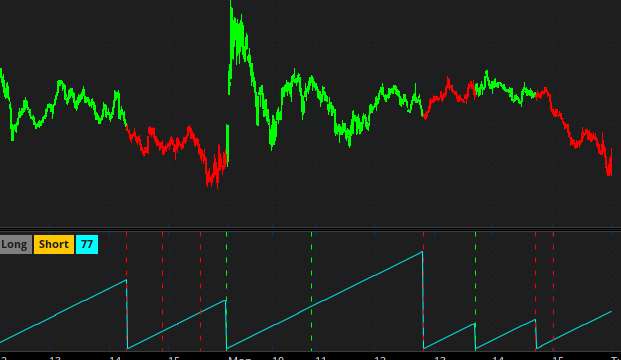
 
Per usual, it's a chart study to show what's happening first.
Convert it to a scan once verified.
KGCNd1i.png
Code:
input t_period = 9;
input k_period = 26;
input sb_period = 52;
input max_bars = 10;

def tenkan = (Highest(high, t_period) + Lowest(low, t_period)) / 2;
def kijun = (Highest(high, k_period) + Lowest(low, k_period)) / 2;

def span_a = (tenkan + kijun) / 2;
def span_b = (Highest(high, sb_period) + Lowest(low, sb_period)) / 2;

def cloud_top = Max(span_a, span_b);
def cloud_bottom = Min(span_a, span_b);
def cloud_bull = span_a >= span_b;

def tk_bull_cross = tenkan crosses above kijun;
def tk_bear_cross = tenkan crosses below kijun;

def price_above = close > cloud_top;
def price_below = close < cloud_bottom;

def chikou_above = close > close[k_period];
def chikou_below = close < close[k_period];

def long_signal = tk_bull_cross and price_above and chikou_above and cloud_bull;
def short_signal = tk_bear_cross and price_below and chikou_below and !cloud_bull;

declare lower;

addverticalLine(long_signal,"",color.green);

addverticalLine(short_signal);


def  ini =
     BarNumber() == 1;
def  Tog =
     if ini then 0
     else if long_signal  && tog[1] <= 0 then +1
     else if short_signal && tog[1] >= 0 then -1
     else tog[1];

def  Count =
     if ini then 0 else
     Count[1] * (Tog == Tog[1]) + 1;
plot x = count;

AddLabel(yes," Long ",
    if TOG == +1 then color.light_green
    else color.gray
);

AddLabel(yes," Short ",
    if TOG == -1 then color.orange
    else color.gray
);

AddLabel(yes," " + count + " " ,
    color.cyan
);

assignpriceColor(
         if TOG == +1 then color.green
    else if TOG == -1 then color.red
    else color.gray
);
 
Good morning! I don't do any scanning but am trying to develop a custom scan for my Ichimoku Simplified as follows (but it's not working for me). The goal is to show if Ichi-L or Ichi-S in place on a stock and for how many bars. Can someone help?
Rick, if you are happy with the reversal points in @Joshua's script;
Here are the instructions for turning it into a scan.

1. Save @Joshua script in your study tab
2. Add this code to the bottom of the study:
Ruby:
plot scanBulls =  TOG == +1 and  TOG[1] != +1 ;
scanBulls.hide();

plot scanBears =  TOG == -1 and  TOG[1] != -1 ;
scanBears.hide();
tSrsLyl.png

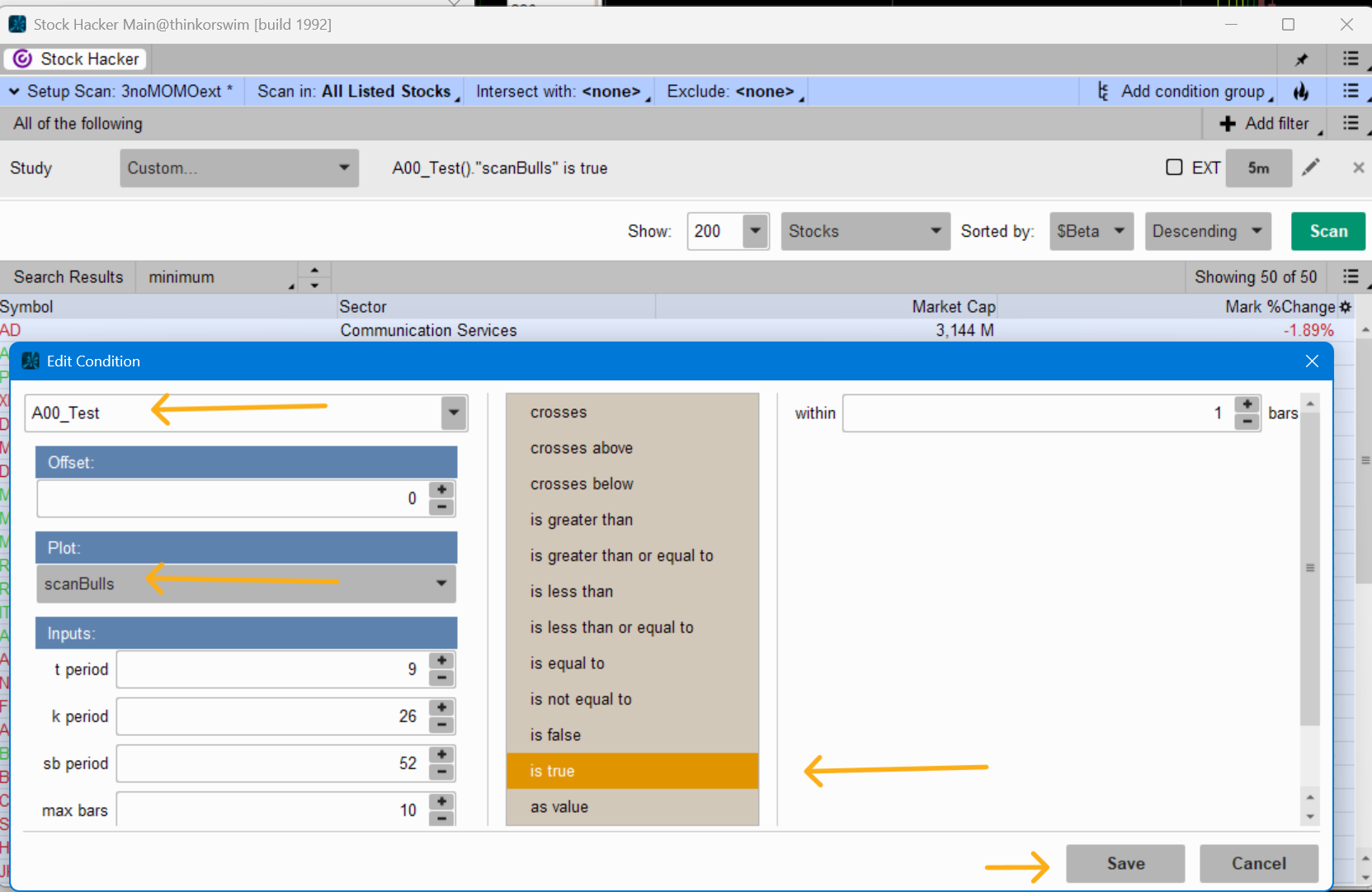
3. Add whatever you named the study to the scanner
4. In the Plot dropdown box; choose whether you want to scan for a bullish or bearish reversal
5. In the middle column, choose "is true"
6. Save and Run
 

Join useThinkScript to post your question to a community of 21,000+ developers and traders.

Similar threads

Not the exact question you're looking for?

Start a new thread and receive assistance from our community.

87k+ Posts
1242 Online
Create Post

Similar threads

Similar threads

The Market Trading Game Changer

Join 2,500+ subscribers inside the useThinkScript VIP Membership Club
  • Exclusive indicators
  • Proven strategies & setups
  • Private Discord community
  • ‘Buy The Dip’ signal alerts
  • Exclusive members-only content
  • Add-ons and resources
  • 1 full year of unlimited support

Frequently Asked Questions

What is useThinkScript?

useThinkScript is the #1 community of stock market investors using indicators and other tools to power their trading strategies. Traders of all skill levels use our forums to learn about scripting and indicators, help each other, and discover new ways to gain an edge in the markets.

How do I get started?

We get it. Our forum can be intimidating, if not overwhelming. With thousands of topics, tens of thousands of posts, our community has created an incredibly deep knowledge base for stock traders. No one can ever exhaust every resource provided on our site.

If you are new, or just looking for guidance, here are some helpful links to get you started.

What are the benefits of VIP Membership?
VIP members get exclusive access to these proven and tested premium indicators: Buy the Dip, Advanced Market Moves 2.0, Take Profit, and Volatility Trading Range. In addition, VIP members get access to over 50 VIP-only custom indicators, add-ons, and strategies, private VIP-only forums, private Discord channel to discuss trades and strategies in real-time, customer support, trade alerts, and much more. Learn all about VIP membership here.
How can I access the premium indicators?
To access the premium indicators, which are plug and play ready, sign up for VIP membership here.
Back
Top