


mod note:
This visual decision accelerator turns raw Heikin‑Ashi into a dashboard. Color‑coding momentum, reversals, and flips into an instant read.
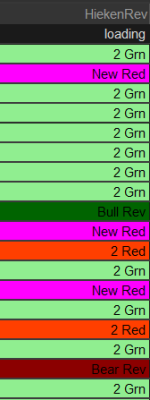
Green signals strength, red signals weakness, bright colors flag change, and darker tones mark conviction. It compresses the entire state of the tape into a glance and tells the eye where to look first during fast markets.
This will show high probability reversals Based on the Heiken Ashi . . . Images below, Can you find the Bull and which is the BEAR ? COMMENTS WELCOMED ...


This visual decision accelerator turns raw Heikin‑Ashi into a dashboard. Color‑coding momentum, reversals, and flips into an instant read.
Green signals strength, red signals weakness, bright colors flag change, and darker tones mark conviction. It compresses the entire state of the tape into a glance and tells the eye where to look first during fast markets.
This will show high probability reversals Based on the Heiken Ashi . . . Images below, Can you find the Bull and which is the BEAR ? COMMENTS WELCOMED ...
Code:
# Heikin Ashi Signals Watchlist Column By AKtion
# Unique colored background for each signal

declare lower;   # Use "lower" for watchlist (it doesn't plot on chart)

# --- Your Heikin Ashi Calculations ---
def haClose = ohlc4;
def haOpen  = if haOpen[1] == 0 then haClose[1] else (haOpen[1] + haClose[1]) / 2;
def haHigh  = Max(high, Max(haClose, haOpen));
def haLow   = Min(low, Min(haClose, haOpen));

def haGreen = haClose > haOpen;
def haRed   = haClose < haOpen;

def twoHaGreen = haGreen[1] and haGreen;
def twoHaRed   = haRed[1] and haRed;

def newHAgreen = haGreen and haRed[1];
def newHared   = haRed and haGreen[1];

def noLowerWickGreen = haClose > haOpen and haOpen == haLow;
def noUpperWickRed   = haClose < haOpen and haOpen == haHigh;

def bullishReversal  = haRed[1] and haGreen and noLowerWickGreen;
def bearishReversal  = haGreen[1] and haRed and noUpperWickRed;
def GrnfiveREDUP =   hagreen and haRed[1] and haRed[2] and haRed[3] and haRed[4] and haRed[5];
def RedfiveGrnDN = haRed and hagreen[1] and hagreen[2] and hagreen[3] and hagreen[4] and hagreen[5];

# --- Main Watchlist Display Logic ---
def signal =
    if bullishReversal  then 1
    else if bearishReversal then 2
    else if twoHaGreen     then 3
    else if twoHaRed       then 4
    else if newHAgreen     then 5
    else if newHared       then 6
   # else if haGreen        then 7
   # else if haRed          then 8
    else if GrnfiveREDUP          then 9
    else if RedfiveGrnDN          then 9
    else 0;

# Text to display in the column
AddLabel(yes,
    if signal == 1 then "Bull Rev"
    else if signal == 2 then "Bear Rev"
    else if signal == 3 then "2 Grn"
    else if signal == 4 then "2 Red"
    else if signal == 5 then "New Grn"
    else if signal == 6 then "New Red"
    else if signal == 7 then "HA Grn"
    else if signal == 8 then "HA Red"
    else if signal == 9 then "Bull Rev"
    else if signal == 10 then "Bear Rev"
    else "No Sig",
    Color.Black
);

# Unique Background Colors for each signal
AssignBackgroundColor(
    if signal == 1 then CreateColor(0, 100, 0)     # Dark Green - Bullish Reversal
    else if signal == 2 then CreateColor(139, 0, 0) # Dark Red - Bearish Reversal
    else if signal == 3 then Color.LIGHT_GREEN     # 2 Green
    else if signal == 4 then Color.LIGHT_RED       # 2 Red
    else if signal == 5 then Color.CYAN            # New Green
    else if signal == 6 then Color.MAGENTA         # New Red
    else if signal == 7 then Color.GREEN           # Single HA Green
    else if signal == 8 then Color.RED             # Single HA Red
    else if signal == 9 then Color.GREEN           # Single HA Green
    else if signal == 10 then Color.RED             # Single HA Red
    else Color.Dark_gray                               # No signal
);
Attachments
Last edited by a moderator:


