

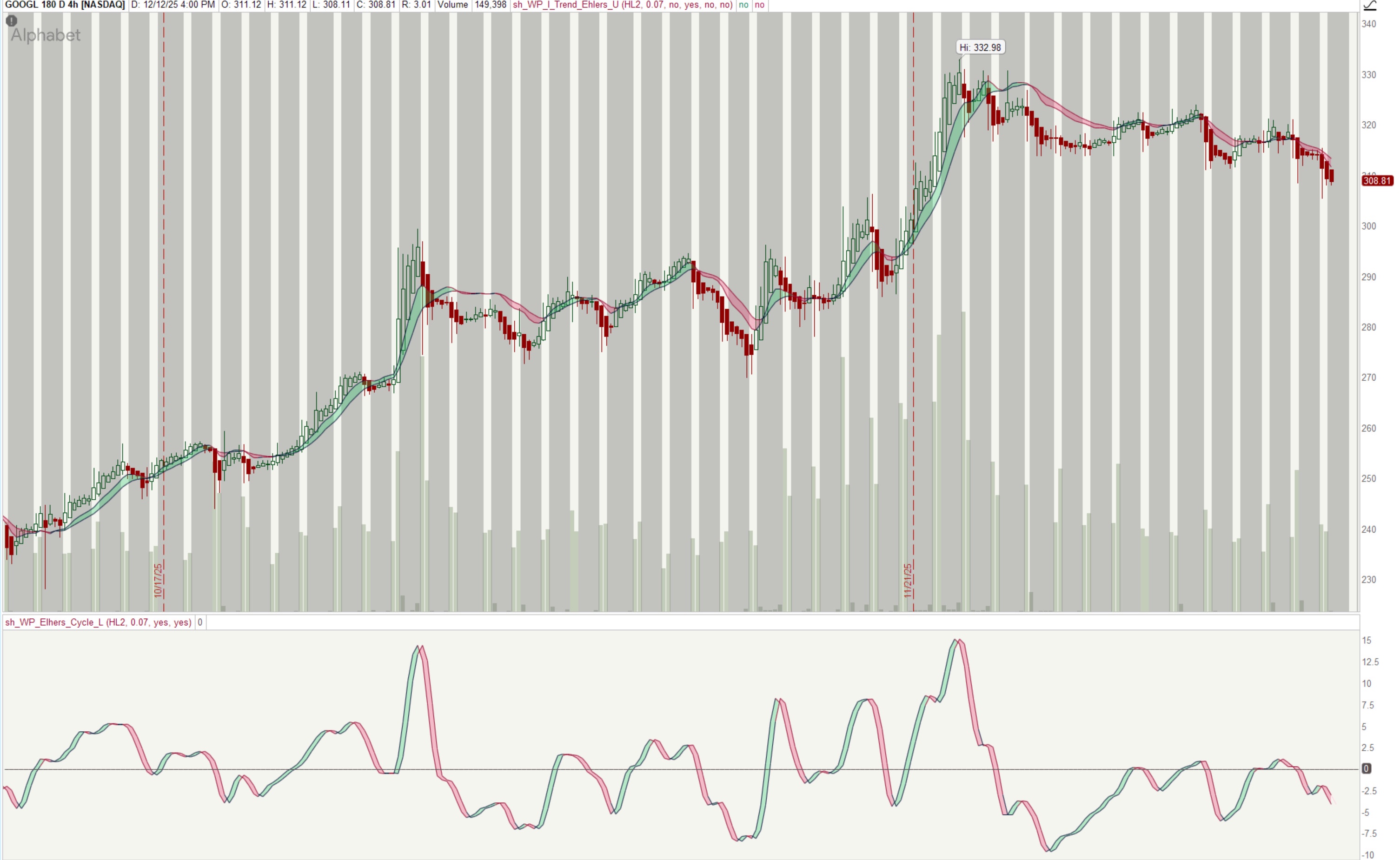
Ehlers Simple Cycle
Based on https://www.tradingview.com/script/xQ4mP4kc-Ehlers-Simple-Cycle-Indicator-LazyBear/
This should work well with Ehlers Instantaneous Trend [LazyBear].
mod note:
Momentum Direction (The Crossover Signal)
primary trading signal generated by the crossing of the two lines.
| Signal Type | Ehlers Cycle Line | Cloud Color | Trading Interpretation |
| Bullish Signal | Crosses Above Lagging Line | Green | Upward Momentum: Market is entering the rising phase of its cycle. Consider a Long entry confirmation. |
| Bearish Signal | Crosses Below Lagging Line | Red | Downward Momentum: Market is entering the falling phase of its cycle. Consider a Short entry confirmation. |
Strength and Amplitude (Cycle Position)
tells you about the conviction behind the current move.
| Relative to Zero | Cycle Amplitude | Trading Interpretation (Risk/Opportunity) |
| Far from the Zero Line (Highly Positive or Highly Negative) | Cycle Exhaustion Zone | High Entry Risk. The momentum is well-established but may be reaching exhaustion. Avoid new entries in the direction of the cycle; instead, focus on managing existing trades or preparing for a potential reversal. |
| Near the Zero Line | Cycle Rest/Reset Zone | Premium Entry Zone / Low Risk. The momentum has paused, and the cycle is "resetting." This is the ideal area to look for low-risk entries when the cycle confirms a new direction. |
Strategy Idea: Cycle Confirmation Trading
- Define Your Primary Signal (The Entry Zone): Identify a key area on the price chart.
- Example: Price successfully bounces off a strong Support Level or breaks above a previous resistance level.
- Look for Ehlers Cycle Confirmation (The Trigger): Wait for the indicator in the lower pane to align with your primary signal.
- Long Entry (Buy): Wait for the price to show a bullish action AND the Ehlers Cycle line to cross above the Lagging Cycle line (or the cloud to turn Green). This confirms that upward momentum is now aligned with your entry zone.
- Short Entry (Sell): Wait for the price to show a bearish action AND the Ehlers Cycle line to cross below the Lagging Cycle line (or the cloud to turn Red). This confirms downward momentum.
- Timeframe: Ehlers indicators work well on shorter timeframes (e.g., 5-minute or 15-minute charts) for day trading. Be aware that the signals will be frequent and you must filter them with your primary signal.
- Input 'a': The input a = 0.07 is a smoothing factor. A smaller number makes the indicator more sensitive (more signals, more noise); a larger number makes it smoother (fewer signals, more lag). You can adjust this in the indicator settings if you find it too noisy.
- Exit Strategy: The cycle crossing back to the opposite color (Green to Red or Red to Green) can serve as an early warning that the momentum is reversing, which you can use as a signal to tighten your stop-loss or take partial profits.
Code:
# sh_WP_Ehlers_Cycle
# Lower study, prints Ehlers Cycle, should work well with Elhers Instantanous Trend
# Based on https://www.tradingview.com/script/xQ4mP4kc-Ehlers-Simple-Cycle-Indicator-LazyBear/
# created by wpnet50 12/14/2025

#DECLARATIONS
declare lower;
declare once_per_bar;


#USER INPUTS
input src = hl2;
input a = 0.07;
input showCL = yes;
input colorLN = yes;
#input showArr = yes;
#input colorBars = yes;

# GLOBAL COLORS
DefineGlobalColor("Green", CreateColor(0,255,0));
DefineGlobalColor("BGreen", CreateColor(34,208,104));
DefineGlobalColor("DGreen", CreateColor(6,18,52));
DefineGlobalColor("BRed", CreateColor(242,58,110));
DefineGlobalColor("DRed", CreateColor(146,6,44));
DefineGlobalColor("DGray", CreateColor(87,78,80));
DefineGlobalColor("BGray", CreateColor(138,128,132));

DefineGlobalColor("SRed", CreateColor(176,18,80));
DefineGlobalColor("SGreen", CreateColor(12,134,94));

# CALCULATIONS
def smooth = if BarNumber() < 3 then src else if BarNumber() > 3 then (src + 2 * src[1] + 2 * src[2] + src[3]) / 6.0 else smooth[1];
def init = if BarNumber() > 2 then (src - 2 * src[1] + src[2]) / 4.0 else init[1];

def cycleA = if BarNumber() < 3 then src else if BarNumber() < 7 then init else if BarNumber() > 6 then
(1 - 0.5 * a) * (1 - 0.5 * a) * (Smooth - 2 * Smooth[1] + Smooth[2]) + 2 * (1 - a) * cycleA[1] - (1 - a) * (1 - a) * cycleA[2] else cycleA[1];


#PLOTS
plot elhC = cycleA;
elhC.AssignValueColor(if colorLN then if cycleA > cycleA[1] then GlobalColor("DGreen") else if cycleA < cycleA[1] then GlobalColor("DRed") else GlobalColor("DGray") else color.CURRENT);
elhC.HideTitle();
elhC.HideBubble();
elhC.SetLineWeight(1);

plot lagC = cycleA[1];;
lagC.AssignValueColor(if colorLN then if cycleA > cycleA[1] then GlobalColor("DGreen") else if cycleA < cycleA[1] then GlobalColor("DRed") else GlobalColor("DGray") else color.CURRENT);
lagC.HideTitle();
lagc.HideBubble();
lagC.SetLineWeight(1);

def zero_level = 0;
plot ZeroLine = zero_level;
ZeroLine.SetPaintingStrategy(PaintingStrategy.HORIZONTAL);
ZeroLine.SetDefaultColor(GlobalColor("DGray"));
ZeroLine.SetLineWeight(1);

#CLOUD
AddCloud(if showCL then elhC else Double.NaN, if showCL then lagC else Double.NaN, GlobalColor("BGreen"), GlobalColor("BRed"));
Last edited by a moderator:


