

This thinkScript study is a trend-following strategy that uses a modified Chande Momentum Oscillator (CMO) to generate buy and sell signals. Instead of looking at price directly, it creates a "Fast" and "Slow" line based on the CMO and triggers trades when they cross.
It also includes a robust backtesting engine that tracks P/L, win rates, and trade statistics directly on your chart labels.
1. The Core Indicator: Chande Momentum Oscillator (CMO)
The script starts by calculating the CMO, which measures momentum by comparing the sum of all recent gains to the sum of all recent losses.
This is the unique part of the script. Rather than using a single moving average of the CMO, it blends two different types and lengths for both the "Fast" and "Slow" lines.
The script simulates a live trading account to show you how the strategy would have performed:
The script provides heavy visual feedback on the chart:
Key Takeaway for the User
This study is designed for momentum swing trading. By using the CMO as the base (instead of price), the moving average crossover is reacting to changes in velocity rather than just price level. The "Blended" MA approach is likely an attempt to smooth out noise (using Simple/Wilders) while maintaining some responsiveness (using Exponential/Hull).
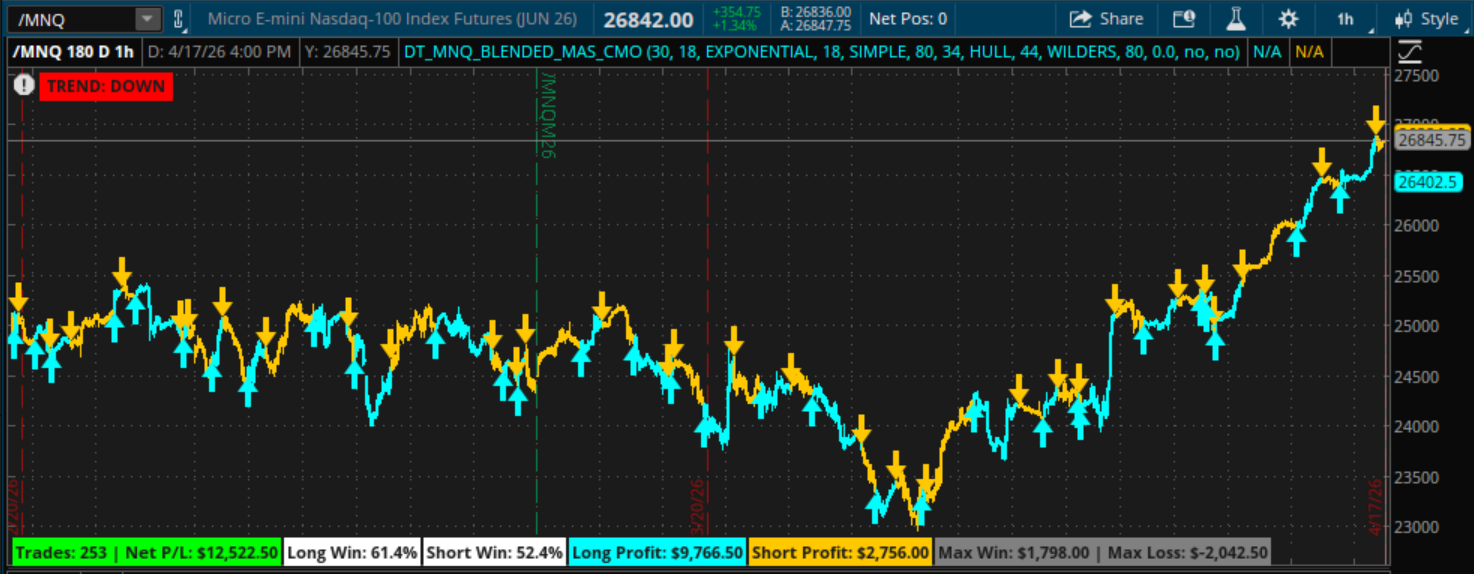
Example of /MNQ with standard inputs. 180 day, 1 hour timeframe. Shows about 300% profit without subtracting contract costs.
It also includes a robust backtesting engine that tracks P/L, win rates, and trade statistics directly on your chart labels.
1. The Core Indicator: Chande Momentum Oscillator (CMO)
The script starts by calculating the CMO, which measures momentum by comparing the sum of all recent gains to the sum of all recent losses.
- Formula Logic: It calculates the difference between the current close and the previous close. It then averages the positive moves and negative moves over a 30-period window (CMO_Len).
- Output: The CMO fluctuates between +100 (overbought/strong upward momentum) and -100 (oversold/strong downward momentum).
This is the unique part of the script. Rather than using a single moving average of the CMO, it blends two different types and lengths for both the "Fast" and "Slow" lines.
- Fast Line: A blend (default 80/20) of an Exponential MA and a Simple MA.
- Slow Line: A blend (default 80/20) of a Hull MA and a Wilder’s Smoothing MA.
- The Trigger: * Long: When the Blended Fast Line crosses abovethe Blended Slow Line.
- Short: When the Blended Fast Line crosses below the Blended Slow Line.
The script simulates a live trading account to show you how the strategy would have performed:
- Position State: It tracks if you are currently "Long" (1), "Short" (-1), or "Flat" (0).
- Profit Calculation: When a signal flips (e.g., going from Long to Short), it calculates the profit of the previous trade.
The script provides heavy visual feedback on the chart:
- Arrows: Cyan arrows for buys, Orange arrows for sells.
- Price Coloring: The candle colors change based on whether you are in a long or short position.
- Dashboard (Labels):At the bottom left, you’ll see:
- Total Net Profit/Loss.
- Win percentage for both Longs and Shorts.
- The "Max Win" and "Max Loss" of a single trade.
- Persistent Status: A label in the top left indicates the current trend direction ("UP" or "DOWN") based on the most recent confirmed signal.
Key Takeaway for the User
This study is designed for momentum swing trading. By using the CMO as the base (instead of price), the moving average crossover is reacting to changes in velocity rather than just price level. The "Blended" MA approach is likely an attempt to smooth out noise (using Simple/Wilders) while maintaining some responsiveness (using Exponential/Hull).
Code:
# CMO WITH BLENDED MOVING AVERAGES
# by whoDAT
# 4/2026
# ---------------------------------------------------------
input CMO_Len = 30;
input Fast_MA_1_Len = 18;
input Fast_MA_1_Type = AverageType.EXPONENTIAL;
input Fast_MA_2_Len = 18;
input Fast_MA_2_Type = AverageType.SIMPLE;
input Fast_1_Percent = 80;
input Slow_MA_1_Len = 34;
input Slow_MA_1_Type = AverageType.HULL;
input Slow_MA_2_Len = 44;
input Slow_MA_2_Type = AverageType.WILDERS;
input Slow_1_Percent = 80;

input PipsLostToSpread = 0.0; # For Futures/Stocks, this acts as Ticks
input ShowProfitBubbles = no;
input ShowDebugBubbles = no;

# 1. CMO Calculation
def diff = close - close[1];
def avgPos = ExpAverage(if diff > 0 then diff else 0, CMO_Len);
def avgNeg = ExpAverage(if diff < 0 then -diff else 0, CMO_Len);
def CMO = if (avgPos + avgNeg) == 0 then 0 else (avgPos - avgNeg) / (avgPos + avgNeg) * 100;

# 2. Dual Moving Averages
def FastLine_1 = MovingAverage(Fast_MA_1_Type, CMO, Fast_MA_1_Len);
def FastLine_2 = MovingAverage(Fast_MA_2_Type, CMO, Fast_MA_2_Len);
def SlowLine_1 = MovingAverage(Slow_MA_1_Type, CMO, Slow_MA_1_Len);
def SlowLine_2 = MovingAverage(Slow_MA_2_Type, CMO, Slow_MA_2_Len);

def FastLine = (FastLine_1 * (Fast_1_Percent / 100)) + (FastLine_2 * ((100 - Fast_1_Percent) / 100));
def SlowLine = (SlowLine_1 * (Slow_1_Percent / 100)) + (SlowLine_2 * ((100 - Slow_1_Percent) / 100));

# 3. Signals
def LongSignal = FastLine crosses above SlowLine;
def ShortSignal = FastLine crosses below SlowLine;

# 4. Position Tracking
rec pos = if IsNaN(pos[1]) then 0
          else if LongSignal then 1
          else if ShortSignal then -1
          else pos[1];

def isNewTrade = !IsNaN(pos[1]) and pos != pos[1];
rec entryPrice = if isNewTrade then close else if !IsNaN(entryPrice[1]) then entryPrice[1] else close;

# 5. THE UNIVERSAL PROFIT ENGINE
# Uses TickValue() / TickSize() to find dollar value per 1.00 price move
def dollarValuePerPoint = TickValue() / TickSize();
def spreadCost = PipsLostToSpread * TickValue();

def tradePnl = if isNewTrade and pos[1] != 0 then
                (if pos[1] == 1 then ((close - entryPrice[1]) * dollarValuePerPoint) - spreadCost
                 else if pos[1] == -1 then ((entryPrice[1] - close) * dollarValuePerPoint) - spreadCost
                 else 0)
               else 0;

# 6. Statistics (Zero-Seeded for Label Stability)
rec totalPnl = if IsNaN(totalPnl[1]) then 0 else totalPnl[1] + tradePnl;
rec tradeCount = if IsNaN(tradeCount[1]) then 0 else if tradePnl != 0 then tradeCount[1] + 1 else tradeCount[1];

rec pLong = if IsNaN(pLong[1]) then 0 else if tradePnl != 0 and pos[1] == 1 then pLong[1] + tradePnl else pLong[1];
rec pShort = if IsNaN(pShort[1]) then 0 else if tradePnl != 0 and pos[1] == -1 then pShort[1] + tradePnl else pShort[1];

rec cLong = if IsNaN(cLong[1]) then 0 else if tradePnl != 0 and pos[1] == 1 then cLong[1] + 1 else cLong[1];
rec cShort = if IsNaN(cShort[1]) then 0 else if tradePnl != 0 and pos[1] == -1 then cShort[1] + 1 else cShort[1];

rec wLong = if IsNaN(wLong[1]) then 0 else if tradePnl > 0 and pos[1] == 1 then wLong[1] + 1 else wLong[1];
rec wShort = if IsNaN(wShort[1]) then 0 else if tradePnl > 0 and pos[1] == -1 then wShort[1] + 1 else wShort[1];

rec mWin = if IsNaN(mWin[1]) then 0 else if tradePnl > mWin[1] then tradePnl else mWin[1];
rec mLoss = if IsNaN(mLoss[1]) then 0 else if tradePnl < mLoss[1] then tradePnl else mLoss[1];

# 7. Labels
AddLabel(yes, "Trades: " + tradeCount + " | Net P/L: " + AsDollars(totalPnl), if totalPnl >= 0 then Color.GREEN else Color.RED, Location.BOTTOM_LEFT);

def wrL = if cLong > 0 then (wLong / cLong) * 100 else 0;
def wrS = if cShort > 0 then (wShort / cShort) * 100 else 0;

AddLabel(cLong > 0, "Long Win: " + Round(wrL, 1) + "%", Color.WHITE, Location.BOTTOM_LEFT);
AddLabel(cShort > 0, "Short Win: " + Round(wrS, 1) + "%", Color.WHITE, Location.BOTTOM_LEFT);

AddLabel(yes, "Long Profit: " + AsDollars(pLong), Color.CYAN, Location.BOTTOM_LEFT);
AddLabel(yes, "Short Profit: " + AsDollars(pShort), Color.ORANGE, Location.BOTTOM_LEFT);

AddLabel(tradeCount > 0, "Max Win: " + AsDollars(mWin) + " | Max Loss: " + AsDollars(mLoss), Color.GRAY, Location.BOTTOM_LEFT);

# --- Persistent Directional Status ---
rec persistentDir = if IsNaN(persistentDir[1]) then 0
                    else if LongSignal[1] then 1
                    else if ShortSignal[1] then -1
                    else persistentDir[1];

def isUp = persistentDir == 1;
def isDn = persistentDir == -1;

AddLabel(isUp , " TREND: UP ", Color.GREEN);
AddLabel(isDn, " TREND: DOWN ",Color.RED);

# 8. Visuals
plot UpArrow = if LongSignal then low - (TickSize() * 5) else Double.NaN;
UpArrow.SetPaintingStrategy(PaintingStrategy.ARROW_UP);
UpArrow.SetDefaultColor(Color.CYAN);
UpArrow.SetLineWeight(4);

plot DownArrow = if ShortSignal then high + (TickSize() * 5) else Double.NaN;
DownArrow.SetPaintingStrategy(PaintingStrategy.ARROW_DOWN);
DownArrow.SetDefaultColor(Color.ORANGE);
DownArrow.SetLineWeight(4);

AssignPriceColor(if pos == 1 then Color.CYAN else if pos == -1 then Color.ORANGE else Color.CURRENT);

# 9. Bubbles
AddChartBubble(ShowDebugBubbles and isNewTrade and pos[1] != 0, close,
    "In: " + entryPrice[1] + "\nOut: " + close + "\nNet: " + AsDollars(tradePnl),
    if tradePnl >= 0 then Color.GREEN else Color.RED,
    if pos[1] == 1 then no else yes);

AddChartBubble(ShowProfitBubbles and isNewTrade and pos[1] != 0, close,
    AsDollars(tradePnl),
    if tradePnl >= 0 then Color.GREEN else Color.RED,
    if pos[1] == 1 then no else yes);
Example of /MNQ with standard inputs. 180 day, 1 hour timeframe. Shows about 300% profit without subtracting contract costs.
Last edited by a moderator:


