


Original concept from: https://www.tradingview.com/script/16toJPAD-ATR-Fibonacci-Trend-Envelopes-BigBeluga/
ATR Fibonacci Trend Envelopes is a professional-grade trend-following and mean-reversion framework. It combines the volatility-filtering power of Average True Range (ATR) with the mathematical precision of the Fibonacci Golden Ratio to define high-probability "buy/sell pockets" within an established trend.
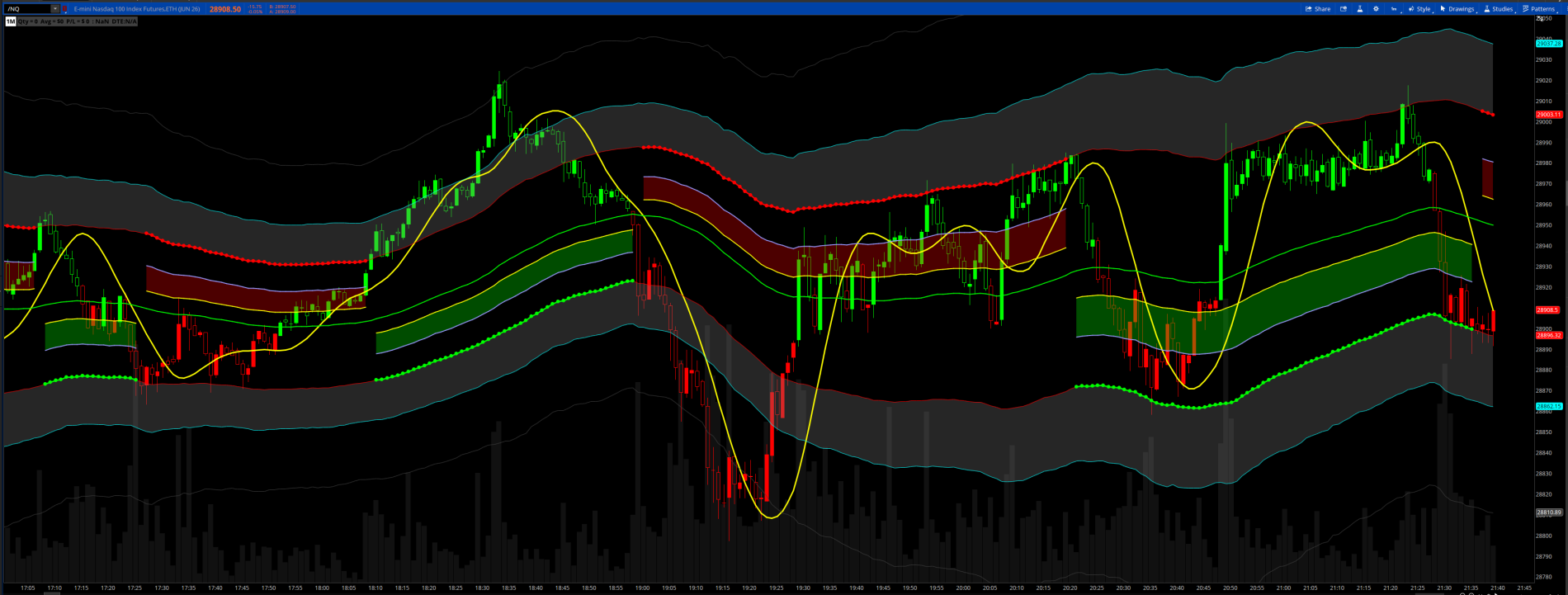
Dynamic Golden Pocket (0.618 - 0.786) Shaded red or green zones: Unlike static retracements, these Fibonacci levels are calculated relative to the current ATR envelope. The "Pocket" acts as a high-interest zone where price is expected to find support (in uptrends) or resistance (in downtrends).
When the Golden Pocket is Green, only take long positions, when it is red, only take short positions.
Additions:
I added targets which are in the gray shaded areas. These are typically reversal zones. There is a dark gray line outside these shaded bands that is an extreme level. A good trade is at the break of the green 50% center line. The yellow line is a trigger line. Trade the break of the yellow line at extremes.
Timeframes: Works on all timeframes, but I especially like the 1 and 3 minute charts.
Inspired by this video.
ATR Fibonacci Trend Envelopes is a professional-grade trend-following and mean-reversion framework. It combines the volatility-filtering power of Average True Range (ATR) with the mathematical precision of the Fibonacci Golden Ratio to define high-probability "buy/sell pockets" within an established trend.
Dynamic Golden Pocket (0.618 - 0.786) Shaded red or green zones: Unlike static retracements, these Fibonacci levels are calculated relative to the current ATR envelope. The "Pocket" acts as a high-interest zone where price is expected to find support (in uptrends) or resistance (in downtrends).
When the Golden Pocket is Green, only take long positions, when it is red, only take short positions.
Additions:
I added targets which are in the gray shaded areas. These are typically reversal zones. There is a dark gray line outside these shaded bands that is an extreme level. A good trade is at the break of the green 50% center line. The yellow line is a trigger line. Trade the break of the yellow line at extremes.
Timeframes: Works on all timeframes, but I especially like the 1 and 3 minute charts.
Inspired by this video.
Code:
# ATR Fibonacci Trend Envelopes
# Original concept by BigBeluga from https://www.tradingview.com/script/16toJPAD-ATR-Fibonacci-Trend-Envelopes-BigBeluga/
# Conversion and modifications by Chewie 5/18/2026

# ═══════════════════════════════════════════════════════
# INPUTS
# ═══════════════════════════════════════════════════════

input colorbar  = yes;
input alert     = yes;
input maType    = {default WMA, RMA, SMA, EMA, HMA};
input maLength  = 100;
input atrLength = 100;
input atrMult   = 3.0;
input breakbubble = yes;

# ═══════════════════════════════════════════════════════
# COLOR CONSTANTS
# ═══════════════════════════════════════════════════════

DefineGlobalColor("Up",     color.green);
DefineGlobalColor("Down",   color.red);

# ═══════════════════════════════════════════════════════
# MOVING AVERAGE HELPER
# ═══════════════════════════════════════════════════════

def maValue;
switch (maType) {
case SMA:
    maValue = Average(close, maLength);
case EMA:
    maValue = ExpAverage(close, maLength);
case WMA:
    maValue = WMA(close, maLength);
case HMA:
    maValue = HullMovingAvg(close, maLength);
case RMA:
    maValue = WildersAverage(close, maLength);
}

# ═══════════════════════════════════════════════════════
# CORE CALCULATIONS
# ═══════════════════════════════════════════════════════

def basis     = maValue;
def atrValue  = Average(TrueRange(high, close, low), atrLength);
def upperBand = basis + atrValue * atrMult;
def lowerBand = basis - atrValue * atrMult;

def fibMid   = 0.5;
def fibGold1 = 0.618;
def fibGold2 = 0.786;
def fibTarget = 1.32;

# Trend state — recursive def replaces Pine's persistent `var int t`
def trend;
if close crosses above upperBand {
    trend = 1;
} else if close crosses below lowerBand {
    trend = -1;
} else {
    trend = trend[1];
}

# Fibonacci levels (direction-aware)
def fib50;
def fib618;
def fib786;
if trend == 1 {
    fib50  = lowerBand + (upperBand - lowerBand) * (1 - fibMid);
    fib618 = lowerBand + (upperBand - lowerBand) * (1 - fibGold1);
    fib786 = lowerBand + (upperBand - lowerBand) * (1 - fibGold2);
} else {
    fib50  = upperBand - (upperBand - lowerBand) * (1 - fibMid);
    fib618 = upperBand - (upperBand - lowerBand) * (1 - fibGold1);
    fib786 = upperBand - (upperBand - lowerBand) * (1 - fibGold2);
}

# 1.0 anchor: lower band in uptrend, upper band in downtrend
def level100    = if trend == 1 then lowerBand else upperBand;
def trendChange = trend != trend[1];
def isUp        = trend == 1;

# ═══════════════════════════════════════════════════════
# PLOTS
# ═══════════════════════════════════════════════════════

# Trend Baseline (1.0 level)
plot TrendMA = if !trendChange then level100 else Double.NaN;
TrendMA.SetLineWeight(3);
TrendMA.AssignValueColor(if isUp then GlobalColor("Up") else GlobalColor("Down"));
TrendMA.SetPaintingStrategy(PaintingStrategy.LINE_VS_POINTS);
TrendMA.HideBubble();

plot lower = lowerband;
lower.setdefaultColor(color.red);
plot upper = upperband;
upper.setdefaultColor(color.red);

# Fib 1.8
plot Ufib150 = upperBand - (upperBand - lowerBand) * (1 - 1.8);
Ufib150.setdefaultColor(color.DARK_GRAY);
plot Lfib150 = lowerBand + (upperBand - lowerBand) * (1 - 1.8);
Lfib150.setdefaultColor(color.DARK_GRAY);


# Fib 1.32
plot Ufib132 = upperBand - (upperBand - lowerBand) * (1 - fibTarget);
Ufib132.setdefaultColor(color.cyan);
plot Lfib132 = lowerBand + (upperBand - lowerBand) * (1 - fibTarget);
Lfib132.setdefaultColor(color.cyan);

# Fib 0.5
plot Fib50Plot = if trend != 0 then fib50 else Double.NaN;
Fib50Plot.SetDefaultColor(color.green);
Fib50Plot.SetLineWeight(2);
Fib50Plot.HideBubble();

# Fib 0.618 (Golden Pocket lower bound)
plot Fib618Plot = if trend != 0 and !trendChange then fib618 else Double.NaN;
Fib618Plot.SetDefaultColor(color.yellow);
Fib618Plot.SetLineWeight(2);
Fib618Plot.HideBubble();

# Fib 0.786 (Golden Pocket upper bound)
plot Fib786Plot = if trend != 0 and !trendChange then fib786 else Double.NaN;
Fib786Plot.SetDefaultColor(color.violet);
Fib786Plot.SetLineWeight(2);
Fib786Plot.HideBubble();

# Golden Pocket Fill
AddCloud(Fib618Plot, Fib786Plot, color.green, color.red);
AddCloud(upper, uFib132, color.gray, color.gray);
AddCloud(lfib132, lower, color.gray, color.gray);

# ALERTS #
def Xfibup = high > Ufib132;
def Xfibdn = low < Lfib132;

def XUP = Xfibup and !Xfibup[1];
def XDN = Xfibdn and !Xfibdn[1];
Alert(Alert and XUP, "X_FIB_UP(First Touch)", Alert.BAR, Sound.Ding);
Alert(Alert and XDN, "X_FIB_DN(First Touch)", Alert.BAR, Sound.Ding);

# COLOR BAR #
AssignPriceColor(
    if !Colorbar then Color.CURRENT
    else if close > fib50plot then Color.GREEN
    else if close < fib50plot then Color.RED
    else Color.YELLOW);

AddChartBubble(breakbubble and
    trendChange and isUp,
    lowerBand,
    "o " + AsText(close, NumberFormat.TWO_DECIMAL_PLACES),
    GlobalColor("Up"),
    no);

AddChartBubble(breakbubble and
    trendChange and !isUp,
    upperBand,
    "o " + AsText(close, NumberFormat.TWO_DECIMAL_PLACES),
    GlobalColor("Down"),
    yes);
Last edited:


