AGAIG SAME-DAY SPY or QQQ TRADER
This is a new custom Indicator for Trading the SPY or QQQ and the indicator stays in place during trading and after hours. This indicator works on both the SPY or QQQ without modification (just load it on each chart) and is built as an upper indicator with a ring once the volume gate activates. You can physically highlight it and move it to an lower chart and it will show (your pick once in place). This is how it works:
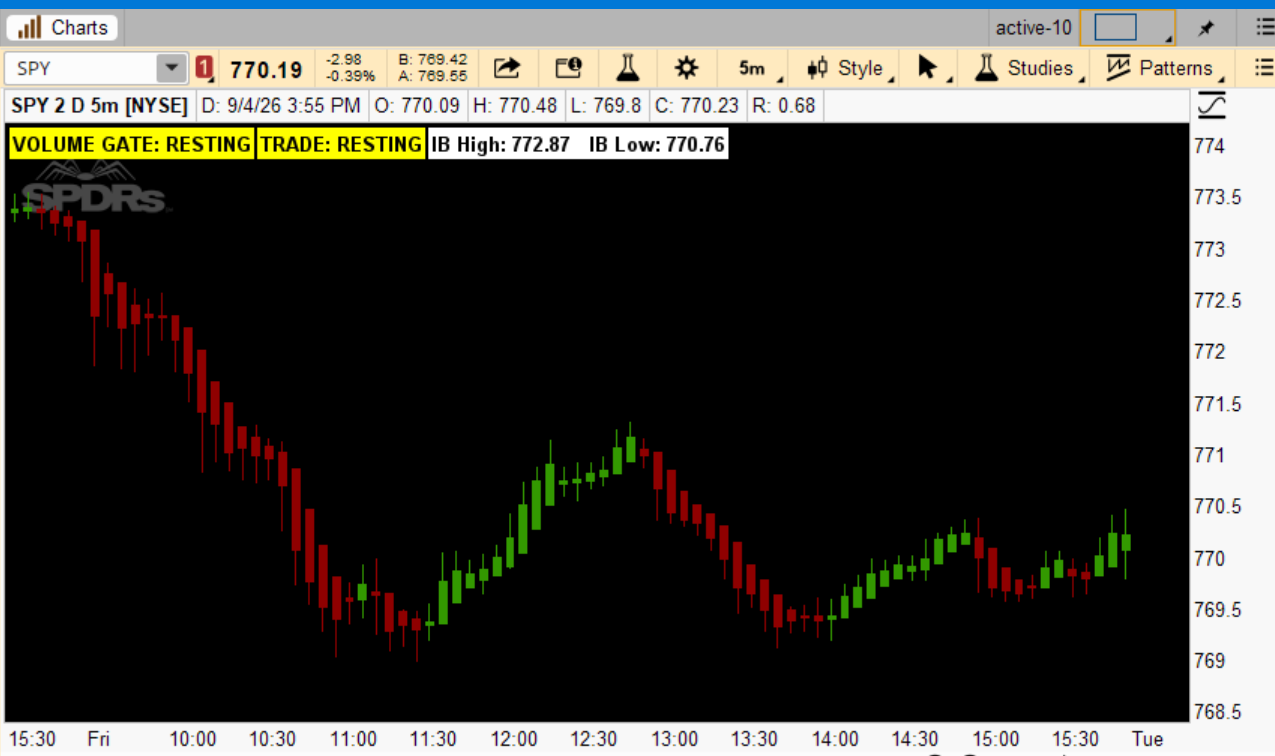
Quick-start commentary:
- 9:30–10:30 AM ET — labels show ANALYZING. This is the Initial Balance forming; don't act on anything yet, it's just measuring SPY's opening-hour high/low.
- 10:30 AM–3:30 PM ET— the labels go live:
- Volume Gate: OPEN means relative volume is strong enough to trust a breakout/failure move; CLOSED means skip it even if a setup looks tempting — thin volume, low conviction.
- Trade: only acts on BUY LONG / BUY SHORT when the Volume Gate is open and one of the three setups (Momentum Long, Look Below & Fail, Look Above & Fail) triggers. Otherwise it says NO TRADE — most bars, most days, this is what you'll see, and that's by design.
- After 3:30 PM ET (and anytime outside the session — overnight, pre-market, weekends) — labels show RESTING. No new entries; this is your reminder to be flat, matching the "no overnight holds" rule.
- IB = Initial Balance: "Initial Balance" is a concept borrowed from Market Profile trading — it's simply the high and low price range established during the first hour of the session (9:30–10:30 AM ET for SPY). It marks out the market's first "fair value" test for the day, and traders watch whether price stays inside that range, breaks out and holds, or breaks out and fails — which is exactly the setup your indicator is built around.
The added alert: It will ring the moment the Volume Gate opens (only once per open, and only 10:30–3:30). Note: Alert() sound only plays in real time on the live/right-most bar of a running chart — it won't make noise scrolling back through history, which is what we want anyway.
One thing worth flagging: on ThinkOrSwim, sound alerts from a study only play while that chart is actually open and in the foreground (or with the platform's alert log active) — it's not a push notification to your phone.
NOTE: To be truthful I sometimes use 1 DTE but want to measure the trade using today’s parameters and want to close before days end.
INDICATOR LINK: http://tos.mx/!yTyUh08Y
Code:
# ==========================================================
# AGAIG Same-Day SPY or QQQ Trader — IB Breakout-Fail Reversal Labels
# ==========================================================
# Synthesized from strategy commentary:
#  - Initial Balance = first 60 min (9:30-10:30 ET) high/low
#  - Setups: Momentum Long, Look Below & Fail Long, Look Above & Fail Short
#  - Volume Gate = Relative Volume filter; gate closed = no trade
#  - Flat by 3:30 PM ET (time-stop, no overnight holds)
#
# LABEL STATES (both labels follow this lifecycle):
#   ANALYZING  -> before the 60-min Initial Balance is complete (9:30-10:30)
#   live value -> 10:30 AM - 3:30 PM: Volume Gate OPEN/CLOSED,
#                 Trade BUY LONG / BUY SHORT / NO TRADE
#   RESTING    -> after the 3:30 PM flat time, for the rest of the session
#
# NOTE ON 0DTE vs 1DTE:
# The Initial Balance / breakout-fail formula below measures SPY's own
# same-day (0DTE-style) price and volume behavior -- that's what the
# original strategy is built on, and it doesn't change based on which
# option expiration you actually trade. If you trade 1DTE contracts,
# this study still "measures" the market the same way; only your fill/
# contract selection differs, which lives outside this chart study.
# ==========================================================

declare upper;

input ibStartTime      = 0930;   # Initial Balance start (ET, HHmm)
input ibEndTime         = 1030;  # Initial Balance end (ET, HHmm) -- 60-min IB
input flatTime           = 1530; # Time-stop / flat-by time (ET, HHmm)
input relVolAvgLength    = 20;   # Bars used to compute average volume baseline
input relVolThreshold    = 1.2;  # Relative volume multiple required to "open" the gate
input useVwapFilter      = yes;  # Require price on correct side of VWAP
input maLength           = 20;   # Trend filter moving average length
input atrLength          = 14;   # ATR length (for reference / future stop sizing)

# ---------- Session / day tracking ----------
def newDay = GetDay() <> GetDay()[1];

# ---------- Initial Balance high/low ----------
def onIB   = SecondsFromTime(ibStartTime) >= 0 and SecondsTillTime(ibEndTime) > 0;
def ibDone = SecondsFromTime(ibEndTime) >= 0;

def ibHigh = CompoundValue(1,
    if newDay then (if onIB then high else 0)
    else if onIB then Max(high, ibHigh[1])
    else ibHigh[1],
    0);

def ibLow = CompoundValue(1,
    if newDay then (if onIB then low else 999999)
    else if onIB then Min(low, ibLow[1])
    else ibLow[1],
    999999);

# ---------- Volume Gate ----------
def avgVol         = Average(volume, relVolAvgLength);
def relVol          = volume / avgVol;
def volumeGateOpen = relVol >= relVolThreshold;

# ---------- Filters ----------
def vwapVal = reference VWAP();
def maVal   = MovingAverage(AverageType.SIMPLE, close, maLength);
def atrVal  = MovingAverage(AverageType.WILDERS, TrueRange(high, close, low), atrLength);

def bullBias = close > maVal and (!useVwapFilter or close > vwapVal);
def bearBias = close < maVal and (!useVwapFilter or close < vwapVal);

# ---------- Setup detection (only valid once IB is complete) ----------
def brokeAboveIB = ibDone and close > ibHigh;

# Momentum Long: breaking and holding above the IB high, biased bullish
def momentumLong = brokeAboveIB and close > close[1] and bullBias;

# Look Below and Fail Long: price dipped below IB low, then reclaimed it
def lookBelowFailLong = ibDone and low[1] < ibLow and close > ibLow and bullBias;

# Look Above and Fail Short: price pushed above IB high, then failed back under it
def lookAboveFailShort = ibDone and high[1] > ibHigh and close < ibHigh and bearBias;

# ---------- Session state machine ----------
# beforeOpen covers pre-market / overnight / weekend bars (any time before 9:30 ET)
# afterFlat covers post-3:30 ET through the close, evening, and overnight
def beforeOpen = SecondsFromTime(ibStartTime) < 0;             # before 9:30
def afterFlat  = SecondsFromTime(flatTime) >= 0;                # 3:30 and later

def resting  = beforeOpen or afterFlat;                         # outside the session entirely
def preIB    = !beforeOpen and !ibDone;                         # 9:30 - 10:30 (IB forming)
def inWindow = ibDone and !afterFlat;                            # 10:30 - 3:30 (live signals)

def longSignal  = inWindow and volumeGateOpen and (momentumLong or lookBelowFailLong);
def shortSignal = inWindow and volumeGateOpen and lookAboveFailShort;

# ---------- Volume Gate audio alert ----------
# Fires once, on the bar the gate flips from CLOSED to OPEN (not on every
# bar it stays open), and only during the live trading window.
def gateJustOpened = inWindow and volumeGateOpen and !volumeGateOpen[1];
Alert(gateJustOpened, "Volume Gate OPEN", Alert.BAR, Sound.Ring);

# ---------- Label 1: VOLUME GATE ----------
AddLabel(yes,
    if preIB then "VOLUME GATE: ANALYZING"
    else if resting then "VOLUME GATE: RESTING"
    else if volumeGateOpen then "VOLUME GATE: OPEN (" + AsText(relVol, NumberFormat.TWO_DECIMAL_PLACES) + "x)"
    else "VOLUME GATE: CLOSED (" + AsText(relVol, NumberFormat.TWO_DECIMAL_PLACES) + "x)",
    if preIB then Color.GRAY
    else if resting then Color.YELLOW
    else if volumeGateOpen then Color.CYAN
    else Color.DARK_GRAY);

# ---------- Label 2: TRADE ----------
AddLabel(yes,
    if preIB then "TRADE: ANALYZING"
    else if resting then "TRADE: RESTING"
    else if longSignal then "TRADE: BUY LONG"
    else if shortSignal then "TRADE: BUY SHORT"
    else "TRADE: NO TRADE",
    if preIB then Color.GRAY
    else if resting then Color.YELLOW
    else if longSignal then Color.GREEN
    else if shortSignal then Color.RED
    else Color.LIGHT_GRAY);

# ---------- Reference label: IB levels ----------
AddLabel(yes,
    if preIB then "IB High: --   IB Low: --"
    else "IB High: " + AsText(ibHigh, NumberFormat.TWO_DECIMAL_PLACES) +
         "   IB Low: " + AsText(ibLow, NumberFormat.TWO_DECIMAL_PLACES),
    Color.WHITE);
Last edited by a moderator: