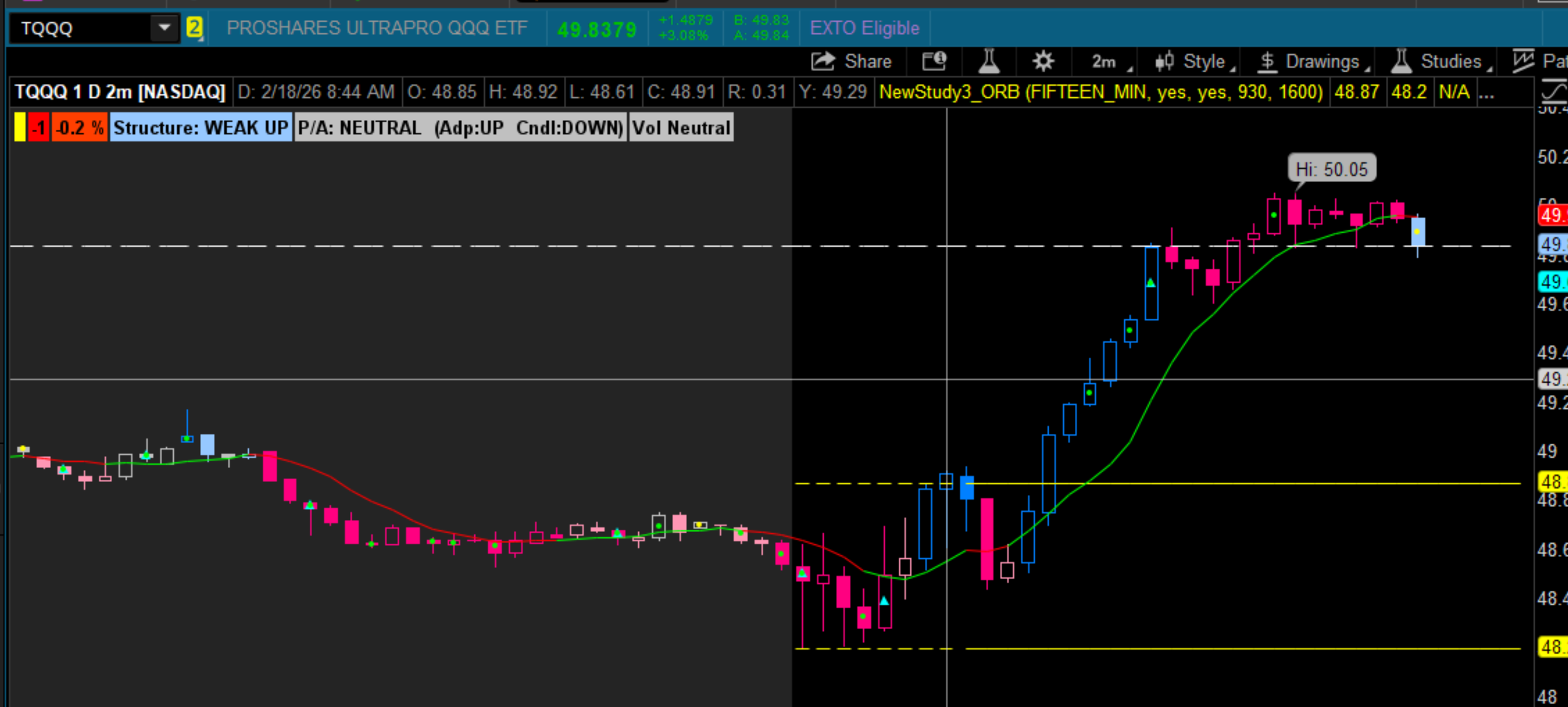
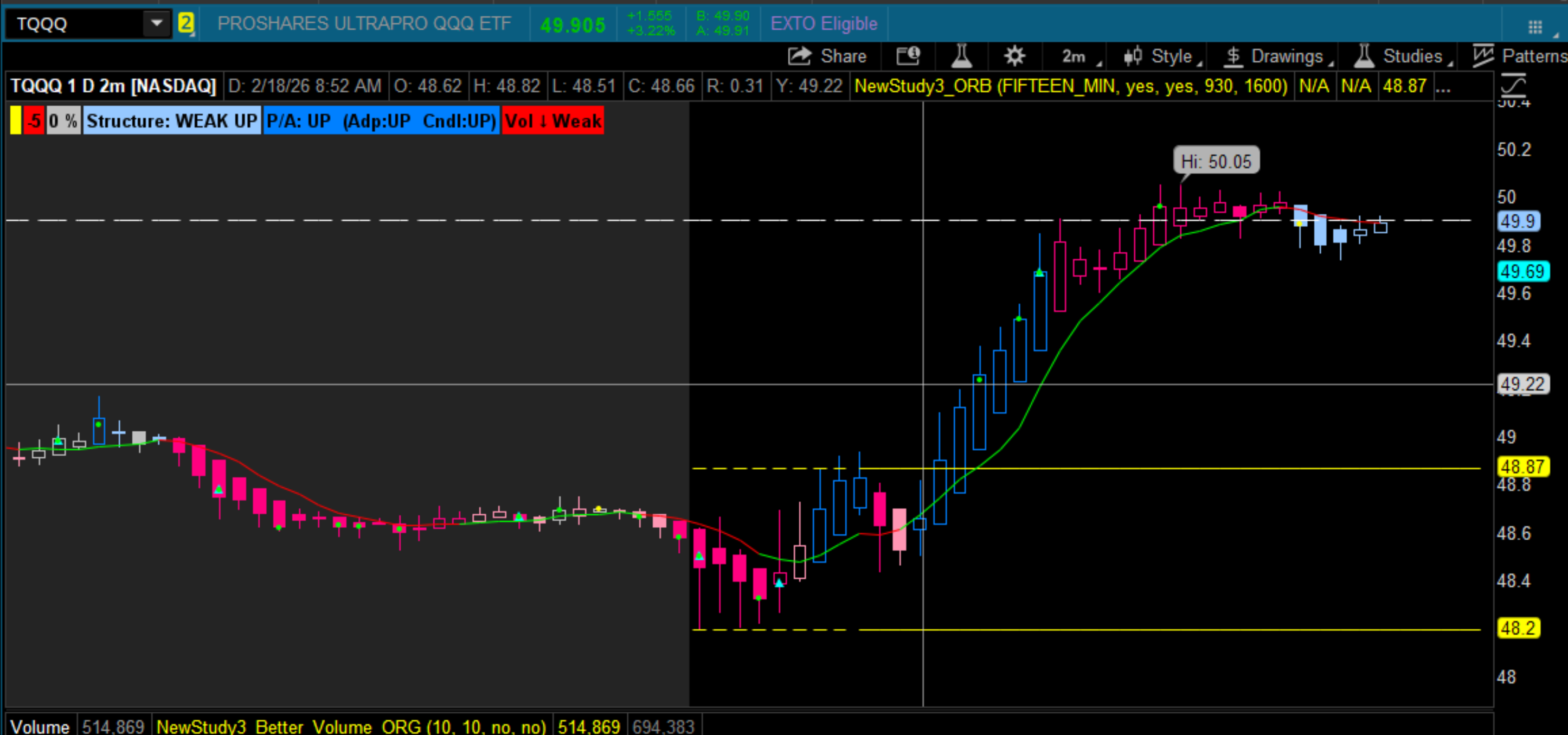
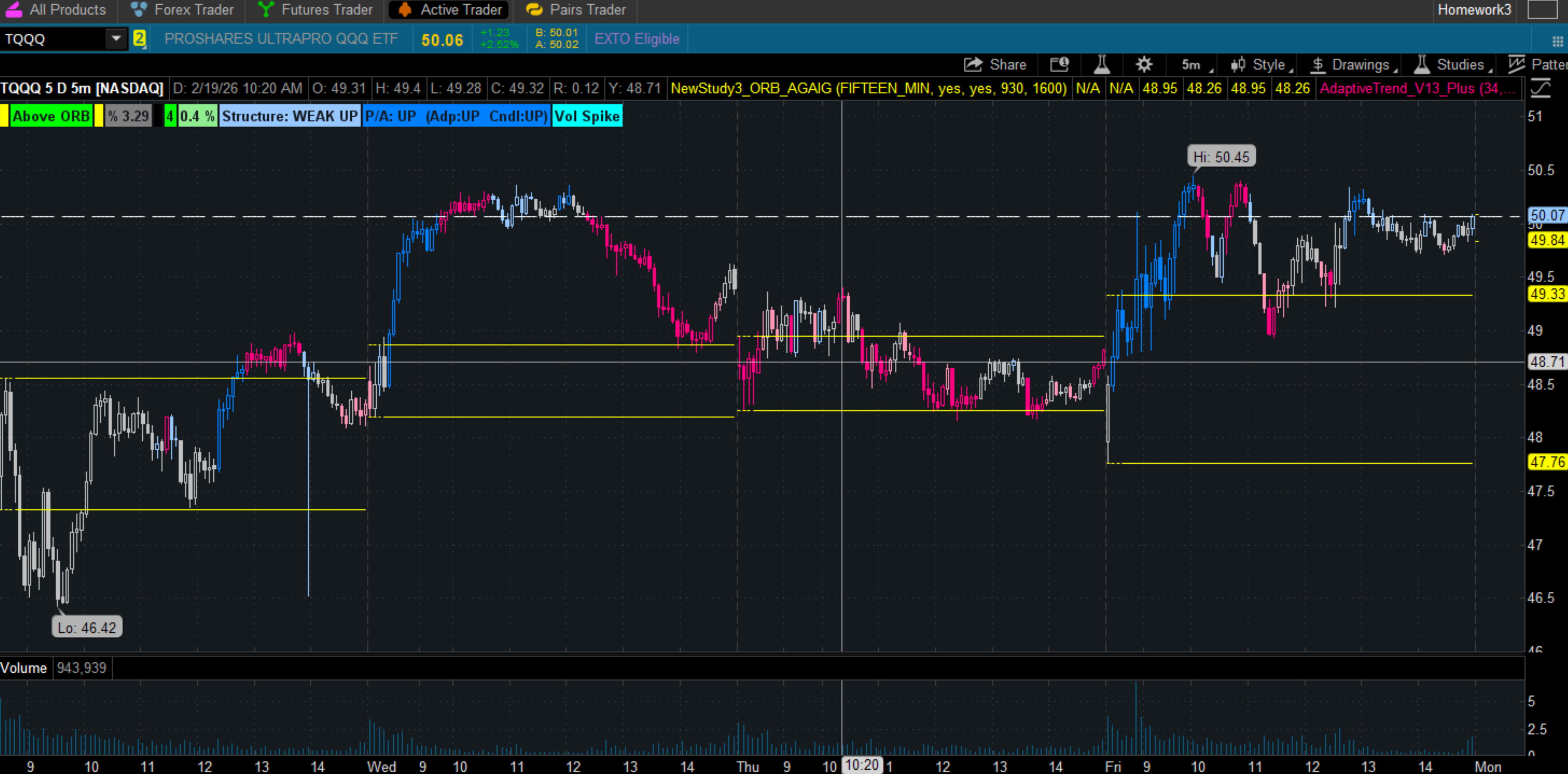
Adaptive Trend V13 – Plus
A structural trend study using two lenses — Structure and Price Action — to give a clear, honest view of the trend.
Adaptive Trend V13 – Plus is built around a simple idea:
price action can lie; structure cannot.
Viewing both Structure and Price Action is an Eye Opener for me.
When they agree, the trend is clean.
When they diverge, the chart reveals what I usually miss — strength inside weakness, weakness inside strength, and the transitions in between.
Watching Pullbacks Develop (Instead of Chasing SMA/EMA/Fib Levels)
Most of us learn to chase pullbacks using tools like SMAs, EMAs, or Fibonacci levels.
Those tools can be useful, but they all measure the same thing:
price touching a line.
Touching a line doesn’t tell you whether the move is:
- a healthy pullback
- a failed breakout
- a dead cat bounce
- early accumulation
- early distribution
- or the start of a full reversal
A pullback isn’t defined by where price lands.
It’s defined by how Structure and Price Action behave relative to each other.
This gives you a way to watch a pullback develop instead of chasing it.
Easter Egg: When the Indicators Conflict
(This is the part that’s hardest to see.)
The real power of V13+ isn’t when Structure and PA agree.
It’s when they disagree — because disagreement is where the market transitions.
When Structure and PA agree, the trend is clean.
When they disagree, the market is shifting.
That’s where the edge is.
Here’s the cheat sheet:
- Structure UP + PA DOWN → Pullback inside an uptrend
Trend intact. Price correcting. - Structure DOWN + PA UP → Dead cat bounce
Looks bullish. Isn’t bullish. - Structure NEUTRAL + PA UP → Early accumulation
Smart money stepping in. - Structure NEUTRAL + PA DOWN → Early distribution
Smart money stepping out.
Why This Matters (and How I Discovered It)
I led with the opening screenshot for a reason.
At first glance, the chart showed a strong Price Action uptrend, yet the entire Structural trend was still Strong Down.
I was in the middle of development and testing, and my first reaction was:
“This can’t be right. Did I break something?”
But when I zoomed out to the full 1‑year / Daily chart, the real story became obvious.
It wasn’t a bug.
It wasn’t a misfire.
It was the story that only becomes visible when Structure and PA are separated.
Charts use the adaptive line as a reference — not a price line.
I use “Line on Price” in place of predefined pivots or S/R levels.
KPO1 YrD
Example 1 — KOP (1‑Year / Daily)
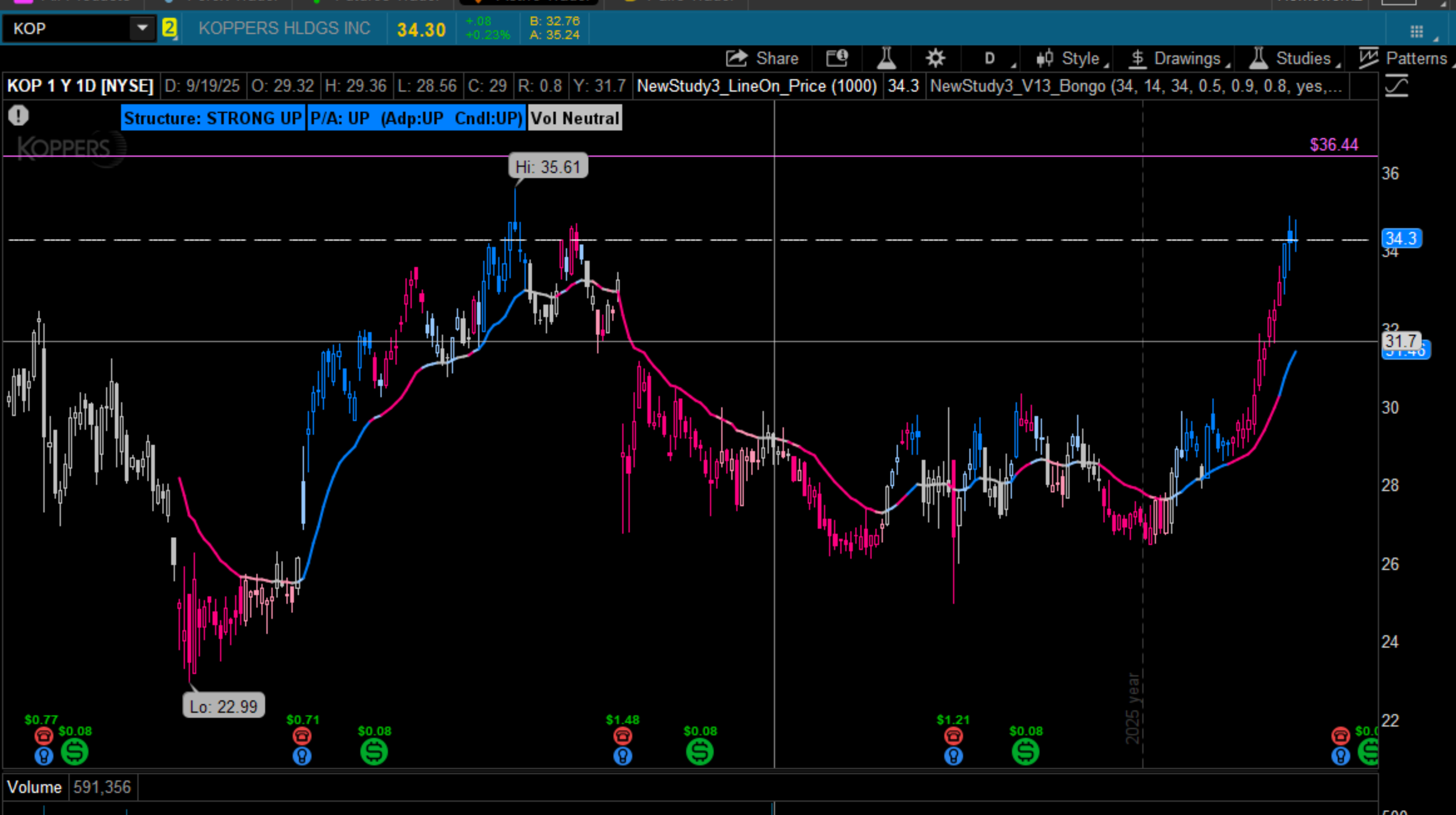
On the short‑term view, KOP looked like it was in a powerful uptrend.
But structurally, it was still deep inside a Strong Down regime.
Once the full chart was visible, the move revealed itself for what it really was:
a retracement inside a dominant downtrend, ending in a clean double‑top.
This was the moment V13+ proved its purpose:
PA told a story, but Structure told the truth.
Example 2 — WLKP (1‑Year / Daily)
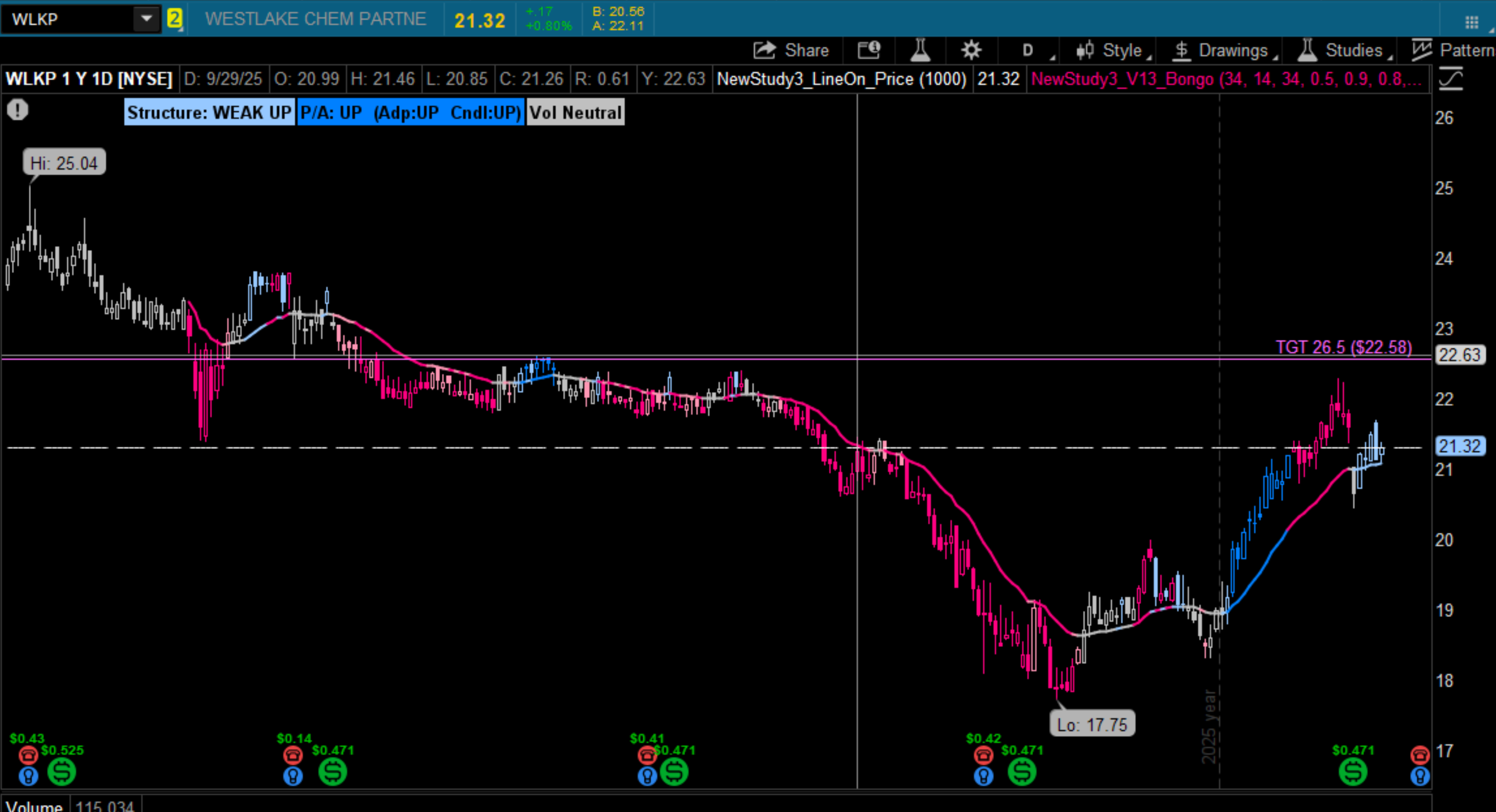
WLKP begins with both Structure and PA aligned in a strong uptrend — a clean, healthy move.
Near the top, Structure begins to deteriorate first.
PA holds a bit longer, but eventually confirms the end of the trend with a small 2% drop and a sideways drift.
This is the classic divergence V13+ is designed to reveal:
Structure weakens before PA gives up.
Example 3 — CVX (1‑Year / Daily)
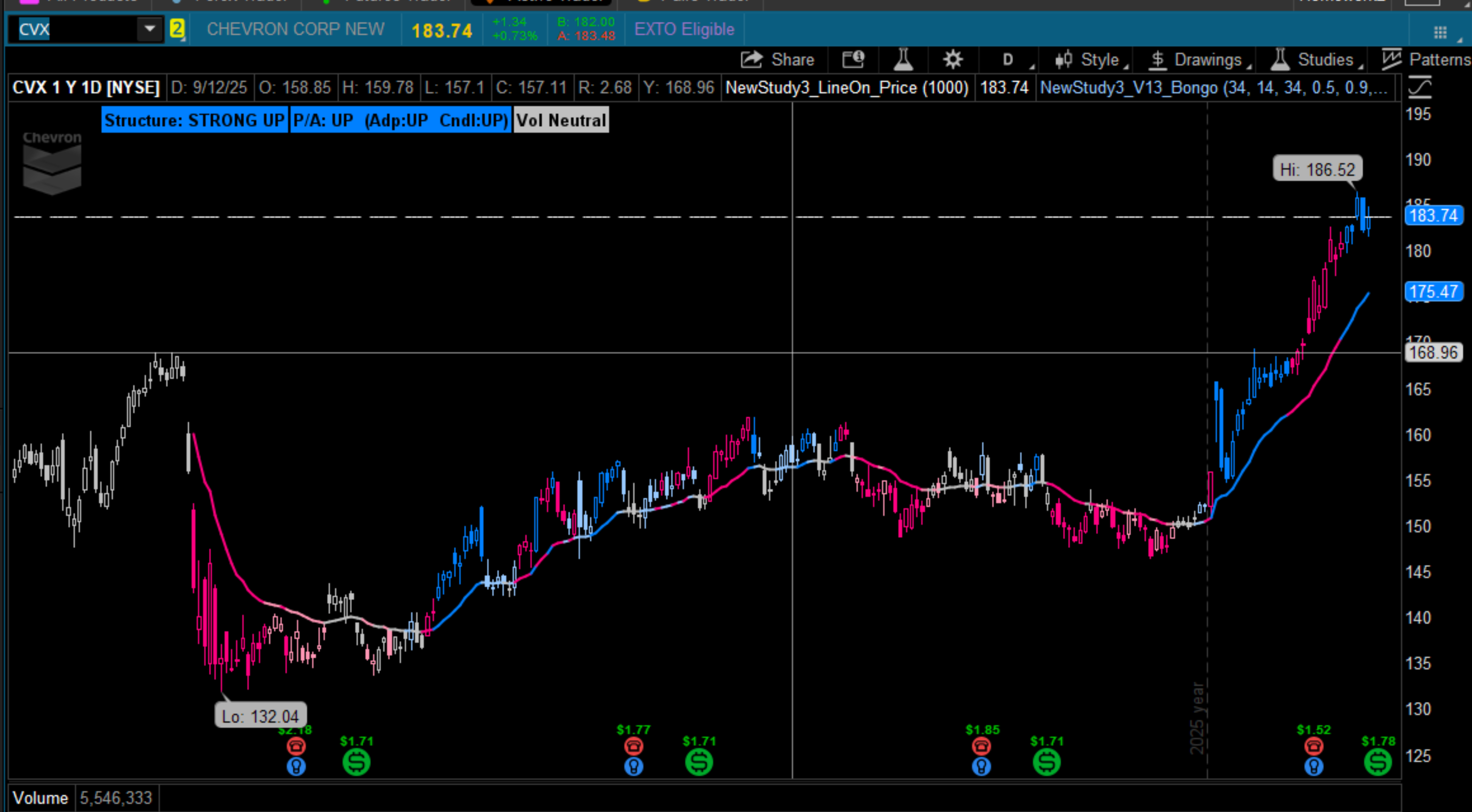
CVX starts with a strong structural and price‑action trend.
About three‑quarters of the way up, Structure begins to weaken — a sign of instability.
But unlike WLKP, the strong PA push carries the trend through the structural wobble, and eventually both lenses reconverge into a unified strong trend again.
This is the opposite scenario:
PA temporarily overpowers structural weakness before the trend re‑aligns.
What These Examples Show
Across these three charts, you see three different relationships between Structure and PA:
- KOP: PA looks strong, Structure reveals a retracement
- WLKP: Structure weakens first, PA confirms later
- CVX: PA carries the trend through structural instability
One consistent framework.
Disclaimer
I currently hold positions in both KOP and WLKP — small, experimental, lessons‑learned size, slightly underwater, nothing that threatens the portfolio.
CVX has been a steady moneymaker for me over the years, batting a thousand on this one… although I wasn’t paying attention and missed this last run
 .
.Adaptive Trend V13 – Plus is built from three independent subsystems.
1. Structure (The Foundation)
Structure is the backbone of the system.
It measures the underlying regime — the part of the trend that doesn’t react to noise, candles, or emotion.
Structure answers:
“What is the market actually doing beneath the surface?”
Under the hood, Structure analyzes an ATR‑modulated Z‑score, giving you a normalized, volatility‑aware view of trend integrity.
2. Price Action (Two‑Part Behavioral Lens)
Price Action is split into two independent components:
PA‑A — Adaptive Drift
Captures directional pressure, momentum, and drift.
It reacts faster than Structure and shows the push behind the move.
PA‑C — Candle Behavior
Reads the character of the candles themselves:
expansion, contraction, aggression, hesitation.
Together, PA‑A and PA‑C form the behavioral layer:
fast, emotional, reactive — the story on top of the truth.
3. The “Plus” — Volume Context
The Plus layer adds volume‑based context:
- spikes
- volume pulse
- visual markers for relative volume and exhaustion
Why These Three Lenses Matter
Each subsystem is independent.
Each subsystem tells its own story.
And the power of V13‑Plus comes from how they interact:
- Agreement → clean trend
- Disagreement → transition
- Volume confirmation → conviction
- Volume contradiction → exhaustion
it’s a multi‑lens trend analyzer.
User Controls & Settings (Overview)
Adaptive Trend V13‑Plus gives you a lot of power, but only a few controls actually matter for day‑to‑day use.
This section focuses on the settings that affect what you see — labels, lines, volume markers, and global colors — while leaving the deeper parameters untouched.
1. Label Controls
These settings control the informational labels that appear on the chart.
show label
Turns the main trend label on/off.
Recommended: ON
This is your primary readout for Structure, PA, and Volume context.
show price action info
Displays the PA‑A and PA‑C breakdown.
Recommended: ON for learning, OFF for minimalism.
bongo label / vlabel (volume)
These are legacy compatibility labels.
Recommended: ON (harmless, informative)
2. Line Controls
These settings determine whether the adaptive trend line or moving averages appear.
line type
Options: None, Bongo, Adaptive, Both.
Recommended: None
V13‑Plus is a label‑driven system — the line is optional.
3. Volume Marker Controls
These settings toggle the “Plus” layer — the volume context.
show volume markers
Turns on/off the micro‑volume markers (dots, spikes).
Recommended: ON
These are the heartbeat of the Plus layer.
rel v length / vol lookback
Controls how relative volume and spikes are detected.
Recommended: Leave untouched
These are calibrated to match the VSA Advisor and DOOM Meter.
4. Global Colors
V13‑Plus uses a global color family so every subsystem speaks the same visual language:
- Blue → Up / Strength
- Pink / Red → Down / Weakness
- Gray → Neutral
- Light variants → Weak versions
- Green → Volume confirmation
- Cyan → Exhaustion / Spike
On a More Relevant Note
@justAnotherTrader recently posted a great valuation‑based bottom‑fishing idea on ADBE.
His early Z‑score work actually helped me understand Z‑score deeply, so I always pay attention to his posts.
I wanted to share how my structural trend framework interprets the same setup.
Fundamentally, ADBE is sitting at a 14‑year FCF Yield extreme — extremely compelling from a valuation standpoint.
Structurally, however, the long‑term trend is still in a Strong Down state.
Together, the message becomes:
“Great valuation, but wait for Structure to improve before acting.”
10‑Year Monthly View
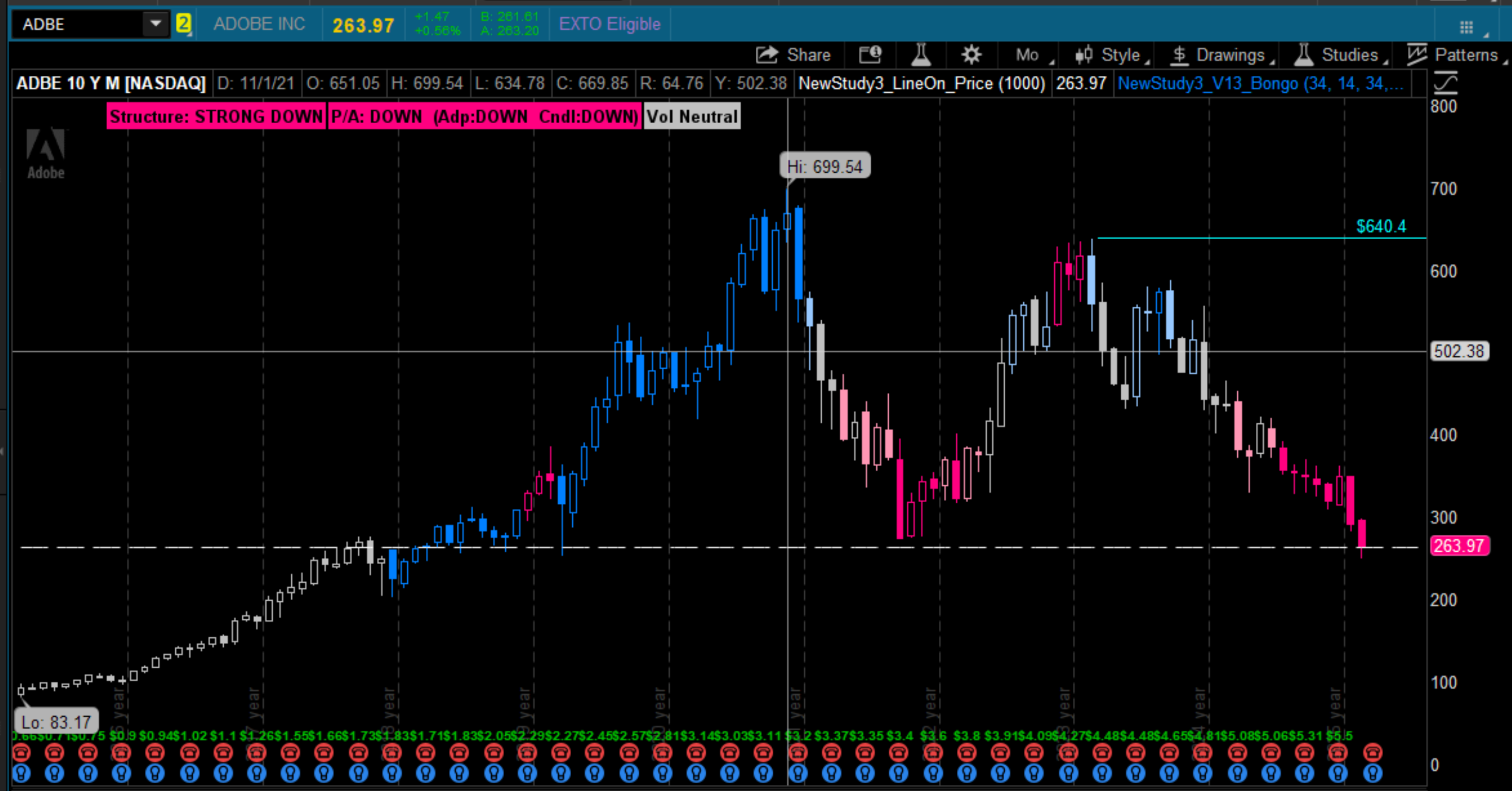
Even though both Structure and Price Action show strong downtrends, the long‑term chart reveals a clean double bottom anchored to the 2018 base — a meaningful structural location.
1‑Year / Daily View
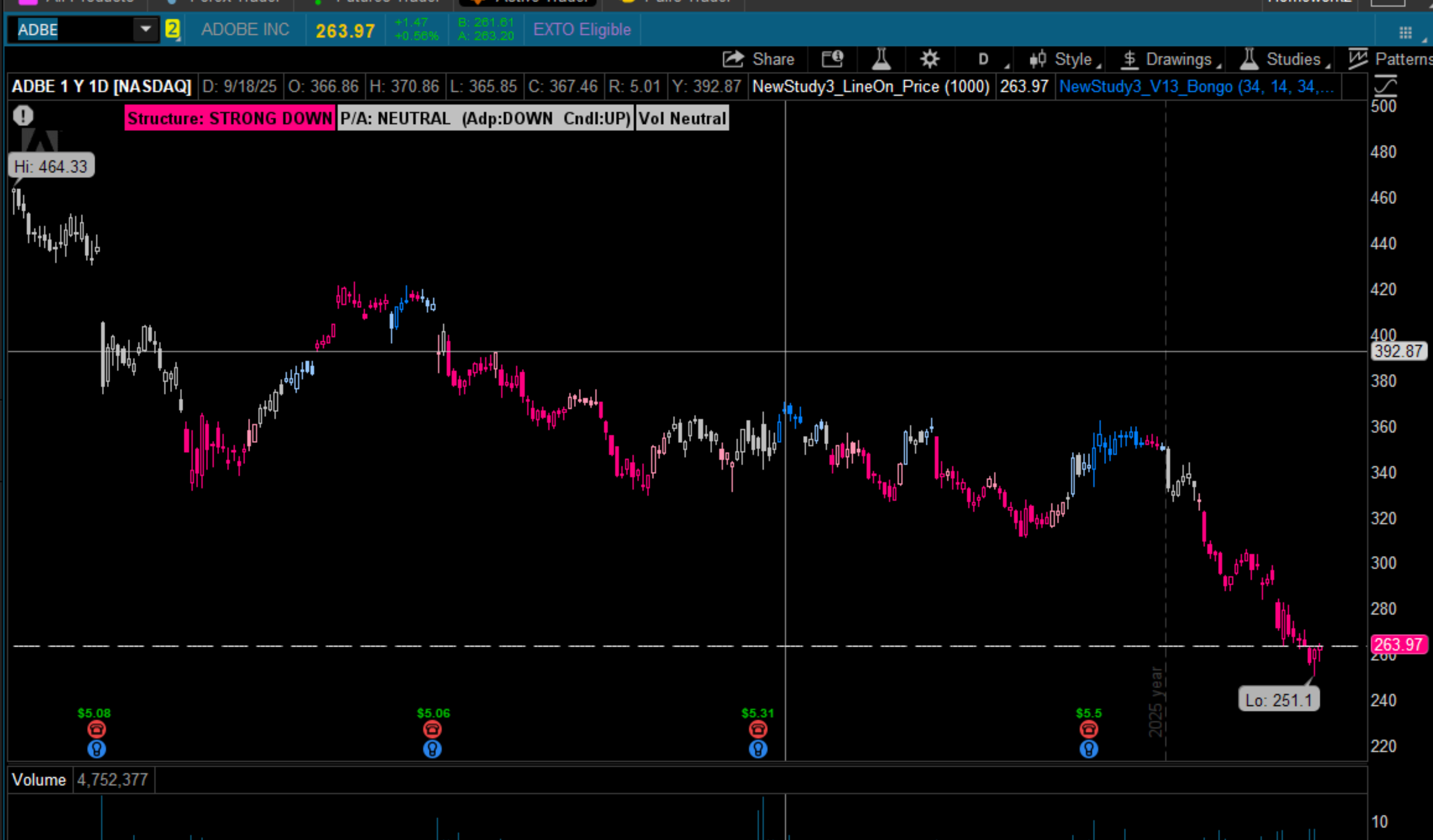
On the 1Y/D timeframe, Structure remains Strong Down, but Price Action has shifted to Neutral, hinting at a possible change in behavior.
If PA strengthens into an Up state while Structure begins to improve, that alignment would create a legitimate entry zone for a valuation‑driven trade.
I’ve added ADBE to my watchlist as this develops.
Developer’s Note
If you made it this far — thanks for reading.
My original goal was simple: I wanted a minimalist chart I could use in future presentations. I was inspired by samer800’s KNN — visually clean, trend‑aware, and anchored by a 10‑period MA.
Somewhere along the way, the project morphed into something else entirely — a unique structural tool for trend analysis.
The bad news: now I want to use this as the base for all my charts.
The good news: I can finally eliminate a half‑dozen studies that were all trying to imply the same information.
It’s been a pleasant distraction, but now I’ll get back to the Fundamental Snippet + Eval Engine + Trade Sentiment project.
(Study Link)
AdaptiveTrend V13-Plus https://tos.mx/!0Dh4csx4
Code:
# AdaptiveTrend v13 – Plus
# Minimalist, volatility‑aware adaptive trend engine
# Structure Trend + Price‑Action Trend (A + C)
# Assembled by ATCSAM — playing it forward

# Credits & Influences
# usethinkscript Community — collaboration, testing, and shared insight
#
# Bongo Indicator (HGSI Seminar Group)
#   Original concept: HGSI traders
#   TOS port: usethinkscript community
#   Modifications: atcsam — user controls + price % from MA
#
# Hot Percent / hiVolume Indicator
#   Source: tinboot.blogspot.com
#   Author: Allen Everhart
#
# Visual Inspiration
#   Samer800 — KNN (clean visual presentation philosophy)
#
# Z‑Score Enlightenment
#   JustAnotherTrader — early work that helped deepen my understanding

declare upper;

#-----------------------------------------
# GLOBAL COLORS
#-----------------------------------------
DefineGlobalColor("Up",          CreateColor(0, 128, 255));    # cyan
DefineGlobalColor("Down",        CreateColor(255, 0, 128));    # magenta
DefineGlobalColor("Neutral",     Color.LIGHT_GRAY);

DefineGlobalColor("UpBar",       CreateColor(0, 128, 255));
DefineGlobalColor("WeakUpBar",   CreateColor(150, 200, 255));

DefineGlobalColor("DownBar",     CreateColor(255, 0, 128));
DefineGlobalColor("WeakDownBar", CreateColor(255, 150, 180));

#-----------------------------------------
# INPUTS
#-----------------------------------------
input Length              = 34;
input VolLookback         = 14;
input ZLen                = 34;

input ZNeutralLevel       = 0.5;
input ATRCompressLvl      = 0.9;
input RangeFactor         = 0.8;

input ShowLabel           = yes;
input ColorBars           = yes;
input ShowPriceActionInfo = yes;


#-----------------------------------------
# LINE MODE SWITCH (Adaptive / Bongo / Both / None)
#-----------------------------------------

input LineType = {default "None", "Bongo", "Adaptive", "Both" };
#    <Bongo> = SMA timing backbone Default trend trade
#    <Adaptive> = v13 structural line
#    <Both> = show both lines
#    <None> = hide all lines";


def showBongo    = LineType == LineType."Bongo" or LineType == LineType."Both";
def showAdaptive = LineType == LineType."Adaptive" or LineType == LineType."Both";
def showNone     = LineType == LineType."None";
def price = close;

#-----------------------------------------
# INITIALIZATION MODE
#-----------------------------------------
def initializing = BarNumber() < ZLen;

#-----------------------------------------
# 1) Volatility Engine
#-----------------------------------------
def tr       = TrueRange(high, close, low);
def atr      = Average(tr, VolLookback);
def atrNorm  = if atr != 0 then atr / Average(atr, VolLookback) else 1;
def atrClamp = Min(Max(atrNorm, 0.5), 2.0);

#-----------------------------------------
# 2) Z-Score Engine
#-----------------------------------------
def meanP  = Average(price, ZLen);
def stdevP = StDev(price, ZLen);
def z      = if stdevP != 0 then (price - meanP) / stdevP else 0;

#-----------------------------------------
# 3) Dynamic Smoothing Factor
#-----------------------------------------
def baseAlpha   = 2.0 / (Length + 1);
def trendBoost  = 1 + (AbsValue(z) / 3.0);
def volBoost    = 1 + ((atrClamp - 1) / 2);
def dynAlphaRaw = baseAlpha * trendBoost * volBoost;
def dynAlpha    = Min(Max(dynAlphaRaw, baseAlpha * 0.25), baseAlpha * 3);

#-----------------------------------------
# 4) Adaptive Line
#-----------------------------------------
rec adaptiveLine =
    if BarNumber() == 1 then price
    else if IsNaN(price) then Double.NaN
    else if IsNaN(adaptiveLine[1]) then price
    else adaptiveLine[1] + dynAlpha * (price - adaptiveLine[1]);

plot Adaptive =
    if initializing or showNone or !showAdaptive then Double.NaN
    else adaptiveLine;

Adaptive.SetLineWeight(2);

#-----------------------------------------
# 5) Trend Classifier (5-State Structural Trend)
#-----------------------------------------
def atrCompress   = atrClamp < ATRCompressLvl;
def zNeutral      = AbsValue(z) < ZNeutralLevel;
def rangeNeutral  = (high - low) < (atr * RangeFactor);

def strongNeutral = atrCompress and zNeutral and rangeNeutral;

def dir =
    if strongNeutral then 0
    else if z > ZNeutralLevel then 1
    else if z < -ZNeutralLevel then -1
    else 0;

def strongUp   =  dir > 0 and AbsValue(z) > 1 and atrClamp >= 1 and !strongNeutral;
def weakUp     =  dir > 0 and AbsValue(z) > 0.3 and AbsValue(z) <= 1 and !strongNeutral;

def strongDown =  dir < 0 and AbsValue(z) > 1 and atrClamp >= 1 and !strongNeutral;
def weakDown   =  dir < 0 and AbsValue(z) > 0.3 and AbsValue(z) <= 1 and !strongNeutral;

def neutral    =  strongNeutral or dir == 0;

def trendState =
    if initializing then 0
    else if strongUp then 1
    else if weakUp then 2
    else if neutral then 0
    else if weakDown then -2
    else -1;

#-----------------------------------------
# 6) Adaptive Line Colors
#-----------------------------------------
Adaptive.AssignValueColor(
    if initializing then GlobalColor("Neutral")
    else if trendState == 1 then GlobalColor("Up")
    else if trendState == 2 then GlobalColor("WeakUpBar")
    else if trendState == 0 then GlobalColor("Neutral")
    else if trendState == -2 then GlobalColor("WeakDownBar")
    else GlobalColor("Down")
);

#-----------------------------------------
# 7) Bar Colors
#-----------------------------------------
AssignPriceColor(
    if !ColorBars then Color.CURRENT
    else if initializing then GlobalColor("Neutral")
    else if trendState == 1 then GlobalColor("UpBar")
    else if trendState == 2 then GlobalColor("WeakUpBar")
    else if trendState == 0 then GlobalColor("Neutral")
    else if trendState == -2 then GlobalColor("WeakDownBar")
    else GlobalColor("DownBar")
);


#-----------------------------------------
# 9) PRICE-ACTION TREND (A + C)
#-----------------------------------------

# A) Adaptive-Line Slope
def paA_raw = adaptiveLine - adaptiveLine[1];
def paA =
    if IsNaN(adaptiveLine) or IsNaN(adaptiveLine[1]) then 0
    else if paA_raw > 0 then 1
    else if paA_raw < 0 then -1
    else 0;

# C) Candle-Based Trend (3-bar)
def upCount   = (close > close[1]) + (close[1] > close[2]) + (close[2] > close[3]);
def downCount = (close < close[1]) + (close[1] < close[2]) + (close[2] < close[3]);

def paC =
    if upCount >= 2 then 1
    else if downCount >= 2 then -1
    else 0;

# Combined PA Trend
def paTrend =
    if paA == 1 and paC == 1 then 1
    else if paA == -1 and paC == -1 then -1
    else 0;


#-----------------------------------------
# BONGO MODULE
#-----------------------------------------

input BongoLabel = yes;
input averagetype = AverageType.SIMPLE;
input lengthB = 8;

input RSI_1 = 8;
input RSI_2 = 14;
input RSI_3 = 19;

DefineGlobalColor("BongoUP", Color.GREEN);
DefineGlobalColor("BongoDn", Color.RED);

def bn = BarNumber();

#-----------------------------------------
# Always compute MA1_raw (never NaN)
#-----------------------------------------
def MA1_raw = MovingAverage(averageType, close, lengthB);

#-----------------------------------------
# RSI Stack (always active)
#-----------------------------------------
def r1 = RSI(length = RSI_1);
def r2 = RSI(length = RSI_2);
def r3 = RSI(length = RSI_3);

#-----------------------------------------
# Bongo Conditions (always active)
#-----------------------------------------
def Up = (r1 > r2) and (r2 > r3) and (close > MA1_raw);
def Dn = (r1 < r2) and (r2 < r3) and (close < MA1_raw);

#-----------------------------------------
# Persistent State (never collapses)
#-----------------------------------------
def BongoUp2 =
    if bn == 1 then 0
    else if Up then 1
    else if Dn then 0
    else BongoUp2[1];

def BongoDn2 =
    if bn == 1 then 0
    else if Dn then 1
    else if Up then 0
    else BongoDn2[1];

#-----------------------------------------
# Plot only when Bongo is selected
#-----------------------------------------
plot MA1 =
    if showBongo then MA1_raw
    else Double.NaN;

MA1.AssignValueColor(
    if BongoUp2 then GlobalColor("BongoUP")
    else if BongoDn2 then GlobalColor("BongoDn")
    else Color.WHITE
);
MA1.SetLineWeight(1);

#-----------------------------------------
# % Distance from MA
#-----------------------------------------
def per = Round(100 * (close - MA1_raw) / MA1_raw, 1);

#-----------------------------------------
# Bar Count Since Reversal
#-----------------------------------------
def cnt =
    if bn == 1 then 0
    else if BongoUp2 and BongoDn2[1] then 1
    else if BongoDn2 and BongoUp2[1] then -1
    else if cnt[1] > 0 then cnt[1] + 1
    else if cnt[1] < 0 then cnt[1] - 1
    else cnt[1];

#-----------------------------------------
# Bongo Labels (ALWAYS show when BongoLabel = yes)
#-----------------------------------------
AddLabel(
    BongoLabel,
    cnt,
    if BongoUp2 then Color.GREEN
    else if BongoDn2 then Color.RED
    else Color.WHITE
);

AddLabel(
    BongoLabel,
    per + " %",
    if per > 0 then Color.LIGHT_GREEN
    else if per < 0 then Color.LIGHT_RED
    else Color.LIGHT_GRAY
);

#-----------------------------------------
# Structure Labels
#-----------------------------------------

AddLabel(
    ShowLabel,
    "Structure: " +
    (if initializing then "INITIALIZING"
     else if trendState == 1 then "STRONG UP"
     else if trendState == 2 then "WEAK UP"
     else if trendState == 0 then "NEUTRAL"
     else if trendState == -2 then "WEAK DOWN"
     else "STRONG DOWN"),
    if initializing then GlobalColor("Neutral")
    else if trendState == 1 then GlobalColor("Up")
    else if trendState == 2 then GlobalColor("WeakUpBar")
    else if trendState == 0 then GlobalColor("Neutral")
    else if trendState == -2 then GlobalColor("WeakDownBar")
    else GlobalColor("Down")
);

#-----------------------------------------
# PRICE-ACTION LABELS
#-----------------------------------------
AddLabel(
    ShowLabel and ShowPriceActionInfo and !initializing,
    "P/A: " +
    (if paTrend == 1 then "UP"
     else if paTrend == -1 then "DOWN"
     else "NEUTRAL") +
    "  (Adp:" +
        (if paA == 1 then "UP"
         else if paA == -1 then "DOWN"
         else "NEUTRAL") +
    "  Cndl:" +
        (if paC == 1 then "UP"
         else if paC == -1 then "DOWN"
         else "NEUTRAL") +
    ")",
    if paTrend == 1 then GlobalColor("Up")
    else if paTrend == -1 then GlobalColor("Down")
    else GlobalColor("Neutral")
);


#-----------------------------------------
# Volume Engine
#-----------------------------------------

input ShowVlabel          = yes;
input ShowVolumeMarkers  = no;

input type        = { default SMP, EXP };
input length1     = 20;
input RelVLenght  = 50;

#-----------------------------------------
# 1) CORE VOLUME SERIES
#-----------------------------------------

def v13p_vol = volume;

# 10-bar average volume (for Pulse + Spike)
def v13p_volAvg10 = Average(v13p_vol, 10);

#-----------------------------------------
# 2) PULSE ENGINE (MACRO CONTEXT)
#-----------------------------------------

# 3-bar pulse (stable, minimal noise)
def v13p_pulse3 = (v13p_vol + v13p_vol[1] + v13p_vol[2]) / 3;

# Pulse ratio vs 10-bar average
def v13p_pulseRatio =
    if v13p_volAvg10 != 0 then v13p_pulse3 / v13p_volAvg10
    else 1;

# Pulse classification
def v13p_pulseStrong  = v13p_pulseRatio > 1.25;
def v13p_pulseNeutral = v13p_pulseRatio >= 0.75 and v13p_pulseRatio <= 1.25;
def v13p_pulseWeak    = v13p_pulseRatio < 0.75;

# Spike detection (expansion event)
def v13p_spike =
    v13p_vol > Highest(v13p_vol[1], 3) and
    v13p_vol > v13p_volAvg10 * 1.5;

#-----------------------------------------
# 3) ORIGINAL RVOL DOT ENGINE (MICRO ACCELERATION)
#-----------------------------------------


# Original RVOL-style acceleration
def v13m_RelPrevVol = v13p_vol / v13p_vol[1];

# Long-term volume average (for color)
def v13m_longAvg = Average(v13p_vol, RelVLenght);

# Dot fires ONLY on acceleration bars
def v13m_dotSignal = v13m_RelPrevVol >= 1.25;

# Dot color (original behavior)
def v13m_dotHigh = v13p_vol >= v13m_longAvg;
def v13m_dotLow  = v13p_vol <  v13m_longAvg;

# Mid-body placement (true body, not high/low)
def v13m_midBody = MidBodyVal();

#-----------------------------------------
# 4) DOT PLOT (MID-BODY
#-----------------------------------------

plot v13m_Dot =
    if ShowVolumeMarkers
       and v13m_dotSignal
       and !v13p_pulseWeak      # suppress dots on weak-volume candles
    then v13m_midBody
    else Double.NaN;

v13m_Dot.SetPaintingStrategy(PaintingStrategy.POINTS);
v13m_Dot.SetLineWeight(1);
v13m_Dot.AssignValueColor(
    if v13m_dotHigh then Color.GREEN
    else Color.YELLOW
);

#-----------------------------------------
# 5) SPIKE TRIANGLE (MID-BODY, WEIGHT 2)
#-----------------------------------------

plot v13m_SpikePlot =
    if ShowVolumeMarkers and v13p_spike then v13m_midBody
    else Double.NaN;

v13m_SpikePlot.SetPaintingStrategy(PaintingStrategy.TRIANGLES);
v13m_SpikePlot.SetLineWeight(2);
v13m_SpikePlot.AssignValueColor(Color.CYAN);

#-----------------------------------------
# 6) VOLUME LABEL (MACRO NARRATIVE)
#-----------------------------------------

AddLabel(
   ShowVlabel,
    if v13p_spike then "Vol Spike"
    else if v13p_pulseStrong then "Vol ↑ Strong"
    else if v13p_pulseWeak then "Vol ↓ Weak"
    else "Vol Neutral",

    if v13p_spike then Color.CYAN
    else if v13p_pulseStrong then Color.GREEN
    else if v13p_pulseWeak then Color.RED
    else Color.LIGHT_GRAY
);
Last edited by a moderator: