


AbsoluteStrength_v8
is an advanced bull–bear pressure oscillator designed to measure directional dominance, momentum persistence, and exhaustion across multiple market regimes.
Unlike traditional oscillators that compress price into a single line, this study separately models bullish and bearish force, allowing traders to see who is in control rather than simply whether price is “overbought” or “oversold.”
The script integrates three mathematical engines (RSI-style, Stochastic-style, and DMI-style dominance), flexible multi-stage smoothing, and adaptive strength/weakness thresholds. This makes it suitable for trend continuation, pullback timing, reversals, and regime detection.
Key characteristics:
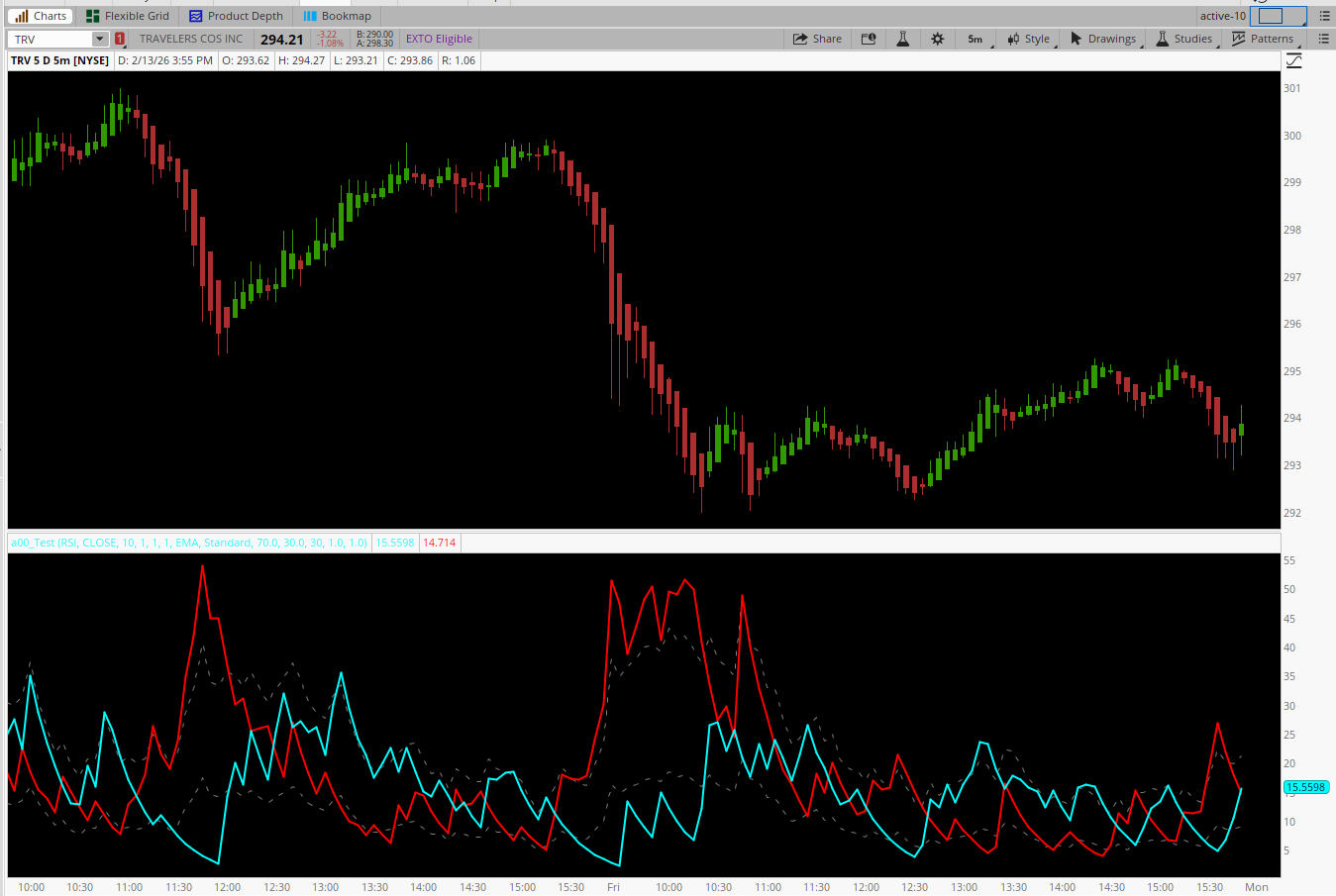
How to Read the Indicator
Core Components
1. mathMode = RSI (Momentum Impulse Model)
Best Use:
2. mathMode = Stochastic (Range & Rotation Model)
Best Use:
This mode reacts faster and should be used with minimal smoothing.
3. mathMode = DMI (Dominance / Trend Filter)
Best Use:
Levels Mode – How to Use Each
Standard
StdDevBands
HighLowChannel
Best Time Frames
 Optimal Performance
5-Minute Chart
AbsoluteStrength_v8 excels when used as:
A trend quality filter
A pullback timing tool
A regime identifier (trend vs range)
It rewards patience, context, and alignment—and performs best when combined with price structure, VWAP, or key levels, not used in isolation.
is an advanced bull–bear pressure oscillator designed to measure directional dominance, momentum persistence, and exhaustion across multiple market regimes.
Unlike traditional oscillators that compress price into a single line, this study separately models bullish and bearish force, allowing traders to see who is in control rather than simply whether price is “overbought” or “oversold.”
The script integrates three mathematical engines (RSI-style, Stochastic-style, and DMI-style dominance), flexible multi-stage smoothing, and adaptive strength/weakness thresholds. This makes it suitable for trend continuation, pullback timing, reversals, and regime detection.
Key characteristics:
- Dual-line structure (Bulls vs Bears) for true directional clarity
- Optional dominance filtering to suppress non-controlling pressure
- Multiple threshold methodologies (fixed, statistical, structural)
- Designed to be non-intrusive, objective, and context-aware
How to Read the Indicator
Core Components
- BullsPlot (Cyan) → Positive directional pressure
- BearsPlot (Red) → Negative directional pressure
- Strength Line → Area where momentum is considered dominant
- Weakness Line → Area where momentum is considered exhausted
- Signal Lines (optional) → Momentum confirmation / smoothing layer
- Bulls > Bears → Buyers control tempo
- Bears > Bulls → Sellers control tempo
- Expansion above Strength → Trend acceptance
- Compression near Weakness → Balance / rotation / exhaustion
1. mathMode = RSI (Momentum Impulse Model)
Best Use:
- Trend continuation
- Pullback entries
- Momentum confirmation
- Long Continuation
- BullsPlot > BearsPlot
- Bulls rising and holding above StrengthLine
- Price pulls back but Bulls remain dominant → buy continuation
- Momentum Failure
- Bulls cross below Bears near StrengthLine
- Indicates trend fatigue → tighten stops or exit
2. mathMode = Stochastic (Range & Rotation Model)
Best Use:
- Mean reversion
- Range-bound sessions
- Overnight or low-volatility markets
- Range Long
- Bulls near WeaknessLine
- Bears begin flattening
- Bulls turn up → buy rotation
- Range Short
- Bears near WeaknessLine
- Bulls stall and roll over → fade highs
This mode reacts faster and should be used with minimal smoothing.
3. mathMode = DMI (Dominance / Trend Filter)
Best Use:
- Strong trend environments
- Avoiding chop
- Higher-timeframe alignment
- Trend Entry
- Only Bulls or Bears are printing (other side suppressed)
- Confirms directional monopoly
- Trend End Warning
- Suppressed side begins to appear
- Dominance erosion → prepare for transition
Levels Mode – How to Use Each
Standard
- Fixed proportional thresholds
- Best for consistent instruments
- Clean and predictable
StdDevBands
- Volatility-adaptive
- Expands in fast markets, contracts in slow ones
- Trade only when Bulls exceed upper band → high-quality momentum
- Avoid signals inside bands → noise
HighLowChannel
- Structural, range-aware thresholds
- Excellent for contextual exhaustion
- Bulls fail near channel high → divergence
- Bears fail near channel low → absorption
- Use signal = 3–5for:
- Momentum confirmation
- Smoother trend holds
- Ignore crossovers; instead use slope agreement
- Bulls above signal + rising → trend healthy
Best Time Frames
Optimal Performance5-Minute Chart
- Best balance of structure and signal quality
- Ideal for index futures, liquid equities
- Matches the smoothing logic of the script
- 3-Minute → Faster scalping (reduce smoothing)
- 15-Minute → Swing confirmation & bias
- Tick charts (too noisy)
- Daily charts (indicator becomes lag-heavy)
- Higher TF (15m)
- Identify dominance (Bulls vs Bears)
- Execution TF (5m)
- Wait for pullback with dominance intact
AbsoluteStrength_v8 excels when used as:
A trend quality filter
A pullback timing tool
A regime identifier (trend vs range)
It rewards patience, context, and alignment—and performs best when combined with price structure, VWAP, or key levels, not used in isolation.
Code:
# AbsoluteStrength_v8

declare lower;

#-----------------------
# Inputs
#-----------------------
input mathMode = {default RSI, Stochastic, DMI};
input priceSource = close;
input length = 10;
input preSmooth = 1;
input smooth = 1;
input signal = 1;
input maMode = {default EMA, SMA, Wilder, LWMA};
input levelsMode = {default Standard, StdDevBands, HighLowChannel};
input strengthLevel = 70.0;
input weaknessLevel = 30.0;
input lookBackPeriod = 30;
input upperMultiplier = 1.0;
input lowerMultiplier = 1.0;

def _point = TickSize();

#-----------------------
# Pre-smoothing
#-----------------------
def price =
    if maMode == maMode.EMA then ExpAverage(priceSource, preSmooth)
    else if maMode == maMode.SMA then Average(priceSource, preSmooth)
    else if maMode == maMode.Wilder then WildersAverage(priceSource, preSmooth)
    else Inertia(priceSource, preSmooth);

def loPrice =
    if maMode == maMode.EMA then ExpAverage(low, preSmooth)
    else if maMode == maMode.SMA then Average(low, preSmooth)
    else if maMode == maMode.Wilder then WildersAverage(low, preSmooth)
    else Inertia(low, preSmooth);

#-----------------------
# Raw Bulls / Bears
#-----------------------
def diff = price - price[1];
def hi = Highest(high, length);
def lo = Lowest(low, length);

def bulls_raw =
    if mathMode == mathMode.RSI then
        0.5 * (AbsValue(diff) + diff) / _point
    else if mathMode == mathMode.Stochastic then
        (price - lo) / _point
    else
        Max(0, 0.5 * (AbsValue(diff) + diff)) / _point;

def bears_raw =
    if mathMode == mathMode.RSI then
        0.5 * (AbsValue(diff) - diff) / _point
    else if mathMode == mathMode.Stochastic then
        (hi - price) / _point
    else
        Max(0, 0.5 * (AbsValue(loPrice[1] - loPrice) + (loPrice[1] - loPrice))) / _point;

# DMI dominance filter
def bulls_dmi = if mathMode == mathMode.DMI and bulls_raw <= bears_raw then 0 else bulls_raw;
def bears_dmi = if mathMode == mathMode.DMI and bears_raw < bulls_raw then 0 else bears_raw;

#-----------------------
# Evaluation smoothing
#-----------------------
def len_eval = if mathMode == mathMode.Stochastic then 1 else length;

def lbulls =
    if maMode == maMode.EMA then ExpAverage(bulls_dmi, len_eval)
    else if maMode == maMode.SMA then Average(bulls_dmi, len_eval)
    else if maMode == maMode.Wilder then WildersAverage(bulls_dmi, len_eval)
    else Inertia(bulls_dmi, len_eval);

def lbears =
    if maMode == maMode.EMA then ExpAverage(bears_dmi, len_eval)
    else if maMode == maMode.SMA then Average(bears_dmi, len_eval)
    else if maMode == maMode.Wilder then WildersAverage(bears_dmi, len_eval)
    else Inertia(bears_dmi, len_eval);

#-----------------------
# Final smoothing
#-----------------------
def bulls =
    if maMode == maMode.EMA then ExpAverage(lbulls, smooth)
    else if maMode == maMode.SMA then Average(lbulls, smooth)
    else if maMode == maMode.Wilder then WildersAverage(lbulls, smooth)
    else Inertia(lbulls, smooth);

def bears =
    if maMode == maMode.EMA then ExpAverage(lbears, smooth)
    else if maMode == maMode.SMA then Average(lbears, smooth)
    else if maMode == maMode.Wilder then WildersAverage(lbears, smooth)
    else Inertia(lbears, smooth);

#-----------------------
# Signal lines
#-----------------------
def sigBulls =
    if signal <= 1 then Double.NaN
    else if maMode == maMode.EMA then ExpAverage(bulls, signal)
    else if maMode == maMode.SMA then Average(bulls, signal)
    else if maMode == maMode.Wilder then WildersAverage(bulls, signal)
    else Inertia(bulls, signal);

def sigBears =
    if signal <= 1 then Double.NaN
    else if maMode == maMode.EMA then ExpAverage(bears, signal)
    else if maMode == maMode.SMA then Average(bears, signal)
    else if maMode == maMode.Wilder then WildersAverage(bears, signal)
    else Inertia(bears, signal);

#-----------------------
# Levels
#-----------------------
def hiArr = Max(bulls, bears);
def loArr = Min(bulls, bears);

def strength =
    if levelsMode == levelsMode.Standard then
        (strengthLevel / 100) * (bulls + bears)
    else if levelsMode == levelsMode.StdDevBands then
        Average(hiArr, lookBackPeriod) + upperMultiplier * StDev(hiArr, lookBackPeriod)
    else
        Highest(hiArr, lookBackPeriod) -
        (Highest(hiArr, lookBackPeriod) - Lowest(loArr, lookBackPeriod)) *
        (1 - strengthLevel / 100);

def weakness =
    if levelsMode == levelsMode.Standard then
        (weaknessLevel / 100) * (bulls + bears)
    else if levelsMode == levelsMode.StdDevBands then
        Average(loArr, lookBackPeriod) - lowerMultiplier * StDev(loArr, lookBackPeriod)
    else
        Lowest(loArr, lookBackPeriod) +
        (Highest(hiArr, lookBackPeriod) - Lowest(loArr, lookBackPeriod)) *
        (weaknessLevel / 100);

#-----------------------
# Plots
#-----------------------
plot BullsPlot = bulls;
plot BearsPlot = bears;
plot SignalBullsPlot = sigBulls;
plot SignalBearsPlot = sigBears;
plot StrengthLinePlot = strength;
plot WeaknessLinePlot = weakness;

BullsPlot.SetDefaultColor(Color.CYAN);
BullsPlot.SetLineWeight(2);

BearsPlot.SetDefaultColor(Color.RED);
BearsPlot.SetLineWeight(2);

SignalBullsPlot.SetDefaultColor(Color.CYAN);
SignalBullsPlot.SetLineWeight(1);
SignalBullsPlot.HideBubble();
SignalBullsPlot.HideTitle();

SignalBearsPlot.SetDefaultColor(Color.RED);
SignalBearsPlot.SetLineWeight(1);
SignalBearsPlot.HideBubble();
SignalBearsPlot.HideTitle();

StrengthLinePlot.SetDefaultColor(Color.GRAY);
StrengthLinePlot.SetStyle(Curve.SHORT_DASH);
StrengthLinePlot.HideBubble();
StrengthLinePlot.HideTitle();

WeaknessLinePlot.SetDefaultColor(Color.GRAY);
WeaknessLinePlot.SetStyle(Curve.SHORT_DASH);
WeaknessLinePlot.HideBubble();
WeaknessLinePlot.HideTitle();
Last edited by a moderator:


