

AGAIG Intraday Optimizer
AGAIG Intraday Optimizer Chart Look:
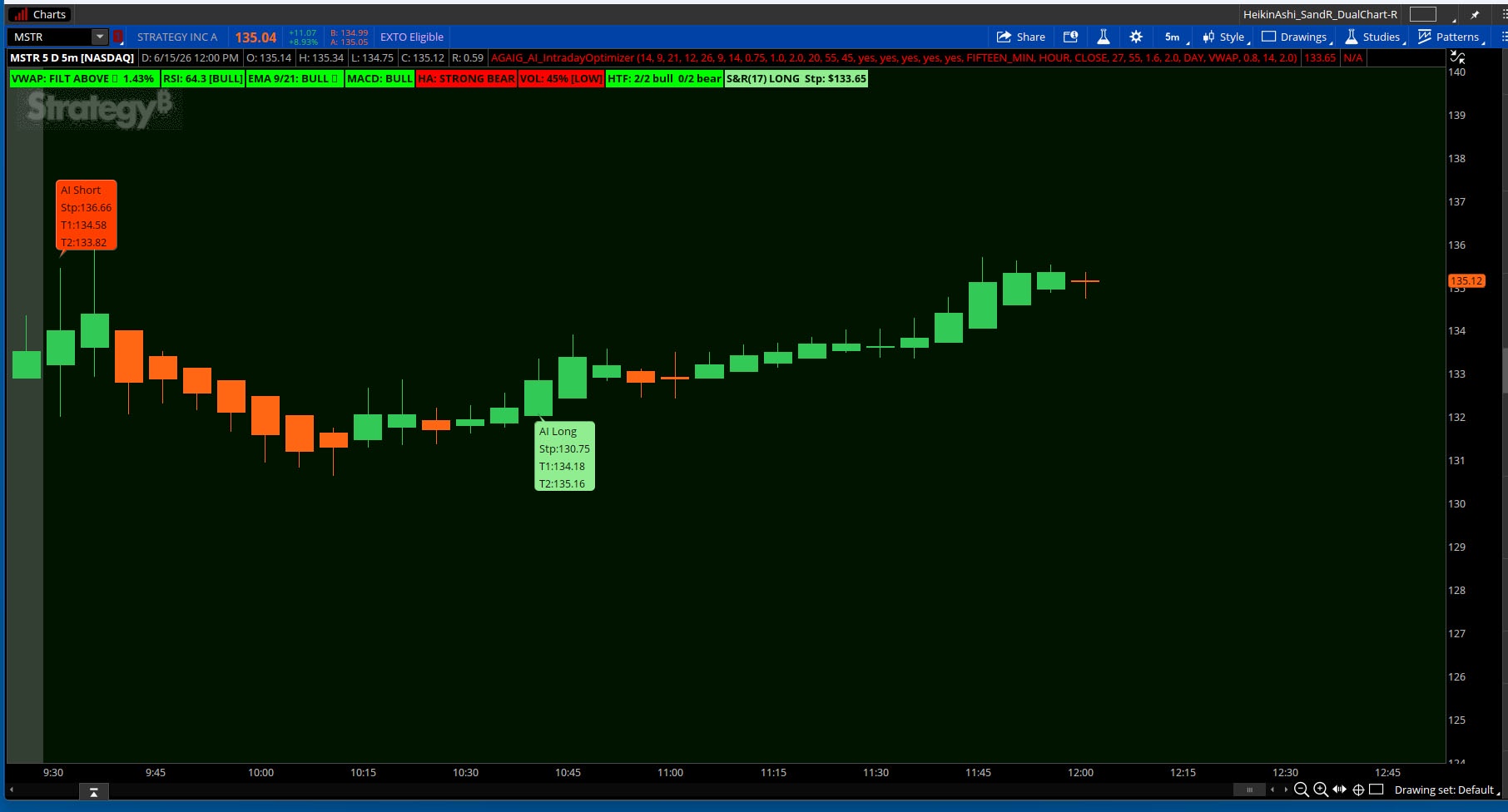
AGAIG Intraday Optimizer Chart Look:
It’s time to put Artificial Intelligence to work and Claude and I have been working on this for several days to get it in place.
First of all, no indicator wins every trade. What this does is put the odds in your favor by requiring two independent conditions to agree before signaling. That alone puts you ahead of most retail setups. The edge comes from consistency — taking the signals, respecting the stops, and not overriding it on emotion.
The architecture is sound — two independent indicators that confirm each other before firing. Your S&R provides the timing trigger based on actual price action crossing ATR-based stops, and your VWAP range filter validates that the move has directional momentum behind it. Neither fires alone. That's the right design philosophy.
The bubble is your alert to look up, not your entry signal. When AI Long or AI Short prints, that's your cue to assess — check the dashboard labels, look at the candle structure, feel the tape. The indicator narrows your attention to the right moment, your judgment makes the trade.
Watch the S&R
 candle count label. Fresh signals at count 1-3 are your best entries. Once you're at 10+ and it shows light green or pink the trend is extended — that's a take profit or tighten stop moment, not an add moment.
The trailing sarStop line is your live exit level on every bar. Respect it.
The Bubbles give you AI generated potential exits which may be blown through with volatility or may not achieve them but I’m finding them to be achievable levels. The Stop is listed if you use hard stops for your positions.
This is great for watching intraday movement?
Non-repainting version found here:
https://usethinkscript.com/threads/...ay-optimizer-indicator-for-thinkorswim.22484/
Indicator Link: http://tos.mx/!DMTkZcrI
CODE:
Code:
# ============================================================
# An INTRADAY OPTIMIZER — Full Study for ThinkorSwim
# Parameters: VWAP, RSI, EMA Cross, Heikin Ashi, Volume,
# MACD, ATR Stops/Targets, Multi-Timeframe
# ============================================================
# ── USER INPUTS ─────────────────────────────────────────────
input rsiLength = 14;
input emaFast = 9;
input emaSlow = 21;
input macdFast = 12;
input macdSlow = 26;
input macdSignal = 9;
input atrLength = 14;
input atrStopMult = 0.75;
input atrTarget1Mult = 1.0;
input atrTarget2Mult = 2.0;
input volAvgLength = 20;
input rsiBullThresh = 55;
input rsiBearThresh = 45;
input showLabels = yes;
input showStops = yes;
input showTargets = yes;
input showVwap = yes;
input showEMAs = yes;
# ── HIGHER TIMEFRAME SELECTION ───────────────────────────────
input htf1 = AggregationPeriod.FIFTEEN_MIN;
input htf2 = AggregationPeriod.HOUR;
# ============================================================
# SECTION 1 — VWAP (Prakash/Samer800/C.Ricks implementation)
# Uses Reference vwap + Range Filter to define bias
# ============================================================
input source = close;
input fastPeriod = 27;
input slowPeriod = 55;
input fastMultiplier = 1.6;
input slowMultiplier = 2.0;
input vwapTimeFrame = {default DAY, WEEK, MONTH};
input filterSelect = {Default "Moving Average", "VWAP", "MA & VWAP", "Don't use Filter"};
def na = Double.NaN;
def quickEMA = ExpAverage(source, 9);
def wap = Reference vwap(timeFrame = vwapTimeFrame).price;
script smoothrng {
input src = close;
input per = 100;
input mult = 3;

def wper = per * 2 - 1;
def srcDif = AbsValue(src - src[1]);
def avrng = ExpAverage(srcDif, per);
def smoothrng = ExpAverage(avrng, wper) * mult;
plot result = smoothrng;
}

script rngfilt {
input src = close;
input r = 0;
def rngfilt = CompoundValue(1,
if !rngfilt[1] then src else
if src > rngfilt[1] then
if (src - r) < rngfilt[1] then rngfilt[1] else (src - r)
else
if (src + r) > rngfilt[1] then rngfilt[1] else (src + r),
src);

plot result = rngfilt;
}

def smrng1 = smoothrng(source, fastPeriod, fastMultiplier);
def smrng2 = smoothrng(source, slowPeriod, slowMultiplier);
def smrng = (smrng1 + smrng2) / 2;
def filt = rngfilt(source, smrng);
def upward = if filt > filt[1] then upward[1] + 1 else
if filt < filt[1] then 0 else upward[1];
def downward = if filt < filt[1] then downward[1] + 1 else
if filt > filt[1] then 0 else downward[1];

def filterUp;
def filterDn;
Switch (filterSelect) {
Case "VWAP":
filterUp = filt > wap;
filterDn = filt < wap;

Case "MA & VWAP":
filterUp = filt > quickEMA and filt > wap;
filterDn = filt < quickEMA and filt < wap;

Case "Don't use Filter":
filterUp = yes;
filterDn = yes;

Default:
filterUp = filt > quickEMA;
filterDn = filt < quickEMA;
}
# Long: filter rising 2+ bars AND above VWAP AND RSI confirms
# Removed source > filt — price spike above filter was causing false longs
def vwapLongCond = upward > 1 and filt > filt[2] and filterUp and RSI(length = 14) > 50;
def vwapShortCond = downward > 1 and filt < filt[2] and filterDn and RSI(length = 14) < 50;
def vwapCondIni = if vwapLongCond then 1 else if vwapShortCond then -1 else vwapCondIni[1];
def aboveVwap = filt > wap; # range filter is above VWAP
def vwapDist = (source - wap) / wap * 100; # price distance from VWAP %

plot VwapLine = if showVwap then wap else na;
VwapLine.SetDefaultColor(Color.YELLOW);
VwapLine.SetLineWeight(2);
VwapLine.SetStyle(Curve.FIRM);
VwapLine.Hide();
VwapLine.HideBubble();
VwapLine.SetHiding(yes);
# ============================================================
# SECTION 2 — EMAs (9 / 21)
# ============================================================
def ema9 = ExpAverage(close, emaFast);
def ema21 = ExpAverage(close, emaSlow);
def emaBull = ema9 > ema21;
def emaXupBar = ema9 crosses above ema21;
def emaXdnBar = ema9 crosses below ema21;

plot EMA9Line = if showEMAs then ema9 else Double.NaN;
plot EMA21Line = if showEMAs then ema21 else Double.NaN;
EMA9Line.SetDefaultColor(Color.CYAN);
EMA21Line.SetDefaultColor(Color.MAGENTA);
EMA9Line.SetLineWeight(1);
EMA21Line.SetLineWeight(1);
EMA9Line.Hide();
EMA9Line.HideBubble();
EMA9Line.SetHiding(yes);
EMA21Line.Hide();
EMA21Line.HideBubble();
EMA21Line.SetHiding(yes);
# ============================================================
# SECTION 3 — RSI
# ============================================================
def rsiVal = RSI(length = rsiLength);
def rsiOB = rsiVal >= 70;
def rsiOS = rsiVal <= 30;
def rsiBullish = rsiVal > rsiBullThresh and !rsiOB;
def rsiBearish = rsiVal < rsiBearThresh and !rsiOS;
# ============================================================
# SECTION 4 — MACD
# ============================================================
def macdLine = MACD(fastLength = macdFast, slowLength = macdSlow, MACDLength = macdSignal).Value;
def macdSig = MACD(fastLength = macdFast, slowLength = macdSlow, MACDLength = macdSignal).Avg;
def macdHist = macdLine - macdSig;
def macdBull = macdLine > macdSig;
def macdXup = macdLine crosses above macdSig;
def macdXdn = macdLine crosses below macdSig;
def macdAbove0 = macdLine > 0;
# ============================================================
# SECTION 5 — HEIKIN ASHI
# ============================================================
def haOpen = (open[1] + close[1]) / 2;
def haClose = (open + high + low + close) / 4;
def haHigh = Max(high, Max(haOpen, haClose));
def haLow = Min(low, Min(haOpen, haClose));
def haBull = haClose > haOpen;
def haStrong = haBull and haLow == Min(haOpen, haClose);
def haBearStr = !haBull and haHigh == Max(haOpen, haClose);
def haDoji = AbsValue(haClose - haOpen) < (haHigh - haLow) * 0.1;
# ============================================================
# SECTION 6 — VOLUME
# ============================================================
def avgVol = Average(volume, volAvgLength);
def volRatio = volume / avgVol * 100;
def highVol = volume > avgVol * 1.2;
def veryHighVol = volume > avgVol * 1.5;
def lowVol = volume < avgVol * 0.8;
# ============================================================
# SECTION 7 — ATR STOPS & TARGETS
# ============================================================
def atrVal = ATR(length = atrLength);
def longStop = close - atrVal * atrStopMult;
def shortStop = close + atrVal * atrStopMult;
def longT1 = close + atrVal * atrTarget1Mult;
def longT2 = close + atrVal * atrTarget2Mult;
def shortT1 = close - atrVal * atrTarget1Mult;
def shortT2 = close - atrVal * atrTarget2Mult;
# ============================================================
# SECTION 8 — MULTI-TIMEFRAME CONFIRMATION (15m & 60m)
# ============================================================
# 15-minute timeframe
# VWAP does not accept a period argument in ThinkScript;
# we use a 50-period EMA on the HTF close as the trend proxy instead
def htf1_close = close(period = htf1);
def htf1_ema50 = ExpAverage(close(period = htf1), 50);
def htf1_ema9 = ExpAverage(close(period = htf1), emaFast);
def htf1_ema21 = ExpAverage(close(period = htf1), emaSlow);
def htf1_rsi = RSI(length = rsiLength, price = close(period = htf1));
def htf1_bull = htf1_close > htf1_ema50 and htf1_ema9 > htf1_ema21 and htf1_rsi > 50;
def htf1_bear = htf1_close < htf1_ema50 and htf1_ema9 < htf1_ema21 and htf1_rsi < 50;
# 60-minute timeframe
def htf2_close = close(period = htf2);
def htf2_ema50 = ExpAverage(close(period = htf2), 50);
def htf2_ema9 = ExpAverage(close(period = htf2), emaFast);
def htf2_ema21 = ExpAverage(close(period = htf2), emaSlow);
def htf2_rsi = RSI(length = rsiLength, price = close(period = htf2));
def htf2_bull = htf2_close > htf2_ema50 and htf2_ema9 > htf2_ema21 and htf2_rsi > 50;
def htf2_bear = htf2_close < htf2_ema50 and htf2_ema9 < htf2_ema21 and htf2_rsi < 50;
# Alignment score (0-2): how many higher timeframes agree
def bullAlign = (if htf1_bull then 1 else 0) + (if htf2_bull then 1 else 0);
def bearAlign = (if htf1_bear then 1 else 0) + (if htf2_bear then 1 else 0);
def fullyAligned = bullAlign == 2 or bearAlign == 2;
# ============================================================
# SECTION 9 — STOP & REVERSE ENGINE (from proven S&R indicator)
# Uses ATR trailing stop that flips on price crossover
# ============================================================
input sarSensitivity = 0.8;
input sarAtrLength = 14;
input sarAtrMult = 2.0;
def sarAtr = ATR(sarAtrLength);
def stopDist = sarAtr * sarAtrMult * sarSensitivity;
def isUpTrend;
def sarStop;
isUpTrend = if IsNaN(isUpTrend[1])
then close > close[1]
else if isUpTrend[1] and low < sarStop[1] then 0
else if !isUpTrend[1] and high > sarStop[1] then 1
else isUpTrend[1];
sarStop = if IsNaN(sarStop[1])
then if isUpTrend then low - stopDist else high + stopDist
else if isUpTrend and isUpTrend[1] then Max(sarStop[1], low - stopDist)
else if !isUpTrend and !isUpTrend[1] then Min(sarStop[1], high + stopDist)
else if isUpTrend and !isUpTrend[1] then low - stopDist
else high + stopDist;

def flippedUp = isUpTrend and !isUpTrend[1];
def flippedDown = !isUpTrend and isUpTrend[1];
# Candle count since last flip
def candleCount = if flippedUp or flippedDown then 1 else candleCount[1] + 1;
def isExtended = candleCount >= 10;
# ── COMPOSITE SIGNALS — S&R flip confirmed by VWAP filter ────
# S&R gives the timing, VWAP filter validates the direction
def longCore = flippedUp and filterUp;
def shortCore = flippedDown and filterDn;
def longConfirmed = flippedUp and filterUp and bullAlign >= 1;
def shortConfirmed = flippedDown and filterDn and bearAlign >= 1;
def gradeA_long = longConfirmed and bullAlign == 2;
def gradeB_long = longConfirmed and bullAlign == 1;
def gradeA_short = shortConfirmed and bearAlign == 2;
def gradeB_short = shortConfirmed and bearAlign == 1;
# ============================================================
# SECTION 10 — NO-REPAINT SIGNAL BUBBLES
# S&R flip is the trigger — one bubble per direction change
# Physically impossible to get two longs or shorts in a row
# ============================================================
# Use S&R ATR targets instead of fixed ATR multipliers
def sarLongStop = sarStop;
def sarLongT1 = close + sarAtr * 1.0;
def sarLongT2 = close + sarAtr * 2.0;
def sarShortStop = sarStop;
def sarShortT1 = close - sarAtr * 1.0;
def sarShortT2 = close - sarAtr * 2.0;

AddChartBubble(flippedUp, low * 0.998,
"AI Long" +
"\nStp:" + Round(sarStop, 2) +
"\nT1:" + Round(sarLongT1, 2) +
"\nT2:" + Round(sarLongT2, 2),
Color.LIGHT_GREEN, no);

AddChartBubble(flippedDown, high * 1.002,
"AI Short" +
"\nStp:" + Round(sarStop, 2) +
"\nT1:" + Round(sarShortT1, 2) +
"\nT2:" + Round(sarShortT2, 2),
Color.LIGHT_RED, yes);
# ============================================================
# SECTION 11 — STOP & TARGET LINES
# ============================================================
plot LongStopLine = if showStops and isUpTrend then sarStop else Double.NaN;
LongStopLine.SetDefaultColor(Color.RED);
LongStopLine.SetStyle(Curve.SHORT_DASH);
LongStopLine.SetLineWeight(1);
LongStopLine.HideBubble();
LongStopLine.SetHiding(yes);

plot ShortStopLine = if showStops and !isUpTrend then sarStop else Double.NaN;
ShortStopLine.SetDefaultColor(Color.RED);
ShortStopLine.SetStyle(Curve.SHORT_DASH);
ShortStopLine.SetLineWeight(1);
ShortStopLine.HideBubble();
ShortStopLine.SetHiding(yes);
# ============================================================
# SECTION 12 — ON-CHART LABEL DASHBOARD
# ============================================================

AddLabel(showLabels,
"VWAP: " + (if aboveVwap then "FILT ABOVE ▲" else "FILT BELOW ▼") +
" " + AsPercent(vwapDist / 100),
if aboveVwap then Color.GREEN else Color.RED
);

AddLabel(showLabels,
"RSI: " + Round(rsiVal, 1) +
(if rsiOB then " [OB]" else if rsiOS then " [OS]" else if rsiBullish then " [BULL]" else if rsiBearish then " [BEAR]" else " [NEUT]"),
if rsiOB then Color.RED else if rsiOS then Color.GREEN else if rsiBullish then Color.GREEN else if rsiBearish then Color.RED else Color.YELLOW
);

AddLabel(showLabels,
"EMA 9/21: " + (if emaBull then "BULL ▲" else "BEAR ▼"),
if emaBull then Color.GREEN else Color.RED
);

AddLabel(showLabels,
"MACD: " + (if macdBull then "BULL" else "BEAR") +
(if macdXup then " [X UP]" else if macdXdn then " [X DN]" else ""),
if macdBull then Color.GREEN else Color.RED
);

AddLabel(showLabels,
"HA: " + (if haStrong then "STRONG BULL" else if haBearStr then "STRONG BEAR" else if haDoji then "DOJI" else if haBull then "BULL" else "BEAR"),
if haStrong or haBull then Color.GREEN else if haDoji then Color.YELLOW else Color.RED
);

AddLabel(showLabels,
"VOL: " + Round(volRatio, 0) + "%" +
(if veryHighVol then " [HIGH]" else if highVol then " [AVG+]" else if lowVol then " [LOW]" else ""),

if veryHighVol then Color.GREEN else if highVol then Color.DARK_GREEN else if lowVol then Color.RED else Color.YELLOW
);

AddLabel(showLabels,
"HTF: " + bullAlign + "/2 bull " + bearAlign + "/2 bear",
if bullAlign == 2 then Color.GREEN
else if bullAlign == 1 then Color.DARK_GREEN
else if bearAlign == 2 then Color.RED
else if bearAlign == 1 then Color.DARK_RED
else Color.YELLOW
);

AddLabel(showLabels,
"S&R(" + candleCount + ") " +
(if isUpTrend then "LONG" else "SHORT") +
" Stp: $" + Round(sarStop, 2),
if isUpTrend
then (if isExtended then Color.LIGHT_GREEN else Color.GREEN)
else (if isExtended then Color.PINK else Color.RED)
);

AddLabel(showLabels and (gradeA_long or gradeB_long),
"STOP $" + Round(sarStop, 2) +
" T1 $" + Round(close + sarAtr, 2) +
" T2 $" + Round(close + sarAtr * 2, 2),
Color.WHITE
);

AddLabel(showLabels and (gradeA_short or gradeB_short),
"STOP $" + Round(sarStop, 2) +
" T1 $" + Round(close - sarAtr, 2) +
" T2 $" + Round(close - sarAtr * 2, 2),
Color.WHITE
);
# ============================================================
# SECTION 13 — BACKGROUND CLOUD (subtle bias shading)
# ============================================================
AssignBackgroundColor(
if isUpTrend and !isExtended then CreateColor(0, 40, 0) else
if isUpTrend and isExtended then CreateColor(0, 20, 0) else
if !isUpTrend and !isExtended then CreateColor(40, 0, 0) else
if !isUpTrend and isExtended then CreateColor(20, 0, 0) else
Color.CURRENT
);
# ============================================================
# SECTION 14 — ALERTS
# ============================================================
Alert(flippedUp, "AI Long - S&R flipped BULLISH", Alert.BAR, Sound.Ring);
Alert(flippedDown, "AI Short - S&R flipped BEARISH", Alert.BAR, Sound.Bell);
# ============================================================
# END OF STUDY
# ==================================================
Last edited:

