

AGAIG Confirming Six Indicator Strategy For ThinkOrSwim

csricksdds

Trader Educator
VIP
AGAIG: THE CONFIRMING SIX INDICATOR STRATEGY FOR TOS​

First, I want to give credit and kudo’s to Options Trader, who joined useThinkScript on March 21, 2020, for assembling “My Simplified Scalping Setup For ThinkOrSwim.” I am intrigued by the six indicator labels this trader pulled together. I spent all day Friday modifying these to fit my trading “eye” (I am a visual trader).

A recent post by HopStanD said: “Looks interesting, but what’s the strategy. Buy on close above the white line and sell on close below? And what is the significance of the yellow dots?”

I spent the day Friday considering how I might use this and so I’m sharing my strategy (for what it’s worth). The labels (six indicators in visual form) intrigued me.
prdTROy.png


So, my strategy for adding this to my chart and using it follows.

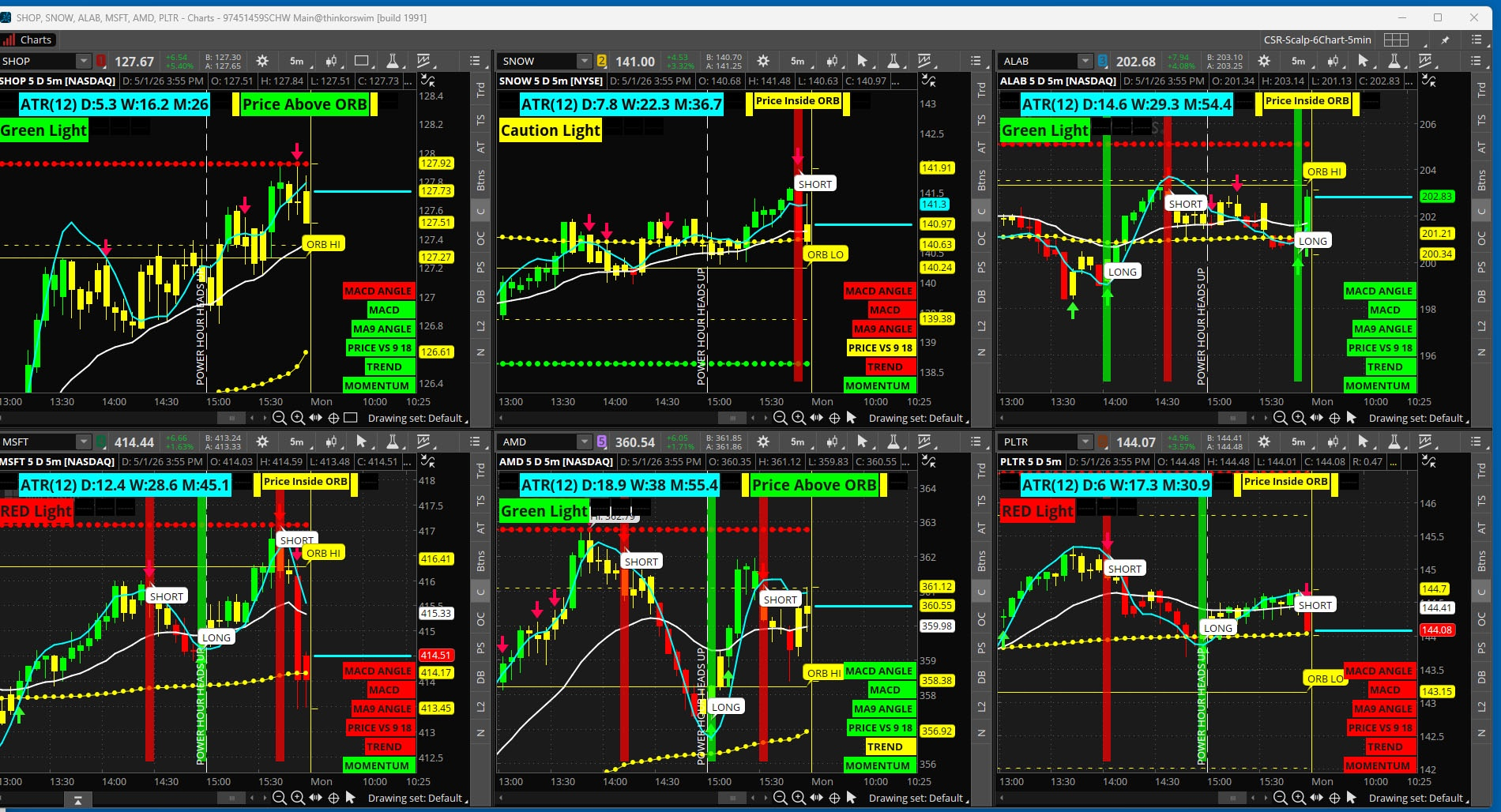
First, I use my AGAIG charting for entry purposes in placing trades. I have added the “Confirming Six” on the lower right of my chart. The “Confirming Six” is a wonderful visual for TREND CONTINUATION. It can also be used for entry/exit purposes should one choose to do so. The “Confirming Six” may help one stay in a trade longer (or exit earlier) when the six indicators become mixed suggesting an impending change in direction?

When the six indicators are all Green, trend is strongly positive. When the six are all Red, trend is strongly negative. Mixed signals suggest a change in direction may be imminent.

This is the AGAIG CONFIRMING CHART I am using. My personal entries are my Long/Short Bubbles and the GREEN/RED HISTOGRAM with the Confirming Six for trend continuation. I turned off the 6-trend alerts since with multiple charts it was like a little dog barking at my heels.

This will work on any timeframe. I am using a 5 minute chart for teaching purposes.

Dual 5 minute chart link: http://tos.mx/!bZHiPETE

Dual 5 minute look:
6 Chart link: http://tos.mx/!3gxJ3szF

6 chart look:
 

Join useThinkScript to post your question to a community of 21,000+ developers and traders.

AGAIG: THE CONFIRMING SIX INDICATOR STRATEGY FOR TOS​

First, I want to give credit and kudo’s to Options Trader, who joined useThinkScript on March 21, 2020, for assembling “My Simplified Scalping Setup For ThinkOrSwim.” I am intrigued by the six indicator labels this trader pulled together. I spent all day Friday modifying these to fit my trading “eye” (I am a visual trader).

A recent post by HopStanD said: “Looks interesting, but what’s the strategy. Buy on close above the white line and sell on close below? And what is the significance of the yellow dots?”

I spent the day Friday considering how I might use this and so I’m sharing my strategy (for what it’s worth). The labels (six indicators in visual form) intrigued me.

prdTROy.png


So, my strategy for adding this to my chart and using it follows.

First, I use my AGAIG charting for entry purposes in placing trades. I have added the “Confirming Six” on the lower right of my chart. The “Confirming Six” is a wonderful visual for TREND CONTINUATION. It can also be used for entry/exit purposes should one choose to do so. The “Confirming Six” may help one stay in a trade longer (or exit earlier) when the six indicators become mixed suggesting an impending change in direction?

When the six indicators are all Green, trend is strongly positive. When the six are all Red, trend is strongly negative. Mixed signals suggest a change in direction may be imminent.

This is the AGAIG CONFIRMING CHART I am using. My personal entries are my Long/Short Bubbles and the GREEN/RED HISTOGRAM with the Confirming Six for trend continuation. I turned off the 6-trend alerts since with multiple charts it was like a little dog barking at my heels.

This will work on any timeframe. I am using a 5 minute chart for teaching purposes.

Dual 5 minute chart link: http://tos.mx/!bZHiPETE

Dual 5 minute look:
6 Chart link: http://tos.mx/!3gxJ3szF

6 chart look:
Same but with some modification for what i like ......... https://tos.mx/!nO1lNC9t
 
Last edited:

Not the exact question you're looking for?

Start a new thread and receive assistance from our community.

87k+ Posts
1281 Online
Create Post

The Market Trading Game Changer

Join 2,500+ subscribers inside the useThinkScript VIP Membership Club
  • Exclusive indicators
  • Proven strategies & setups
  • Private Discord community
  • ‘Buy The Dip’ signal alerts
  • Exclusive members-only content
  • Add-ons and resources
  • 1 full year of unlimited support

Frequently Asked Questions

What is useThinkScript?

useThinkScript is the #1 community of stock market investors using indicators and other tools to power their trading strategies. Traders of all skill levels use our forums to learn about scripting and indicators, help each other, and discover new ways to gain an edge in the markets.

How do I get started?

We get it. Our forum can be intimidating, if not overwhelming. With thousands of topics, tens of thousands of posts, our community has created an incredibly deep knowledge base for stock traders. No one can ever exhaust every resource provided on our site.

If you are new, or just looking for guidance, here are some helpful links to get you started.

What are the benefits of VIP Membership?
VIP members get exclusive access to these proven and tested premium indicators: Buy the Dip, Advanced Market Moves 2.0, Take Profit, and Volatility Trading Range. In addition, VIP members get access to over 50 VIP-only custom indicators, add-ons, and strategies, private VIP-only forums, private Discord channel to discuss trades and strategies in real-time, customer support, trade alerts, and much more. Learn all about VIP membership here.
How can I access the premium indicators?
To access the premium indicators, which are plug and play ready, sign up for VIP membership here.
Back
Top
