Swing Trade Scanner Based On Fibonoci Long and Short Setups

Aktion

New member
Plus
Explanation:
  • This scan detects when the close price pulls back down into the Fibonacci retracement zone between 32% and 61%.
  • It requires that the previous bar's close was above the 32% fib level (outside the zone) and the current close is inside the zone.
  • This ensures the scanner detects a pullback down into the Fibonacci zone, not just being inside it.
Here is the Longs https://tos.mx/!a8p2EQ8P
Here is the Shorts https://tos.mx/!IElybBg6

Long Result
Longres.png


Short Result
Shortres.png
 
Last edited:
Explanation:
  • This scan detects when the close price pulls back down into the Fibonacci retracement zone between 32% and 61%.
  • It requires that the previous bar's close was above the 32% fib level (outside the zone) and the current close is inside the zone.
  • This ensures the scanner detects a pullback down into the Fibonacci zone, not just being inside it.
Here is the Longs https://tos.mx/!e4zv57b5
Here is the Shorts https://tos.mx/!y7vFmhbI

Long Result
View attachment 27341

Short Result
View attachment 27342
Can you please share the codes? Thanks
 
Explanation:
  • This scan detects when the close price pulls back down into the Fibonacci retracement zone between 32% and 61%.
  • It requires that the previous bar's close was above the 32% fib level (outside the zone) and the current close is inside the zone.
  • This ensures the scanner detects a pullback down into the Fibonacci zone, not just being inside it.
Here is the Longs https://tos.mx/!e4zv57b5
Here is the Shorts https://tos.mx/!y7vFmhbI

Long Result
View attachment 27341

Short Result
View attachment 27342
Hi Aktion.. Please tell me how do you get the arrows in your scanning. Do you have these scanners as studies too? If so, please send the links. Thank you very much
 
I dont understand what codes ? do the not show in the scan option area ?
@Aktion I believe your links create a watchlist table with some random static stock symbols.

No, they are not shared scanner links.
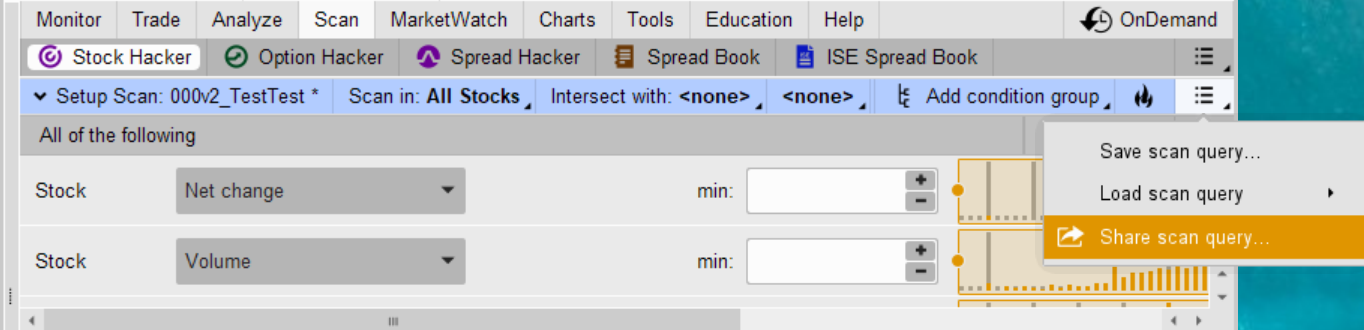
To create a shared scanner link:
zyii33a.png


CAVEAT!
Thinkorswim SHARED scanners can only run code that is fully embedded inside the scan.
If the scan points to a custom study that you named, the shared link won’t work for anyone else. Custom study name pointers are saved locally in your personal account, not on Schwab’s servers, so they can’t be shared the same way charts, studies, or grids can.
 
Last edited:
@Aktion I believe your links create a watchlist table with some random static stock symbols.

No, they are not shared scanner links.
To create a shared scanner link:
zyii33a.png


CAVEAT!
Thinkorswim SHARED scanners can only run code that is fully embedded inside the scan.
If the scan points to a custom study that you named, the shared link won’t work for anyone else. Custom study name pointers are saved locally in your personal account, not on Schwab’s servers, so they can’t be shared the same way charts, studies, or grids can.
Do these work ???
Re-Shared Longs https://tos.mx/!a8p2EQ8P
Re-Shared Shorts https://tos.mx/!IElybBg6
 

Join useThinkScript to post your question to a community of 21,000+ developers and traders.

Similar threads

Not the exact question you're looking for?

Start a new thread and receive assistance from our community.

87k+ Posts
900 Online
Create Post

Similar threads

Similar threads

The Market Trading Game Changer

Join 2,500+ subscribers inside the useThinkScript VIP Membership Club
  • Exclusive indicators
  • Proven strategies & setups
  • Private Discord community
  • ‘Buy The Dip’ signal alerts
  • Exclusive members-only content
  • Add-ons and resources
  • 1 full year of unlimited support

Frequently Asked Questions

What is useThinkScript?

useThinkScript is the #1 community of stock market investors using indicators and other tools to power their trading strategies. Traders of all skill levels use our forums to learn about scripting and indicators, help each other, and discover new ways to gain an edge in the markets.

How do I get started?

We get it. Our forum can be intimidating, if not overwhelming. With thousands of topics, tens of thousands of posts, our community has created an incredibly deep knowledge base for stock traders. No one can ever exhaust every resource provided on our site.

If you are new, or just looking for guidance, here are some helpful links to get you started.

What are the benefits of VIP Membership?
VIP members get exclusive access to these proven and tested premium indicators: Buy the Dip, Advanced Market Moves 2.0, Take Profit, and Volatility Trading Range. In addition, VIP members get access to over 50 VIP-only custom indicators, add-ons, and strategies, private VIP-only forums, private Discord channel to discuss trades and strategies in real-time, customer support, trade alerts, and much more. Learn all about VIP membership here.
How can I access the premium indicators?
To access the premium indicators, which are plug and play ready, sign up for VIP membership here.
Back
Top