


MTF PPO Heatmap — Destroyer Edition: — it sinks them all, to reveal regime and control across timeframes.  Mods—don’t worry, it’s just here to sink bad signals… ”
This is a gift from me to the useThinkScript community.
I’ve spent a lot of time building, breaking, fixing, and tightening this until it behaved the way I want a real “at-a-glance” market read to behave. The goal is simple: stop guessing what timeframe is driving price, and see the PPO state across multiple timeframes in one clean heatmap.
This study is a Multi-Timeframe Standard PPO Heatmap built around PPO histogram behavior:
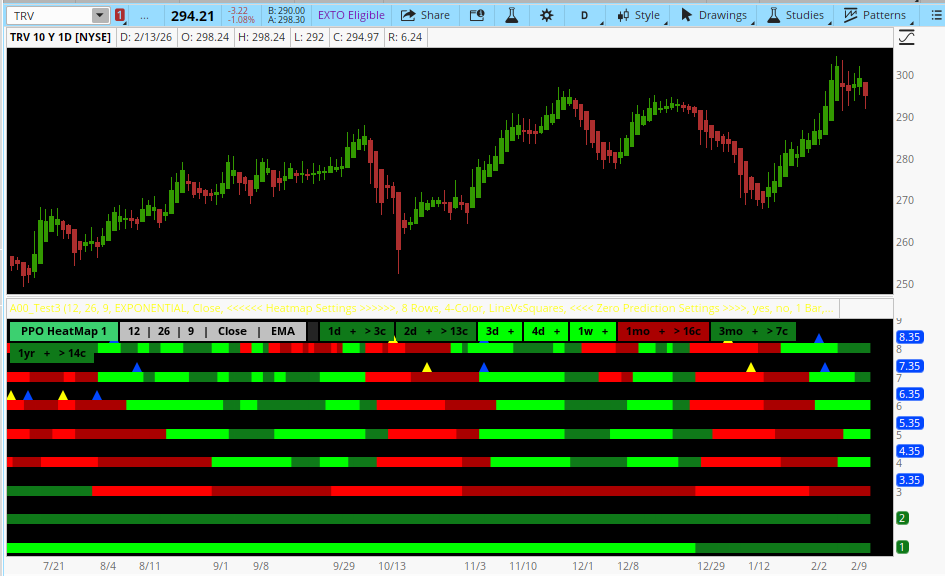
What You Get
1) A clean multi-timeframe PPO “state” heatmap (up to 8 rows)
Rows ladder up automatically from your chart timeframe (ex: 1d → 2d → 3d → 4d → 1w → 1mo → 3mo → 1yr).
2) 4-Color or 2-Color heatmap mode (plots only)
4-Color = direction + momentum shading
3) Optional zero-line cross markers + forecast markers
NaN-safe logic is included so you don’t get fake arrows when data is unavailable (common on higher aggregations or limited history symbols). Prediction math is last-bar gated to reduce load.
Performance / Practical Controls
“Repaint?” — Quick clarification
This study does not use ZigZag, pivots, or any future-bar lookahead logic. It’s straight PPO math (MAC, Signal, Histogram) and state coloring.
Like all indicators, values update until the bar is closed.
And because this is MTF, Thinkorswim will also update higher-timeframe values while that higher-timeframe candle is still forming. So on a lower timeframe chart, the higher rows can appear to “shift” until that higher timeframe bar closes. A lot of people call that repainting, but it’s really just normal MTF behavior.
Bottom line: nothing “changes after the higher-timeframe bar is closed.”
Treat higher-timeframe rows/markers as confirmed on that timeframe’s close.
Also, the optional forecast/projection features are estimates by design and will update as momentum changes.
How I Use It
This isn’t meant to be “the signal.” It’s meant to be your market posture dashboard:
Give It a Real Test
Drop it on different symbols, different timeframes, and watch how it behaves around:
“Use it, tweak it, improve it — and if you make it better, post it back so the whole forum levels up.”
Hope you all enjoy it,
Tricky Rick
if st8 == 2 then GlobalColor("BrightGreen") else if st8 == 1 then GlobalColor("DarkGreen")
else if st8 == -1 then GlobalColor("DarkRed") else if st8 == -2 then GlobalColor("BrightRed")
else GlobalColor("Neutral"), location = tfLblLoc
);[/CODE]
Mods—don’t worry, it’s just here to sink bad signals… ”This is a gift from me to the useThinkScript community.
I’ve spent a lot of time building, breaking, fixing, and tightening this until it behaved the way I want a real “at-a-glance” market read to behave. The goal is simple: stop guessing what timeframe is driving price, and see the PPO state across multiple timeframes in one clean heatmap.
This study is a Multi-Timeframe Standard PPO Heatmap built around PPO histogram behavior:
- Histogram (DELTA) = MAC − SIG
- Bull vs Bear is the sign of the histogram (above/below zero)
- Strength vs Weakening is the histogram’s momentum (rising/falling)
What You Get
1) A clean multi-timeframe PPO “state” heatmap (up to 8 rows)
Rows ladder up automatically from your chart timeframe (ex: 1d → 2d → 3d → 4d → 1w → 1mo → 3mo → 1yr).
2) 4-Color or 2-Color heatmap mode (plots only)
4-Color = direction + momentum shading
- BrightGreen: bull strengthening
- DarkGreen: bull weakening
- DarkRed: bear weakening
- BrightRed: bear strengthening
- Green when histogram rising
- Red when histogram falling
3) Optional zero-line cross markers + forecast markers
- Confirmed markers fire on the exact cross bar (MAC crosses 0).
- Forecast markers can show when a cross is projected within a user-set window.
NaN-safe logic is included so you don’t get fake arrows when data is unavailable (common on higher aggregations or limited history symbols). Prediction math is last-bar gated to reduce load.
Performance / Practical Controls
- rowCount (3–8 rows) lets you cut rows for speed and clarity.
- Rows that aren’t enabled or aren’t distinct do not plot (no useless placeholders).
- Base chart support is time-based up to Quarterly (3 months). Year is used only as an upper ladder row.
“Repaint?” — Quick clarification
This study does not use ZigZag, pivots, or any future-bar lookahead logic. It’s straight PPO math (MAC, Signal, Histogram) and state coloring.
Like all indicators, values update until the bar is closed.
And because this is MTF, Thinkorswim will also update higher-timeframe values while that higher-timeframe candle is still forming. So on a lower timeframe chart, the higher rows can appear to “shift” until that higher timeframe bar closes. A lot of people call that repainting, but it’s really just normal MTF behavior.
Bottom line: nothing “changes after the higher-timeframe bar is closed.”
Treat higher-timeframe rows/markers as confirmed on that timeframe’s close.
Also, the optional forecast/projection features are estimates by design and will update as momentum changes.
How I Use It
This isn’t meant to be “the signal.” It’s meant to be your market posture dashboard:
- Are the higher timeframes aligned or fighting?
- Is momentum expanding or fading?
- Is the move real, or just lower-TF noise?
Give It a Real Test
Drop it on different symbols, different timeframes, and watch how it behaves around:
- trend starts
- pullbacks
- consolidations
- reversals
- fakeouts
“Use it, tweak it, improve it — and if you make it better, post it back so the whole forum levels up.”
Hope you all enjoy it,
Tricky Rick
if st8 == 2 then GlobalColor("BrightGreen") else if st8 == 1 then GlobalColor("DarkGreen")
else if st8 == -1 then GlobalColor("DarkRed") else if st8 == -2 then GlobalColor("BrightRed")
else GlobalColor("Neutral"), location = tfLblLoc
);[/CODE]
Last edited:


