


Introduction
This indicator, Uptrick: Volume Weighted Bands, overlays dynamic, volume-informed trend channels directly on the chart. By fusing price and volume data through volume-weighted and exponential moving averages, the script forms a core trend line with adaptive bandwidth controlled by volatility. It is designed to help traders identify trend direction, breakout entries, and extended conditions that may warrant take-profits or pullback re-entries.
Overview
The Volume Weighted Bands system is built around a trend line calculated by averaging a Volume Weighted Moving Average (VWMA) and an Exponential Moving Average (EMA), both over a configurable lookback period. This hybrid trend baseline is then smoothed further and expanded into dynamic upper and lower bands using an Average True Range (ATR) multiplier. These bands adapt with market volatility and shift color based on prevailing price action, helping traders quickly identify bullish, bearish, or neutral conditions.
Originality and Unique Features
This script introduces originality by blending both price and volume in the core trend calculation, a technique that is more responsive than traditional moving average bands. Its multi-mode visualization (cloud, single-band, or line-only), combined with selective buy/sell signals, makes it flexible for discretionary and algorithmic strategies alike. Optional modules for take-profit signals based on z-score deviation and RSI slope, as well as buy-back detection logic with cooldown filters, offer practical tools for managing trades beyond simple entries.
This indicator is two styles in one. Either a cloud mode, or a single band mode. There is also a single line mode. This indicator gives CLEAR ENTRY POINTS and CLEAR TAKE PROFIT AREAS.
By default, the ATR Length is 500 which makes this very smooth. For a different feel, you can adjust this down to 14 or 20 for more reactive bands.
In this conversion, I added additional outside bands to the cloud mode. Take profit plots can be either arrows, or chart bubbles selectable in the settings. Re-entry or buy back plots can be either points, or chart bubbles in the settings.
This is "CLOUD MODE"

This is "SINGLE BAND MODE"

Explanation of Inputs
Every user input in this script is included to give the trader control over behavior and visual presentation:
Take-Profit Signal Module
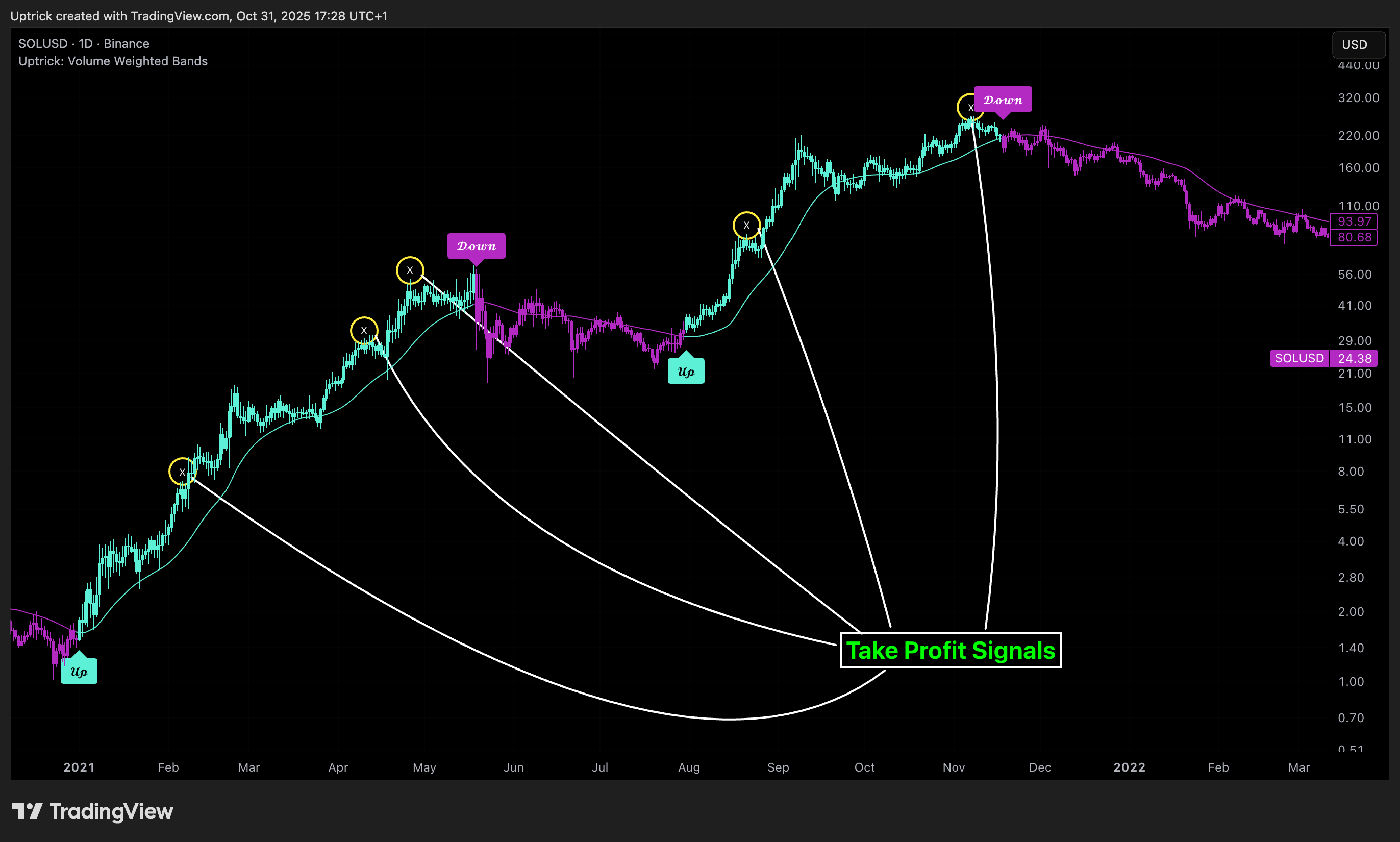
The take-profit module uses a z-score of the distance between price and the trend line to detect extended conditions. In bullish trends, a signal appears when price is well above the band and RSI indicates exhaustion; the opposite applies for bearish conditions. A boolean flag is used to prevent retriggering until RSI resets. These signals are plotted with minimalist “arrow” markers near recent highs or lows, based on whether the market is extended upward or downward.
Re-Entry Logic
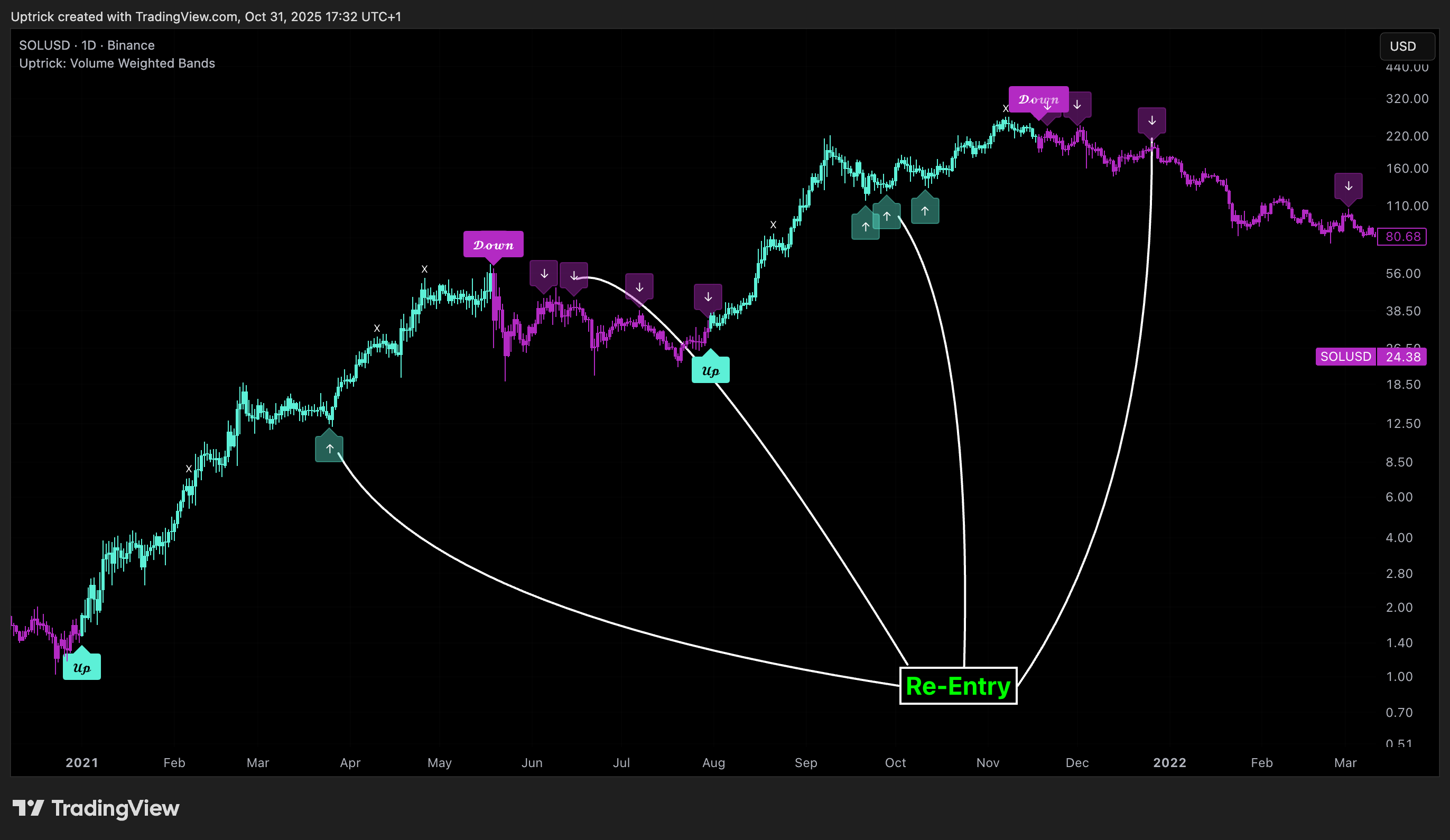
The re-entry system identifies instances where price momentarily dips or spikes into the opposite band but closes back inside, implying a continuation of the prevailing trend. This module can be particularly useful for traders managing entries after brief pullbacks. A built-in cooldown period helps filter out noise and prevents signal overloading during fast markets. Visual markers are shown as upward or downward arrows near the relevant candle wicks.
How to Use This Indicator
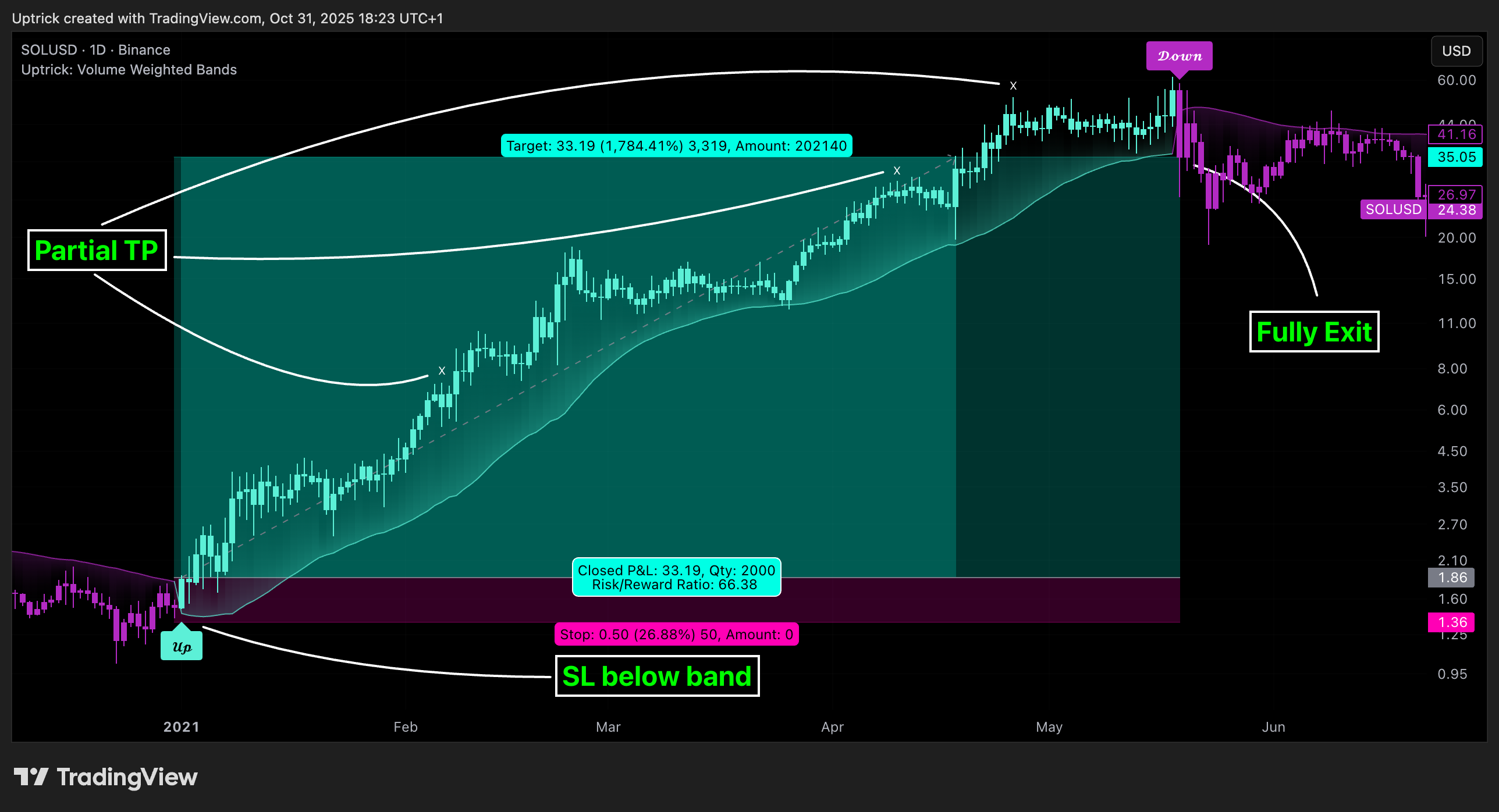
The basic usage of this indicator follows a directional, signal-driven approach. When a buy signal appears, it suggests entering a long position. The recommended stop loss placement is below the lower band, allowing for some breathing space to accommodate natural volatility. As the position progresses, take partial profits—typically 10% to 15% of the position—each time a take-profit signal (marked with an "arrow") is shown on the chart.
An optional feature is the buy-back signal, which can be used to re-enter after partial exits or missed entries. Utilizing this can help reduce losses during false breakouts or trend reversals by scaling in more gradually. However, it also means that in strong, clean trends, the full position may not be captured from the start, potentially reducing the total return. It is up to the trader to decide whether to enter fully on the initial signal or incrementally using buy-backs.
When a sell signal appears, the strategy advises fully exiting any long positions and immediately switching to a short position. The short trade follows the same logic: place your stop loss above the upper band with some margin, and again, take partial profits at each take-profit signal.
Visual Presentation and Signal Labels
All signals are plotted with clean, minimal labels that avoid clutter, and are color-coded using a custom palette designed to remain clear across light and dark chart themes. Bullish trends are marked in teal and bearish trends in magenta. Candles and wicks are also colored accordingly to align price action with the detected trend state. Buy and sell entries are marked with "𝓤𝓹" and "𝓓𝓸𝔀𝓷" labels.
Summary
In summary, the Uptrick: Volume Weighted Bands indicator provides a versatile, visually adaptive trend and volatility tool that can serve multiple styles of trading. Through its integration of price, volume, and volatility, along with modular take-profit and buy-back signaling, it aims to provide actionable structure across a range of market conditions.
This indicator, Uptrick: Volume Weighted Bands, overlays dynamic, volume-informed trend channels directly on the chart. By fusing price and volume data through volume-weighted and exponential moving averages, the script forms a core trend line with adaptive bandwidth controlled by volatility. It is designed to help traders identify trend direction, breakout entries, and extended conditions that may warrant take-profits or pullback re-entries.
Overview
The Volume Weighted Bands system is built around a trend line calculated by averaging a Volume Weighted Moving Average (VWMA) and an Exponential Moving Average (EMA), both over a configurable lookback period. This hybrid trend baseline is then smoothed further and expanded into dynamic upper and lower bands using an Average True Range (ATR) multiplier. These bands adapt with market volatility and shift color based on prevailing price action, helping traders quickly identify bullish, bearish, or neutral conditions.
Originality and Unique Features
This script introduces originality by blending both price and volume in the core trend calculation, a technique that is more responsive than traditional moving average bands. Its multi-mode visualization (cloud, single-band, or line-only), combined with selective buy/sell signals, makes it flexible for discretionary and algorithmic strategies alike. Optional modules for take-profit signals based on z-score deviation and RSI slope, as well as buy-back detection logic with cooldown filters, offer practical tools for managing trades beyond simple entries.
This indicator is two styles in one. Either a cloud mode, or a single band mode. There is also a single line mode. This indicator gives CLEAR ENTRY POINTS and CLEAR TAKE PROFIT AREAS.
By default, the ATR Length is 500 which makes this very smooth. For a different feel, you can adjust this down to 14 or 20 for more reactive bands.
In this conversion, I added additional outside bands to the cloud mode. Take profit plots can be either arrows, or chart bubbles selectable in the settings. Re-entry or buy back plots can be either points, or chart bubbles in the settings.
This is "CLOUD MODE"
This is "SINGLE BAND MODE"
Code:
# Uptrick: Volume Weighted Bands
# https://www.tradingview.com/script/N5H4qGLa-Uptrick-Volume-Weighted-Bands/
# Converted by Chewie 3/16/2026

declare upper;

# ═══════════════════════════════════════
# INPUTS
# ═══════════════════════════════════════
input colorbar         = yes;
input len             = 50;       # Origninal 24 Trend Length
input smoothLen     = 50;       # Original 14 Extra Smoothing
input bandMult        = 1.0;      # Band Width (ATR Multiplier)
input bandMult3      = 3.0;      # Band Width (ATR Multiplier)
input bandMult6      = 6.0;      # Band Width (ATR Multiplier)
input bandMult9      = 9.0;      # Band Width (ATR Multiplier)
input atrLen          = 500;      # Original 14 ATR Length
input showSignals    = yes;      # Show Buy/Sell Signals
input visualMode     = {default "Cloud", "Single Band", "Line Only"};

# Take-Profit
input TP_Bubble        = yes;
input TP_Arrows        = yes;
input tpThreshold     = 0.5;     # Original 1.0 TP Z-Score Threshold
input tphigh          = 63;
input tplow            = 37;

# Re-Entry
input BuyBackBubble   = yes;
input BuyBackDots     = yes;
input buyBackCooldown = 5;       # Re-Entry Cooldown (bars)

# Signal label offsets
input buyOffset  = 0.0;
input sellOffset = 0.0;

# ═══════════════════════════════════════
# COLORS
# ═══════════════════════════════════════
DefineGlobalColor("Bull",    CreateColor(92,  240, 215));
DefineGlobalColor("Bear",    CreateColor(179, 42,  195));
DefineGlobalColor("Neutral", Color.GRAY);

# ═══════════════════════════════════════
# CORE CALCULATION
# ═══════════════════════════════════════
def vwma      = Average(close * volume, len) / Average(volume, len);
def ema       = ExpAverage(close, len);
def rawLine   = (vwma + ema) / 2;
def trendLine = ExpAverage(rawLine, smoothLen);

# ═══════════════════════════════════════
# BAND CALCULATION
# ═══════════════════════════════════════
def atr       = Average(TrueRange(high, close, low), atrLen);
def upperBand = trendLine + atr * bandMult;
def lowerBand = trendLine - atr * bandMult;

def upperBand3 = trendLine + atr * bandMult3;
def lowerBand3 = trendLine - atr * bandMult3;

def upperBand6 = trendLine + atr * bandMult6;
def lowerBand6 = trendLine - atr * bandMult6;

def upperBand9 = trendLine + atr * bandMult9;
def lowerBand9 = trendLine - atr * bandMult9;

# ═══════════════════════════════════════
# TREND STATE
# ═══════════════════════════════════════
def trendUp = close > upperBand;
def trendDn = close < lowerBand;

rec trendState =
    if BarNumber() == 1 then 0
    else if trendUp     then 1
    else if trendDn     then -1
    else trendState[1];

def bull    = trendState == 1;
def bear    = trendState == -1;

# ═══════════════════════════════════════
# SINGLE BAND MODE
# ═══════════════════════════════════════
def singleBand =
    if bull then lowerBand
    else if bear then upperBand
    else Double.NaN;

# ═══════════════════════════════════════
# PLOTS
# ═══════════════════════════════════════

# --- Cloud mode: upper + lower bands + fill ---
plot UpperBandPlot = if visualMode == visualMode."Cloud" then upperBand else Double.NaN;
UpperBandPlot.SetLineWeight(2);
UpperBandPlot.AssignValueColor(
    if bull then CreateColor(92, 240, 215)
    else if bear then CreateColor(179, 42, 195)
    else Color.GRAY);

plot LowerBandPlot = if visualMode == visualMode."Cloud" then lowerBand else Double.NaN;
LowerBandPlot.SetLineWeight(2);
LowerBandPlot.AssignValueColor(
    if bull then CreateColor(92, 240, 215)
    else if bear then CreateColor(179, 42, 195)
    else Color.GRAY);

def UpperBandPlotL = if bull then upperbandplot else double.nan;
def LowerBandPlotR = if bear then lowerbandplot else double.nan;

AddCloud(UpperBandPlotL, LowerBandPlot,
    CreateColor(0, 60, 50), CreateColor(60, 10, 65));
AddCloud(LowerBandPlotR, UpperBandPlot,
    CreateColor(0, 60, 50), CreateColor(60, 10, 65));

plot UpperBandPlot3 = if visualMode == visualMode."Cloud" then upperBand3 else Double.NaN;
UpperBandPlot3.SetLineWeight(1);
UpperBandPlot3.AssignValueColor(
    if bull then CreateColor(92, 240, 215)
    else if bear then CreateColor(179, 42, 195)
    else Color.GRAY);
plot LowerBandPlot3 = if visualMode == visualMode."Cloud" then lowerBand3 else Double.NaN;
LowerBandPlot3.SetLineWeight(1);
LowerBandPlot3.AssignValueColor(
    if bull then CreateColor(92, 240, 215)
    else if bear then CreateColor(179, 42, 195)
    else Color.GRAY);

plot UpperBandPlot6 = if visualMode == visualMode."Cloud" then upperBand6 else Double.NaN;
UpperBandPlot6.SetLineWeight(1);
UpperBandPlot6.AssignValueColor(
    if bull then CreateColor(92, 240, 215)
    else if bear then CreateColor(179, 42, 195)
    else Color.GRAY);

plot LowerBandPlot6 = if visualMode == visualMode."Cloud" then lowerBand6 else Double.NaN;
LowerBandPlot6.SetLineWeight(1);
LowerBandPlot6.AssignValueColor(
    if bull then CreateColor(92, 240, 215)
    else if bear then CreateColor(179, 42, 195)
    else Color.GRAY);

plot UpperBandPlot9 = if visualMode == visualMode."Cloud"  then upperBand9 else Double.NaN;
UpperBandPlot9.SetLineWeight(1);
UpperBandPlot9.AssignValueColor(
    if bull then CreateColor(92, 240, 215)
    else if bear then CreateColor(179, 42, 195)
    else Color.GRAY);
def UpperBandPlot9L = if bull then upperbandplot9 else double.nan;
def UpperBandPlot9R = if bear then upperbandplot9 else double.nan;

plot LowerBandPlot9 = if visualMode == visualMode."Cloud" then lowerBand9 else Double.NaN;
LowerBandPlot9.SetLineWeight(1);
LowerBandPlot9.AssignValueColor(
    if bull then CreateColor(92, 240, 215)
    else if bear then CreateColor(179, 42, 195)
    else Color.GRAY);

def LowerBandPlot9L = if bull then lowerbandplot9 else double.nan;
def LowerBandPlot9R = if bear then lowerbandplot9 else double.nan;

AddCloud(UpperBandPlot9L, UpperBandPlot6,
    CreateColor(0, 60, 50), CreateColor(60, 10, 65));
AddCloud(LowerBandPlot6, LowerBandPlot9L,
    CreateColor(0, 60, 50), CreateColor(60, 10, 65));

AddCloud(UpperBandPlot6, UpperBandPlot9R,
    CreateColor(0, 60, 50), CreateColor(60, 10, 65));
AddCloud(LowerBandPlot9R, LowerBandPlot6,
    CreateColor(0, 60, 50), CreateColor(60, 10, 65));


# --- Trend line: shown in Cloud and Line Only modes ---
plot TrendLinePlot =
    if visualMode == visualMode."Cloud" or visualMode == visualMode."Line Only"
    then trendLine
    else Double.NaN;
TrendLinePlot.SetLineWeight(4);
TrendLinePlot.AssignValueColor(
    if bull then GlobalColor("Bull")
    else if bear then GlobalColor("Bear")
    else GlobalColor("Neutral"));

# --- Single Band mode ---
plot SingleBandPlot = if visualMode == visualMode."Single Band" then singleBand else Double.NaN;
SingleBandPlot.SetLineWeight(2);
SingleBandPlot.AssignValueColor(
    if bull then GlobalColor("Bull")
    else if bear then GlobalColor("Bear")
    else GlobalColor("Neutral"));

# Gradient fill between price and the active band (Single Band mode)

AddCloud(
    if visualMode == visualMode."Single Band" then close else Double.NaN,
    SingleBandPlot,
    CreateColor(0, 60, 50),
    CreateColor(60, 10, 65));

# ═══════════════════════════════════════
# BAR COLOR
# ═══════════════════════════════════════
AssignPriceColor(
    if colorbar and bull then GlobalColor("Bull")
    else if colorbar and bear then GlobalColor("Bear")
    else color.current);

# ═══════════════════════════════════════
# ENTRY SIGNALS
# Non-pyramiding: only fire when direction changes
# ═══════════════════════════════════════
def buySignal  = showSignals and close crosses above upperBand;
def sellSignal = showSignals and close crosses below lowerBand;

rec trendMode =
    if BarNumber() == 1 then 0
    else if buySignal  and trendMode[1] != 1  then 1
    else if sellSignal and trendMode[1] != -1 then -1
    else trendMode[1];

def newBuy  = buySignal  and trendMode[1] != 1;
def newSell = sellSignal and trendMode[1] != -1;

def signalOffset = atr * 0.3;

# Signals: bubbles only
AddChartBubble(newBuy,  lowerBand - signalOffset + (atr * buyOffset),  "Up",   GlobalColor("Bull"), no);
AddChartBubble(newSell, upperBand + signalOffset + (atr * sellOffset), "Down", GlobalColor("Bear"), yes);

# ═══════════════════════════════════════
# TAKE-PROFIT LOGIC
# ═══════════════════════════════════════
def rsi     = RSI(Price = close, Length = 14);
def rsiEma7 = ExpAverage(rsi, 7);
def rsiSlope = rsiEma7 - rsiEma7[1];

def dist  = close - trendLine;
def mean  = Average(dist, atrlen);
def stdev = StandardDeviation(dist, atrlen);
def zDist = if stdev != 0 then (dist - mean) / stdev else 0;

# TP reset flags (mirrors Pine's canBearTP / canBullTP)
rec canBearTP =
    if BarNumber() == 1 then 1
    else if canBearTP[1] == 1 and trendState == 1 and zDist > tpThreshold
           and rsiEma7 > 70 and rsiSlope < 0 then 0   # disarm after firing
    else if rsiEma7 < 70 then 1                        # re-arm when RSI cools
    else canBearTP[1];

rec canBullTP =
    if BarNumber() == 1 then 1
    else if canBullTP[1] == 1 and trendState == -1 and zDist < -tpThreshold
           and rsiEma7 < 30 and rsiSlope > 0 then 0   # disarm after firing
    else if rsiEma7 > 30 then 1                        # re-arm when RSI recovers
    else canBullTP[1];

def bearishTP = TP_Bubble and trendState == 1  and zDist >  tpThreshold and rsiEma7 > tphigh and rsiSlope < 0 and canBearTP;
def bullishTP = TP_Bubble and trendState == -1 and zDist < -tpThreshold and rsiEma7 < tplow and rsiSlope > 0 and canBullTP;

plot tpArrowhigh = if TP_Arrows  and trendState == 1  and zDist >  tpThreshold and rsiEma7 > tphigh and rsiSlope < 0 and canBearTP then high + ATR(60) / 2  else Double.NaN;
tpArrowhigh.SetPaintingStrategy(PaintingStrategy.ARROW_DOWN);
tpArrowhigh.SetDefaultColor(CreateColor(179, 42, 195));

plot tpArrowlow = if TP_Arrows  and trendState == -1 and zDist < -tpThreshold and rsiEma7 < tplow and rsiSlope > 0 and canBullTP then low - ATR(60) / 2  else Double.NaN;
tpArrowLOW.SetPaintingStrategy(PaintingStrategy.ARROW_UP);
tpArrowLOW.SetDefaultColor(GlobalColor("Bull"));


# TP markers:
AddChartBubble(bearishTP, high + atr * 0.3, "TP", GlobalColor("Bear"), yes);
AddChartBubble(bullishTP, low  - atr * 0.3, "TP", GlobalColor("Bull"), no);

# ═══════════════════════════════════════
# RE-ENTRY (BUY-BACK) LOGIC
# ═══════════════════════════════════════
def wickLow    = low;
def wickHigh   = high;
def bullTouch  = trendState == 1  and wickLow  <= lowerBand and close > lowerBand;
def bearTouch  = trendState == -1 and wickHigh >= upperBand and close < upperBand;

rec barsSinceLastBB =
    if BarNumber() == 1 then buyBackCooldown + 1
    else if BuyBackBubble and (bullTouch or bearTouch) and barsSinceLastBB[1] > buyBackCooldown
    then 0
    else barsSinceLastBB[1] + 1;

def canTriggerBB  = barsSinceLastBB[1] > buyBackCooldown;
def buyBackBull   = BuyBackBubble and canTriggerBB and bullTouch;
def buyBackBear   = BuyBackBubble and canTriggerBB and bearTouch;

# Re-entry: arrow bubbles only
AddChartBubble(buyBackBull, low  - atr * 0.2, "BB", GlobalColor("Bull"), no);
AddChartBubble(buyBackBear, high + atr * 0.2, "BB", GlobalColor("Bear"), yes);

plot BBdothigh = if BuyBackDots and canTriggerBB and bearTouch then high + ATR(60) / 2  else Double.NaN;
BBdothigh.SetPaintingStrategy(PaintingStrategy.POINTS);
BBdothigh.SetDefaultColor(GlobalColor("Bear"));
BBdothigh.setlineWeight(2);

plot BBdotlow = if BuyBackDots   and canTriggerBB and bullTouch then low - ATR(60) / 2  else Double.NaN;
BBdotlow.SetPaintingStrategy(PaintingStrategy.POINTS);
BBdotlow.SetDefaultColor(GlobalColor("Bull"));
BBdotlow.setlineWeight(2);


# ═══════════════════════════════════════
# STATUS LABEL
# ═══════════════════════════════════════
AddLabel(
    yes,
    if bull  then "VWB: BULL"
    else if bear then "VWB: BEAR"
    else "VWB: NEUTRAL",
    if bull  then GlobalColor("Bull")
    else if bear then GlobalColor("Bear")
    else GlobalColor("Neutral")
);
Explanation of Inputs
Every user input in this script is included to give the trader control over behavior and visual presentation:
- Trend Length (len): Defines the lookback window for both the VWMA and EMA, controlling the sensitivity of the core trend baseline. A lower value makes the bands more reactive, while a higher value smooths out short-term noise.
- Extra Smoothing (smoothLen): Applies an additional EMA to the blended VWMA/EMA average. This second-level smoothing ensures the central trend line reacts gradually to shifts in price.
- Band Width (ATR Multiplier) (bandMult): Multiplies the ATR to create the width of the upper and lower bands around the trend line. Larger values widen the bands, capturing more volatility, while smaller values narrow them.
- ATR Length (atrLen): Sets the length of the ATR used in calculating band width and signal offsets. Longer values produce smoother band boundaries.
- Show Buy/Sell Signals (showSignals): Toggles the primary crossover/crossunder entry signals, which are labeled when the close crosses the upper or lower band.
- Visual Mode (visualMode): Allows selection between three display modes:
--> Cloud: Shows both bands and the central trend line with a shaded background.
--> Single Band: Displays only the active (upper or lower) band depending on trend state, with gradient fill to price.
--> Line Only: Shows only the trend line for a minimal visual profile.
- Take Profit Signals (enableTP): Enables a z-score-based profit-taking signal system. Signals occur when price deviates significantly from the trend line and RSI confirms exhaustion.
- TP Z-Score Threshold (tpThreshold): Sets the z-score deviation required to trigger a take-profit signal. Higher values reduce the frequency of signals, focusing on more extreme moves.
- Re-Entries (enableBuyBack): Enables logic to signal when price reverts into the band after an initial breakout, suggesting a possible re-entry or pullback setup.
- Buy Back Cooldown (bars) (buyBackCooldown): Defines a minimum bar count before a new buy-back signal is allowed, preventing rapid retriggering in choppy conditions.
- Buy Offset and Sell Offset: Hidden inputs used to vertically adjust the placement of the Buy ("𝓤𝓹") and Sell ("𝓓𝓸𝔀𝓷") labels relative to the bands. These use ATR units to maintain proportionality across different instruments and timeframes.
Take-Profit Signal Module
The take-profit module uses a z-score of the distance between price and the trend line to detect extended conditions. In bullish trends, a signal appears when price is well above the band and RSI indicates exhaustion; the opposite applies for bearish conditions. A boolean flag is used to prevent retriggering until RSI resets. These signals are plotted with minimalist “arrow” markers near recent highs or lows, based on whether the market is extended upward or downward.
Re-Entry Logic
The re-entry system identifies instances where price momentarily dips or spikes into the opposite band but closes back inside, implying a continuation of the prevailing trend. This module can be particularly useful for traders managing entries after brief pullbacks. A built-in cooldown period helps filter out noise and prevents signal overloading during fast markets. Visual markers are shown as upward or downward arrows near the relevant candle wicks.
How to Use This Indicator
The basic usage of this indicator follows a directional, signal-driven approach. When a buy signal appears, it suggests entering a long position. The recommended stop loss placement is below the lower band, allowing for some breathing space to accommodate natural volatility. As the position progresses, take partial profits—typically 10% to 15% of the position—each time a take-profit signal (marked with an "arrow") is shown on the chart.
An optional feature is the buy-back signal, which can be used to re-enter after partial exits or missed entries. Utilizing this can help reduce losses during false breakouts or trend reversals by scaling in more gradually. However, it also means that in strong, clean trends, the full position may not be captured from the start, potentially reducing the total return. It is up to the trader to decide whether to enter fully on the initial signal or incrementally using buy-backs.
When a sell signal appears, the strategy advises fully exiting any long positions and immediately switching to a short position. The short trade follows the same logic: place your stop loss above the upper band with some margin, and again, take partial profits at each take-profit signal.
Visual Presentation and Signal Labels
All signals are plotted with clean, minimal labels that avoid clutter, and are color-coded using a custom palette designed to remain clear across light and dark chart themes. Bullish trends are marked in teal and bearish trends in magenta. Candles and wicks are also colored accordingly to align price action with the detected trend state. Buy and sell entries are marked with "𝓤𝓹" and "𝓓𝓸𝔀𝓷" labels.
Summary
In summary, the Uptrick: Volume Weighted Bands indicator provides a versatile, visually adaptive trend and volatility tool that can serve multiple styles of trading. Through its integration of price, volume, and volatility, along with modular take-profit and buy-back signaling, it aims to provide actionable structure across a range of market conditions.
Last edited:


