

Hi fellow traders. Here is a chart set up that I just created. Hopefully it will help put a few coins in your pocket. Enjoy!
http://tos.mx/!hxERdmRH
mod note:
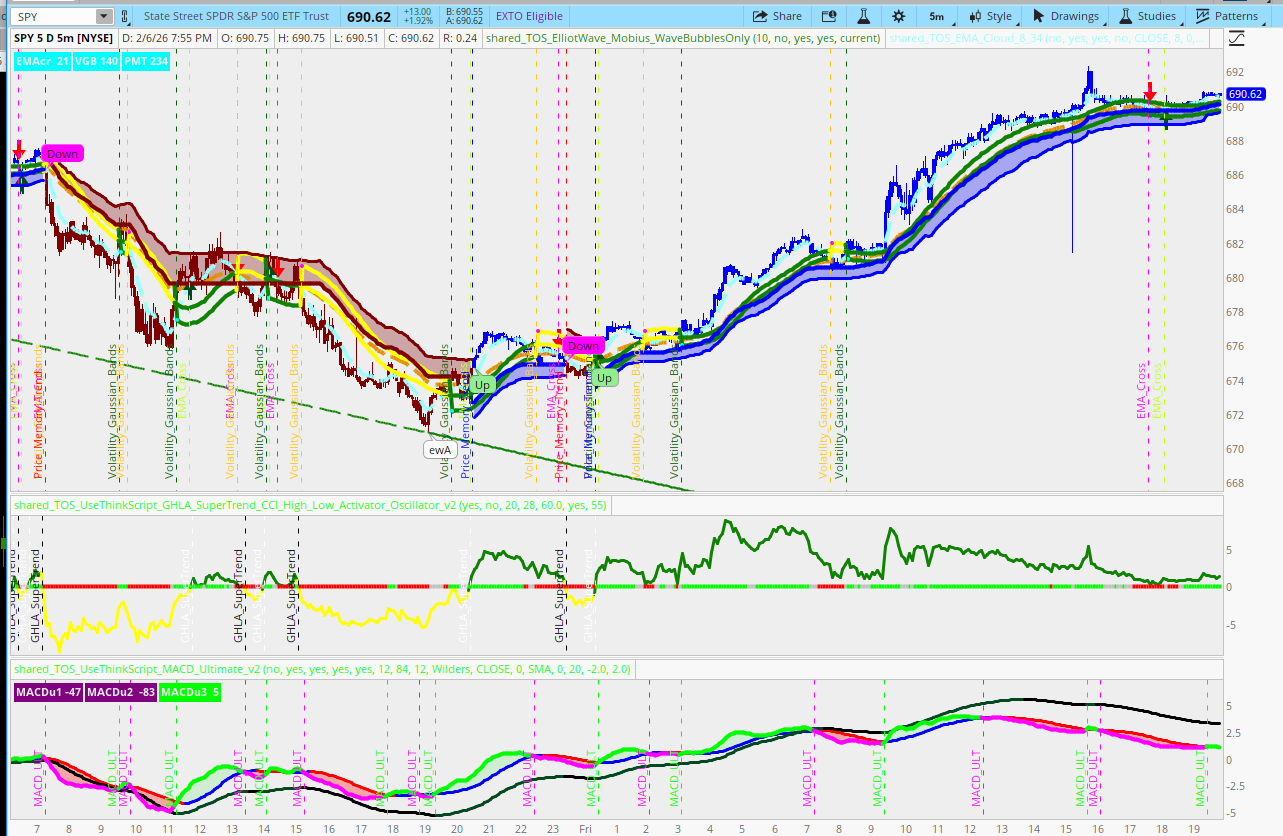
This chart is a multi-layered setup combining trend-following filters with volatility bands and momentum oscillators.
The Core Framework: Volatility Gaussian Bands
The upper chart clouds and primary trend lines on the chart are Gaussian Bands. Unlike standard Bollinger Bands, these use a Gaussian filter for smoother data, reducing noise.
Bullish Signal: When the avgLine crosses above the trendLine (marked by Dark Green vertical lines).
Bearish Signal: When the avgLine crosses below the trendLine (marked by Orange vertical lines).
The cloud acts as a dynamic support/resistance zone. Staying above the cloud confirms a strong uptrend.
The Strategy Filter: Price Memory Trend (PMT)
Identifies if the current price movement has "memory" (persistence) or if it's just random noise.
Status Labels: You will see "PMT: BULL" or "PMT: BEAR" in the top corner.
Color Logic: The script modifies bar colors to reflect trend strength—blue for bullish and dark red for bearish.
The Execution Trigger: EMA Cross (8/34)
8-period EMA crossing a 34-period EMA as the final entry/exit trigger.
Down Arrow: When the 8 EMA crosses below the 34 EMA.
Label Counting: The labels show how many bars the price has stayed in its current cross (e.g., "EMAcr 10" means the 8 EMA has been above the 34 EMA for 10 bars).
The Momentum Confirmation: Gann Oscillator
The oscillator at the bottom of the study helps time entries within the trend.
http://tos.mx/!hxERdmRH
mod note:
This chart is a multi-layered setup combining trend-following filters with volatility bands and momentum oscillators.
The Core Framework: Volatility Gaussian Bands
The upper chart clouds and primary trend lines on the chart are Gaussian Bands. Unlike standard Bollinger Bands, these use a Gaussian filter for smoother data, reducing noise.
Bullish Signal: When the avgLine crosses above the trendLine (marked by Dark Green vertical lines).
Bearish Signal: When the avgLine crosses below the trendLine (marked by Orange vertical lines).
The cloud acts as a dynamic support/resistance zone. Staying above the cloud confirms a strong uptrend.
The Strategy Filter: Price Memory Trend (PMT)
Identifies if the current price movement has "memory" (persistence) or if it's just random noise.
Status Labels: You will see "PMT: BULL" or "PMT: BEAR" in the top corner.
Color Logic: The script modifies bar colors to reflect trend strength—blue for bullish and dark red for bearish.
The Execution Trigger: EMA Cross (8/34)
8-period EMA crossing a 34-period EMA as the final entry/exit trigger.
Up Arrow (Cyan/Yellow Cloud): When the 8 EMA (Fast) crosses above the 34 EMA (Slow). This is often the "Go" signal if the PMT and Gaussian bands agree.
Down Arrow: When the 8 EMA crosses below the 34 EMA.
Label Counting: The labels show how many bars the price has stayed in its current cross (e.g., "EMAcr 10" means the 8 EMA has been above the 34 EMA for 10 bars).
The Momentum Confirmation: Gann Oscillator
The oscillator at the bottom of the study helps time entries within the trend.
Above 0.5 (Green): Bullish state.
Below 0.5 (Orange/Red): Bearish state.
Strategy Tip: Look for "retests." If the price pulls back to the Gaussian Cloud but the Gann Oscillator stays above 0.5, it’s often a "buy the dip" opportunity.| Step | Indicator | Condition |
|---|---|---|
| 1. Context | Gaussian Bands | Is the price above/below the cloud? |
| 2. Trend | PMT Label | Does the "Price Memory" confirm Bull or Bear? |
| 3. Momentum | Gann Oscillator | Is the oscillator color-aligned with the trend? |
| 4. Entry | EMA Cross | Wait for the 8 EMA to cross the 34 EMA for the final trigger. |
Last edited by a moderator:

