


The author states:
Script based in:
original John Carter's ideas (SQUEEZE & SQUEEZE PRO) at simplertrading dot com
LazyBear's script (Squeeze Momentum Indicator) here at tradingview dot com
USE IT IN CONJUNCTION WITH THE SQUEEZE PRO ARROWS INDICATOR
This system is based in the volatility reversion to the mean: volatility contraction leads to volatility expansion and the other way on
The dot signal is a warning of volatility compression, more often than not this leads to a expansion of volatility and a move in the action price usually bigger than the expected move
Be aware of the trend direction, use the momentum histogram to see the slope direction
There are 3 levels of compression:
Level 1: ORANGE, the lesser compresion level
Level 2: RED, the normal level marked by the original squeeze indicator
Level 3: YELLOW, the max compression level
The more the compression the bigger the after move
The GREEN dots signal the volatility expansion out of the squeeze ranges
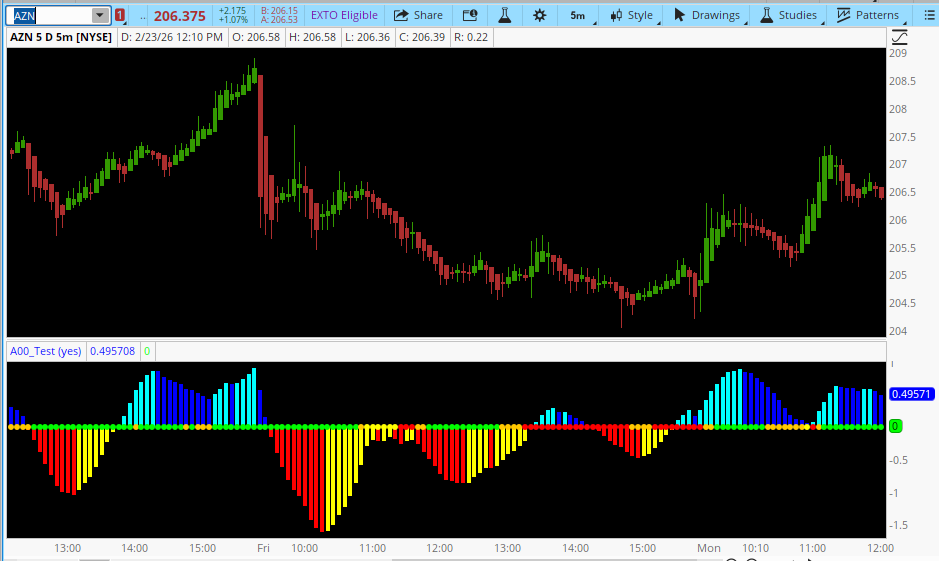
Please check the John Carter's book (Mastering the Trade) and attend his webinars for more insight about the squeeze & squeeze pro systems
https://www.tradingview.com/script/TAAt6eRX-Squeeze-PRO-Indicator-Makit0/
Script based in:
original John Carter's ideas (SQUEEZE & SQUEEZE PRO) at simplertrading dot com
LazyBear's script (Squeeze Momentum Indicator) here at tradingview dot com
USE IT IN CONJUNCTION WITH THE SQUEEZE PRO ARROWS INDICATOR
This system is based in the volatility reversion to the mean: volatility contraction leads to volatility expansion and the other way on
The dot signal is a warning of volatility compression, more often than not this leads to a expansion of volatility and a move in the action price usually bigger than the expected move
Be aware of the trend direction, use the momentum histogram to see the slope direction
There are 3 levels of compression:
Level 1: ORANGE, the lesser compresion level
Level 2: RED, the normal level marked by the original squeeze indicator
Level 3: YELLOW, the max compression level
The more the compression the bigger the after move
The GREEN dots signal the volatility expansion out of the squeeze ranges
Please check the John Carter's book (Mastering the Trade) and attend his webinars for more insight about the squeeze & squeeze pro systems
https://www.tradingview.com/script/TAAt6eRX-Squeeze-PRO-Indicator-Makit0/
Code:
# Author:Makit0_Squeeze_PRO_v0.5BETA
#@author Makit0
#script based in:
# original John Carter's ideas (SQUEEZE & SQUEEZE PRO) https://www.simplertrading.com/
# LazyBear's script (Squeeze Momentum Indicator) https://www.tradingview.com/script/nqQ1DT5a-Squeeze-Momentum-Indicator-LazyBear/

# USE IT IN CONJUNCTION WITH THE SQUEEZE PRO ARROWS INDICATOR

# This system is based in the volatility reversion to the mean: volatility contraction leads to volatility expansion and the other way on
# The dot signal is a warning of volatility compression, more often than not this leads to a expansion of volatility and a move in the action price usually bigger than the expected move
# Be aware of the trend direction, use the momentum histogram to see the slope direction

# There are 3 levels of compression:
# Level 1: ORANGE, the lesser compresion level
# Level 2: RED, the normal level marked by the original squeeze indicator
# Level 3: YELLOW, the max compression level
# The more the compression the bigger the after move

# The GREEN dots signal the volatility expansion out of the squeeze ranges
# Converted from Pine Script to ThinkScript By ;CANDO13579

declare lower;

input enableAlerts = YES;

# Pine Script variables
def length = 20;
def source = close;
def nBB = 2.0;        # Bollinger multiplier
def nKC_Wide = 2.0;   # Keltner wide multiplier
def nKC_Normal = 1.5; # Keltner normal multiplier
def nKC_Narrow = 1.0; # Keltner narrow multiplier

# Calculations
def ma = Average(source, length);
def devBB = StDev(source, length);
def tr = TrueRange(high, close, low);
def devKC = Average(tr, length);

# Bollinger Bands (2x)
def upBB = ma + devBB * nBB;
def lowBB = ma - devBB * nBB;

# Keltner Channels (various widths)
def upKCWide = ma + devKC * nKC_Wide;
def lowKCWide = ma - devKC * nKC_Wide;

def upKCNormal = ma + devKC * nKC_Normal;
def lowKCNormal = ma - devKC * nKC_Normal;

def upKCNarrow = ma + devKC * nKC_Narrow;
def lowKCNarrow = ma - devKC * nKC_Narrow;

# Squeeze conditions
def sqzOnWide = lowBB >= lowKCWide and upBB <= upKCWide;       # WIDE SQUEEZE: ORANGE
def sqzOnNormal = lowBB >= lowKCNormal and upBB <= upKCNormal; # NORMAL SQUEEZE: RED
def sqzOnNarrow = lowBB >= lowKCNarrow and upBB <= upKCNarrow; # NARROW SQUEEZE: YELLOW
def sqzOffWide = lowBB < lowKCWide and upBB > upKCWide;        # FIRED WIDE SQUEEZE: GREEN
def noSqz = !sqzOnWide and !sqzOffWide;                        # NO SQUEEZE: BLUE

# Momentum Oscillator (Linear Regression)
def avgHL = (Highest(high, length) + Lowest(low, length)) / 2;
def avgSMA = Average(close, length);
def avgAll = (avgHL + avgSMA) / 2;
def mom = Inertia(source - avgAll, length);

# Momentum plot
plot oscillator = mom;
oscillator.SetPaintingStrategy(PaintingStrategy.HISTOGRAM);
oscillator.SetLineWeight(5);

# Momentum colors
oscillator.DefineColor("Aqua", Color.CYAN);     # Rising Positive
oscillator.DefineColor("Blue", Color.BLUE);     # Falling Positive
oscillator.DefineColor("Red", Color.RED);       # Falling Negative
oscillator.DefineColor("Yellow", Color.YELLOW); # Rising Negative

oscillator.AssignValueColor(
    if mom > 0 then
        if mom > mom[1] then oscillator.Color("Aqua")
        else oscillator.Color("Blue")
    else
        if mom < mom[1] then oscillator.Color("Red")
        else oscillator.Color("Yellow")
);

# Squeeze indicator (dots at zero line)
plot squeezeIndicator = 0;
squeezeIndicator.SetPaintingStrategy(PaintingStrategy.POINTS);
squeezeIndicator.SetLineWeight(3);

# Squeeze colors
squeezeIndicator.DefineColor("Blue", Color.BLUE);     # No squeeze
squeezeIndicator.DefineColor("Yellow", Color.YELLOW); # Narrow squeeze
squeezeIndicator.DefineColor("Red", Color.RED);       # Normal squeeze
squeezeIndicator.DefineColor("Orange", Color.ORANGE); # Wide squeeze
squeezeIndicator.DefineColor("Lime", Color.GREEN);    # Fired squeeze

squeezeIndicator.AssignValueColor(
    if noSqz then squeezeIndicator.Color("Blue")
    else if sqzOnNarrow then squeezeIndicator.Color("Yellow")
    else if sqzOnNormal then squeezeIndicator.Color("Red")
    else if sqzOnWide then squeezeIndicator.Color("Orange")
    else squeezeIndicator.Color("Lime")
);

# Alerts
def enteredSqzNarrow = sqzOnNarrow and !sqzOnNarrow[1];
def enteredSqzNormal = sqzOnNormal and !sqzOnNormal[1];
def enteredSqzWide = sqzOnWide and !sqzOnWide[1];
def enteredFiredWide = sqzOffWide and !sqzOffWide[1];

def exitedSqzNarrow = !sqzOnNarrow and sqzOnNarrow[1];
def exitedSqzNormal = !sqzOnNormal and sqzOnNormal[1];
def exitedSqzWide = !sqzOnWide and sqzOnWide[1];
def exitedFiredWide = !sqzOffWide and sqzOffWide[1];

# Alerts
alert(enteredSqzNarrow and enableAlerts, "NARROW SQUEEZE STARTED (YELLOW)", Alert.BAR, Sound.NoSound);
alert(enteredSqzNormal and enableAlerts, "NORMAL SQUEEZE STARTED (RED)", Alert.BAR, Sound.NoSound);
alert(enteredSqzWide and enableAlerts, "WIDE SQUEEZE STARTED (ORANGE)", Alert.BAR, Sound.NoSound);
alert(enteredFiredWide and enableAlerts, "SQUEEZE FIRED (GREEN)", Alert.BAR, Sound.NoSound);

alert(exitedSqzNarrow and enableAlerts, "NARROW SQUEEZE ENDED", Alert.BAR, Sound.NoSound);
alert(exitedSqzNormal and enableAlerts, "NORMAL SQUEEZE ENDED", Alert.BAR, Sound.NoSound);
alert(exitedSqzWide and enableAlerts, "WIDE SQUEEZE ENDED", Alert.BAR, Sound.NoSound);
alert(exitedFiredWide and enableAlerts, "SQUEEZE FIRED ENDED", Alert.BAR, Sound.NoSound);
Last edited by a moderator:


