


 RSI Pulse Candles is a momentum-based candle coloring system that combines:
Price action (bullish vs bearish candles) and momentum strength (via RSI) to give you an instant visual read of market intent.
Instead of plain red/green candles, this indicator classifies each candle based on whether price and momentum are aligned or diverging.
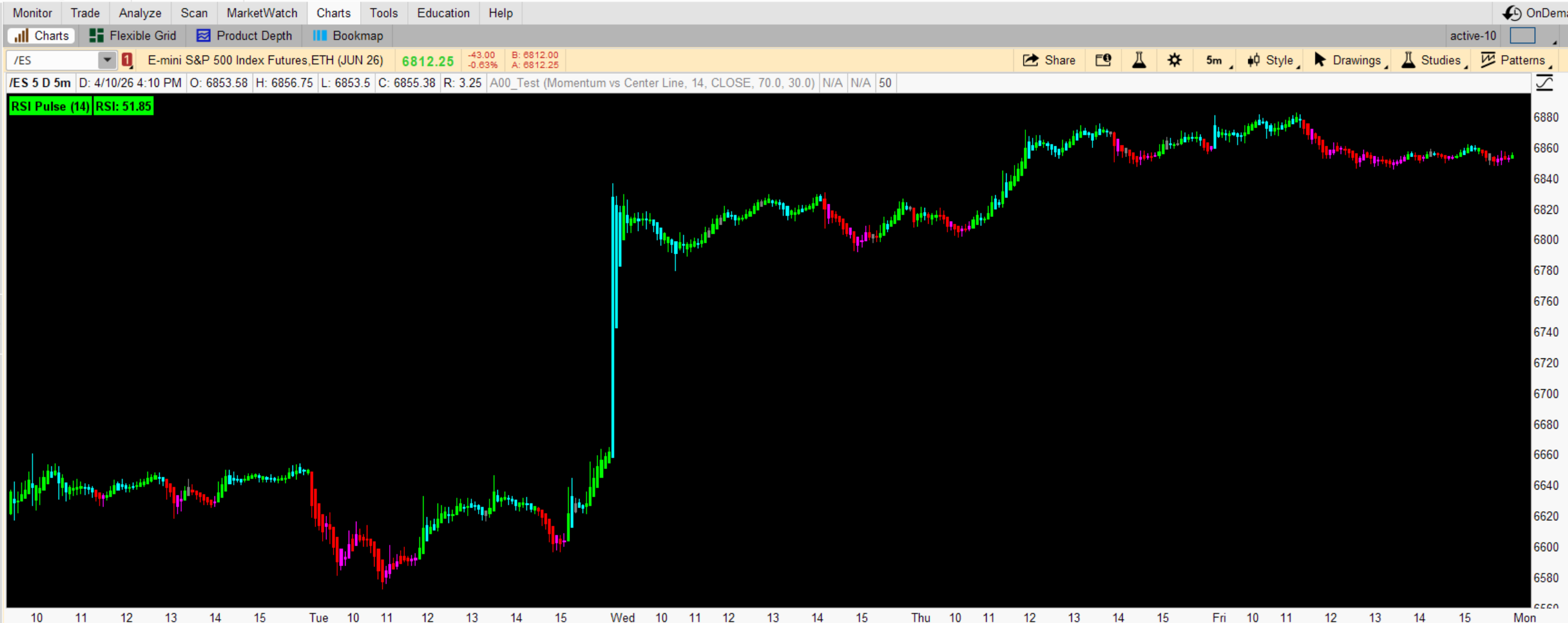
What the Colors Mean
Each candle tells a story about who’s really in control:
 Green (Bull + Bull)
→ Price is up AND momentum supports it
 Strong bullish continuation
 Cyan (Bull Momentum + Bear Candle)
→ Momentum is bullish, but price pulled back
 Potential dip / pullback in an uptrend
 Red (Bear + Bear)
→ Price is down AND momentum confirms it
Strong bearish continuation Magenta (Bear Momentum + Bull Candle)
→ Price bounced, but momentum is still bearish
Weak rally / possible trap Gray (Neutral)
→ No clear momentum edge
 Chop / low-quality conditions
Modes (How Momentum Is Measured)
You can switch how momentum is interpreted:
Momentum vs Center Line (Default)
Uses RSI 50 as the dividing line
Above 50 = bullish bias
Below 50 = bearish bias
Best for general trend tradingMomentum vs Extreme Zones
Uses RSI 70 / 30 levels
Focuses on overbought / oversold extremes
Best for reversals and exhaustion playsMomentum Rising or Falling
Looks at whether RSI is increasing or decreasing
Best for early momentum shiftsHow to Use It (Beginner → Advanced)
Beginner Use (Simple & Effective)Trend Confirmation
Look for consecutive Green candles → bullish trend
Look for consecutive Red candles → bearish trend
Trade in that direction only
Avoid Chop
If you see lots of Gray / mixed colors
→ Stay out
Intermediate Use
Pullback Entries
In an uptrend:
Wait for Cyan candles (pullbacks)
Enter when it turns back Green
In a downtrend:
Wait for Magenta candles (weak bounce)
Enter when it turns Red
This helps you buy dips / sell rallies
Advanced Use (Where it gets powerful)
A+ Setup (High Probability)
Only trade:
Green after Cyan → bullish continuation Red after Magenta → bearish continuationThis shows:
Pullback ✔
Momentum still intact ✔
Trend resuming ✔
Momentum Divergence Insight
Magenta during price rise → hidden weakness Cyan during drop → hidden strengthHelps spot traps before they happen
What This Indicator Really Solves
Most traders struggle with:
Entering too late
Getting trapped in fake moves
Trading in chop
This tool helps you:
See real momentum behind candles
Filter weak vs strong moves
Time entries with structure + momentum
Important Tips
Works best on:
ES / SPY / NQ
1m, 5m, 15m charts
Don’t use it alone:
Combine with key levels / structure
Use with your OB / liquidity concepts
MOMENTUM PERIOD IS SET TO 14, PERSONALLY I USE 5, FOR (ES)
Code:
# RSI_Pulse Candles
declare upper;

input ColoringMode = {default "Momentum vs Center Line", "Momentum vs Extreme Zones", "Momentum Rising or Falling"};
input MomentumPeriod = 14;
input Price = close;
input UpperZone = 70.0;
input LowerZone = 30.0;

# Colors
DefineGlobalColor("BullBull", Color.GREEN);
DefineGlobalColor("BullBear", Color.CYAN);
DefineGlobalColor("BearBear", Color.RED);
DefineGlobalColor("BearBull", Color.MAGENTA);
DefineGlobalColor("Neutral", Color.GRAY);

# RSI Momentum
def momentum = RSI(price = Price, length = MomentumPeriod);

# Momentum Bias
def momentumBias =
    if ColoringMode == ColoringMode."Momentum vs Center Line" then
        (if momentum > 50 then 1 else if momentum < 50 then -1 else 0)
    else if ColoringMode == ColoringMode."Momentum vs Extreme Zones" then
        (if momentum > UpperZone then 1 else if momentum < LowerZone then -1 else 0)
    else
        (if momentum > momentum[1] then 1 else if momentum < momentum[1] then -1 else 0);

# Candle Bias
def candleBias = if close > open then 1 else if close < open then -1 else 0;

# Color Index
def colorIndex =
    if momentumBias == 1 and candleBias == 1 then 0
    else if momentumBias == 1 and candleBias == -1 then 1
    else if momentumBias == -1 and candleBias == -1 then 2
    else if momentumBias == -1 and candleBias == 1 then 3
    else 4;

# Assign colors
AssignPriceColor(
    if colorIndex == 0 then GlobalColor("BullBull")
    else if colorIndex == 1 then GlobalColor("BullBear")
    else if colorIndex == 2 then GlobalColor("BearBear")
    else if colorIndex == 3 then GlobalColor("BearBull")
    else GlobalColor("Neutral")
);

# Labels
AddLabel(yes, "RSI Pulse (" + MomentumPeriod + ")",
    if colorIndex == 0 then GlobalColor("BullBull")
    else if colorIndex == 1 then GlobalColor("BullBear")
    else if colorIndex == 2 then GlobalColor("BearBear")
    else if colorIndex == 3 then GlobalColor("BearBull")
    else GlobalColor("Neutral")
);

AddLabel(yes, "RSI: " + Round(momentum, 2),
    if momentum > 50 then Color.GREEN
    else if momentum < 50 then Color.RED
    else Color.GRAY);

# Conditional Lines
plot UpperLine = if ColoringMode == ColoringMode."Momentum vs Extreme Zones" then UpperZone else Double.NaN;
plot LowerLine = if ColoringMode == ColoringMode."Momentum vs Extreme Zones" then LowerZone else Double.NaN;
plot MidLine   = if ColoringMode != ColoringMode."Momentum Rising or Falling" then 50 else Double.NaN;

UpperLine.SetDefaultColor(Color.GRAY);
LowerLine.SetDefaultColor(Color.GRAY);
MidLine.SetDefaultColor(Color.DARK_GRAY);

UpperLine.SetStyle(Curve.SHORT_DASH);
LowerLine.SetStyle(Curve.SHORT_DASH);
MidLine.SetStyle(Curve.LONG_DASH);
Last edited by a moderator:


