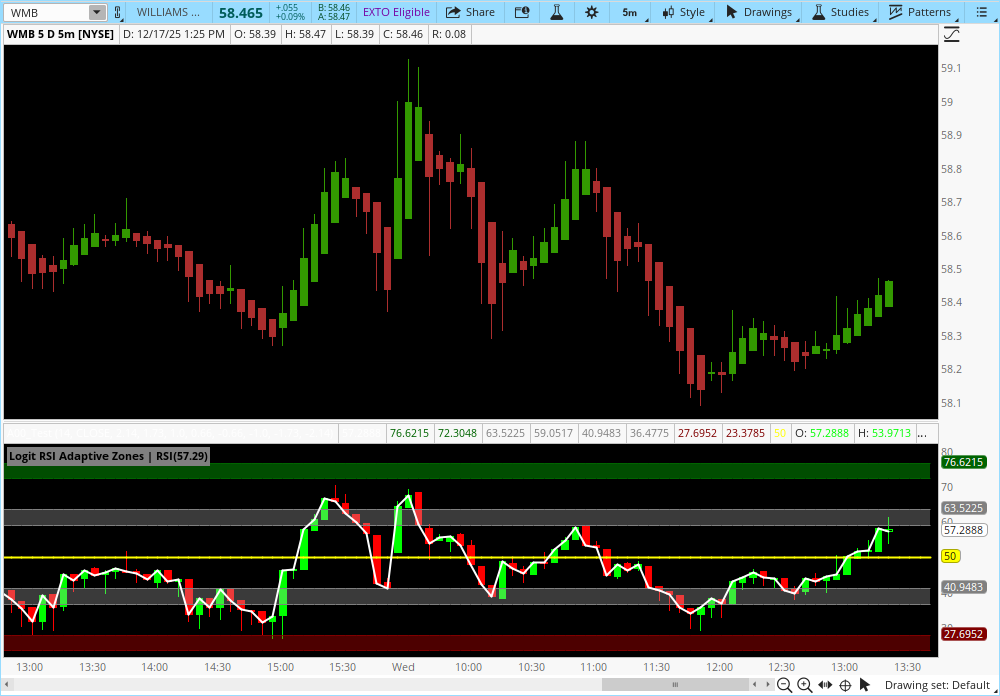
# AdaptiveRSI for Thinkorswim
# Original Concept by AdaptiveRSI (Pine Script)
# Converted to ThinkScript by ShinJ
# License: CC BY-NC-SA 4.0

declare lower;

# ─── Inputs ─────────────────────────────────────────────
input length = 14;
input plotStyle = {default Candle, Bar, Line};
input smoothingType = {default "None", "SMA + Bollinger Bands", "SMA"};
input maLength = 21;
input bbStdDev = 2.0;

# Visibility Inputs
input showSupportResistance = yes;
input showOverboughtOversold = yes;

# ─── Constants & Math Helpers ───────────────────────────
def SF = 1.0 / length;
def power_exponent = 0.5;
def half_range = 50.0;
def eps = 0.0000000001;

# ─── RSI Components ─────────────────────────────────────
# Standard RSI uses Wilder's Average
def middle = WildersAverage(close, length);

# Hybrid Smoothing: Uses Previous Middle but Current Price Data
def middle_O = (1.0 - SF) * middle[1] + SF * open;
def middle_H = (1.0 - SF) * middle[1] + SF * high;
def middle_L = (1.0 - SF) * middle[1] + SF * low;

# Volatility Calculation
def CC_vol = WildersAverage(AbsValue(close - close[1]), length);
def CC_vol_O = (1.0 - SF) * CC_vol[1] + SF * AbsValue(open - close[1]);
def CC_vol_H = (1.0 - SF) * CC_vol[1] + SF * AbsValue(high - close[1]);
def CC_vol_L = (1.0 - SF) * CC_vol[1] + SF * AbsValue(low - close[1]);

# ─── RSI OHLC Calculation ───────────────────────────────
def den_C = Max(CC_vol, eps) * (length - 1.0);
def den_O = Max(CC_vol_O, eps) * (length - 1.0);
def den_H = Max(CC_vol_H, eps) * (length - 1.0);
def den_L = Max(CC_vol_L, eps) * (length - 1.0);

def RSI_C = half_range + half_range * ((close - middle) / den_C);
def RSI_O = half_range + half_range * ((open - middle_O) / den_O);
def RSI_H = half_range + half_range * ((high - middle_H) / den_H);
def RSI_L = half_range + half_range * ((low - middle_L) / den_L);

# ─── Adaptive Zones Thresholds ──────────────────────────
def inv_sqrt_lenm1 = 1.0 / Power(length - 1.0, power_exponent);
def body_threshold = Sqrt((5.0 - Sqrt(17.0)) / 2.0);
def tail_threshold = Sqrt((5.0 + Sqrt(17.0)) / 2.0);
def breakout_threshold = 1.0;
def reversal_threshold = Sqrt(3.0);

script Tanh {
    input x = 0;
    def ex = Exp(2.0 * x);
    plot val = (ex - 1.0) / (ex + 1.0);
}

def Z_ins  = half_range * Tanh(body_threshold * inv_sqrt_lenm1);
def Z_out  = half_range * Tanh(breakout_threshold * inv_sqrt_lenm1);
def OO_ins = half_range * Tanh(reversal_threshold * inv_sqrt_lenm1);
def OO_out = half_range * Tanh(tail_threshold * inv_sqrt_lenm1);

# ─── Smoothing Logic ────────────────────────────────────
def xc = Min(Max(RSI_C, eps), 100 - eps);
def logit_RSI_C = Log(xc / (100 - xc));
def source_RSI = logit_RSI_C;
def LMA = if smoothingType == smoothingType.None then source_RSI else Average(source_RSI, maLength);
def pop_correction = Sqrt((maLength - 1) / maLength);
def LRSI_StDev = StDev(source_RSI, maLength) * pop_correction;
def smoothedRSI = 100 * (Exp(LMA) / (1 + Exp(LMA)));
def upperBB_logit = LMA + bbStdDev * LRSI_StDev;
def lowerBB_logit = LMA - bbStdDev * LRSI_StDev;
def upperBB = 100 * (Exp(upperBB_logit) / (1 + Exp(upperBB_logit)));
def lowerBB = 100 * (Exp(lowerBB_logit) / (1 + Exp(lowerBB_logit)));

# ─── Plotting: Standard Plots ───────────────────────────
plot MidLine = 50;
MidLine.SetStyle(Curve.SHORT_DASH);
MidLine.SetDefaultColor(Color.DARK_GRAY);

plot BBUpper = if smoothingType == smoothingType."SMA + Bollinger Bands" then upperBB else Double.NaN;
BBUpper.SetDefaultColor(Color.ORANGE);
plot BBLower = if smoothingType == smoothingType."SMA + Bollinger Bands" then lowerBB else Double.NaN;
BBLower.SetDefaultColor(Color.ORANGE);
plot MASmooth = if smoothingType != smoothingType.None then smoothedRSI else Double.NaN;
MASmooth.SetDefaultColor(Color.YELLOW);

# ─── Plotting: Candles/Bars using AddChart ──────────────
# Define logic for Up vs Down candles
def isGreen = RSI_C >= RSI_O;

# Determine if we should plot candles/bars
def useCandle = plotStyle == plotStyle.Candle;
def useBar = plotStyle == plotStyle.Bar;

# 1. Candle Mode (Green)
AddChart(high = if useCandle and isGreen then RSI_H else Double.NaN,
         low = if useCandle and isGreen then RSI_L else Double.NaN,
         open = if useCandle and isGreen then RSI_O else Double.NaN,
         close = if useCandle and isGreen then RSI_C else Double.NaN,
         type = ChartType.CANDLE,
         growColor = Color.GREEN);

# 2. Candle Mode (Red)
AddChart(high = if useCandle and !isGreen then RSI_H else Double.NaN,
         low = if useCandle and !isGreen then RSI_L else Double.NaN,
         open = if useCandle and !isGreen then RSI_O else Double.NaN,
         close = if useCandle and !isGreen then RSI_C else Double.NaN,
         type = ChartType.CANDLE,
         growColor = Color.RED);

# 3. Bar Mode (Green)
AddChart(high = if useBar and isGreen then RSI_H else Double.NaN,
         low = if useBar and isGreen then RSI_L else Double.NaN,
         open = if useBar and isGreen then RSI_O else Double.NaN,
         close = if useBar and isGreen then RSI_C else Double.NaN,
         type = ChartType.BAR,
         growColor = Color.GREEN);

# 4. Bar Mode (Red)
AddChart(high = if useBar and !isGreen then RSI_H else Double.NaN,
         low = if useBar and !isGreen then RSI_L else Double.NaN,
         open = if useBar and !isGreen then RSI_O else Double.NaN,
         close = if useBar and !isGreen then RSI_C else Double.NaN,
         type = ChartType.BAR,
         growColor = Color.RED);

# 5. Line Mode
plot RSILine = if plotStyle == plotStyle.Line then RSI_C else Double.NaN;
RSILine.SetLineWeight(2);
RSILine.AssignValueColor(if RSI_C > (50 + OO_ins) then Color.RED else if RSI_C < (50 - OO_ins) then Color.GREEN else Color.GRAY);

# ─── Clouds / Zones (Background) ────────────────────────
def OB_Top = 50 + OO_out;
def OB_Bot = 50 + OO_ins;
AddCloud(if showOverboughtOversold then OB_Top else Double.NaN, OB_Bot, CreateColor(50, 166, 69), CreateColor(50, 166, 69));

def OS_Top = 50 - OO_ins;
def OS_Bot = 50 - OO_out;
AddCloud(if showOverboughtOversold then OS_Top else Double.NaN, OS_Bot, CreateColor(217, 35, 35), CreateColor(217, 35, 35));

def Res_Top = 50 + Z_out;
def Res_Bot = 50 + Z_ins;
AddCloud(if showSupportResistance then Res_Top else Double.NaN, Res_Bot, Color.GRAY, Color.GRAY);

def Sup_Top = 50 - Z_ins;
def Sup_Bot = 50 - Z_out;
AddCloud(if showSupportResistance then Sup_Top else Double.NaN, Sup_Bot, Color.GRAY, Color.GRAY);