


Overview
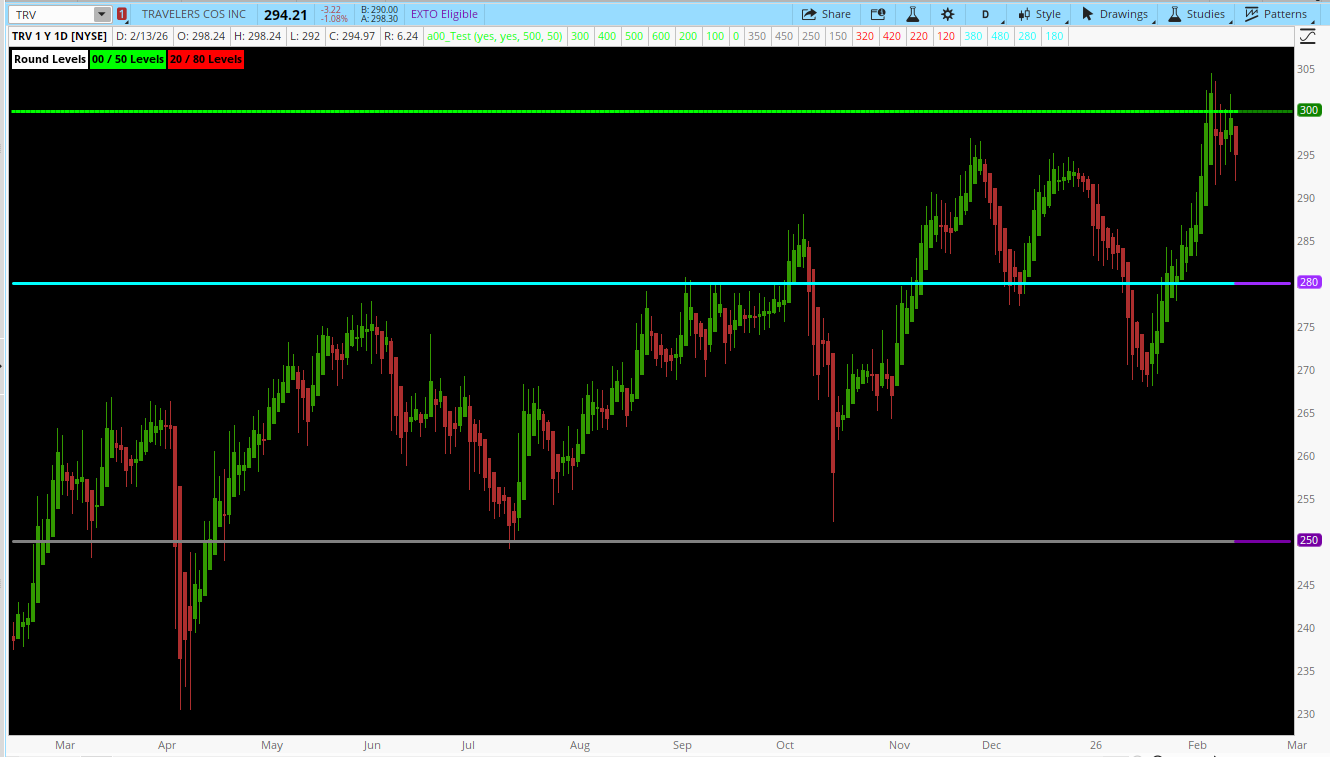
The Round Price Levels script is a technical analysis tool designed for Thinkorswim that identifies and plots psychologically significant price levels based on rounded numbers. These levels often act as support, resistance, or decision points because traders naturally gravitate toward round numbers when placing orders.
The script specifically plots 00, 50, 20, and 80 levels, providing a clear visual guide to potential turning points in the market. It’s highly useful for swing traders, day traders, and scalpers looking for areas where price might pause, reverse, or break out.
Key Inputs
The Round Price Levels script is a technical analysis tool designed for Thinkorswim that identifies and plots psychologically significant price levels based on rounded numbers. These levels often act as support, resistance, or decision points because traders naturally gravitate toward round numbers when placing orders.
The script specifically plots 00, 50, 20, and 80 levels, providing a clear visual guide to potential turning points in the market. It’s highly useful for swing traders, day traders, and scalpers looking for areas where price might pause, reverse, or break out.
Key Inputs
- show0050 (Yes/No) – Enables or disables plotting of the 00 and 50 levels (e.g., 100, 150, 200).
- show2080 (Yes/No) – Enables or disables plotting of the 20 and 80 levels. These are “minor” psychological levels that can provide additional granularity.
- lookback (default 500 bars) – Determines how far back the script looks to identify the highest high for calculating the base level.
- padding (default 50) – Adds a buffer to the high price to ensure levels are plotted above recent price action.
- Identify Price Range
def highPrice = Highest(high, lookback) + padding;- Finds the highest price within the lookback period and adds extra “padding” to extend the levels slightly above recent highs.
- Calculate Base Level
def rawBase = Floor(highPrice / 100) * 100;
def baseLevel = HighestAll(rawBase);- Floors the highPrice to the nearest 100 to get a primary 00 level.
- HighestAll(rawBase) ensures the base level is consistent across the chart.
- Plot Round Levels
The script plots seven 00 levels, four 50 levels, four 20 levels, and four 80 levels, all relative to the base level.
Examples:- 00 Levels: base ± 100, ± 200, ± 300
- 50 Levels: base ± 50, ± 150
- 20 Levels: base +20, +120, -80, -180
- 80 Levels: base +80, +180, -20, -120
- Color Coding
Each level type is assigned a specific global color for easy visual differentiation:- 00: Green – major round numbers
- 50: Gray – midpoint levels
- 20: Red – minor round levels
- 80: Cyan – minor round levels
- Labels
AddLabel(yes, "Round Levels", Color.WHITE);
AddLabel(show0050, "00 / 50 Levels", GlobalColor("00"));
AddLabel(show2080, "20 / 80 Levels", GlobalColor("20"));- Provides a legend on the chart so users can identify which levels are active.
- Support & Resistance
- Round numbers often act as psychological barriers. Traders frequently place stop-loss or take-profit orders around these levels, causing price to react.
- Breakout / Reversal Zones
- Observe price behavior at these levels:
- Multiple rejections → strong support/resistance
- Break and retest → potential continuation
- Observe price behavior at these levels:
- Scalping & Intraday Trading
- Use 00 and 50 levels for high-probability scalps.
- Combine with intraday candlestick patterns or momentum indicators for confirmation.
- Risk Management
- These levels are ideal for entry, exit, and stop placement because they align with widely recognized market psychology.
- Time Frame: Works best on 5-min to daily charts. Shorter intraday charts (1–15 min) highlight minor level bounces, while higher time frames (hourly/daily) give longer-term support/resistance context.
- Lookback & Padding:
- Default of 500 bars and 50 padding works well for most markets.
- Increase lookback for markets with long trending moves.
- Combining Indicators:
- Use alongside volume, moving averages, or oscillators to confirm signals.
- For example, a bounce off a 00 level aligned with RSI oversold can indicate a strong buy opportunity.
- Simple and intuitive; visually clear levels.
- Customizable to highlight major (00/50) vs. minor (20/80) levels.
- Ideal for multiple trading styles (scalping, swing, positional).
- Works best in liquid markets; minor levels may be less significant in thinly traded assets.
- Should be used in conjunction with other analysis techniques; not a standalone trading signal.
Code:
# ==================================================
# Round Price Levels
# ==================================================
declare upper;

# -------- Inputs --------
input show0050 = yes;
input show2080 = yes;
input lookback = 500;
input padding = 50;

# -------- Colors --------
DefineGlobalColor("00", Color.GREEN);
DefineGlobalColor("50", Color.GRAY);
DefineGlobalColor("20", Color.RED);
DefineGlobalColor("80", Color.CYAN);

# -------- Price range --------
def highPrice = Highest(high, lookback) + padding;

# -------- Base level
def rawBase = Floor(highPrice / 100) * 100;

# -------- Force constant --------
def baseLevel = HighestAll(rawBase);

# ===============================
# 00 Levels
# ===============================
plot L00_0 = if show0050 then baseLevel else Double.NaN;
plot L00_1 = if show0050 then baseLevel + 100 else Double.NaN;
plot L00_2 = if show0050 then baseLevel + 200 else Double.NaN;
plot L00_3 = if show0050 then baseLevel + 300 else Double.NaN;
plot L00_4 = if show0050 then baseLevel - 100 else Double.NaN;
plot L00_5 = if show0050 then baseLevel - 200 else Double.NaN;
plot L00_6 = if show0050 then baseLevel - 300 else Double.NaN;

# ===============================
# 50 Levels
# ===============================
plot L50_0 = if show0050 then baseLevel + 50 else Double.NaN;
plot L50_1 = if show0050 then baseLevel + 150 else Double.NaN;
plot L50_2 = if show0050 then baseLevel - 50 else Double.NaN;
plot L50_3 = if show0050 then baseLevel - 150 else Double.NaN;

# ===============================
# 20 Levels
# ===============================
plot L20_0 = if show2080 then baseLevel + 20 else Double.NaN;
plot L20_1 = if show2080 then baseLevel + 120 else Double.NaN;
plot L20_2 = if show2080 then baseLevel - 80 else Double.NaN;
plot L20_3 = if show2080 then baseLevel - 180 else Double.NaN;

# ===============================
# 80 Levels
# ===============================
plot L80_0 = if show2080 then baseLevel + 80 else Double.NaN;
plot L80_1 = if show2080 then baseLevel + 180 else Double.NaN;
plot L80_2 = if show2080 then baseLevel - 20 else Double.NaN;
plot L80_3 = if show2080 then baseLevel - 120 else Double.NaN;

# ===============================
# Styling
# ===============================
L00_0.SetPaintingStrategy(PaintingStrategy.HORIZONTAL);
L00_1.SetPaintingStrategy(PaintingStrategy.HORIZONTAL);
L00_2.SetPaintingStrategy(PaintingStrategy.HORIZONTAL);
L00_3.SetPaintingStrategy(PaintingStrategy.HORIZONTAL);
L00_4.SetPaintingStrategy(PaintingStrategy.HORIZONTAL);
L00_5.SetPaintingStrategy(PaintingStrategy.HORIZONTAL);
L00_6.SetPaintingStrategy(PaintingStrategy.HORIZONTAL);

L00_0.AssignValueColor(GlobalColor("00"));
L00_1.AssignValueColor(GlobalColor("00"));
L00_2.AssignValueColor(GlobalColor("00"));
L00_3.AssignValueColor(GlobalColor("00"));
L00_4.AssignValueColor(GlobalColor("00"));
L00_5.AssignValueColor(GlobalColor("00"));
L00_6.AssignValueColor(GlobalColor("00"));

L50_0.AssignValueColor(GlobalColor("50"));
L50_1.AssignValueColor(GlobalColor("50"));
L50_2.AssignValueColor(GlobalColor("50"));
L50_3.AssignValueColor(GlobalColor("50"));

L20_0.AssignValueColor(GlobalColor("20"));
L20_1.AssignValueColor(GlobalColor("20"));
L20_2.AssignValueColor(GlobalColor("20"));
L20_3.AssignValueColor(GlobalColor("20"));

L80_0.AssignValueColor(GlobalColor("80"));
L80_1.AssignValueColor(GlobalColor("80"));
L80_2.AssignValueColor(GlobalColor("80"));
L80_3.AssignValueColor(GlobalColor("80"));

# ===============================
# Labels
# ===============================
AddLabel(yes, "Round Levels", Color.WHITE);
AddLabel(show0050, "00 / 50 Levels", GlobalColor("00"));
AddLabel(show2080, "20 / 80 Levels", GlobalColor("20"));
Last edited by a moderator:


