


I built this indicator to solve a specific problem: identifying sector rotations before they become obvious. Turns out though, this thing can do a lot more than that. While price tells you where a stock is, Relative Strength (RS) Z-Scores tell you how much energy is actually behind the move compared to the rest of the market.
What started as a tool for quick rotations has evolved into a complete framework for navigating market cycles.
Let me walk you through an example of me using it to find a stock I want to trade:
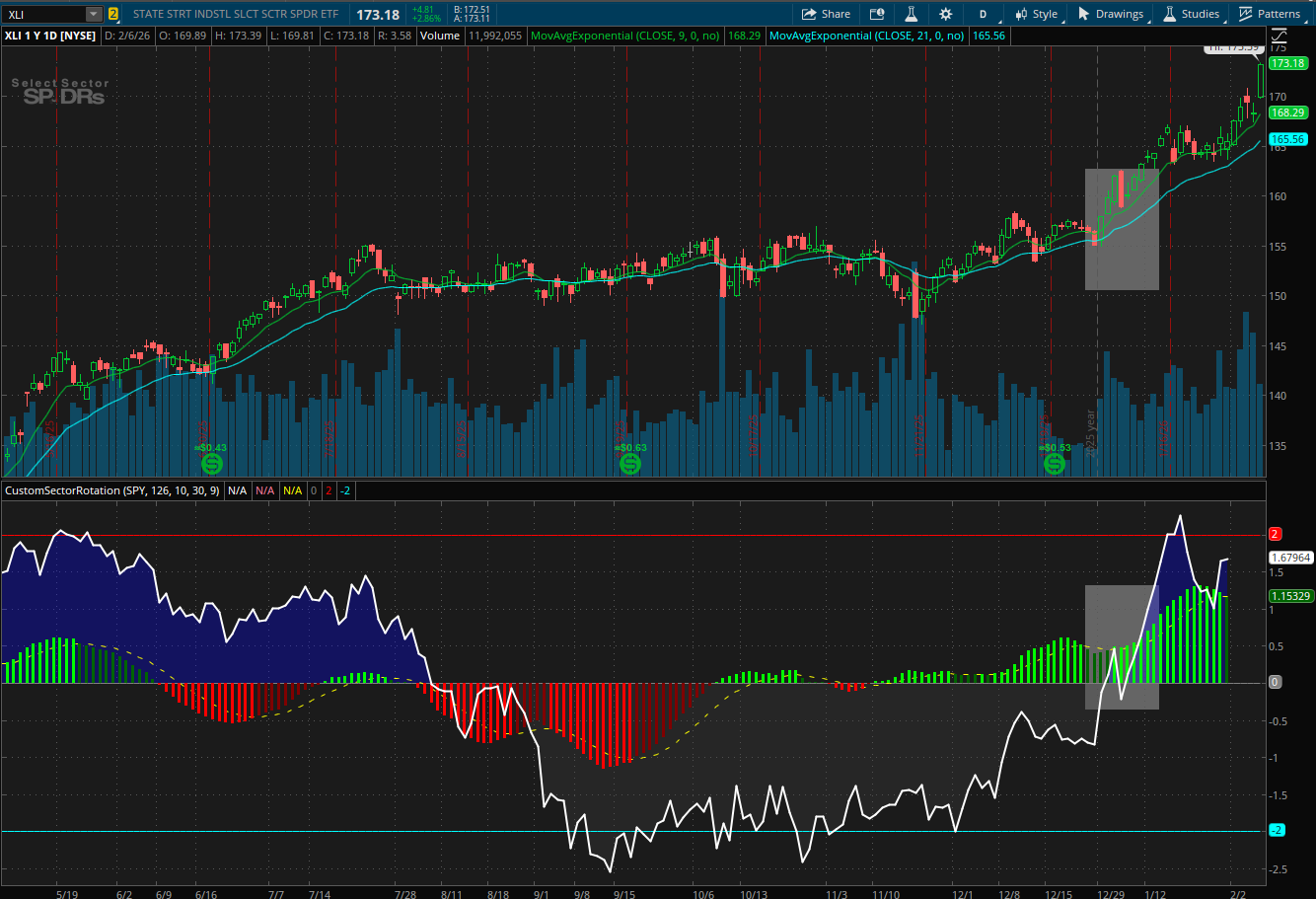
Sector Outperformance: Notice in the following image in the shaded area. When the Z-Score crossed above the zero-line it indicated that XLI was consistently outperforming our benchmark (SPY)
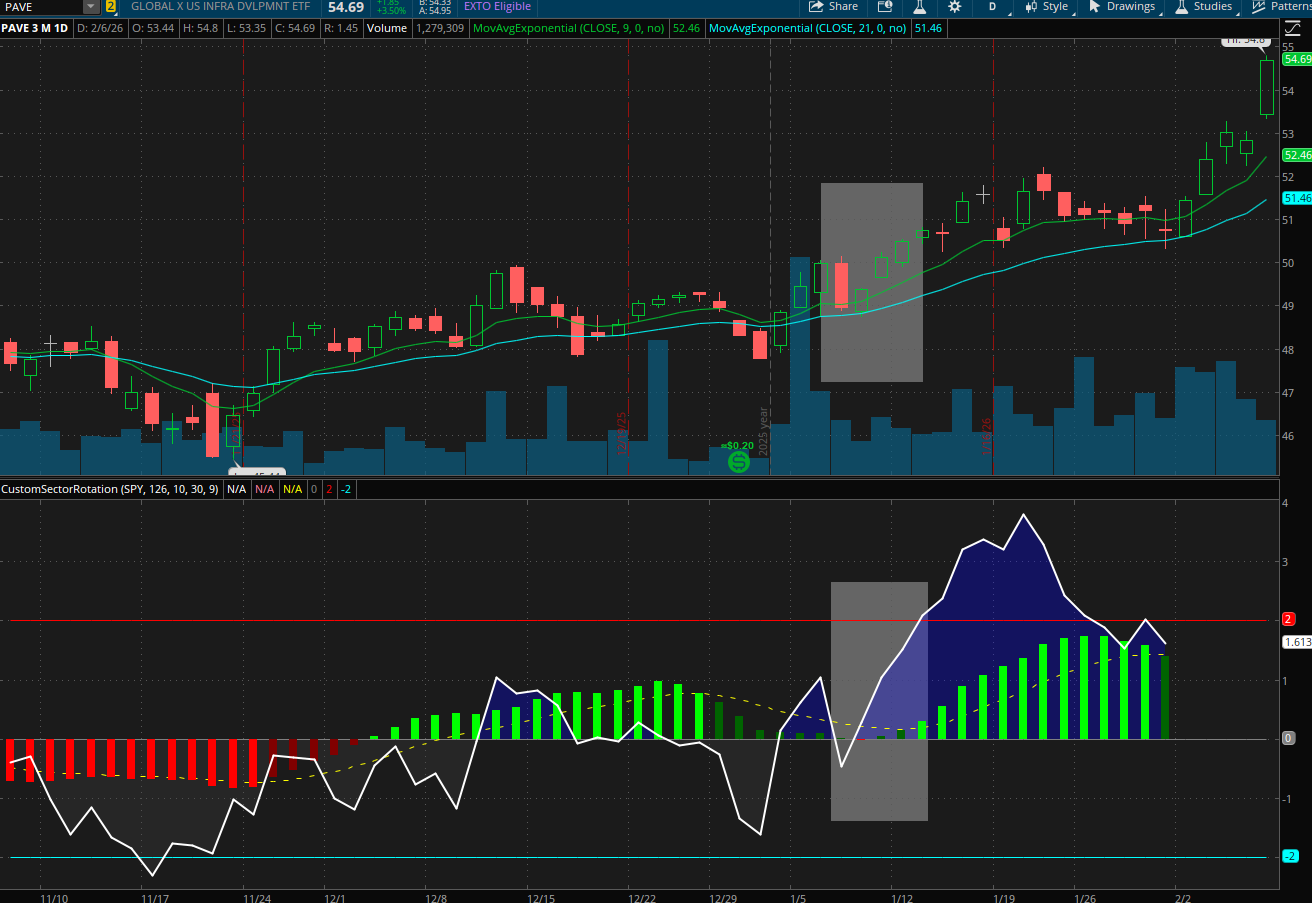
Industry Outperformance: Now I go through different ETF's that represent different industries of the Industrial Sectors and I come across one called PAVE that represents the power and engineering industrials and notice the following chart. I am getting a lot of bullish trending action and the stocks are respecting the 21EMA at the shaded areas, now using XLI as my benchmark
Individual Company: Lastly I drill down into the specific companies of ETF PAVE (Using PAVE as my new benchmark) and I find FIX. Notice that FIX has been outperforming its own industry for quite a while, and lining up the time from the shaded area on the chart above would have been an opportune buying time.
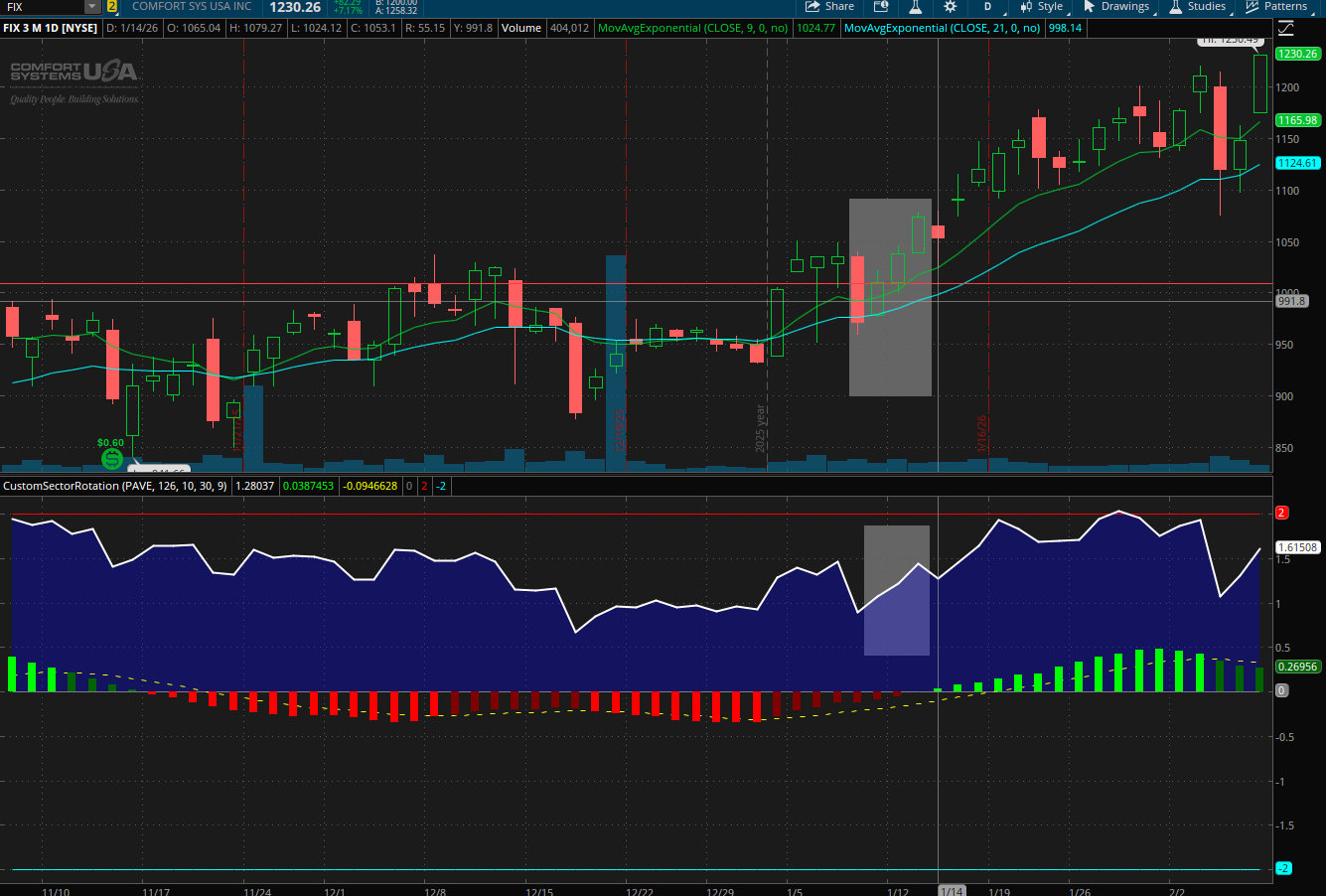
Note that I have been trading FIX and have mentioned it over in the sites discord recently. It is up over 20% in the last month, while the overall market is struggling to keep up. I hope you find this indicator useful.
Cheers!
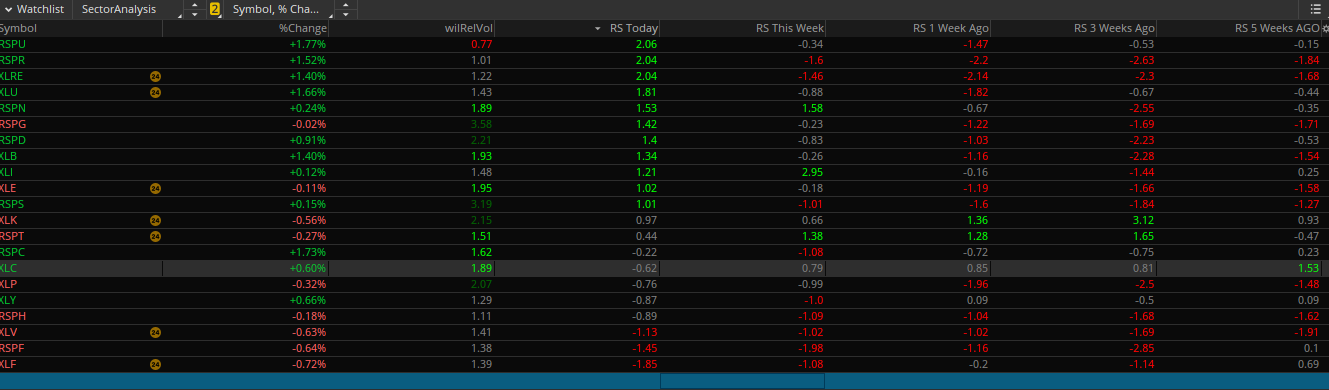
Also in order to track trends for sector rotation I use watchlist columns like the one pictured below:
Here is the code for that:
What started as a tool for quick rotations has evolved into a complete framework for navigating market cycles.
How it Works
The study combines three distinct layers of signal:- The White Line (Z-Score): This represents the Fundamental Reality. It normalizes performance over a 6-month window to show if a sector is a true leader (Z > 0) or a laggard (Z < 0).
- The Histogram (MACD-Style): This captures the Market Mood. When the histogram turns green, the Expectations Gap is narrowing—the market is starting to price in a turnaround even if the Z-score is still low.
- The Cloud: This defines the Regime. A blue cloud signifies a self-reinforcing reflexive trend (Soros), where you want to be positioning rather than predicting.
Why It is Useful
By triangulating these values, I can separate tradable excuses from fundamental shifts. It allows me to spot Mood Exhaustion at statistical extremes (Z > 2.0 or Z < -2.0) and identify the exact moment a new industry begins to lead the pack.Let me walk you through an example of me using it to find a stock I want to trade:
Sector Outperformance: Notice in the following image in the shaded area. When the Z-Score crossed above the zero-line it indicated that XLI was consistently outperforming our benchmark (SPY)
Industry Outperformance: Now I go through different ETF's that represent different industries of the Industrial Sectors and I come across one called PAVE that represents the power and engineering industrials and notice the following chart. I am getting a lot of bullish trending action and the stocks are respecting the 21EMA at the shaded areas, now using XLI as my benchmark
Individual Company: Lastly I drill down into the specific companies of ETF PAVE (Using PAVE as my new benchmark) and I find FIX. Notice that FIX has been outperforming its own industry for quite a while, and lining up the time from the shaded area on the chart above would have been an opportune buying time.
Note that I have been trading FIX and have mentioned it over in the sites discord recently. It is up over 20% in the last month, while the overall market is struggling to keep up. I hope you find this indicator useful.
Cheers!
Code:
# RS Z-Score MACD-Style with Z-Line & Signal
# Fixed Color Constants for ThinkScript

declare lower;

input benchmark = "SPY";
input zLength = 126;
input fastLen = 10;
input slowLen = 30;
input signalLen = 9;

# --- Relative Strength Logic ---
def benchClose = close(symbol = benchmark);
def rs = if !IsNaN(benchClose) and benchClose > 0 then close / benchClose else Double.NaN;

# --- RS Z-Score (The "Reality" Line) ---
def mean = Average(rs, zLength);
def sd   = StDev(rs, zLength);
plot RSZ_Line = if sd != 0 then (rs - mean) / sd else 0;

# --- MACD Components ---
def rsZ_fast = Average(RSZ_Line, fastLen);
def rsZ_slow = Average(RSZ_Line, slowLen);
plot RSZ_Hist = rsZ_fast - rsZ_slow;
plot Signal = ExpAverage(RSZ_Hist, signalLen);

# --- Thresholds ---
plot ZeroLine = 0;
plot UpperExtreme = 2.0;
plot LowerExtreme = -2.0;

# --- Styling & Clouds ---
RSZ_Line.SetDefaultColor(Color.WHITE);
RSZ_Line.SetLineWeight(2);

RSZ_Hist.SetPaintingStrategy(PaintingStrategy.HISTOGRAM);
RSZ_Hist.AssignValueColor(
    if RSZ_Hist > Signal and RSZ_Hist > 0 then Color.GREEN
    else if RSZ_Hist < Signal and RSZ_Hist > 0 then Color.DARK_GREEN
    else if RSZ_Hist < Signal and RSZ_Hist < 0 then Color.RED
    else Color.DARK_RED
);

# Fixed Cloud: Using DefineColor or standard Blue
AddCloud(RSZ_Line, ZeroLine, Color.BLUE, Color.DARK_GRAY);

Signal.SetDefaultColor(Color.YELLOW);
Signal.SetStyle(Curve.SHORT_DASH);
ZeroLine.SetDefaultColor(Color.GRAY);
UpperExtreme.SetDefaultColor(Color.RED);
LowerExtreme.SetDefaultColor(Color.CYAN);
Also in order to track trends for sector rotation I use watchlist columns like the one pictured below:
Here is the code for that:
Code:
input benchmark = "SPY";
input zLength = 126;     # ~6 months
input weeksAgo = 0;      # set per column: 1, 3, 5, 8, 13

def barsPerWeek = 5;
def offsetBars = weeksAgo * barsPerWeek;

def rs = close / close(benchmark);
def mean = Average(rs, zLength);
def sd = StDev(rs, zLength);

def rsZ =
    if sd != 0
    then (rs - mean) / sd
    else 0;

plot RS_Z_AsOf = rsZ[offsetBars];

RS_Z_AsOf.AssignValueColor(
    if RS_Z_AsOf > 1 then Color.GREEN
    else if RS_Z_AsOf < -1 then Color.RED
    else Color.GRAY
);

RS_Z_AsOf.SetLineWeight(2);
Last edited:


