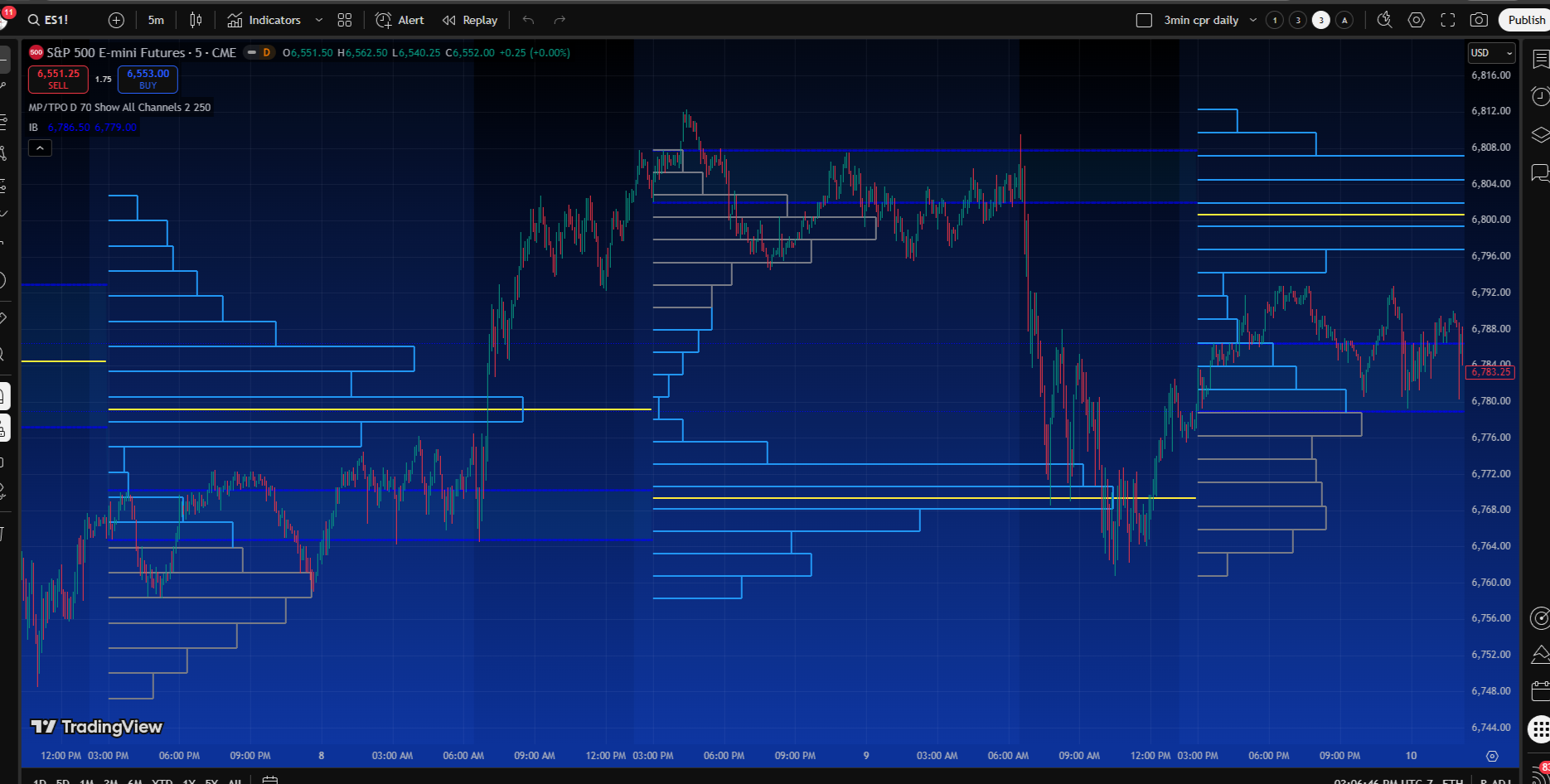
Question on TPO Profile.

AdamantBidoof

New member
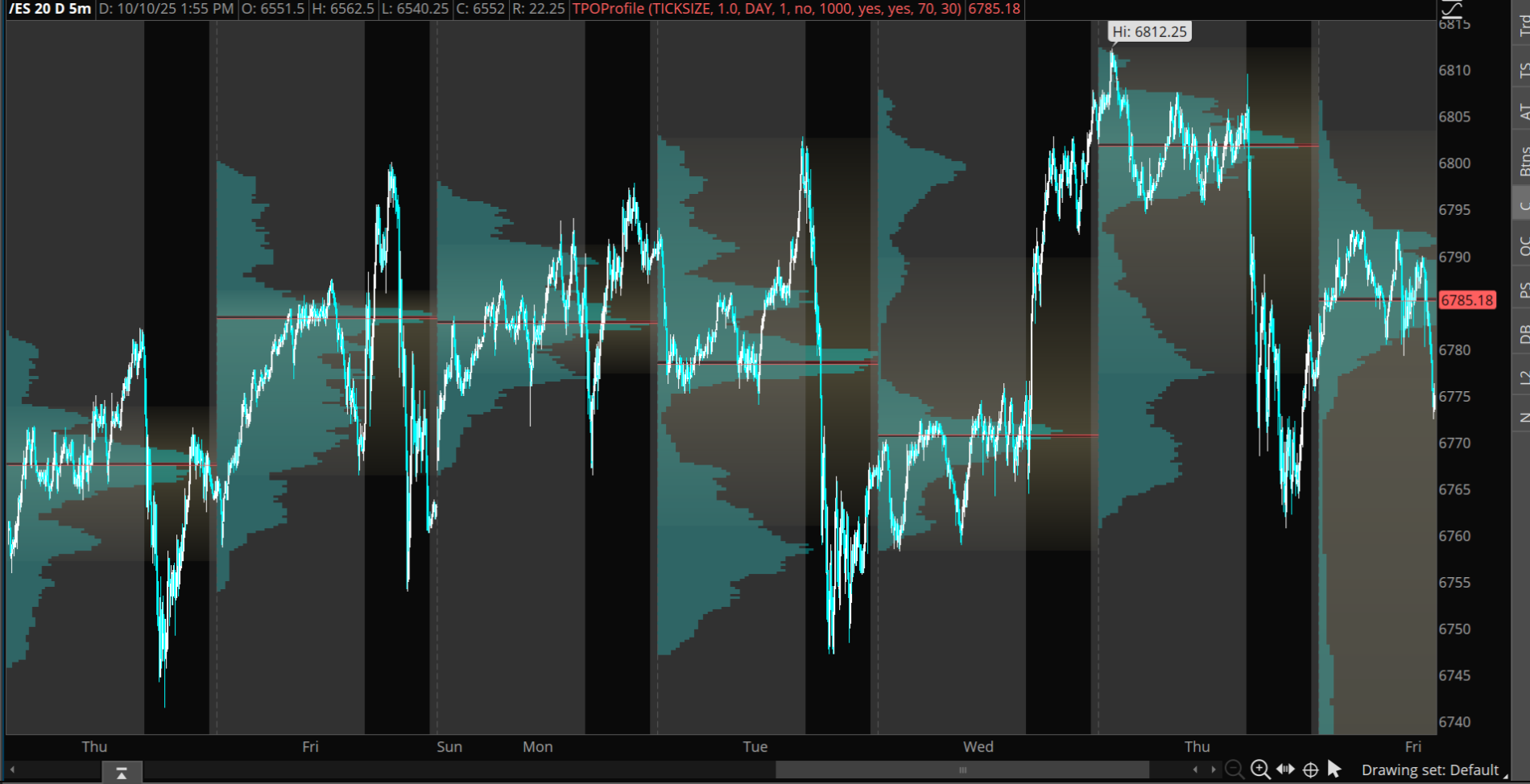
Is there a way or code to have the blue TPO profile NOT the levels move onto the next day like in this example? not just the levels.
Screenshot (641).png
Screenshot (640).png
 

Join useThinkScript to post your question to a community of 21,000+ developers and traders.

Change use showOnExpansion to Yes if you want to keep at the end. Also, TOS default has the setting.

Python:
# ########################################
# TPO (Time Profile) + POC/VAH/VAL + IB Lines

declare upper;

# ########################################
# Globals
def sc = close;
def sh = high;
def sl = low;
def so = open;
def na = Double.NaN;

# ########################################
# Inputs
input showProfile        = yes;
input showLevels         = yes;
input showBubbles        = yes;
input profileMode        = {default DAY, RTH}; # DAY = new profile each date; RTH = splits by RTH/ETH boundary
input rthStart           = 0930;
input rthEnd             = 1600;
input valueAreaPercent   = 70.0;
input pricePerRow        = PricePerRow.AUTOMATIC;
input showIB             = yes;
input ibMinutes          = 60;
input showOnExpansion    = no;

def aggOK = GetAggregationPeriod() < AggregationPeriod.DAY;

def inRTH = SecondsFromTime(rthStart) >= 0 and SecondsTillTime(rthEnd) > 0;

def startNew =
    if !aggOK then 0
    else if profileMode == profileMode.DAY then GetYYYYMMDD() <> GetYYYYMMDD()[1]
    else (inRTH && !inRTH[1]) or (!inRTH && inRTH[1]);

profile tpo = TimeProfile(
    pricePerRow          = pricePerRow,
    "startNewProfile"    = startNew,
    "onExpansion"        = showOnExpansion,
    "value area percent" = valueAreaPercent
);

tpo.Show(
    color      = if showProfile then Color.GRAY   else Color.CURRENT,
    "poc color"= if showProfile then Color.YELLOW else Color.CURRENT,
    "va color" = if showProfile then Color.CYAN   else Color.CURRENT,
    opacity    = 45
);

def POC = tpo.GetPointOfControl();
def VAH = tpo.GetHighestValueArea();
def VAL = tpo.GetLowestValueArea();

plot pPOC = if showLevels && aggOK then POC else na;
pPOC.SetPaintingStrategy(PaintingStrategy.HORIZONTAL);
pPOC.SetLineWeight(2);

plot pVAH = if showLevels && aggOK then VAH else na;
pVAH.SetPaintingStrategy(PaintingStrategy.HORIZONTAL);
pVAH.SetLineWeight(1);

plot pVAL = if showLevels && aggOK then VAL else na;
pVAL.SetPaintingStrategy(PaintingStrategy.HORIZONTAL);
pVAL.SetLineWeight(1);

# ########################################
# Initial Balance (IB) = first ibMinutes of RTH
def newRTH = aggOK && (inRTH && !inRTH[1]);
def ibSec  = SecondsFromTime(rthStart);
def inIB   = aggOK && inRTH && ibSec >= 0 && ibSec < ibMinutes * 60;

rec ibH = if newRTH then sh else if inIB then Max(sh, ibH[1]) else ibH[1];
rec ibL = if newRTH then sl  else if inIB then Min(sl,  ibL[1]) else ibL[1];

plot pIBH = if showIB && aggOK then ibH else na;
pIBH.SetPaintingStrategy(PaintingStrategy.HORIZONTAL);
pIBH.SetStyle(Curve.SHORT_DASH);

plot pIBL = if showIB && aggOK then ibL else na;
pIBL.SetPaintingStrategy(PaintingStrategy.HORIZONTAL);
pIBL.SetStyle(Curve.SHORT_DASH);

# ########################################
# Right-edge bubbles
def lastBar = !IsNaN(sc) && IsNaN(sc[-1]);

AddChartBubble(showBubbles && lastBar && showLevels && aggOK, POC, "POC " + AsPrice(POC), Color.YELLOW, no);
AddChartBubble(showBubbles && lastBar && showLevels && aggOK, VAH, "VAH " + AsPrice(VAH), Color.CYAN,   no);
AddChartBubble(showBubbles && lastBar && showLevels && aggOK, VAL, "VAL " + AsPrice(VAL), Color.CYAN,   yes);

AddChartBubble(showBubbles && lastBar && showIB && aggOK, ibH, "IBH " + AsPrice(ibH), Color.LIGHT_GRAY, no);
AddChartBubble(showBubbles && lastBar && showIB && aggOK, ibL, "IBL " + AsPrice(ibL), Color.LIGHT_GRAY, yes);

AddLabel(!aggOK, "TPO/TimeProfile is intended for intraday charts", Color.RED);
 
Hmmm Interesting. @antwerks have you heard of this?
There is this one - ( I think the bubble labels need to be looked at though)
filename: MR__EZ_VP_TPO_Hybrid_Profile_Optimized_
# source: https://usethinkscript.com/threads/go-with-the-flow.20732/post-151684

# VP_TPO_Hybrid_Profile_Optimized
# Based on: https://usethinkscript.com/threads/go-with-the-flow.20732/post-151661
# Combines Volume Profile and Time Profile features with optimized performance
Code:
# filename: MR__EZ_VP_TPO_Hybrid_Profile_Optimized_
# source: https://usethinkscript.com/threads/go-with-the-flow.20732/post-151684

# _VP_TPO_Hybrid_Profile_Optimized_
# Based on: https://usethinkscript.com/threads/go-with-the-flow.20732/post-151661
# Combines Volume Profile and Time Profile features with optimized performance

# ===== Session Control =====
input begin = 1800;                            # Session start time
def rth = SecondsFromTime(begin) == 0 and secondsTillTime(begin) == 0;

# ===== Profile Configuration =====
input pricePerRowHeightMode = {AUTOMATIC, default TICKSIZE};
def height = if pricePerRowHeightMode == pricePerRowHeightMode.AUTOMATIC
             then PricePerRow.AUTOMATIC
             else PricePerRow.TICKSIZE;

def height2 = PricePerRow.AUTOMATIC;

input timePerProfile = {CHART, MINUTE, HOUR, default DAY, WEEK, MONTH, "OPT EXP", BAR};
input multiplier = 1;
input profiles = 2;
input valueAreaPercent = 70;
input showpointofcontrol = yes;
input showvaluearea = no;
input showvolumehistogram = yes;
input opacity = 50;
input shownakedonly = yes;
input start = 0;
input showLabels = yes;           # Added option to toggle labels
input bubbleOffset = 10;           # Number of bars from current bar where bubbles appear
input showBubblesOnNewProfiles = yes;  # Show bubbles when new profiles are created

# ===== Period/Timing Logic =====
def period;
def yyyymmdd = GetYYYYMMDD();
def seconds = SecondsFromTime(0);
def month = GetYear() * 12 + GetMonth();
def day_number = DaysFromDate(First(yyyymmdd)) + GetDayOfWeek(First(yyyymmdd));
def dom = GetDayOfMonth(yyyymmdd);
def dow = GetDayOfWeek(yyyymmdd - dom + 1);
def expthismonth = (if dow > 5 then 27 else 20) - dow;
def exp_opt = month + (dom > expthismonth);

switch (timePerProfile) {
    case CHART:
        period = 0;
    case MINUTE:
        period = Floor(seconds / 60 + day_number * 24 * 60);
    case HOUR:
        period = Floor(seconds / 3600 + day_number * 24);
    case DAY:
        period = CountTradingDays(Min(First(yyyymmdd), yyyymmdd), yyyymmdd) - 1;
    case WEEK:
        period = Floor(day_number / 7);
    case MONTH:
        period = Floor(month - First(month));
    case "OPT EXP":
        period = exp_opt - First(exp_opt);
    case BAR:
        period = BarNumber() - 1;
}

# ===== Volume Profile Creation =====
# Current profile
profile vol = VolumeProfile("startNewProfile" = rth,
                           "onExpansion" = no,
                           "numberOfProfiles" = 1000,
                           pricePerRow = height);

# Previous profiles
def count = CompoundValue(1,
                         if period != period[1]
                         then (count[1] + period - period[1]) % multiplier
                         else count[1],
                         0);
def cond = count < count[1] + period - period[1];

profile vol2 = VolumeProfile("startNewProfile" = cond,
                            "numberOfProfiles" = profiles,
                            "pricePerRow" = height2,
                            "value area percent" = valueAreaPercent,
                            onExpansion = no);

# ===== Current Session Levels =====
def pca = if IsNaN(vol.GetPointOfControl()) then pca[1] else vol.GetPointOfControl();
def hVA = if IsNaN(vol.GetHighestValueArea()) then hVA[1] else vol.GetHighestValueArea();
def lVA = if IsNaN(vol.GetLowestValueArea()) then lVA[1] else vol.GetLowestValueArea();

# Current session values accounting for RTH
def poc = if !rth or IsNaN(close) then poc[1] else pca;
def ub = if !rth or IsNaN(close) then ub[1] else hVA;
def lb = if !rth or IsNaN(close) then lb[1] else lVA;

# ===== Previous Session Levels =====
# Previous Value Area High and Low
def HVA2 = if IsNaN(vol.GetHighestValueArea()) then HVA2[1] else vol.GetHighestValueArea();
def pHVA = CompoundValue(1, if cond then HVA2[1] else pHVA[1], Double.NaN);
def LVA2 = if IsNaN(vol.GetLowestValueArea()) then LVA[1] else vol.GetLowestValueArea();
def pLVA = CompoundValue(1, if cond then LVA2[1] else pLVA[1], Double.NaN);

# Previous POC
def POC2 = if IsNaN(vol.GetPointOfControl()) then POC2[1] else vol.GetPointOfControl();
def pPOC = CompoundValue(1, if cond then POC2[1] else pPOC[1], Double.NaN);

# ===== Plot Current Session Levels =====
plot VPOC = poc;
plot VAH = ub;
plot VAL = lb;

VPOC.SetDefaultColor(Color.GREEN);
VAH.SetDefaultColor(Color.ORANGE);
VAL.SetDefaultColor(Color.ORANGE);
VPOC.SetPaintingStrategy(PaintingStrategy.HORIZONTAL);
VAH.SetPaintingStrategy(PaintingStrategy.HORIZONTAL);
VAL.SetPaintingStrategy(PaintingStrategy.HORIZONTAL);
VPOC.SetLineWeight(2);
VAH.SetLineWeight(2);
VAL.SetLineWeight(2);

# ===== Plot Previous Session Levels =====
plot PrevVHVA = pHVA;
plot PrevVLVA = pLVA;
PrevVHVA.SetDefaultColor(Color.PLUM);
PrevVLVA.SetDefaultColor(Color.PLUM);
PrevVHVA.SetPaintingStrategy(PaintingStrategy.HORIZONTAL);
PrevVLVA.SetPaintingStrategy(PaintingStrategy.HORIZONTAL);
PrevVHVA.SetLineWeight(2);
PrevVLVA.SetLineWeight(2);

plot PrevVPOC = pPOC;
PrevVPOC.SetPaintingStrategy(PaintingStrategy.HORIZONTAL);
PrevVPOC.SetDefaultColor(Color.MAGENTA);
PrevVPOC.SetLineWeight(2);

# ===== Show Volume Profile =====
vol.Show(CreateColor(0, 102, 204),
        if showpointofcontrol then Color.GREEN else Color.CURRENT,
        if showvaluearea then Color.YELLOW else Color.CURRENT,
        if showvolumehistogram then opacity else 0);

# ===== Naked Virgin POCs Script =====
# This has been optimized to be more efficient
script NakedVirginPOC {
    input days_back = 1;
    
    def volp = reference VolumeProfile("time per profile" = "DAY",
                                      "on expansion" = no,
                                      "price per row height mode" = "TICKSIZE");
    def ymd = GetYYYYMMDD();
    def y = if ymd != ymd[1] then y[1] + 1 else y[1];
    
    # Get POC for the specific day
    def pc = if IsNaN(close)
             then pc[1]
             else if y == HighestAll(y) - days_back
             then volp
             else pc[1];
    
    # Check if POC has been touched
    plot x = if y > HighestAll(y) - days_back and
             (Between(pc, low, high) or close crosses pc)
             then BarNumber()
             else Double.NaN;
    
    # Return POC if it's "naked" (untouched)
    plot poc = if IsNaN(LowestAll(x))
              then pc
              else if BarNumber() > LowestAll(x)
              then Double.NaN
              else pc;
}

# ===== Global Colors =====
DefineGlobalColor("NakedPOC", Color.WHITE);
DefineGlobalColor("TouchedPOC", Color.MAGENTA);

# ===== Generate Naked POCs =====
# This has been optimized to use a loop-like approach
# It fixes the issue with repetitive code and makes it more maintainable

def isLastBar = BarNumber() == HighestAll(BarNumber());
def isTouched1 = !IsNaN(LowestAll(NakedVirginPOC(1 + start).x));
def isTouched2 = !IsNaN(LowestAll(NakedVirginPOC(2 + start).x));
def isTouched3 = !IsNaN(LowestAll(NakedVirginPOC(3 + start).x));
def isTouched4 = !IsNaN(LowestAll(NakedVirginPOC(4 + start).x));
def isTouched5 = !IsNaN(LowestAll(NakedVirginPOC(5 + start).x));

# Plot Naked Virgin POCs only if they haven't been touched
plot v1 = if shownakedonly and isTouched1 then Double.NaN else NakedVirginPOC(1 + start).poc;
plot v2 = if shownakedonly and isTouched2 then Double.NaN else NakedVirginPOC(2 + start).poc;
plot v3 = if shownakedonly and isTouched3 then Double.NaN else NakedVirginPOC(3 + start).poc;
plot v4 = if shownakedonly and isTouched4 then Double.NaN else NakedVirginPOC(4 + start).poc;
plot v5 = if shownakedonly and isTouched5 then Double.NaN else NakedVirginPOC(5 + start).poc;

# Style the Naked Virgin POCs
v1.AssignValueColor(if isTouched1 then GlobalColor("TouchedPOC") else GlobalColor("NakedPOC"));
v2.AssignValueColor(if isTouched2 then GlobalColor("TouchedPOC") else GlobalColor("NakedPOC"));
v3.AssignValueColor(if isTouched3 then GlobalColor("TouchedPOC") else GlobalColor("NakedPOC"));
v4.AssignValueColor(if isTouched4 then GlobalColor("TouchedPOC") else GlobalColor("NakedPOC"));
v5.AssignValueColor(if isTouched5 then GlobalColor("TouchedPOC") else GlobalColor("NakedPOC"));

v1.SetPaintingStrategy(PaintingStrategy.DASHES);
v2.SetPaintingStrategy(PaintingStrategy.DASHES);
v3.SetPaintingStrategy(PaintingStrategy.DASHES);
v4.SetPaintingStrategy(PaintingStrategy.DASHES);
v5.SetPaintingStrategy(PaintingStrategy.DASHES);

v1.SetLineWeight(2);
v2.SetLineWeight(2);
v3.SetLineWeight(2);
v4.SetLineWeight(2);
v5.SetLineWeight(2);

# ===== Labels =====
# Bubble placement and visibility control
#input bubbleOffset = 10;      # Number of bars from current bar where bubbles appear
#input showBubblesOnNewProfiles = yes;  # Show bubbles when a new profile is created

# Calculate bubble locations
def currentBar = HighestAll(if !IsNaN(close) then BarNumber() else Double.NaN);
def bubbleBar = currentBar + bubbleOffset;
def isTargetBar = BarNumber() == bubbleBar;

# Profile boundary conditions for bubble placement
def newProfile = period != period[1];
def profileStart = CompoundValue(1, if newProfile then BarNumber() else profileStart[1], 0);

# Add bubbles at the offset from current bar and at profile start points for current session
# Current Day POC, VAH, VAL
AddChartBubble(isTargetBar and showLabels, VPOC, "POC", Color.GREEN, yes);
AddChartBubble(isTargetBar and showLabels, VAH, "VAH", Color.ORANGE, yes);
AddChartBubble(isTargetBar and showLabels, VAL, "VAL", Color.ORANGE, yes);

# Previous Day POC, VAH, VAL
AddChartBubble(isTargetBar and showLabels, PrevVPOC, "PVPOC", Color.MAGENTA, yes);
AddChartBubble(isTargetBar and showLabels, PrevVHVA, "PVHVA", Color.YELLOW, yes);
AddChartBubble(isTargetBar and showLabels, PrevVLVA, "PVLVA", Color.YELLOW, yes);

# Additional bubbles at the start of each new profile (like in the original code)
AddChartBubble(newProfile and profileStart != 0 and showBubblesOnNewProfiles and showLabels,
               PrevVHVA[1], "PVHVA", Color.YELLOW, yes);
AddChartBubble(newProfile and profileStart != 0 and showBubblesOnNewProfiles and showLabels,
               PrevVLVA[1], "PVLVA", Color.YELLOW, yes);
AddChartBubble(newProfile and profileStart != 0 and showBubblesOnNewProfiles and showLabels,
               PrevVPOC[1], "PVPOC", Color.MAGENTA, yes);

# Naked Virgin POCs - bubbles at offset and when POC changes
AddChartBubble(isTargetBar and showLabels and !isTouched1 and !IsNaN(v1),
               v1, "NV-POC1", GlobalColor("NakedPOC"), yes);
AddChartBubble(isTargetBar and showLabels and !isTouched2 and !IsNaN(v2),
               v2, "NV-POC2", GlobalColor("NakedPOC"), yes);
AddChartBubble(isTargetBar and showLabels and !isTouched3 and !IsNaN(v3),
               v3, "NV-POC3", GlobalColor("NakedPOC"), yes);
AddChartBubble(isTargetBar and showLabels and !isTouched4 and !IsNaN(v4),
               v4, "NV-POC4", GlobalColor("NakedPOC"), yes);
AddChartBubble(isTargetBar and showLabels and !isTouched5 and !IsNaN(v5),
               v5, "NV-POC5", GlobalColor("NakedPOC"), yes);

1765587749974.png
 
Then there is this one where you can choose your timeframe (from this date to that date) not sure the author

Code:
#VolumeProfile_Choice_of_Displaying_Input_Dates_Times_v1
#Dates and Times must show on chart
#

input startdate   = 20250826;
input enddate     = 20250827;

input starttime   = 1600;
input endtime     = 0930;

input show_profilehigh_low = yes;

#Show vol profile will display the profile area when set to yes. However, since we have no control over the function vol.show, the profile for the area beyond the selected dates/times will also display. Therefore the default is set to no.
input show_vol_profile     = no;

input show_label           = yes;
AddLabel(show_label, "VolProfile: " + AsPrice(startdate) + " at " + AsPrice(starttime) + " to " + AsPrice(enddate) + " at " + AsPrice(endtime), Color.YELLOW);

input pricePerRowHeightMode = {AUTOMATIC, default TICKSIZE, CUSTOM};
input customRowHeight = 1.0;
input onExpansion = no;
input profiles = 2;
input showPointOfControl = yes;
input showValueArea = no;
input valueAreaPercent = 70;
input opacity = 50;

def na = Double.NaN;
def bn = BarNumber();
def begin = if GetYYYYMMDD() == startdate and SecondsFromTime(starttime)[1] < 0 and SecondsFromTime(starttime) >= 0 then bn else na;
def end   = if GetYYYYMMDD() == enddate and SecondsFromTime(endtime)[1] < 0 and SecondsFromTime(endtime) >= 0 then bn else na;
def tz = Between(bn, HighestAll(begin), HighestAll(end));

def zone = 1;
def cond = tz != tz[1];
def height;
switch (pricePerRowHeightMode) {
case AUTOMATIC:
    height = PricePerRow.AUTOMATIC;
case TICKSIZE:
    height = PricePerRow.TICKSIZE;
case CUSTOM:
    height = customRowHeight;
}

profile vol = VolumeProfile("startNewProfile" = cond, "onExpansion" = onExpansion, "numberOfProfiles" = profiles, "pricePerRow" = height, "value area percent" = valueAreaPercent);

def pc  = if IsNaN(vol.GetPointOfControl()) then pc[1] else vol.GetPointOfControl();
def hVA = if IsNaN(vol.GetHighestValueArea()) then hVA[1] else vol.GetHighestValueArea();
def lVA = if IsNaN(vol.GetLowestValueArea()) then lVA[1] else vol.GetLowestValueArea();

def hProfile = if IsNaN(vol.GetHighest()) then hProfile[1] else vol.GetHighest();
def lProfile = if IsNaN(vol.GetLowest()) then lProfile[1] else vol.GetLowest();

def POC_         = if tz == zone then pc else na;
def ProfileHigh_ = if tz == zone then hProfile else na;
def ProfileLow_  = if tz == zone then lProfile else na;
def VAHigh_      = if tz == zone then hVA else na;
def VALow_       = if tz == zone then lVA else na;

plot POC = POC_;
plot VAHigh = VAHigh_;
plot VALow = VALow_;
plot ProfileHigh = if !show_profilehigh_low then na else ProfileHigh_;
plot ProfileLow = if !show_profilehigh_low then na else ProfileLow_;

DefineGlobalColor("Profile", Color.GRAY);
DefineGlobalColor("Point Of Control", Color.RED);
DefineGlobalColor("Value Area", Color.GRAY);

vol.Show(if show_vol_profile then GlobalColor("Profile") else Color.CURRENT);#, if showPointOfControl then GlobalColor("Point Of Control") else Color.CURRENT, if showValueArea then GlobalColor("Value Area") else Color.CURRENT, opacity);

POC.SetDefaultColor(GlobalColor("Point Of Control"));
POC.SetPaintingStrategy(PaintingStrategy.HORIZONTAL);
VAHigh.SetPaintingStrategy(PaintingStrategy.HORIZONTAL);
VALow.SetPaintingStrategy(PaintingStrategy.HORIZONTAL);
VAHigh.SetDefaultColor(GlobalColor("Value Area"));
VALow.SetDefaultColor(GlobalColor("Value Area"));
ProfileHigh.SetPaintingStrategy(PaintingStrategy.HORIZONTAL);
ProfileLow.SetPaintingStrategy(PaintingStrategy.HORIZONTAL);
ProfileHigh.SetDefaultColor(GetColor(3));
ProfileLow.SetDefaultColor(GetColor(3));

input bubbles = yes;
input n  = 6;
AddChartBubble(bubbles and tz[n] == 1 and tz[n - 1] == 0, VAHigh[n], "VAH", Color.YELLOW, yes);
AddChartBubble(bubbles and tz[n] == 1 and tz[n - 1] == 0, VALow[n], "VAL", Color.YELLOW, no);
AddChartBubble(bubbles and tz[n] == 1 and tz[n - 1] == 0, POC[n], "POC", Color.RED, no);

#
1765588412791.png
 
Now there is this one QTA VP that you can load 2 or more (2 is plenty) and it gives you day and week POC and as you can see the week POC can be seen as a support resistance - supply demand zone as price action is supported or rejected along with the daily POC
Code:
#
# Quant Trading App Volume Profile
# Created: September 15, 2021
#
# Credit: Bryant Littrean, Thinkorswim
# Contact: [email protected]
# Trading Litt Youtube: https://bit.ly/trading-litt-yt
# Quant Trading App Discord: https://quanttradingdiscord.com
# 20220427 Sleepyz added timeperprofile for Day, Week, Month options
#

def multiplier = 1;
def onExpansion = no;
def profiles = 1000;
input profileSession = {default Day, Week, Month};
input showPointOfControl = yes;
input showValueArea = yes;
input valueAreaPercent = 68;
input opacity = 90;
def period;
def yyyymmdd = GetYYYYMMDD();
def seconds = SecondsFromTime(0);
def month = GetYear() * 12 + GetMonth();
def day_number = DaysFromDate(First(yyyymmdd)) + GetDayOfWeek(First(yyyymmdd));
def dom = GetDayOfMonth(yyyymmdd);
def dow = GetDayOfWeek(yyyymmdd - dom + 1);
def expthismonth = (if dow > 5 then 27 else 20) - dow;
def exp_opt = month + (dom > expthismonth);
switch (profileSession) {case DAY: period = countTradingDays(min(first(yyyymmdd), yyyymmdd), yyyymmdd) - 1;
case WEEK: period = floor(day_number / 7);case MONTH: period = floor(month - first(month));}
def count = CompoundValue(1, if period != period[1] then (count[1] + period - period[1]) % multiplier else count[1], 0);def cond = count < count[1] + period - period[1];
def height = PricePerRow.TICKSIZE;profile vol = VolumeProfile("startNewProfile" = cond, "onExpansion" = onExpansion, "numberOfProfiles" = profiles, "pricePerRow" = height, "value area percent" = valueAreaPercent);
def con = CompoundValue(1, onExpansion, no);
def pc = if IsNaN(vol.GetPointOfControl()) and con then pc[1] else vol.GetPointOfControl();
def hVA = if IsNaN(vol.GetHighestValueArea()) and con then hVA[1] else vol.GetHighestValueArea();
def lVA = if IsNaN(vol.GetLowestValueArea()) and con then lVA[1] else vol.GetLowestValueArea();
def hProfile = if IsNaN(vol.GetHighest()) and con then hProfile[1] else vol.GetHighest();def lProfile = if IsNaN(vol.GetLowest()) and con then lProfile[1] else vol.GetLowest();
def plotsDomain = IsNaN(close) == onExpansion;plot POC = if plotsDomain then pc else Double.NaN;plot ProfileHigh = if plotsDomain then hProfile else Double.NaN;plot ProfileLow = if plotsDomain then lProfile else Double.NaN;
plot VAHigh = if plotsDomain then hVA else Double.NaN;
plot VALow = if plotsDomain then lVA else Double.NaN;DefineGlobalColor("Profile", CreateColor(70, 70, 70));DefineGlobalColor("Point Of Control", CreateColor(255, 215, 0));DefineGlobalColor("Value Area", CreateColor(95, 140, 230));
vol.Show(GlobalColor("Profile"), if showPointOfControl then GlobalColor("Point Of Control") else Color.CURRENT, if showValueArea then GlobalColor("Value Area") else Color.CURRENT, opacity);
POC.SetDefaultColor(GlobalColor("Point Of Control"));
POC.SetPaintingStrategy(PaintingStrategy.HORIZONTAL);
POC.SetLineWeight(2);VAHigh.SetPaintingStrategy(PaintingStrategy.HORIZONTAL);
VALow.SetPaintingStrategy(PaintingStrategy.HORIZONTAL);
VAHigh.SetDefaultColor(GlobalColor("Value Area"));
VALow.SetDefaultColor(GlobalColor("Value Area"));
ProfileHigh.SetPaintingStrategy(PaintingStrategy.HORIZONTAL);ProfileLow.SetPaintingStrategy(PaintingStrategy.HORIZONTAL);
ProfileHigh.SetDefaultColor(GetColor(3));
ProfileLow.SetDefaultColor(GetColor(3));
ProfileHigh.Hide();ProfileLow.Hide();
1765589978205.png
 
Now there is this one QTA VP that you can load 2 or more (2 is plenty) and it gives you day and week POC and as you can see the week POC can be seen as a support resistance - supply demand zone as price action is supported or rejected along with the daily POC
Code:
#
# Quant Trading App Volume Profile
# Created: September 15, 2021
#
# Credit: Bryant Littrean, Thinkorswim
# Contact: [email protected]
# Trading Litt Youtube: https://bit.ly/trading-litt-yt
# Quant Trading App Discord: https://quanttradingdiscord.com
# 20220427 Sleepyz added timeperprofile for Day, Week, Month options
#

def multiplier = 1;
def onExpansion = no;
def profiles = 1000;
input profileSession = {default Day, Week, Month};
input showPointOfControl = yes;
input showValueArea = yes;
input valueAreaPercent = 68;
input opacity = 90;
def period;
def yyyymmdd = GetYYYYMMDD();
def seconds = SecondsFromTime(0);
def month = GetYear() * 12 + GetMonth();
def day_number = DaysFromDate(First(yyyymmdd)) + GetDayOfWeek(First(yyyymmdd));
def dom = GetDayOfMonth(yyyymmdd);
def dow = GetDayOfWeek(yyyymmdd - dom + 1);
def expthismonth = (if dow > 5 then 27 else 20) - dow;
def exp_opt = month + (dom > expthismonth);
switch (profileSession) {case DAY: period = countTradingDays(min(first(yyyymmdd), yyyymmdd), yyyymmdd) - 1;
case WEEK: period = floor(day_number / 7);case MONTH: period = floor(month - first(month));}
def count = CompoundValue(1, if period != period[1] then (count[1] + period - period[1]) % multiplier else count[1], 0);def cond = count < count[1] + period - period[1];
def height = PricePerRow.TICKSIZE;profile vol = VolumeProfile("startNewProfile" = cond, "onExpansion" = onExpansion, "numberOfProfiles" = profiles, "pricePerRow" = height, "value area percent" = valueAreaPercent);
def con = CompoundValue(1, onExpansion, no);
def pc = if IsNaN(vol.GetPointOfControl()) and con then pc[1] else vol.GetPointOfControl();
def hVA = if IsNaN(vol.GetHighestValueArea()) and con then hVA[1] else vol.GetHighestValueArea();
def lVA = if IsNaN(vol.GetLowestValueArea()) and con then lVA[1] else vol.GetLowestValueArea();
def hProfile = if IsNaN(vol.GetHighest()) and con then hProfile[1] else vol.GetHighest();def lProfile = if IsNaN(vol.GetLowest()) and con then lProfile[1] else vol.GetLowest();
def plotsDomain = IsNaN(close) == onExpansion;plot POC = if plotsDomain then pc else Double.NaN;plot ProfileHigh = if plotsDomain then hProfile else Double.NaN;plot ProfileLow = if plotsDomain then lProfile else Double.NaN;
plot VAHigh = if plotsDomain then hVA else Double.NaN;
plot VALow = if plotsDomain then lVA else Double.NaN;DefineGlobalColor("Profile", CreateColor(70, 70, 70));DefineGlobalColor("Point Of Control", CreateColor(255, 215, 0));DefineGlobalColor("Value Area", CreateColor(95, 140, 230));
vol.Show(GlobalColor("Profile"), if showPointOfControl then GlobalColor("Point Of Control") else Color.CURRENT, if showValueArea then GlobalColor("Value Area") else Color.CURRENT, opacity);
POC.SetDefaultColor(GlobalColor("Point Of Control"));
POC.SetPaintingStrategy(PaintingStrategy.HORIZONTAL);
POC.SetLineWeight(2);VAHigh.SetPaintingStrategy(PaintingStrategy.HORIZONTAL);
VALow.SetPaintingStrategy(PaintingStrategy.HORIZONTAL);
VAHigh.SetDefaultColor(GlobalColor("Value Area"));
VALow.SetDefaultColor(GlobalColor("Value Area"));
ProfileHigh.SetPaintingStrategy(PaintingStrategy.HORIZONTAL);ProfileLow.SetPaintingStrategy(PaintingStrategy.HORIZONTAL);
ProfileHigh.SetDefaultColor(GetColor(3));
ProfileLow.SetDefaultColor(GetColor(3));
ProfileHigh.Hide();ProfileLow.Hide();
View attachment 26546
Interesting! Thank Ant.
 
Here is another kinda neat one but a tad busy on the chart, but it is a script that is for ThinkOrSwim platform that creates a Volume Profile Breakout Indicator. It doesn't generate automated trades but provides visual signals for potential bullish or bearish breakouts based on a combination of Volume Profile, Moving Averages (EMA55, SMA200 as default but you can set them where you need as the time frame changes), VWAP, Volume Spikes (you can set how big the spike) and Trend Filters. You can use the volume spike to see where rejections are and when validated big moves happen and when the spikes congregate then you might be in a supply or demand zone.
1765595774058.png


Code:
# ===============================
#   VOLUME PROFILE BREAKOUT SYSTEM
#         Indicator ONLY
# ===============================

input lengthEMA = 55;
input lengthSMA = 200;
input volumeSpikeMult = 2.0;

# -------------------------------
# SESSION FILTER
# -------------------------------
def isRegularHours = GetTime() >= RegularTradingStart(GetYYYYMMDD()) and
                     GetTime() <= RegularTradingEnd(GetYYYYMMDD());

# -------------------------------
# MOVING AVERAGES
# -------------------------------
def EMA55 = ExpAverage(close, lengthEMA);
def SMA200 = Average(close, lengthSMA);

plot pEMA55 = EMA55;
plot pSMA200 = SMA200;

pEMA55.SetDefaultColor(Color.YELLOW);
pSMA200.SetDefaultColor(Color.MAGENTA);

# -------------------------------
# VWAP
# -------------------------------
plot VWAP = reference VWAP();
VWAP.SetDefaultColor(Color.CYAN);
VWAP.SetLineWeight(2);

# -------------------------------
# CURRENT DAY VOLUME PROFILE
# -------------------------------
profile vp = VolumeProfile("startNewProfile" = yes, "onExpansion" = no);
def POC = vp.GetPointOfControl();
def VAH = vp.GetHighestValueArea();
def VAL = vp.GetLowestValueArea();
def validToday = !IsNaN(POC);

plot POCline = if validToday then POC else Double.NaN;
plot VAHline = if validToday then VAH else Double.NaN;
plot VALline = if validToday then VAL else Double.NaN;

POCline.SetDefaultColor(Color.CYAN);
VAHline.SetDefaultColor(Color.GREEN);
VALline.SetDefaultColor(Color.RED);

# -------------------------------
# PRIOR DAY PROFILE (expansion trick)
# -------------------------------
profile vpPrev = VolumeProfile("startNewProfile" = yes, "onExpansion" = yes);
def POC_prev = vpPrev.GetPointOfControl();
def VAH_prev = vpPrev.GetHighestValueArea();
def VAL_prev = vpPrev.GetLowestValueArea();
def validPrev = !IsNaN(POC_prev);

plot PrevPOC = if validPrev then POC_prev else Double.NaN;
plot PrevVAH = if validPrev then VAH_prev else Double.NaN;
plot PrevVAL = if validPrev then VAL_prev else Double.NaN;

PrevPOC.SetDefaultColor(Color.WHITE);
PrevVAH.SetDefaultColor(Color.WHITE);
PrevVAL.SetDefaultColor(Color.WHITE);

# -------------------------------
# VOLUME SPIKE
# -------------------------------
def volAvg = Average(volume, 50);
def volSpike = volume > volAvg * volumeSpikeMult;

plot VolSpikeDot = if volSpike then low - TickSize() else Double.NaN;
VolSpikeDot.SetPaintingStrategy(PaintingStrategy.POINTS);
VolSpikeDot.SetDefaultColor(Color.ORANGE);
VolSpikeDot.SetLineWeight(3);

# -------------------------------
# BREAKOUT CONDITIONS
# -------------------------------
def breakoutVAH = close > VAH;
def breakdownVAL = close < VAL;
def breakPrevPOC = close crosses above POC_prev or close crosses below POC_prev;

def bullishTrend = close > EMA55 and EMA55 > SMA200 and close > VWAP;
def bearishTrend = close < EMA55 and EMA55 < SMA200 and close < VWAP;

# -------------------------------
# SIGNAL CONDITIONS (with session filter)
# -------------------------------
def strongLongSignal = isRegularHours and bullishTrend and volSpike and (breakoutVAH or breakPrevPOC);
def relaxedLongSignal = isRegularHours and close > EMA55 and volume > volAvg * 1.2 and (close > VAH or close > POC_prev);
def shortSignal = isRegularHours and bearishTrend and volSpike and (breakdownVAL or breakPrevPOC);

# -------------------------------
# PLOTS
# -------------------------------
plot StrongLongArrow = if strongLongSignal then low else Double.NaN;
StrongLongArrow.SetPaintingStrategy(PaintingStrategy.ARROW_UP);
StrongLongArrow.SetDefaultColor(Color.GREEN);
StrongLongArrow.SetLineWeight(3);

plot SoftLongArrow = if relaxedLongSignal and !strongLongSignal then low else Double.NaN;
SoftLongArrow.SetPaintingStrategy(PaintingStrategy.ARROW_UP);
SoftLongArrow.SetDefaultColor(Color.YELLOW);
SoftLongArrow.SetLineWeight(2);

plot ShortArrow = if shortSignal then high else Double.NaN;
ShortArrow.SetPaintingStrategy(PaintingStrategy.ARROW_DOWN);
ShortArrow.SetDefaultColor(Color.RED);
ShortArrow.SetLineWeight(3);

# ========================
#   LABELS SECTION
# ========================

AddLabel(yes, "Volume Profile Breakout System", Color.WHITE);

# Market Session Label
AddLabel(yes,
    if isRegularHours then "Market: Regular Session"
    else "Market: After Hours",
    if isRegularHours then Color.GREEN else Color.DARK_RED
);

# Trend Status
AddLabel(yes,
    if bullishTrend then "Trend: Bullish"
    else if bearishTrend then "Trend: Bearish"
    else "Trend: Neutral",
    if bullishTrend then Color.GREEN
    else if bearishTrend then Color.RED
    else Color.GRAY
);

# Volume Spike Info
AddLabel(yes,
    if volSpike then "Volume Spike: YES"
    else "Volume Spike: NO",
    if volSpike then Color.ORANGE else Color.DARK_GRAY
);

# Breakout Info
AddLabel(yes,
    if breakoutVAH then "Breaking VAH ↑"
    else if breakdownVAL then "Breaking VAL ↓"
    else "Within Value Area",
    if breakoutVAH then Color.GREEN
    else if breakdownVAL then Color.RED
    else Color.GRAY
);

AddLabel(yes,
    if breakPrevPOC then "Crossing Prev POC"
    else "Below/Above Prev POC",
    if breakPrevPOC then Color.CYAN else Color.DARK_GRAY
);

# Signal Summary
AddLabel(yes,
    if strongLongSignal then "🔔 STRONG BULLISH SIGNAL"
    else if relaxedLongSignal then "⚠️ SOFT BULLISH SIGNAL"
    else "No Signal",
    if strongLongSignal then Color.GREEN
    else if relaxedLongSignal then Color.YELLOW
    else Color.DARK_GRAY
);

# -------------------------------
# END OF INDICATOR
# -------------------------------
 
Thread starter Similar threads Forum Replies Date
J Question on Line Properties Questions 1
T ThinkScript ---> Excel Question Questions 5
coachted API Question Questions 1
B Order Set-up Question Questions 10
W XSP Question on a chart signal Questions 4

Similar threads

Not the exact question you're looking for?

Start a new thread and receive assistance from our community.

87k+ Posts
1044 Online
Create Post

Similar threads

Similar threads

The Market Trading Game Changer

Join 2,500+ subscribers inside the useThinkScript VIP Membership Club
  • Exclusive indicators
  • Proven strategies & setups
  • Private Discord community
  • ‘Buy The Dip’ signal alerts
  • Exclusive members-only content
  • Add-ons and resources
  • 1 full year of unlimited support

Frequently Asked Questions

What is useThinkScript?

useThinkScript is the #1 community of stock market investors using indicators and other tools to power their trading strategies. Traders of all skill levels use our forums to learn about scripting and indicators, help each other, and discover new ways to gain an edge in the markets.

How do I get started?

We get it. Our forum can be intimidating, if not overwhelming. With thousands of topics, tens of thousands of posts, our community has created an incredibly deep knowledge base for stock traders. No one can ever exhaust every resource provided on our site.

If you are new, or just looking for guidance, here are some helpful links to get you started.

What are the benefits of VIP Membership?
VIP members get exclusive access to these proven and tested premium indicators: Buy the Dip, Advanced Market Moves 2.0, Take Profit, and Volatility Trading Range. In addition, VIP members get access to over 50 VIP-only custom indicators, add-ons, and strategies, private VIP-only forums, private Discord channel to discuss trades and strategies in real-time, customer support, trade alerts, and much more. Learn all about VIP membership here.
How can I access the premium indicators?
To access the premium indicators, which are plug and play ready, sign up for VIP membership here.
Back
Top